
Amazon affiliate links - we earn a commission.Affiliate disclosure

Buying guide · 13 min read · Updated 2026-11-18

Best Label Printers for FedEx (2026)

Six thermal printers for FedEx labels compared on Zebra-style driver support, 4x6 handling, network sharing and how each one fits a daily pickup routine.

James MillerBy James MillerLead Machine Editor6 machines comparedSpec-sheet verified
Best Label Printers for FedEx

At a glance

Our top picks

Side by side

Spec comparison

MachinePrint methodLabel sizeSoftware
Zebra ZP450 direct thermal label printer, 5 ipsBest OverallZebra ZP450 direct thermal label printer, 5 ipsDirect thermal, no ribbonn/an/a
Rollo USB 4x6 direct thermal printerBest ValueRollo USB 4x6 direct thermal printerDirect thermal, no ink4x6 inch shipping labelsFree Rollo Ship app
Rollo Wireless Wi-Fi 4x6 thermal printer, 150 mm/sBest for Wi-Fi PrintingRollo Wireless Wi-Fi 4x6 thermal printer, 150 mm/sDirect thermal, no ink4x6 inch shipping labelsRollo Ship Manager app
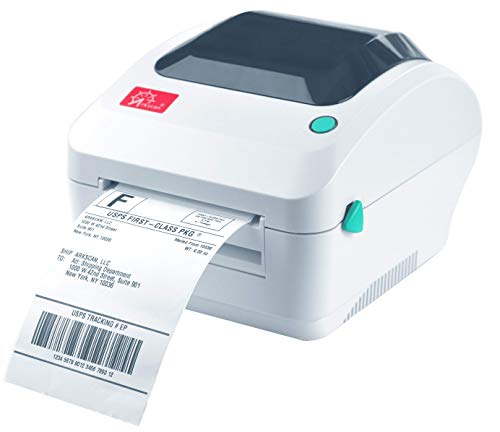
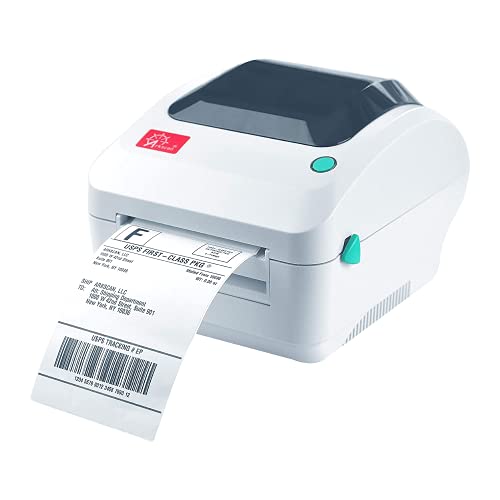
Arkscan 2054A-LAN Ethernet 4x6 shipping printerBest for Shared NetworksArkscan 2054A-LAN Ethernet 4x6 shipping printerDirect thermal, no ink4x6 inch shipping labelsBarTender UltraLite, Windows only
D450BT Bluetooth 4x6 printer with label compartmentBest for Folded StockD450BT Bluetooth 4x6 printer with label compartmentDirect thermal, no inkn/an/a
Arkscan 2054A USB 4x6 shipping label printerBest for Multi-Site SellersArkscan 2054A USB 4x6 shipping label printerDirect thermal, no ink4x6 inch shipping labelsBarTender UltraLite, Windows only

FedEx volume tends to arrive as a daily rhythm: a pickup window, a cut-off time, and a stack of labels that must be on parcels before the driver arrives. A label printer for that rhythm earns its keep by being ready at four in the afternoon without any fuss, and by producing a dense, dark label that the carrier's scanners read the first time.

Industrial shippers have long favored a particular family of thermal printers because carrier software was written for them, and that history shows in driver support. Smaller sellers can use newer, cheaper machines, but they should know which trade they are making. This guide lays out both sides across six printers.

Before you buy

6 Criteria to Look For Before Buying a Label Printer for FedEx

  1. 01

    Carrier-family driver support

    FedEx's own software and several third-party tools were written around Zebra-style printer languages for years. The Zebra ZP450 belongs to that family and its listing names FedEx labels, while the Rollo, Arkscan and D450BT models rely on standard PDF printing through ordinary drivers. For a browser-based shipper, either works. For a shipper whose desktop software calls out a Zebra-compatible printer, the family name is a real requirement, not marketing.

  2. 02

    Daily cut-off reliability

    A pickup window is a hard deadline, and a printer that needs coaxing at four in the afternoon costs more than any spec can recover. Wired links, as on the Zebra ZP450 and the two Arkscans, rarely fail at the wrong moment. Bluetooth and Wi-Fi models add a layer that can. Run a test label ten minutes before the deadline each day until you trust it.

  3. 03

    Print speed in practice

    The ZP450 lists 5 inches per second at 203 dpi, and the Rollo Wireless lists 150 millimeters per second, which is just under 6 inches per second. For a few dozen daily labels, either clears the stack in under a minute. The mistake is to pay for speed and then wait on a slow computer or a weak Wi-Fi signal. Think about the whole path from the label page to the finished sticker.

  4. 04

    Sharing across staff

    A single desk can use USB, but a team needs a network path. The Arkscan 2054A-LAN has an Ethernet jack, the Rollo Wireless joins Wi-Fi, and the Zebra ZP450 as listed has USB, serial and parallel only. If more than one person prints, count the computers and choose a network-capable model, because passing a USB cable around is a poor system.

  5. 05

    Roll versus folded stock

    The D450BT takes both a roll and folded stock, and the others favor one or the other. Folded stacks are cheaper per label but need a straight feed from behind. Match the printer to the stock you intend to buy in bulk, since switching later means a new calibration and sometimes new accessories.

  6. 06

    Parts and support in year three

    Thermal heads and platens wear, and a widely used family such as Zebra has replacement parts on shelves. Newer brands may not. A shipper who prints a hundred labels a day will want to know that the head can be replaced rather than the whole printer. Check the warranty period and spare-part availability before buying.

Detailed reviews

The 6 best label printers for fedex, explained

01
Zebra ZP450 direct thermal label printer, 5 ips
4 in direct thermal5 ips at 203 dpiUSB serial parallelNames FedEx
Check price on Amazon
Best for: FedEx shippers whose software or workflow expects a Zebra-family direct thermal printer.

Zebra built a reputation on printers that carrier software already knows how to talk to, and the ZP450 sits in that lineage. Its listing states 5 inches per second at 203 dpi, direct thermal, with USB, serial and parallel ports. The serial and parallel ports look old-fashioned, but they tell you who it was designed for: warehouse and counter stations with legacy computers.

The model is described as handling UPS and FedEx labels, which makes it the one printer in this group with a carrier name on its page. It is the right choice for a shipper whose software expects a Zebra-family printer, but it asks for more setup than the cheaper units, since drivers must be installed and media width set. At 5 inches per second it is slower than the Rollo Wireless at 150 millimeters per second, though a single label still prints in about a second.

Keep the platen clean and the head free of adhesive, and set the media to the label stock you use. Because it is a widely used family, replacement heads and platens are easy to find, which matters in year three when the first one wears.

What works

  • Listing names UPS and FedEx labels
  • Established printer family with wide parts supply
  • 5 ips at 203 dpi is dependable for daily labels
  • USB, serial and parallel suit legacy stations

Watch out for

  • No wireless option for phone printing
  • Setup and driver work take more effort

Spec sheet

Print method
Direct thermal, no ribbon
Resolution
203 dpi
Speed
Up to 5 inches per second
Interfaces
USB, serial and parallel
Carrier fit
Listing names UPS and FedEx labels
02
Rollo USB 4x6 direct thermal printer
4x6 direct thermalUSB onlyWindows XP and Mac 10.9+Rollo Ship app
Check price on Amazon
Best for: Small FedEx shippers who print from a Windows or Mac laptop.

A seller who builds FedEx labels in a browser does not need legacy ports. The Rollo USB is a plain 4x6 direct thermal printer that accepts the label file over a single cable, with Windows XP and newer and Mac 10.9 and newer support listed. The setup is a driver install and a page-size choice, and then it is done.

What it gives up next to the Zebra is carrier-specific heritage. The listing does not name FedEx, and it lacks the serial and parallel ports that legacy shipping stations sometimes need. What it gains is a simpler driver and a lower barrier for a seller who wants a printer that works with an ordinary laptop.

Upkeep is minimal: alcohol on the head after a few rolls, a square stack, and a test label before the pickup window. Keep a spare roll beside the machine so the cut-off hour never sneaks up on you with an empty feed.

What works

  • Simple driver and a single USB cable
  • Broad Windows and Mac support
  • Free shipping app included
  • Plain feed path

Watch out for

  • No FedEx wording on the listing
  • No legacy serial or parallel ports

Spec sheet

Label size
4x6 inch shipping labels
Print method
Direct thermal, no ink
Connection
USB cable
Computer support
Windows XP and newer, Mac 10.9 and newer
Software
Free Rollo Ship app
03
Rollo Wireless Wi-Fi 4x6 thermal printer, 150 mm/s
4x6 direct thermalWi-Fi and AirPrint150 mm/sShip Manager app
Check price on Amazon
Best for: FedEx shippers who print from a phone or iPad.

Wi-Fi changes where the printer can live. The Rollo Wireless joins the shop network and takes jobs from iPhones, iPads and Macs through AirPrint, so a FedEx label bought on a tablet can print without a computer in the middle. At 150 millimeters per second it prints a little faster than the Zebra ZP450's 5 inches per second.

The cost of that freedom is network dependence, and a restart of the router is the first thing to try when it goes quiet. Compared with the Rollo USB, you add radio risk. Compared with the Arkscan LAN below, you get Wi-Fi instead of a wired network jack, which is easier to place but less steady.

Keep it on a stable shelf near the packing table, wipe the head every few rolls and plan to rejoin Wi-Fi if the router is ever replaced.

What works

  • AirPrint for Apple devices without drivers
  • 150 mm per second is faster than the Zebra ZP450
  • Wi-Fi lets it sit away from a computer
  • Companion app for other devices

Watch out for

  • Depends on a steady Wi-Fi network
  • No carrier name on the listing

Spec sheet

Label size
4x6 inch shipping labels
Print method
Direct thermal, no ink
Wireless
Wi-Fi with AirPrint
Speed
150 mm per second
Software
Rollo Ship Manager app
04
Arkscan 2054A-LAN Ethernet 4x6 shipping printer
4x6 direct thermalEthernet LANWindows Mac ChromebookBarTender UltraLite
Check price on Amazon
Best for: Small offices where several people print FedEx labels from different computers.

Arkscan's LAN model adds a wired network jack to its standard 2054A design, so several computers in an office can send FedEx labels to the same printer. The listing names many marketplaces and postage tools, and it prints product and barcode labels as well. An office with a shipping desk and two or three other staff will appreciate that sharing.

The wired network is more dependable than Wi-Fi, because it does not roam or sleep. You give up phone printing, and BarTender UltraLite is Windows only. Compared with the plain Arkscan 2054A, the LAN version costs a little more and takes a cable run to the router.

Treat it as a shared office appliance: give it a fixed address on the network, keep the stock flat, and clean the head with alcohol each few rolls.

What works

  • Ethernet jack shares one printer across a network
  • Prints product and barcode labels too
  • Names many marketplaces and postage tools
  • Wired network avoids Wi-Fi dropouts

Watch out for

  • Needs a cable run to the router
  • Bundled designer is Windows only

Spec sheet

Label size
4x6 inch shipping labels
Print method
Direct thermal, no ink
Network
Ethernet LAN port
Platforms named
Amazon FBA, EasyPost, eBay, Etsy, Endicia and others
Software
BarTender UltraLite, Windows only
05
D450BT Bluetooth 4x6 printer with label compartment
4x6 direct thermalBluetoothRoll and folded stock1 to 4.6 in widths
Check price on Amazon
Best for: Shippers who buy both roll and folded labels and print from a phone.

This printer is built for people who buy labels both ways. Its internal compartment holds a roll, and a rear slot feeds folded stacks, so a FedEx shipper can use whichever stock is cheaper that month. The label width range of 1 to 4.6 inches also covers parcel labels and smaller stickers.

Bluetooth pairs with Android and iOS, and the listing bundles 750 labels so there is stock on hand for the first weeks. Against the Zebra, it has no carrier name and far less track record. Against the Rollo Wireless, it trades Wi-Fi for Bluetooth and gains the flexibility of two stock paths.

Watch the stock path closely: folded and roll feeds each have their own calibration, so run it again when you change. Clean the head with alcohol and keep the internal compartment free of lint.

What works

  • Takes roll or folded stock
  • Wide 1 to 4.6 inch label range
  • Bluetooth with Android and iOS
  • Starter labels included

Watch out for

  • No carrier named on the listing
  • Short owner history

Spec sheet

Label width range
1 to 4.6 inch labels
Print method
Direct thermal, no ink
Stock handling
Internal roll compartment and rear folded paper
Wireless
Bluetooth with Android and iOS
Extras
Listing includes 750 labels
06
Arkscan 2054A USB 4x6 shipping label printer
4x6 direct thermalUSB wiredWindows Mac ChromebookMulti-platform
Check price on Amazon
Best for: Single-desk shippers who sell on several platforms and use FedEx among other carriers.

The USB Arkscan is the same design without the network jack. Its listing reads like a tour of seller platforms, which suits shippers who send parcels through FedEx and other carriers from several storefronts. It also prints barcodes and product labels, so a single machine can cover parcel and shelf.

Next to the LAN version it is simpler and cheaper, but it ties the printer to one computer. Next to the Zebra it has far broader platform wording and none of the legacy ports. A shipper who works from one desk will find it a quiet performer.

Wipe the head, check the roller and keep the stack square. With a Chromebook it works as stated, and Mac users should plan on other software for label design.

What works

  • Names many platforms and postage tools
  • Supports Windows, Mac, Chromebook and Android
  • Prints product and barcode labels
  • Simple wired link

Watch out for

  • Tied to one computer
  • Designer software is Windows only

Spec sheet

Label size
4x6 inch shipping labels
Print method
Direct thermal, no ink
Connection
USB
Systems
Windows, Mac, Chromebook and Android
Software
BarTender UltraLite, Windows only

Spec sheet decoder

What the numbers on the box really mean

The specs manufacturers lead with, translated into what they tell you about real-world performance.

203 dpi

Dots per inch of print resolution, a standard for shipping labels. It gives clear barcodes and small text.

Watch forThe ZP450 lists it, and the others generally match the same class.

Inches per second

How quickly paper moves under the head. Higher numbers shorten batches.

Watch forThe ZP450 lists 5, and the Rollo Wireless lists 150 mm per second, about 5.9.

Serial and parallel ports

Older computer connections still found on legacy warehouse stations. Modern laptops usually lack them.

Watch forThe ZP450 has both, but a laptop will use its USB port.

Ethernet LAN

A wired network connection that lets several computers share a printer.

Watch forThe Arkscan 2054A-LAN is the only wired network model here.

Folded versus roll stock

Labels can come as a wound roll or as a folded stack, each fed differently.

Watch forThe D450BT supports both, which gives purchasing flexibility.

Methodology

How We Evaluated These Label Printers for FedEx

Carrier fit

We looked at which printers name carrier labels and which rely on generic 4x6 PDF printing. The Zebra ZP450 names UPS and FedEx. The other five do not, so we weighed the value of the name against setup effort.

Connection options

USB, serial, parallel, Ethernet, Wi-Fi and Bluetooth were all counted. The ZP450 has three legacy ports, the Arkscan LAN has Ethernet, and the Rollo Wireless has Wi-Fi. Fallback routes scored higher than a single link.

Speed and workload

The ZP450 lists 5 ips and the Rollo Wireless 150 mm/s. We judged both against a typical daily FedEx stack. For most shippers, steadiness mattered more than raw speed.

Stock handling

Roll, folded and rear-fed designs were compared, with the D450BT standing out for taking both. Feed straightness and calibration needs were part of the notes.

Long-term ownership

Parts supply, cleaning and driver upkeep were weighed. An established family scored higher on parts, and newer brands scored lower on history. Simple wired designs scored highest on upkeep.

Decision guide

How to Choose the Right Label Printers for FedEx

By Shipping Setup

SituationPickWhy
Software expects a Zebra-family printerZebra ZP450Listing names FedEx and UPS labels.
Browser-based labels on one laptopRollo USBPlain driver and a single cable.
Several staff print from different computersArkscan 2054A-LANEthernet lets the network share it.
Print from an iPad or iPhoneRollo WirelessAirPrint over Wi-Fi.

By Budget

TierPickWhy
Lowest outlayRollo USBWired and basic.
Middle tierArkscan 2054ANames many platforms.
Network tierArkscan 2054A-LANAdds Ethernet sharing.
Established-brand tierZebra ZP450Carrier-known family.

Legacy Ports vs Wireless

Legacy ports

The Zebra ZP450 offers USB, serial and parallel. These suit warehouse stations that already have the cables. They do not help a phone.

Wireless

The Rollo Wireless and D450BT print from phones. They suit mobile shippers. They add radio risk.

Choose legacy ports for fixed stations and wireless for flexible shipping.

Stock Preference

PreferencePickWhy
Roll or folded depending on priceD450BTTakes both.
Folded stack behind the printerArkscan 2054ARear feed suits stacks.
Roll in a desk setupRollo USBStandard roll path.

For a Daily Pickup Specifically

Look for

A printer that is ready without warm-up fuss, a spare roll and a test label routine. Wired models are the safest.

In this comparison

The Zebra ZP450 and the two Arkscan models are wired and steady, so they suit a hard pickup deadline.

When to Spend More

Spend more if

Several staff share the printer or your software expects a Zebra-family model. The Arkscan LAN and ZP450 each solve one.

Save if

One laptop makes labels. The Rollo USB covers that cleanly.

Ownership

Maintenance schedule

The upkeep that decides whether this machine lasts two seasons or ten.

TaskIntervalWhy it matters
Clean the headEvery few rollsAdhesive and dust cause pale bars that carrier scanners can miss. Alcohol and a swab fix most streaks.
Wipe the platen rollerMonthlyA dirty roller slips and causes skewed labels. Rotate it while cleaning.
Set media type after stock changeEach new brandPrinters learn label gaps. A stale setting feeds blank labels.
Test before the cut-offDailyA single test label ten minutes before pickup shows a problem while there is still time to fix it.
Check network or cableWeekly for networked unitsA drifting address or a loose cable looks like a dead printer. Verify the link first.

FAQ

Frequently Asked Questions

Does FedEx require a specific printer?

FedEx labels print on standard 4x6 thermal stock, and many carrier tools support Zebra-family printers by name. For browser-based label printing, any 4x6 direct thermal printer works.

Is the Zebra ZP450 better than a cheaper printer?

It has a stronger carrier heritage and legacy ports, but it needs more setup and has no wireless. A cheaper 4x6 printer prints the same label from a browser with less effort.

Can I print FedEx labels from my phone?

Yes with a wireless model such as the Rollo Wireless or the D450BT. Share the label file to the app and print. Keep a cable-connected backup for deadline days.

How many labels can these print a day?

Thermal heads can run hundreds of labels a day when kept clean. The limit is usually stock handling and connection rather than the head. Buy a spare roll ahead of busy weeks.

Do I need a network printer for an office?

If several people print, yes. The Arkscan 2054A-LAN has an Ethernet jack. A Wi-Fi model also works if the signal is strong.

Why does my label print faint?

A dirty head, worn paper or low heat setting is the usual cause. Clean the head and check the stock is direct thermal. A fading barcode can fail a pickup scan.

Bottom line

The short version

Browse more label printers for fedexon Amazon →
James Miller, Lead Machine Editor

About the author

James Miller

Lead Machine Editor, MachineFanatic

James Miller leads MachineFanatic's buying guides, turning spec sheets, manuals and owner feedback into clear verdicts on power tools, outdoor power equipment, shop machines and kitchen machines.

More from James →

Keep reading

Related guides