
Amazon affiliate links - we earn a commission.Affiliate disclosure

Buying guide · 12 min read · Updated 2026-11-07

Best Label Printers for Mac (2026)

Five thermal label printers that work with macOS, compared on driver support, AirPrint, label cost and speed, so your Mac prints shipping labels cleanly.

James MillerBy James MillerLead Machine Editor5 machines comparedSpec-sheet verified
Best Label Printers for Mac

At a glance

Our top picks

Side by side

Spec comparison

Mac owners hit a problem that Windows users rarely notice: plenty of cheap label printers ship with a driver disc or an installer that was never built for macOS. The result is a printer that works for a week and then breaks after an operating system update.

The sensible approach is to pick on connection method first. A printer that speaks AirPrint or uses a standard driver survives updates, while one that depends on a vendor utility is a gamble. After that come label size, media cost and how fast the machine needs to run.

Before you buy

6 Criteria to Look For Before Buying a Label Printer for Mac

  1. 01

    AirPrint versus vendor driver

    AirPrint, which the Rollo Wireless uses, lets a Mac print through the system dialog with no installer, so operating system updates rarely break it. A vendor driver, as on the Rollo USB, Arkscan 2054A and Arrvel A42BT, works well but depends on the maker keeping pace with macOS releases. Before buying, check the date of the most recent driver on the maker's support page. A driver last updated several macOS versions ago is a red flag, even if the box says Mac compatible.

  2. 02

    Label size and the job

    The Rollo printers, the Arkscan and the Arrvel center on 4x6 shipping labels, while the DYMO LabelWriter 550 is built for smaller address, file and barcode labels. Buying the wrong format forces awkward scaling in the print dialog. Decide first whether you print carrier labels or small labels, and pick the machine that matches, because the same physical printer rarely does both well.

  3. 03

    Open media versus locked media

    The DYMO 550 uses automatic label recognition and works only with authentic DYMO labels, which keeps jams rare but fixes the media price. The Rollo and Arkscan models take generic thermal rolls, so you can buy by the case from any supplier. Over a year of weekly shipping the difference can outweigh the cost of the machine, so tally your monthly label count against the media prices you can find.

  4. 04

    Wired versus wireless

    A USB cable is the steadiest link and the Rollo USB and Arkscan both use one. Wi-Fi, as on the Rollo Wireless, lets you place the printer anywhere and print from an iPad, but a router change or sleep wake cycle can drop it. Give a wireless printer a reserved address in your router, or you will chase offline errors.

  5. 05

    Print speed and batch size

    The Arrvel quotes up to 150 mm/s, about 72 labels a minute, which suits large batches. Most Mac-based sellers print one or two labels at a time, so the real limit is how long it takes to fetch the PDF and load the roll. Speed only matters if you routinely print 30 labels in a sitting.

  6. 06

    Software and postage tools

    Rollo provides a free Ship Manager app for postage, and the DYMO has a desktop suite for design and address books. The Arkscan relies on your marketplace's PDF. If you buy postage through a platform already, the printer app matters little. If not, a built-in postage tool saves a separate subscription.

Detailed reviews

The 5 best label printers for mac, explained

01
Rollo Wireless Wi-Fi 4x6 Thermal Label Printer
4x6 direct thermalWi-Fi + AirPrintRollo Ship appOpen media
Check price on Amazon
Best for: Mac and iPhone owners who want driverless AirPrint shipping labels.

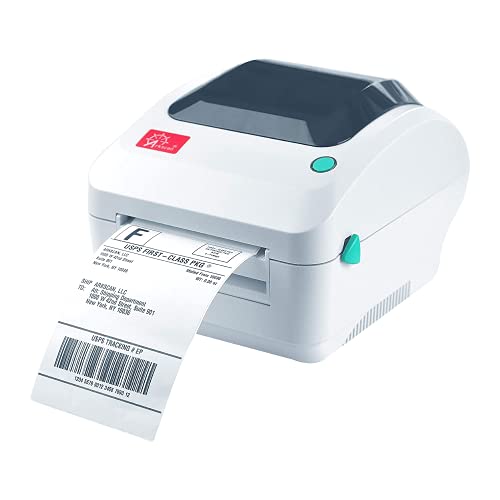
The wireless Rollo is the cleanest fit for a Mac because it uses AirPrint. A Mac discovers it on the network and prints to it through the standard system dialog, with no installer, no kernel extension and no driver that can break after an operating system update. Behind that front end sits a direct thermal engine that darkens heat-reactive paper, so there is no ink or ribbon to manage.

Compared with the wired Rollo USB, the wireless model trades a cable for a network setup step. That step is worth doing if your packing table is across the room from your computer, or if an iPad or iPhone also needs to print. The free Rollo Ship Manager app helps with discounted postage, and the printer accepts generic 4x6 rolls, which keeps media cost low next to the locked DYMO 550.

In practice, the weak point of any Wi-Fi printer is the network. Reserve an address in your router or keep it on a stable 2.4 GHz band so the Mac does not lose it after sleep. Clean the head occasionally with isopropyl alcohol and keep rolls out of heat. For shipping volume in the dozens per day, this is the printer to buy first.

What works

  • AirPrint support means no driver install on macOS
  • Prints from Mac, iPhone and iPad without cables
  • Accepts generic 4x6 thermal rolls for low running cost
  • Free Rollo Ship Manager app for postage

Watch out for

  • Wi-Fi setup adds a step compared with a plain USB cable
  • Network drops after sleep can need a printer restart
  • Needs a stable router address to stay reliable

Spec sheet

Technology
Direct thermal, no ink
Connectivity
Wi-Fi with AirPrint
Label size
4x6 inch shipping rolls
Mac workflow
Prints from Mac, iPhone and iPad
Software
Rollo Ship Manager app
02
Rollo USB Commercial 4x6 Thermal Label Printer
4x6 direct thermalUSB wiredMac 10.9 and newerOpen media
Check price on Amazon
Best for: Mac users with a fixed packing desk who prefer a cable over Wi-Fi.

The USB Rollo is the older sibling of the wireless unit and shares its core engine. A wired link means the printer appears the moment you plug it into a Mac, with a driver the maker lists for macOS 10.9 and newer as well as Windows XP and later. It is the right shape for a desk that already has a computer within a metre of the printer.

Where it differs from the wireless Rollo is flexibility. There is no AirPrint, so printing from an iPhone is not part of the plan, and the cable ties the printer to one spot. In exchange, there is no Wi-Fi to fail, which is attractive to anyone who has lost an afternoon to a network printer that went offline. Against the Arkscan 2054A it feels more commercial in its software story, with the free Rollo app handling shipping workflows.

Ownership is quiet. A direct thermal head needs a wipe with isopropyl alcohol when prints streak, and rolls should sit in a cool drawer. Because the driver is a manufacturer package, it is worth checking the maker's site after each major macOS release rather than assuming it carries forward.

What works

  • Plain USB link with no network to troubleshoot
  • Driver listed for macOS 10.9 and newer
  • Same open 4x6 roll supply as the wireless model
  • Commercial-grade build for daily shipping

Watch out for

  • No AirPrint, so iPhone printing is not supported
  • Cable fixes the printer to one spot on the desk
  • Relies on a vendor driver after OS updates

Spec sheet

Technology
Direct thermal, no ink
Connectivity
USB cable
Mac support
macOS 10.9 and newer
Windows support
XP and newer
Software
Rollo Ship Manager app
03
Arkscan 2054A Shipping Label Printer for Mac and Windows
Thermal shipping labelsMac, Windows, ChromebookMarketplace supportUSB
Check price on Amazon
Best for: Resellers who print shipping and FNSKU labels on a budget.

The Arkscan 2054A is a no-frills USB thermal printer marketed across Windows, Mac, Chromebook and Android. Its pitch is breadth: shipping labels for Amazon merchant fulfillment, FBA product labels, FNSKU barcodes, and common platforms such as eBay, EasyPost and Endicia. That makes it popular with resellers who bounce between marketplaces on one machine.

Against the two Rollo printers, the 2054A feels more like a utility. It does not lean on AirPrint or a branded shipping app, so a Mac user works through a standard driver and the marketplace's own label PDF. The advantage is value, since it sits near the cheaper end of this lineup and accepts generic thermal rolls. The cost is polish, because the setup instructions are more technical and the community support is thinner.

Plan on spending an hour at setup, installing the driver and setting the paper size to 4x6 inches before the first real print. Once configured it runs for years on the same routine of head cleaning and dry roll storage. If your Mac gets a major update, test one label before a shipping rush.

What works

  • Lowest cost way into thermal printing on a Mac
  • Works with Amazon, eBay and other marketplace labels
  • Supports FNSKU and product barcode labels
  • Standard thermal rolls keep the supply cheap

Watch out for

  • Setup is more technical than the AirPrint Rollo
  • Thinner community and vendor support
  • USB only, so no wireless printing

Spec sheet

Technology
Direct thermal
Platforms
Windows, Mac, Chromebook, Android
Marketplaces
Amazon, eBay, Etsy workflows
Barcode use
FNSKU and product labels
Connection
USB
04
DYMO LabelWriter 550 Series Label Printer
Auto label recognitionDYMO labels onlyMac softwareDesktop
Check price on Amazon
Best for: Mac users who label envelopes, folders and small parcels all day.

The LabelWriter 550 is the practical choice for printing small address, file and barcode labels, which is a different job from 4x6 carrier labels. It reads the roll through automatic label recognition and prints precise quantities rather than wasting a whole sheet, which the maker presents as a saving over sheet labels. Mac support comes through the DYMO desktop software, which has a long track record.

The trade-off is lock-in. The printer works only with authentic DYMO LabelWriter labels, which are BPA-free and sold in a range of sizes. That keeps jams rare and the print consistent, but the media price is whatever the maker sets. Compared with the Rollo and Arkscan models, which take open 4x6 rolls, the 550 is better for envelopes and small labels and weaker as a high-volume carrier label printer.

Ownership is easy: a desktop unit, a straightforward feed path and software that follows macOS. Keep the head clean and avoid dragging labels at an angle through the feed. If you need to print shipping labels at 4x6, check the specific model variant before buying.

What works

  • Automatic label recognition cuts wasted labels
  • Mature desktop software with long macOS support
  • Prints small address and barcode labels precisely
  • Rolls matched to the head for fewer jams

Watch out for

  • Works only with authentic DYMO labels
  • Not the cheapest way to print 4x6 carrier labels
  • Media cost is set by the maker

Spec sheet

Technology
Direct thermal
Media
DYMO LabelWriter labels only
Recognition
Automatic label recognition
Best for
Address, file and barcode labels
Software
DYMO Connect desktop suite
05
Arrvel A42BT Bluetooth Thermal Printer With Stand
4x6 direct thermalBluetooth + USBmacOS via USB-CStand included
Check price on Amazon
Best for: Mac users who also want phone printing and a built-in roll stand.

The Arrvel A42BT is the newest design in the group and the only one with a bundled stand. It links over Bluetooth to a phone through the FlashLabel app or over USB to a computer, and the maker lists macOS support through an included USB-C adapter. That adapter detail is helpful on a modern Mac with only USB-C ports, where a plain USB-A cable would need a dongle.

Its quoted speed of up to 150 mm/s works out to roughly 72 labels a minute, faster than anything else here by the published numbers. Against the Rollo Wireless, the Arrvel uses Bluetooth rather than AirPrint, so a Mac prints over a cable and a phone prints over the app. The Rollo is easier for a Mac-first desk; the Arrvel is better when phone and Mac both share the duty and a roll stand matters.

Treat the app as a convenience rather than the foundation. Keep the USB route working so a Mac can print if the phone app changes. Clean the head with isopropyl alcohol when streaks appear, and keep stock dry.

What works

  • Bundled stand keeps rolls feeding straight
  • USB-C adapter included for modern Macs
  • Fastest quoted speed in the group at 150 mm/s
  • Bluetooth app printing for iOS and Android

Watch out for

  • No AirPrint, so Macs print through a cable
  • Phone workflow depends on the maker's app
  • Newer model with a shorter track record

Spec sheet

Technology
Direct thermal
Speed
Up to 150 mm/s
Mac route
USB-C adapter included
Other systems
Windows 7+, ChromeOS, Linux
Mobile app
FlashLabel for iOS and Android

Spec sheet decoder

What the numbers on the box really mean

The specs manufacturers lead with, translated into what they tell you about real-world performance.

AirPrint

Apple's driverless printing protocol lets a Mac or iPhone discover a printer on the network. The Rollo Wireless supports it.

Watch forA Wi-Fi printer without AirPrint still needs a vendor driver, so confirm the exact wording.

Direct thermal

A heated head darkens the paper, with no ink or ribbon. The Rollo, Arkscan and Arrvel all work this way.

Watch forPrints fade in heat and sunlight, so avoid it for long-term archive labels.

macOS compatibility range

The Rollo USB lists macOS 10.9 and newer, which describes the oldest supported release, not a promise for tomorrow's update.

Watch forCheck the support page for a driver dated after your macOS version.

Automatic label recognition

The DYMO 550 reads the roll to know the size and count of labels remaining, which cuts waste.

Watch forIt requires authentic DYMO labels, so a third-party roll will not be accepted.

mm/s print speed

The Arrvel's 150 mm/s works out to roughly 72 four by six labels a minute in ideal conditions.

Watch forDense barcodes slow it down, so treat the number as a ceiling.

Methodology

How We Evaluated These Label Printers for Mac

macOS integration

We evaluated how each printer connects to a Mac, weighing AirPrint on the Rollo Wireless against vendor drivers on the Rollo USB, Arkscan and Arrvel. The Arrvel's USB-C adapter earned credit for modern Macs. Driverless printing scored highest.

Label format fit

We separated 4x6 carrier label machines from the DYMO LabelWriter 550's smaller formats. A printer is only useful if it matches the labels you actually print. Mixed-use buyers were considered separately.

Media cost and lock-in

We checked which printers accept generic rolls and which need branded media. The DYMO 550 restricts you to authentic labels while the others use open stock. Over a year this changes the total cost.

Reliability signals

Based on owner feedback patterns, wired USB links were steadier than Wi-Fi ones, and driver age mattered more than hardware. We rewarded printers with a clear support route.

Speed and setup effort

The Arrvel's 150 mm/s quoted speed is the highest here, but setup time and software polish mattered more for most buyers. The Arkscan needs more manual configuration than the Rollo printers.

Decision guide

How to Choose the Right Label Printers for Mac

By Mac Connection Style

SituationPickWhy
I want driverless printingRollo WirelessAirPrint means the Mac needs no installer
My printer sits next to the MacRollo USBA plain USB link with a listed macOS driver
I only have USB-C portsArrvel A42BTUSB-C adapter is included in the box

By Budget

Budget tierPickWhy
Lowest outlayArkscan 2054AA basic USB thermal printer with generic rolls
Middle groundRollo USBCommercial build with a free postage app
Highest outlayRollo WirelessPay for AirPrint and wireless flexibility

Wired vs Wireless

Wired

The Rollo USB and Arkscan 2054A link by cable, which avoids network drops and pairing issues. The price is a printer tied to one spot and no phone printing.

Wireless

The Rollo Wireless prints over Wi-Fi with AirPrint, while the Arrvel uses Bluetooth for phones. You gain placement freedom and mobile printing, at the cost of a little network upkeep.

Pick wired for a fixed desk; pick wireless if a phone or tablet joins the workflow.

Carrier Labels vs Small Labels

PreferencePickWhy
4x6 parcel labelsRollo WirelessBuilt around 4x6 rolls with open supply
Address and file labelsDYMO LabelWriter 550Prints small precise quantities with recognition
FNSKU and barcode labelsArkscan 2054AMarketed for FBA and product labeling

For Mac Users Specifically

Look for

AirPrint or a driver dated after your macOS version, a USB-C route if your ports are modern, and support for your label format. Print one test label before buying a case of rolls.

In this comparison

The Rollo Wireless is the least friction on a Mac because of AirPrint. The Arrvel A42BT includes a USB-C adapter, and the DYMO 550 has the most mature Mac software suite.

When to Spend More

Spend more if

Several devices print to the same machine or you hate troubleshooting. The Rollo Wireless and the DYMO 550 reduce setup grief, and the Arrvel adds speed and a stand.

Save if

You print from one Mac at one desk. The Arkscan 2054A or Rollo USB gets the same label on paper for less.

Ownership

Maintenance schedule

The upkeep that decides whether this machine lasts two seasons or ten.

TaskIntervalWhy it matters
Wipe the printheadEvery 2 to 4 weeksResidue causes streaks. Use isopropyl alcohol on a swab with the printer off.
Check the driver after macOS updatesAfter each major updateDrivers can break with a system release. Print one test label before a rush.
Clean the platenMonthlyDust makes the feed slip. Wipe the roller while rotating it.
Store rolls cool and dryOngoingHeat darkens thermal paper. Keep spares in a drawer, not near a window.
Reserve a network addressOnce, wireless modelsA router that reassigns addresses makes the Mac lose the printer. A fixed lease prevents that.

FAQ

Frequently Asked Questions

Which label printer is easiest to set up on a Mac?

The Rollo Wireless, because AirPrint lets the Mac find it without a driver. A USB model like the Rollo USB is next, with a listed macOS driver.

Is the DYMO LabelWriter 550 a good shipping label printer?

It is better for address, file and barcode labels than for 4x6 carrier labels. For parcels, the Rollo and Arrvel use the standard 4x6 format with open rolls.

Do thermal printers need ink?

No. Direct thermal printers darken heat-reactive paper, so the only supply is the roll. The trade-off is that prints fade in heat and sunlight.

Does a faster printer matter?

Only for big batches. The Arrvel's 150 mm/s is about 72 labels a minute, but sellers who print a few at a time rarely notice the difference.

Will my printer stop working after a macOS update?

AirPrint printers are the safest. Vendor drivers can lag, so check the maker's support page and print a test label after a major update.

Can I print from an iPhone?

The Rollo Wireless supports AirPrint from iPhone and iPad. The Arrvel prints from phones through its FlashLabel app over Bluetooth.

Bottom line

The short version

Browse more label printers for macon Amazon →
James Miller, Lead Machine Editor

About the author

James Miller

Lead Machine Editor, MachineFanatic

James Miller leads MachineFanatic's buying guides, turning spec sheets, manuals and owner feedback into clear verdicts on power tools, outdoor power equipment, shop machines and kitchen machines.

More from James →

Keep reading

Related guides