
Amazon affiliate links - we earn a commission.Affiliate disclosure

Buying guide · 12 min read · Updated 2026-11-18

Best Label Printers for Shopify (2026)

Five 4x6 thermal printers for Shopify stores, compared on how label files reach the machine, batch speed, stock handling and what a store owner trips on.

James MillerBy James MillerLead Machine Editor5 machines comparedSpec-sheet verified
Best Label Printers for Shopify

At a glance

Our top picks

Side by side

Spec comparison

MachineLabel sizePrint methodSpeedWireless
Arkscan 2054A 4x6 thermal shipping label printerBest OverallArkscan 2054A 4x6 thermal shipping label printer4x6 inch shipping labelsDirect thermal, no inkn/an/a
Arrvel A42BT Bluetooth 4x6 printer with standBest ValueArrvel A42BT Bluetooth 4x6 printer with stand4x6 inch shipping labelsDirect thermal, no ink150 mm per second, 72 labels a minuteBluetooth for iOS and Android
Rollo Wireless Wi-Fi 4x6 label printerBest for Apple DevicesRollo Wireless Wi-Fi 4x6 label printer4x6 inch shipping labelsDirect thermal, no ink150 mm per secondWi-Fi, AirPrint from Apple devices
Rollo USB 4x6 direct thermal printerBest for SimplicityRollo USB 4x6 direct thermal printer4x6 inch shipping labelsDirect thermal, no inkn/an/a
SVANTTO Y42BT 4x6 Bluetooth printer 180 mm/sFastest ListedSVANTTO Y42BT 4x6 Bluetooth printer 180 mm/s4x6 inch shipping labelsDirect thermal, no inkUp to 180 mm per secondBluetooth for iOS and Android

A Shopify store does not need a special printer. It needs one that accepts a standard four-by-six PDF from the browser and prints it without reformatting. What matters is everything around that file: how many orders are queued at once, how quickly the printer clears them and how forgiving the paper feed is.

Store owners also change tools over time, adding a second sales channel or a shipping app, so a printer tied to one workflow ages badly. This guide ranks five direct thermal printers by how well they hold up when the order queue grows past a few parcels a day.

Before you buy

6 Criteria to Look For Before Buying a Label Printer for Shopify

  1. 01

    Where the label file originates

    Shopify generates postage labels as downloadable PDFs, usually through its own shipping tools or a connected app. Because the file is a standard four-by-six page, any thermal printer that accepts it will print it. The Arkscan 2054A names Shopify on the listing, but that is reassurance rather than a requirement. The mistake is to pay a premium for platform wording instead of checking the real constraints: label size, operating system and connection.

  2. 02

    Order volume and queue size

    A store clearing five orders a day does not feel the difference between 72 labels a minute on the Arrvel and up to 180 millimeters per second on the SVANTTO. Past fifty orders, the gap becomes visible, and a slow printer ties up the packer. Count your busiest day, not the average, because the peak is what the printer has to survive. A store that launches a product drop or a holiday sale can see a week of orders in an afternoon, and that is the moment a slow head or a dropped Bluetooth link turns into a stack of unprinted parcels beside the packing table.

  3. 03

    Apple device support

    Owners who run the store from an iPad should check for AirPrint or a native iOS app. The Rollo Wireless lists AirPrint, while the Arrvel and SVANTTO rely on Bluetooth apps. A Bluetooth app can be perfectly good, but it adds a third party that must keep updating for the printer to keep working. If an app is pulled from the store or a phone update breaks pairing, the printer can only fall back on its cable, so an iPad-first store should confirm which route it will use on a bad day before it commits.

  4. 04

    Wired fallback

    Every wireless link fails at the worst moment, and a USB cable lets you keep printing while you troubleshoot. The Arrvel and SVANTTO include USB alongside Bluetooth, and the Arkscan and Rollo USB are wired outright. The Rollo Wireless is the one without that fallback, so it is the riskiest for a store that cannot pause. Owners who choose it should keep a second way to produce a label ready, such as printing the PDF to a laptop's own printer or buying postage at a carrier counter, until the network proves itself over a few busy weeks.

  5. 05

    Stock handling and fanfold

    Shopify stores often buy fanfold stacks in bulk because they are cheaper per label. A printer needs a straight feed path from behind, so stands like the Arrvel's matter. A stack that sits at an angle feeds crooked and causes sensor errors. Test one stack before buying a carton. Perforation quality varies by seller, and a weak perforation can tear a label at the fold as it passes the roller, which looks like a printer fault but is a stock fault.

  6. 06

    Support when something fails

    An established name such as Rollo or Arkscan has a long record of owner feedback to search, while newer entrants like SVANTTO have less. When the store is your income, a fixable known issue beats an unknown one. Check the return window before the first big order season arrives, because a printer that fails in week three of a sale is the costly kind of failure. Keep the box and the cable until you are sure the unit suits your workflow.

Detailed reviews

The 5 best label printers for shopify, explained

01
Arkscan 2054A 4x6 thermal shipping label printer
4x6 direct thermalUSB wiredWindows Mac ChromebookBarTender UltraLite
Check price on Amazon
Best for: Multi-channel Shopify stores that also print product and barcode labels from a Windows or Mac computer.

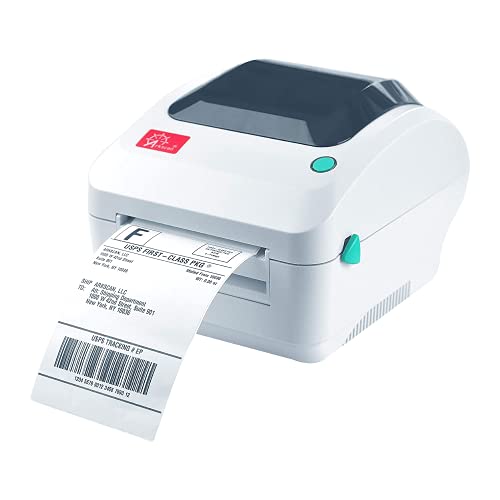
Arkscan sells this printer on breadth. The listing names Shopify next to Etsy, eBay, PayPal, Amazon seller tools and several shipping services, and it also prints product barcodes and FNSKU-style labels. For a store that sells on more than one channel, that single printer can serve both the parcel label and the product sticker.

The bundled BarTender UltraLite is Windows only, and it is the one real catch for Mac owners: you get the printer but not the label designer. A plain carrier PDF does not need it, so a Shopify store printing only postage labels loses nothing. Its wired USB link also keeps it out of the Wi-Fi guessing game that plagues the wireless units here, though it will not print from a phone.

In use, this is a quiet workhorse. Feed fanfold stacks from the back or a roll from a holder, run the calibration whenever stock changes, and clean the head with alcohol when streaks appear. Chromebook owners should note that the listing explicitly names the platform, which many entry printers skip.

What works

  • Listing names Shopify and several other seller platforms
  • Works with Windows, Mac and Chromebook
  • Also prints product and barcode labels
  • Wired USB removes pairing problems

Watch out for

  • Bundled label designer runs on Windows only
  • No wireless route for phone or tablet printing

Spec sheet

Label size
4x6 inch shipping labels
Print method
Direct thermal, no ink
Connection
USB
Operating systems
Windows, Mac, Chromebook, Android
Bundled software
BarTender UltraLite, Windows only
02
Arrvel A42BT Bluetooth 4x6 printer with stand
4x6 direct thermalBluetooth and USB150 mm/s72 labels per minute
Check price on Amazon
Best for: Store owners who want Bluetooth phone printing and a USB fallback in one printer.

Arrvel packs a stand into the box, which tells you the designer was thinking about how the label stack sits behind the machine. The A42BT is rated at 150 millimeters per second, or 72 labels a minute, and it takes either Bluetooth from a phone or a USB cable from a computer. The Mac route goes through an included USB-C adapter, so a newer MacBook needs nothing extra.

Where it differs from the Arkscan is the open-ended wireless side. A Shopify owner standing at a shelf can print from a phone app, while the wired Arkscan stays tied to a computer. The compromise is that Bluetooth pairing quality depends on the app and phone, and a dropped link in the middle of a hundred-parcel batch is the one thing to plan for.

Upkeep follows the usual thermal rules. Keep the stack square to the feed slot, clean the roller of adhesive strings and run calibration after changing stock. The stand slows the urge to balance the printer on a box of mailers, which is how many printers get knocked off a counter.

What works

  • Rated at 72 labels a minute for batch days
  • Bluetooth plus USB gives two routes
  • Included stand holds the stack in line
  • USB-C adapter covers newer Macs

Watch out for

  • Bluetooth quality depends on phone and app
  • Fewer platform names on the listing than the Arkscan

Spec sheet

Label size
4x6 inch shipping labels
Print method
Direct thermal, no ink
Speed
150 mm per second, 72 labels a minute
Wireless
Bluetooth for iOS and Android
Wired
USB for Windows, ChromeOS, Linux, Mac via USB-C adapter
03
Rollo Wireless Wi-Fi 4x6 label printer
4x6 direct thermalWi-Fi and AirPrint150 mm/sShip Manager app
Check price on Amazon
Best for: Stores that confirm and print orders from an iPad or iPhone.

Anyone running a store from an iPad or iPhone will notice the AirPrint line first. The Rollo Wireless sits on the Wi-Fi network and accepts a label straight from Apple devices with no driver step, and it still offers the Rollo Ship Manager app for other computers. That makes it the least fussy option for an owner who confirms orders on a tablet.

Network dependence is the cost. If the router sits across the house, the printer sleeps through a rush, and the cure is usually a restart of both devices. Compared with the Arrvel, there is no Bluetooth fallback and no stand, so you carry the burden of placing the stack and the printer on a stable shelf.

Treat it as an appliance on a network. Give it a steady place, wipe the head every few rolls and keep the manual's network reset steps nearby, since a new router means rejoining the printer to Wi-Fi from scratch.

What works

  • AirPrint removes driver setup on Apple devices
  • Wi-Fi lets several devices share one printer
  • 150 mm per second keeps up with batches
  • Companion app covers other computers

Watch out for

  • No Bluetooth or cable-free fallback if Wi-Fi fails
  • Router changes mean rejoining the network

Spec sheet

Label size
4x6 inch shipping labels
Print method
Direct thermal, no ink
Wireless
Wi-Fi, AirPrint from Apple devices
Speed
150 mm per second
Software
Rollo Ship Manager app
04
Rollo USB 4x6 direct thermal printer
4x6 direct thermalUSB onlyWindows XP and Mac 10.9+Rollo Ship app
Check price on Amazon
Best for: Single-laptop stores that want the least that can go wrong.

Lead with the age of its driver list: Windows XP and Mac 10.9 onward. That reach tells you the Rollo USB is a mature design that has been through many operating system updates. For a Shopify owner with a modest desk laptop, a cable and a plain driver are the entire setup.

The free Rollo Ship app is a modest extra rather than a reason to buy. Most Shopify stores buy postage in the store admin or through a shipping tool and only need a printer that accepts the resulting PDF, which this one does. What it will not do is print from a phone, and it will not name specific platforms the way the Arkscan listing does.

Cleaning is the whole ownership story: alcohol on the head, a dry swab on the roller and a square stack. Because it has no radios, the main risk is a loose USB cable, so tuck the cable behind a clip.

What works

  • Wired design with no pairing or network
  • Driver support reaches back to old systems
  • Free shipping app is included
  • Simple feed path

Watch out for

  • No phone or tablet printing
  • Listing does not name individual platforms

Spec sheet

Label size
4x6 inch shipping labels
Print method
Direct thermal, no ink
Connection
USB cable
Computer support
Windows XP and newer, Mac 10.9 and newer
Software
Free Rollo Ship app
05
SVANTTO Y42BT 4x6 Bluetooth printer 180 mm/s
4x6 direct thermalBluetooth and USB180 mm/siOS Android Windows Mac
Check price on Amazon
Best for: High-volume stores that print batches and value raw speed.

SVANTTO advertises the highest speed in this group: up to 180 millimeters per second, which is a little over seven inches of paper per second. For a store that prints batches of fifty or more, that shaves seconds off each label, and seconds add up to minutes by the end of a run.

The design mirrors the Arrvel with USB for computers and Bluetooth for phones. The edge is raw speed, while the weakness is brand reach: a lesser-known name means less owner feedback to lean on and a thinner support track record. If something fails, you are depending on the listing's warranty rather than a long forum history.

Treat the head with care at that speed, because dust and adhesive wear it faster. Clean it after every few rolls and avoid cheap curling labels that can jam the feed. A store that prints mostly one or two labels at a time will never see the speed advantage.

What works

  • Up to 180 mm per second is the quickest here
  • Bluetooth and USB cover phones and computers
  • Works with Windows, macOS and ChromeOS
  • Suits batch printing days

Watch out for

  • Newer brand with little owner history
  • Speed advantage is wasted on low-volume stores

Spec sheet

Label size
4x6 inch shipping labels
Print method
Direct thermal, no ink
Speed
Up to 180 mm per second
Wireless
Bluetooth for iOS and Android
Wired
USB for Windows, macOS and ChromeOS

Spec sheet decoder

What the numbers on the box really mean

The specs manufacturers lead with, translated into what they tell you about real-world performance.

Labels per minute

A printer's rate expressed as finished 4x6 labels each minute. It combines head speed with the time the printer takes to feed and cut.

Watch forThe Arrvel lists 72 a minute, which is the only labels-per-minute figure in this lineup.

Millimeters per second

The speed of paper past the head. Divide by 25.4 to get inches per second.

Watch forThe SVANTTO lists up to 180, while the Arrvel and Rollo Wireless list 150.

AirPrint

Apple's driverless printing standard that lets iPhones, iPads and Macs find and use a network printer.

Watch forOnly the Rollo Wireless advertises it in this group.

BarTender UltraLite

A label design tool for creating product and barcode labels, not carrier labels.

Watch forIt comes with the Arkscan 2054A and runs on Windows only.

Direct thermal

Heat darkens special paper, so no ink or ribbon is needed. Prints fade with heat and time.

Watch forEvery printer here is direct thermal, so only buy direct thermal label stock.

Methodology

How We Evaluated These Label Printers for Shopify

Fit with Shopify workflow

We looked at whether each printer takes a standard four-by-six PDF without extra steps. All five do, and the Arkscan 2054A lists Shopify by name. Platform claims were treated as a convenience rather than a requirement.

Batch throughput

Speed claims were compared across the lineup: 180 mm/s for the SVANTTO, 150 mm/s for the Arrvel and Rollo Wireless, and a 72-label-a-minute rating on the Arrvel. We weighed these against typical store volumes.

Connection options

We counted routes to the printer: USB, Bluetooth, Wi-Fi and AirPrint. The Arrvel and SVANTTO offer two, while the Arkscan and Rollo USB offer one. Redundancy counted for more than a long feature list.

Operating system reach

Listings were read for Windows, Mac, Chromebook, Linux and mobile support. The Arkscan names Chromebook and Android, and the Arrvel names Linux. A store using a less common operating system needs this detail.

Ownership and upkeep

Each printer was scored on cleaning needs, calibration and software dependence. Wired designs scored higher because there is less to maintain. Newer brands were marked down for limited owner history.

Decision guide

How to Choose the Right Label Printers for Shopify

By Daily Order Volume

Daily ordersPickWhy
Fewer than 10Rollo USBA simple wired unit handles light use without extra features.
10 to 50Arrvel A42BTRated at 72 labels a minute with a stand for the stack.
50 or moreSVANTTO Y42BTUp to 180 mm per second trims batch time.
Multi-channel with product labelsArkscan 2054APrints parcel and product labels from one machine.

By Budget

TierPickWhy
Lowest outlayRollo USBWired design with no extras to pay for.
Middle tierArrvel A42BTAdds Bluetooth and a stand.
Higher tier for Apple devicesRollo WirelessAirPrint and Wi-Fi convenience.

Wired vs Bluetooth

Wired

The Arkscan 2054A and Rollo USB print over a cable. They are dependable but tied to one computer. They suit a stationary packing desk.

Bluetooth

The Arrvel A42BT and SVANTTO Y42BT add a phone route on top of USB. They suit owners who print from a shelf. They carry pairing risk.

Choose wired for a fixed desk, Bluetooth if you also print from a phone.

Single Channel vs Multi-Channel

Store typePickWhy
Shopify onlyRollo USBNeeds only the carrier PDF.
Shopify plus Etsy and eBayArkscan 2054AListing names several marketplaces.
Shopify plus a phone-based pop-upArrvel A42BTPrints from a phone at events.

For Fanfold Stacks Specifically

Look for

A feed path that lets the stack sit square behind the printer, and a calibration routine for new stock. A stand or tray helps.

In this comparison

The Arrvel A42BT includes a stand, and the Arkscan 2054A is built to feed from the rear, so both suit fanfold stock.

When to Spend More

Spend more if

You use an iPad for fulfilment or print more than fifty labels a day. The Rollo Wireless and SVANTTO each solve one of those.

Save if

Your orders are under ten a day and one laptop does the work. The Rollo USB is enough.

Ownership

Maintenance schedule

The upkeep that decides whether this machine lasts two seasons or ten.

TaskIntervalWhy it matters
Clean the print headEvery few rollsAdhesive lint builds up and causes streaks. Use alcohol and a swab.
Recalibrate sensorWhen switching label brandGap spacing differs by stock. A stale calibration produces blank labels.
Check USB cableMonthlyA loose cable is the commonest cause of a printer that appears dead. Reseat both ends and route the cable where a box cannot snag it.
Update the phone appAs updates arriveBluetooth printers depend on app updates to keep working with new phone software.
Keep stacks flat and dryOngoingWarped fanfold stacks jam in the feed slot. Humidity makes the paper wave, so a closed box in a dry cupboard is better than an open shelf.

FAQ

Frequently Asked Questions

Does a Shopify store need a specific label printer?

No. Shopify labels download as standard four-by-six PDFs, and any thermal printer with that size accepts them. Choose by connection, speed and operating system. A name on the listing can reassure, but it is the PDF page size that decides whether labels print at the right scale, so check that your print dialog is set to a four-by-six page before the first order.

Which printer is best for an iPad-based store?

The Rollo Wireless lists AirPrint, so an iPad can send a label without a driver. The Arrvel and SVANTTO use Bluetooth apps instead.

How long do these printers last?

A thermal head lasts for many rolls if kept clean. Cleaning with alcohol and avoiding dusty storage matter more than brand. Platen rollers eventually wear smooth and begin to slip, which shows up as uneven print density and is the usual sign it is time for service.

Are fast printers worth it?

Only past fifty labels a day. Below that, the speed of the SVANTTO or Arrvel goes unnoticed, and a steadier connection is worth more to the person doing the packing than a faster head.

Can I print product barcodes too?

The Arkscan 2054A lists product and barcode labels, and it comes with BarTender UltraLite on Windows. Other printers print barcodes from their own apps. For a Shopify store the practical split is simple: carrier labels come from the shipping tool, and product barcodes come from a designer, so check which of the two jobs your printer's software can do.

Should I buy roll or fanfold labels?

Fanfold is cheaper per label and suits a rear-feed printer with a stand. Rolls suit a printer with an internal holder. Either way, buy a small pack first and confirm the perforation tears cleanly before you commit to a carton.

Bottom line

The short version

Browse more label printers for shopifyon Amazon →
James Miller, Lead Machine Editor

About the author

James Miller

Lead Machine Editor, MachineFanatic

James Miller leads MachineFanatic's buying guides, turning spec sheets, manuals and owner feedback into clear verdicts on power tools, outdoor power equipment, shop machines and kitchen machines.

More from James →

Keep reading

Related guides