
Amazon affiliate links - we earn a commission.Affiliate disclosure

Buying guide · 13 min read · Updated 2026-11-18

Best Label Printers for Small Businesses (2026)

Five label printers for small businesses that need shipping, shelf, cable and product labels, compared by job, label type, upkeep and honest tradeoffs.

James MillerBy James MillerLead Machine Editor5 machines comparedSpec-sheet verified
Best Label Printers for Small Businesses

At a glance

Our top picks

Side by side

Spec comparison

MachineConnectionLabel sizePrint method
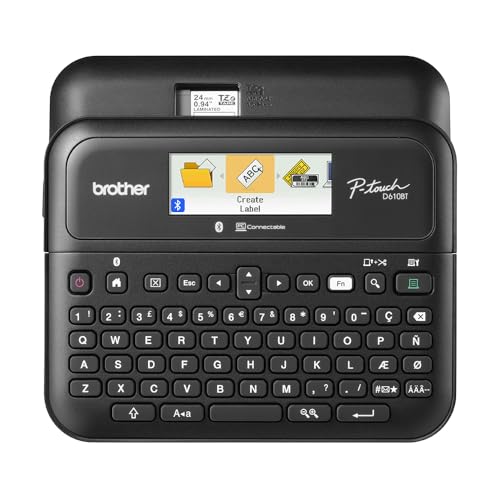
Brother P-Touch PT-D610BT keyboard label makerBest OverallBrother P-Touch PT-D610BT keyboard label makerBluetooth and USBn/an/a
Rollo USB 4x6 thermal shipping printerBest for ShippingRollo USB 4x6 thermal shipping printerUSB cable4x6 inch shipping labelsDirect thermal, no ink
NIIMBOT B1 Bluetooth thermal label printerBest for Product LabelsNIIMBOT B1 Bluetooth thermal label printerBluetooth with the NIIMBOT appn/aDirect thermal, no ink
KNAON Y41BT 4x6 Bluetooth thermal label printerBest for Phone and LaptopKNAON Y41BT 4x6 Bluetooth thermal label printern/a4x6 inch labelsDirect thermal, no ink
Arrvel A42BT Bluetooth 4x6 printer with standBest for Busy Shipping DaysArrvel A42BT Bluetooth 4x6 printer with standn/a4x6 inch labelsDirect thermal, no ink

A small business rarely has one labeling job. In the same week there may be a parcel to ship, a shelf edge to relabel, a jar to mark, a cable to identify and a bin to tag. No single printer does all of that well, so the first question is which job takes the most time and which labels must survive the harshest handling.

This guide sorts five printers by the work they are best at. It separates durable tape machines from large-format shipping printers and from small phone-driven thermal printers, so an owner can see where one machine replaces another and where it needs a partner.

Before you buy

6 Criteria to Look For Before Buying a Label Printer for Small Businesses

  1. 01

    Start with the harshest label job

    A parcel label lives for a few days, but a shelf tag or a cable flag may live for years. The Brother PT-D610BT's laminated TZe tape is made for the long job, and the thermal models are made for the short one. Pick the printer for the job that costs you the most when it fails. A faded shelf tag is a nuisance, but a faded cable tag in a server closet is a real expense. Retail owners often discover this the second year, when thermal price tags that looked sharp on opening day have gone pale under display lights. Ask how long each label must stay legible before you buy, and let the answer rule out whole printer families.

  2. 02

    Label format and size

    The Brother handles tapes up to about 24 millimeters, the NIIMBOT B1 handles rolls such as 50x30 millimeters, and the KNAON, Rollo and Arrvel handle 4x6 parcel labels. These are three different families, and none replaces the others. A business that needs two families should budget for two printers rather than stretching one. The classic mistake is buying a parcel printer and then trying to print a tiny barcode on a wide label, wasting the roll and producing something no scanner likes. Write down every label you print in a month, note its size, and match each to one of these three families.

  3. 03

    Consumable cost per label

    Cassette tapes cost more per inch than thermal rolls, but they last longer. Thermal rolls are cheap per label but fade and cannot be used for durable tags. Estimate how many labels you print in a month and what each type costs, then compare against the lifespan you need. A cheap label that must be reprinted yearly is not cheap. Count the labor of reprinting as well, since a staff member walking the shop to replace faded tags costs far more than the paper. Tape cassettes are also sealed, so there is no half-used roll to dry out when a job pauses for a few weeks.

  4. 04

    Who will operate it

    A keyboard unit like the Brother is easy for any staff member to use. Phone-driven models like the NIIMBOT B1, KNAON and Arrvel rely on an app. If your team includes people who dislike phone apps, a keyboard and screen matter more than Bluetooth. Consider turnover too, since a printer that only one person understands becomes a risk. Write the pairing steps on a card and tape it inside the cabinet where the printer lives. A new hire should be able to print a test label alone in under two minutes, and if that is not true, the setup is too fragile.

  5. 05

    Peak volume

    The Arrvel's 72 labels a minute matters in a rush and is wasted otherwise. A small shop should size for its busiest week, not its average week. If volume spikes seasonally, a faster printer saves overtime, but if volume is steady, a simple machine like the Rollo USB is enough. A useful trick is to look at last year's busiest week and ask how many labels it needed, then divide by the hours you actually had to print. If the answer is under a hundred labels an hour, the head is never the bottleneck and speed ratings are noise.

  6. 06

    Support when it fails

    A broken printer on a busy day is a real cost. Brother and Rollo have long records and wide owner communities, while the newer brands lean on their listing warranties. Keep the receipt and the packaging for the first month and run a test batch before you rely on any machine. For the thermal models, order a second brand of roll early so you know the printer accepts it. Being locked to one supplier is a quiet risk if that supplier runs out during a busy month.

Detailed reviews

The 5 best label printers for small businesses, explained

01
Brother P-Touch PT-D610BT keyboard label maker
Laminated TZe tapeUp to 24 mm wideBluetooth and USBStores 90 labels
Check price on Amazon
Best for: Businesses that need durable shelf, cable, bin and equipment labels printed in-house.

Brother's keyboard unit solves the problem small businesses actually have: labels that last. TZe tape is laminated, so the print sits between two films and survives water, scuffs and cleaning, which is why it appears on shop shelves, in server cabinets and on toolboxes. The PT-D610BT has a keyboard for standalone use and adds Bluetooth and USB for designing on a phone or computer.

The built-in memory stores up to 90 frequently used labels, which suits a business that reprints the same shelf tags or asset codes every week. The listing counts 17 fonts, 17 styles, 160 frames and 900 symbols, enough for varied signage without a design program. It cannot print a 4x6 parcel label, so a shipping business will still need a second printer, and the cassette tape costs more per inch than a thermal roll.

Ownership is easy. Keep spare TZe cartridges on hand, clean the cutter blade if it starts to drag, and check the battery or adapter before a long job. A well-used unit in a back room can run for years because there is no print head swapping or ink to dry.

What works

  • Laminated TZe tape resists water and scuffs
  • Keyboard works with no computer
  • Memory holds 90 reprint-ready labels
  • Bluetooth and USB for designing elsewhere

Watch out for

  • Cannot print 4x6 shipping labels
  • Tape costs more per inch than thermal rolls

Spec sheet

Tape type
Brother TZe laminated tape
Maximum width
About 1 inch (24 mm)
Connection
Bluetooth and USB
Memory
Up to 90 frequently used labels
Design options
17 fonts, 17 styles, 160 frames and 900 symbols
02
Rollo USB 4x6 thermal shipping printer
4x6 direct thermalUSB onlyWindows XP and Mac 10.9+Free Rollo Ship app
Check price on Amazon
Best for: Small businesses whose main labeling job is shipping parcels from a laptop.

Where the Brother handles small durable tags, the Rollo handles parcels, and it does so with very little ceremony. It prints 4x6 direct thermal labels over a USB cable and lists Windows XP and Mac 10.9 as its oldest supported systems. A small business that ships a few boxes a day gets a dependable label with no ink to buy.

The free Rollo Ship app lets the owner buy postage without a separate subscription, though most businesses will use whatever shipping tool they already have. The compromise next to the other printers here is scope: it prints large flat labels only and is poor for product jars or cable tags. It also needs a computer, since there is no phone route.

Upkeep is a head wipe with alcohol every few rolls and a square stack. Direct thermal labels fade, so use it for parcels and not for anything meant to stay on a shelf for months.

What works

  • Wired link with minimal setup
  • Broad Windows and Mac support
  • Free shipping app included
  • No ink or toner to buy

Watch out for

  • Prints parcel labels only, not small tags
  • No phone printing

Spec sheet

Label size
4x6 inch shipping labels
Print method
Direct thermal, no ink
Connection
USB cable
Computer support
Windows XP and newer, Mac 10.9 and newer
Software
Free Rollo Ship app
03
NIIMBOT B1 Bluetooth thermal label printer
Direct thermal rolls50x30 mm labelsBluetooth appiOS and Android
Check price on Amazon
Best for: Handmade and food sellers who label jars, tubs and tags from a phone.

NIIMBOT sells this as a phone-driven sticker printer for the kind of labels small businesses use on jars, tubs, price tags and handmade goods. The bundle includes three rolls, among them 50x30 millimeter, 50x80 millimeter and a 50x50 round, so the first stickers can be printed without a separate purchase. The app identifies the loaded roll size automatically, which spares the owner a layout fix on each job.

The design library claims more than 30 fonts, 100 borders and 1500 symbols, and it works on both iOS and Android. As a printer it is smaller and lighter than a 4x6 machine, and the labels are narrower, so it cannot do parcel labels. The weakness against the Brother is durability: direct thermal prints fade, and a jar in a sunny window will pale over time.

Keep rolls in a drawer, clean the head occasionally and pair it again after a phone update if needed. For a seller of candles or sauces, it covers the sticker work for pennies of overhead.

What works

  • Three starter rolls in the bundle
  • App auto-detects roll size
  • Large template and symbol library
  • Light enough to move around a workshop

Watch out for

  • Direct thermal prints fade in sun
  • Cannot print parcel labels

Spec sheet

Included labels
Three rolls, including 50x30 mm and 50x80 mm
Print method
Direct thermal, no ink
Connection
Bluetooth with the NIIMBOT app
Apps
iOS and Android
Design library
30+ fonts, 100 borders and 1500 symbols
04
KNAON Y41BT 4x6 Bluetooth thermal label printer
4x6 direct thermalBluetooth and USBiOS AndroidTemplates
Check price on Amazon
Best for: Small businesses with mixed devices that print parcels from phones and laptops.

KNAON offers the broadest device list among the 4x6 printers here: Bluetooth for phones and USB for macOS, Windows 7 and later and ChromeOS. A small business with a mix of tablets, phones and an old laptop can plug in whichever works. The template library also covers more than carrier labels, such as return notices and handling stickers.

The flexibility has a price, which is reliance on a phone app and an occasional re-pairing step. Next to the Rollo, it adds wireless and gives up some maturity. Next to the Brother, it prints larger labels but not durable ones.

Treat it as a portable shipping tool for a shared workspace. Keep the cable in the drawer, wipe the head after a few rolls and recalibrate when stock changes.

What works

  • Bluetooth and USB cover mixed devices
  • ChromeOS is named on the listing
  • Templates extend beyond parcel labels
  • Portable for a shared space

Watch out for

  • Phone app dependence
  • Direct thermal labels fade

Spec sheet

Label size
4x6 inch labels
Print method
Direct thermal, no ink
Wireless
Bluetooth for iOS and Android
Wired
USB for macOS, Windows 7 and up, ChromeOS
Extras
Template library for DIY labels
05
Arrvel A42BT Bluetooth 4x6 printer with stand
4x6 direct thermal72 labels a minuteBluetooth and USBIncludes stand
Check price on Amazon
Best for: Seasonal businesses that need to clear large shipping peaks quickly.

Arrvel's value is throughput. At 150 millimeters per second, or 72 labels a minute, it clears an order backlog faster than most printers in its class, and the included stand keeps a stack in line. The FlashLabel app handles phones over Bluetooth, and USB handles computers, with a USB-C adapter bundled for newer Macs.

The small-business case is a seasonal one: a shop that ships a few boxes a day most of the year and hundreds in the holiday weeks. A slower printer will work in the quiet months and struggle in the busy ones. The compromise is that the maker has less history than the Rollo, so keep the receipt.

Clean the head every few rolls, keep the stack straight on the stand, and recalibrate after switching stock. In January, when volume drops, it will simply sit on the desk.

What works

  • Rated at 72 labels a minute
  • Stand keeps stacks aligned
  • Bluetooth plus USB routes
  • USB-C adapter for newer Macs

Watch out for

  • Speed unused in quiet months
  • Newer brand with less owner history

Spec sheet

Label size
4x6 inch labels
Print method
Direct thermal, no ink
Speed
150 mm per second, 72 labels a minute
Wireless
Bluetooth with the FlashLabel app
Wired
USB for Windows 7+, ChromeOS, Linux, Mac via USB-C adapter

Spec sheet decoder

What the numbers on the box really mean

The specs manufacturers lead with, translated into what they tell you about real-world performance.

Laminated tape

TZe tape seals the print between two films, so it survives water, abrasion and cleaners. It costs more per inch than thermal paper.

Watch forThe PT-D610BT uses it, and none of the thermal printers do.

Direct thermal

A heated head marks heat-sensitive paper without ink. Prints fade over months in heat and light.

Watch forNIIMBOT, KNAON, Rollo and Arrvel all use it, so none suit permanent tags.

Built-in memory

Storage for frequently used labels, so a repeated label needs no retyping.

Watch forThe PT-D610BT stores up to 90 labels.

Roll auto-detect

The printer or app senses the loaded roll size and adjusts the layout.

Watch forThe NIIMBOT B1 app does this, which spares layout mistakes.

Labels per minute

Finished labels each minute, including feed time. It matters for batch work.

Watch forThe Arrvel lists 72 a minute, the only figure in this lineup.

Methodology

How We Evaluated These Label Printers for Small Businesses

Job coverage

We sorted the five printers by the job each does best: durable tape, parcels, jar stickers and so on. No machine covers every job, so we scored how well each handled its own. The Brother and Rollo scored highest in their lanes. We also looked at how awkward it is to combine them: an owner who runs a keyboard tape machine next to a parcel printer is covering most small-business work with two simple tools.

Durability of the output

Laminated tape on the Brother resists water and wear, while direct thermal prints on the others fade. We weighted this by how long labels must last. Parcels need only days, while shelves need years. A thermal sticker on a candle jar sits in between, since it may last a season but not several. The point of the weighting is to avoid sending an owner home with a printer that does the wrong kind of label well.

Operator friendliness

We looked at whether staff can use the printer without a phone or computer. The Brother has a keyboard, and the others use apps or drivers. A simple interface reduces training.

Throughput

Speed claims were compared, with the Arrvel's 72 labels a minute leading. Other models were judged on typical small-business volumes. Speed counted less than steadiness.

Cost and ownership

Consumable cost, cleaning, app dependence and brand history were compared. Cassette tapes scored lower on cost per inch and higher on lifespan. Newer brands lost points for thin history.

Decision guide

How to Choose the Right Label Printers for Small Businesses

By Main Job

Main jobPickWhy
Shelf, cable and bin labelsBrother PT-D610BTLaminated tape lasts.
Parcel labels from a laptopRollo USBWired and simple.
Jar and product stickersNIIMBOT B1Starter rolls and app templates.
Parcels from phone and laptopKNAON Y41BTBluetooth plus USB.

By Budget

TierPickWhy
Lower tierNIIMBOT B1Small sticker work.
Middle tier for parcelsRollo USBEstablished shipping printer.
Higher tier for durable labelsBrother PT-D610BTLaminated tape and keyboard.

Tape Machine vs Thermal Roll

Tape machine

The Brother PT-D610BT prints on laminated tape. It lasts years and handles water. It costs more per inch.

Thermal roll

The NIIMBOT, KNAON, Rollo and Arrvel print on thermal rolls. They are cheap per label and fast. They fade.

Choose tape for permanent labels and thermal for short-lived ones.

By Team Size

TeamPickWhy
Solo ownerNIIMBOT B1Phone-driven and light.
Two or three staff on shared devicesKNAON Y41BTWorks with mixed devices.
Larger team with a packing lineArrvel A42BTSpeed and a stand.

For Handmade Goods Specifically

Look for

Small stickers, round or rectangular shapes, and templates. A printer that auto-detects the roll saves layout steps.

In this comparison

The NIIMBOT B1 comes with three rolls, including a round one, and its app detects the roll size.

When to Spend More

Spend more if

Labels must survive years or volume spikes. The Brother PT-D610BT and Arrvel A42BT each address one.

Save if

You print a few labels a week. The NIIMBOT B1 or Rollo USB is enough.

Ownership

Maintenance schedule

The upkeep that decides whether this machine lasts two seasons or ten.

TaskIntervalWhy it matters
Wipe the print headEvery few rolls on thermal modelsLint and adhesive cause pale prints. Use alcohol and a swab.
Clean the tape cutterQuarterlyAdhesive builds on the Brother's blade and makes cuts ragged. A damp swab with the power off clears it, and a clean blade also avoids tape jams in the exit slot.
Recalibrate for new stockWhen changing brandThe sensor learns the label gap. Skipping this feeds blank labels.
Update phone appsAs updates arriveBluetooth printers rely on app updates. Delay can break pairing.
Store spare rolls and cassettes coolOngoingHeat darkens thermal paper before it is printed. A closed drawer keeps stock fresh, and cassettes keep their adhesive from drying out.

FAQ

Frequently Asked Questions

Which label printer should a small business buy first?

Start with the job that costs you the most time. Shipping points to a 4x6 thermal printer, durable tags point to the Brother, and jars point to the NIIMBOT.

Can one printer do shipping and product labels?

Not well. A 4x6 printer cannot make small tags cleanly, and a small sticker printer cannot print a parcel label. Plan for two machines if you need both. Many small shops end up with a 4x6 printer for shipping and a tape or small-sticker unit for everything else, and the pair costs less than a single industrial machine.

Are thermal labels good enough for shelves?

For months, yes, in indoor light. They fade in sun and heat, so a laminated tape or thermal transfer label is better for years.

Is a keyboard label maker outdated?

No. It is faster for repeated labels and needs no phone. The Brother PT-D610BT adds Bluetooth and USB for designs made elsewhere.

How do I avoid running out of labels?

Keep a spare roll or cassette beside the printer and reorder when one is left. Stock-outs happen at the busiest hour, and a missing cassette can stall a whole afternoon's relabeling job. Write the reorder code on the printer's lid so anyone on the team can place the order.

Do I need a computer for these printers?

The Brother works alone, and the NIIMBOT, KNAON and Arrvel work from a phone. The Rollo USB requires a computer.

Bottom line

The short version

Browse more label printers for small businesseson Amazon →
James Miller, Lead Machine Editor

About the author

James Miller

Lead Machine Editor, MachineFanatic

James Miller leads MachineFanatic's buying guides, turning spec sheets, manuals and owner feedback into clear verdicts on power tools, outdoor power equipment, shop machines and kitchen machines.

More from James →

Keep reading

Related guides