
Amazon affiliate links - we earn a commission.Affiliate disclosure

Buying guide · 12 min read · Updated 2026-11-18

Best Label Printers for USPS (2026)

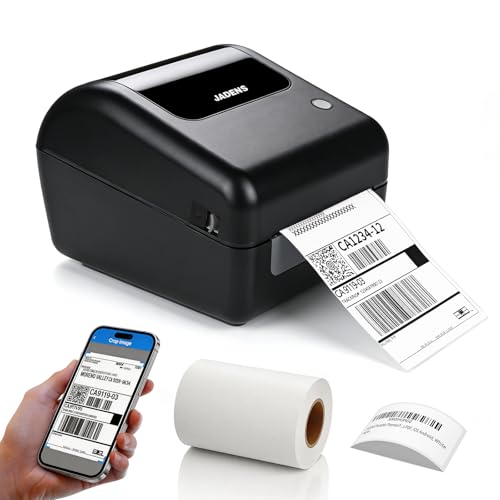
Four 4x6 thermal printers for USPS postage labels, compared on barcode clarity, how the label file arrives, built-in label storage and desk footprint.

James MillerBy James MillerLead Machine Editor4 machines comparedSpec-sheet verified
Best Label Printers for USPS

At a glance

Our top picks

Side by side

Spec comparison

MachinePrint methodWirelessWiredLabel size
Bluetooth 4x6 thermal printer with built-in label binBest OverallBluetooth 4x6 thermal printer with built-in label binDirect thermal, no inkBluetooth from iPhone, iPad, Android and WindowsUSB connection includedn/a
Rollo USB 4x6 direct thermal printerBest for Laptop DesksRollo USB 4x6 direct thermal printerDirect thermal, no inkn/an/a4x6 inch shipping labels
KNAON 4x6 Bluetooth thermal printer, whiteBest for Mixed DevicesKNAON 4x6 Bluetooth thermal printer, whiteDirect thermal, no inkBluetooth for mobile usersUSB for macOS, Windows 7 and up, ChromeOS4x6 inch shipping labels
Arrvel A42BT 4x6 Bluetooth printer with standFastest of the FourArrvel A42BT 4x6 Bluetooth printer with standDirect thermal, no inkBluetooth through the FlashLabel appUSB for Windows 7+, ChromeOS, Linux, Mac via USB-C adapter4x6 inch shipping labels

Postal shipping runs on one thing a printer must get right: the tracking barcode. A pale stripe, a curled edge or a label printed slightly small can turn a clean scan at the counter into a manual lookup, and a missed scan is how a parcel gets delayed at a sorting machine. Everything else about the printer is secondary to a crisp, flat, full-size label.

Sellers who use postal rates also tend to ship in small, light parcels, often several a day, and they stand at a counter or a table with a scale beside the machine. This guide ranks four direct thermal printers on how reliably they produce that clean barcode and how neatly they live on a shipping desk.

Before you buy

6 Criteria to Look For Before Buying a Label Printer for USPS

  1. 01

    Barcode scan reliability

    A postal tracking barcode is read by scanners that expect dark, uniform bars with a clear margin. A faint or striped print can fail a scan and cause a manual lookup at the counter. Every printer here uses direct thermal heat on 4x6 labels, so the variable is head cleanliness. Wipe the head with alcohol every few rolls and print one test label before a batch, because a pale barcode is more common than a dead printer. Postal labels also travel through conveyor belts and automated readers, so a barcode with a thin white margin or a crease through it is at risk even when it looked fine on the desk. Press the label flat on the parcel and avoid applying it across a box seam where tape or an edge will break the bars.

  2. 02

    Label size accuracy

    A thermal postage label must print at full size, four inches by six. If the print dialog is left on a letter-sized page the label prints small and the barcode shrinks. The built-in-bin printer accepts widths from 1.57 to 4.1 inches, which is a reminder that it can print many sizes, so confirm the page setting every time you change tools. Measure the first label against the label edge before trusting a batch. Postal tools often offer both a half-sheet layout for letter paper and a thermal layout, and picking the wrong one is the commonest cause of a label that comes out tiny in the corner of a large sticker. If the tool you use has a label size dropdown, set it once and save it.

  3. 03

    Stock storage and feed path

    Roll stock stored inside the body of the top pick stays cleaner than a roll left on a spindle, and the Arrvel's stand supports a fanfold stack. The Rollo USB and KNAON leave stock outside, so a box or a holder needs to keep it square. Dust on the adhesive side leads to jams. A closed storage design is a small but real advantage for a desk that shares space with tape and cardboard. Cardboard dust is especially unkind to thermal heads, since fine fibers drift onto the roller and into the paper path. Sellers who cut boxes at the same table as the printer should consider a cover or a separate shelf.

  4. 04

    Where postage is bought

    Sellers buy postal rates on a phone, a laptop, or both. The KNAON and the Arrvel include Bluetooth plus USB, the top pick offers Bluetooth plus USB too, and the Rollo USB is computer-only. Choose a printer that fits the device where you actually buy postage, so you never need to forward a PDF between devices just to print. Moving a file from a phone to a computer to a printer is the sort of small friction that makes sellers abandon a workflow after a month. Count the steps between a paid label and a printed one, and choose the printer that removes the most.

  5. 05

    Chromebook and Linux support

    Many drivers cover only Windows and Mac. The KNAON lists ChromeOS, and the Arrvel lists ChromeOS and Linux. If your shipping desk runs on a cheap laptop with a limited operating system, this support decides whether the printer works at all.

  6. 06

    Return window and support

    Printers from newer brands have little owner history. Rollo's long record helps with troubleshooting, while the built-in-bin printer and Arrvel rely more on the seller's return terms. Keep packaging for the first month, since early faults usually show up within the first fifty labels. A printer that handles a test box of fifty cleanly has passed the first big hurdle. Keep the return receipt and the original box handy until a full week of real shipping has gone by.

Detailed reviews

The 4 best label printers for usps, explained

01
Bluetooth 4x6 thermal printer with built-in label bin
4x6 direct thermalBuilt-in label binBluetooth and USB1.57 to 4.1 in labels
Check price on Amazon
Best for: USPS shippers who want a compact desk unit with the label stock stored inside.

The integrated label holder is what earns this printer the top spot for a postal shipper. Roll stock sits inside the body instead of hanging off the back on a spindle, so the printer, the labels and the cable become a single tidy block beside the scale. That keeps the stock clean, which helps because dust and fingerprints on the adhesive side are a common cause of poor feeding.

It accepts direct thermal labels from 1.57 to 4.1 inches wide, so it can print the standard 4x6 postage label and also smaller barcode or return-address stickers. Bluetooth reaches iPhones, iPads, Android phones and Windows computers, with a USB route as a fallback. The cost of this flexibility is a maker with little public track record, so the listing's return terms matter more here than they would on an established name.

Upkeep is simple. Clean the head and roller with alcohol, keep the internal holder free of loose paper scraps, and recalibrate when you load a different roll. Because the stock is covered, it lasts longer between jobs, but the covered holder also hides a roll that has slipped off its core until the printer starts to feed crooked.

What works

  • Built-in holder keeps roll stock clean and tidy
  • Accepts 1.57 to 4.1 inch wide labels
  • Bluetooth plus USB offers two routes
  • Small footprint fits beside a postal scale

Watch out for

  • Newer maker with limited owner history
  • Covered holder hides a slipping roll

Spec sheet

Label size range
1.57 to 4.1 inch wide direct thermal labels
Print method
Direct thermal, no ink
Stock storage
Integrated label holder for roll labels
Wireless
Bluetooth from iPhone, iPad, Android and Windows
Wired
USB connection included
02
Rollo USB 4x6 direct thermal printer
4x6 direct thermalUSB wiredWindows XP and Mac 10.9+Rollo Ship app
Check price on Amazon
Best for: Shippers who buy postage on a Windows or Mac laptop and want the simplest setup.

Few printers in this class have as long a driver history as the Rollo USB, which lists Windows XP and Mac 10.9 as its oldest supported systems. For someone buying postage on a laptop, that maturity is reassuring, because the printer was designed for the dull job of turning a PDF into a barcode over a cable.

The free Rollo Ship app can buy postage and print in one flow, a convenience that suits low-volume sellers who dislike juggling several accounts. There is no phone printing and no built-in label holder, so stock sits behind the machine and the cable ties it to the computer. Compared with the top pick, that makes the desk a little less tidy and the setup a little more dependable.

Keep the roll or fanfold stack square, wipe the head every few rolls and run a test label after a long idle period. A clean head produces the dark, even bars that USPS scanners need, and no radio means no pairing to repair mid-batch.

What works

  • Wired link with no pairing or signal issues
  • Driver support reaches back to old systems
  • Companion app can buy postage
  • Simple feed path

Watch out for

  • No phone or tablet printing
  • Stock sits outside the body

Spec sheet

Label size
4x6 inch shipping labels
Print method
Direct thermal, no ink
Connection
USB cable
Computer support
Windows XP and newer, Mac 10.9 and newer
Software
Free Rollo Ship app
03
KNAON 4x6 Bluetooth thermal printer, white
4x6 direct thermalBluetooth and USBMobile appsChromeOS support
Check price on Amazon
Best for: Sellers who buy postage on a phone and sometimes on a Chromebook or laptop.

The white KNAON offers the same split the black one does: Bluetooth for a phone and USB for a computer. For USPS work, that means a seller can buy postage on a phone, print a label by Bluetooth and still fall back to a cable if the wireless link fails. The ChromeOS support named on the listing is a rarity, and it matters to anyone shipping from a school-issued or budget laptop.

The built-in templates give it an edge over the Rollo for the odd extra sticker, such as a fragile warning or a return address. What it lacks compared with the top pick is the covered label holder, so roll or fanfold stock stays outside the machine and needs a stand or box to feed straight.

Ownership is routine: head wipe, roller check, calibration after switching stock, and a re-pair after a phone update. If a label prints faint, suspect the head before blaming the barcode, since a dirty head is the usual reason a postal scanner struggles.

What works

  • Bluetooth for phones and USB for computers
  • ChromeOS support is stated on the listing
  • Templates add extra stickers
  • Portable body

Watch out for

  • Stock is not stored inside the machine
  • Pairing sometimes needs repeating

Spec sheet

Label size
4x6 inch shipping labels
Print method
Direct thermal, no ink
Wireless
Bluetooth for mobile users
Wired
USB for macOS, Windows 7 and up, ChromeOS
Extras
Pre-designed label templates
04
Arrvel A42BT 4x6 Bluetooth printer with stand
4x6 direct thermal150 mm/s72 labels a minuteFlashLabel app
Check price on Amazon
Best for: Shippers who print postage in batches and want a stand for fanfold stacks.

Arrvel pairs this printer with a stand and a rated speed of 72 labels a minute, which together suit someone who prints a stack of postage in one go. The FlashLabel app on iOS and Android handles Bluetooth, and a USB cable covers Windows, ChromeOS and Linux, with an adapter included for Macs.

The stand is the quiet advantage, since a fanfold stack resting on it feeds straight and a straight feed keeps the sensor aligned. Next to the covered holder of the top pick, the stand leaves paper exposed to dust. Next to the Rollo USB, you gain Bluetooth but add a phone app that must keep working with new phone software.

In practice, clean the head after each box of labels, keep the stack unwarped and recalibrate when the brand changes. If your volume is a few parcels a week, you will not use the speed, and a simpler wired machine will serve better.

What works

  • Rated at 72 labels a minute
  • Stand keeps fanfold stock straight
  • USB-C adapter included for newer Macs
  • Supports Linux and ChromeOS by cable

Watch out for

  • Stock stays exposed to dust
  • Speed is wasted on low volume

Spec sheet

Label size
4x6 inch shipping labels
Print method
Direct thermal, no ink
Speed
150 mm per second, 72 labels a minute
Wireless
Bluetooth through the FlashLabel app
Wired
USB for Windows 7+, ChromeOS, Linux, Mac via USB-C adapter

Spec sheet decoder

What the numbers on the box really mean

The specs manufacturers lead with, translated into what they tell you about real-world performance.

Label width range

The narrowest and widest stock a printer will take. A wider range means one machine can print postage and small stickers.

Watch forThe built-in-bin printer lists 1.57 to 4.1 inches, the broadest range in this lineup.

Labels per minute

Finished labels each minute, a practical measure for batch work. It includes feed time as well as head speed.

Watch forThe Arrvel lists 72 a minute, and the other three give no figure.

Integrated label holder

A compartment inside the printer that holds the roll. It keeps stock clean and reduces desk clutter.

Watch forOnly the top pick has it, and a slipping roll is harder to spot.

USB-C adapter

A small connector that lets a computer without a standard USB port use the printer's cable.

Watch forThe Arrvel includes one for Macs.

Direct thermal

Heat marks the paper directly with no ink. Prints fade with heat and sunlight over months.

Watch forShip soon after printing and do not leave labels on a hot dashboard.

Methodology

How We Evaluated These Label Printers for USPS

Barcode quality factors

We looked at what affects a scannable barcode: head cleanliness, stock feed and label size. All four print direct thermal on 4x6 stock. We scored printers on how easy they make full-size, clean output.

Device fit for postage buying

We read each listing for the devices it supports. The Arrvel names Linux and ChromeOS, the KNAON names ChromeOS, and the top pick names iPad and Windows. The Rollo USB is computer-only.

Stock handling

The built-in holder, the Arrvel stand and the open feed paths of the Rollo and KNAON were compared. A covered path scored highest for cleanliness, while a stand scored for fanfold feeding.

Speed and volume

The Arrvel lists 72 labels a minute, which suits batch printing. Other printers were judged on the standard 4x6 expectation of about a second a label. We compared these to a typical home shipper's volume, which is usually under fifty labels in a sitting. Few postal shippers ever hit the limit of the head, so speed counted for less than steadiness.

Ownership over time

Cleaning, calibration and app dependence were weighed. Wired designs asked least, and newer brands lost points for thin history. A seller who ships weekly should value fewer moving parts, because a postal shipper wants the machine to disappear into the routine. The ranking therefore leans toward designs that keep stock clean and connections simple.

Decision guide

How to Choose the Right Label Printers for USPS

By Shipping Desk

SituationPickWhy
Small desk beside a postal scaleBluetooth printer with built-in binStock stored inside keeps the desk tidy.
Laptop buys postageRollo USBWired and simple.
Phone buys postageKNAON 4x6 BluetoothBluetooth with a USB backup.
Batch printing from fanfoldArrvel A42BTStand and 72 labels a minute.

By Budget

TierPickWhy
Lowest outlayRollo USBWired design with no extras.
Middle tierKNAON 4x6 BluetoothAdds phone printing.
Higher tierBluetooth printer with built-in binAdds integrated stock storage and wide label range.

Covered Roll vs Open Stack

Covered roll

The built-in-bin printer keeps the roll inside. It stays cleaner and the desk stays neat. A slipping roll is harder to see.

Open stack

The Rollo USB, KNAON and Arrvel feed from outside. The Arrvel's stand helps a fanfold stack feed straight. Dust can reach the adhesive side.

Choose covered for a clean desk, open for fanfold stacks.

Phone vs Computer Postage

PreferencePickWhy
Buy on iPhone or iPadBluetooth printer with built-in binLists iPhone and iPad support.
Buy on an Android phoneKNAON 4x6 BluetoothMobile apps over Bluetooth.
Buy on a Linux laptopArrvel A42BTLinux is named on the listing.

For Small Light Parcels Specifically

Look for

A printer that can also make small return or fragile stickers, since light parcels often carry extra notes. A label width range wider than 4x6 helps.

In this comparison

The built-in-bin printer takes 1.57 to 4.1 inch labels, and the KNAON has a template library, so both can print the extra stickers.

When to Spend More

Spend more if

You want stock covered and a tidy desk, or you print big batches. The built-in-bin printer and Arrvel each address one.

Save if

You buy postage from one laptop. The Rollo USB covers that with the fewest parts.

Ownership

Maintenance schedule

The upkeep that decides whether this machine lasts two seasons or ten.

TaskIntervalWhy it matters
Wipe the print headEvery 3 to 4 rollsA dirty head leaves pale stripes across a tracking barcode. Alcohol on a swab keeps the bars dark and even.
Print a test labelBefore each batchA single label shows darkness, size and alignment at a glance. It spares you from reprinting a whole run of postal labels that fail a scan.
Recalibrate for stock changesWhen changing label brandThe sensor learns the gap between labels. Skipping it feeds blank labels.
Check the internal roll holderMonthlyA roll can slip off its core inside a covered holder. Open the cover, reseat the roll and clear any loose scraps so the feed does not drag.
Keep labels away from heatOngoingDirect thermal paper darkens when it gets hot. A drawer is safer than a sunny shelf.

FAQ

Frequently Asked Questions

Which printer is best for USPS labels?

Any 4x6 direct thermal printer can print postal labels. The built-in-bin model keeps stock tidy, the Rollo USB is simplest, and the Arrvel suits batches. Choose by how you buy postage, where the desk sits and whether you want the stock covered. After that the print quality is essentially the same, because all four use the same heat-on-paper method and the same label size.

Why won't my postal barcode scan?

The usual causes are a dirty head, a label printed too small or a curled edge. Wipe the head, check the page scale and flatten the label before applying. If a label is printed correctly and still fails, look at where it was stuck: a barcode across a tape line or a box edge is hard for a scanner to read. Reprint and place it on a flat face of the parcel.

Do I need a printer if I only ship a few parcels?

Not for a handful a month, because a counter visit costs less than a machine and a case of labels. A printer pays off when you ship weekly.

Can I print USPS labels from a phone?

Yes with a Bluetooth printer such as the KNAON, the Arrvel or the built-in-bin model. Share the label PDF to the app and print. Keep a USB cable as backup.

Are thermal labels permanent?

No, they fade in heat and sunlight. They last through a normal shipment, but they are not for long-term labelling. If you need a durable shelf tag, a thermal transfer printer and ribbon are the right tool instead. For postage the short life is no problem, as the label is stuck on and gone within days.

Does label stock brand matter?

Somewhat. Strong adhesive and clean perforations feed better. Buy a small pack first and confirm that the printer calibrates to it.

Bottom line

The short version

Browse more label printers for uspson Amazon →
James Miller, Lead Machine Editor

About the author

James Miller

Lead Machine Editor, MachineFanatic

James Miller leads MachineFanatic's buying guides, turning spec sheets, manuals and owner feedback into clear verdicts on power tools, outdoor power equipment, shop machines and kitchen machines.

More from James →

Keep reading

Related guides