
Amazon affiliate links - we earn a commission.Affiliate disclosure

Buying guide · 14 min read · Updated 2026-11-18

Best Label Printers Under $1000 (2026)

Six label printers at or below $1000: new Zebra ZD421 desktop configurations and three small printers that show what the extra headroom really buys.

James MillerBy James MillerLead Machine Editor6 machines comparedSpec-sheet verified
Best Label Printers Under $1000

At a glance

Our top picks

Side by side

Spec comparison

A thousand-dollar ceiling is generous for a label printer. It covers new industrial desktop machines from the warehouse world, and it is far above what a small shop needs for shipping or shelf stickers. The honest question is not what the cap allows but what the extra headroom actually buys.

Mostly it buys one thing: a printer built for a daily duty cycle, with a warranty and a connection set that lasts a decade. This guide compares new desktop configurations against three small printers, so a buyer can see exactly where the premium earns its place. Prices move, and the cap reflects listing prices when this guide was updated.

Before you buy

6 Criteria to Look For Before Buying a Label Printer Under $1000

  1. 01

    What the headroom actually buys

    With a $1000 ceiling, the extra spend over a small printer buys a duty cycle, a mature driver and a long service life, not better-looking labels. A parcel label from the Arrvel A42BT looks the same as one from a Zebra ZD421 at 203 dpi. The difference shows up after tens of thousands of labels, when the cheaper head is worn and the industrial one is not. A seller who prints fifty labels a day will take years to reach that point, so the premium only makes sense at several hundred labels a day or for work where downtime is expensive. Think in terms of cost per label over the machine's life, not the price on the day.

  2. 02

    Direct thermal or thermal transfer

    The ZD421 line comes in direct thermal only, thermal transfer only and dual configurations, and the Zebra ZD421t with Ethernet and Bluetooth is the dual one. Direct thermal is cheap and fades. Thermal transfer needs a ribbon but lasts. If you cannot predict your labels, buy the dual model and avoid a second purchase. A shop that starts with parcels and later adds shelf and asset labels will thank itself for the flexibility. Check that the ribbon width and core size you will buy match the printer, since thermal transfer supplies come in several sizes.

  3. 03

    Resolution

    Most desktop printers print at 203 dpi, and one ZD421 listed here prints at 300 dpi. The higher grid helps tiny text and compact two-dimensional codes. It does not help a parcel label. Pay for resolution only if your smallest printed feature demands it.

  4. 04

    Connection set

    The ZD421t lists USB, Ethernet, Bluetooth and field-upgradeable wireless, and the direct thermal ZD421 lists USB, Bluetooth and Wi-Fi. The smaller printers offer Bluetooth only or Bluetooth and USB. A shared workspace benefits from Ethernet, and a one-person desk does not. Match the connection to the room. Ethernet is the quiet favorite of anyone who has had Wi-Fi drop mid-batch, because a cable asks nothing of the network beyond a link light. If the printer sits in a back room with weak signal, a cable can be the difference between a working day and a lost one.

  5. 05

    Maintenance and parts

    Industrial printers are built so heads and platens can be replaced, which turns a printer into a decade tool. Pocket printers are replaced as a whole. If you expect to print every day for years, the lower cost per label of a serviceable machine wins. A new platen roller costs little compared with a new printer, and swapping one takes minutes. That is the real economic case for the industrial class, and it only matters if you print a lot.

  6. 06

    Honest sizing

    Most buyers searching for a printer under a high cap do not need an industrial machine. If you print fewer than a hundred labels a day, the Arrvel A42BT or a pocket printer is enough. Be honest about volume before spending, because the unused capacity of a big printer is wasted money.

Detailed reviews

The 6 best label printers under $1000, explained

01
Zebra ZD421t direct thermal and thermal transfer, USB Ethernet Bluetooth
Direct and transfer203 dpi, 4 inUSB Ethernet Bluetooth3 buttons, 5 LEDs
Check price on Amazon
Best for: Shops that need one printer for shipping labels and durable tags.

The ZD421t does what the cheaper printers here cannot: it prints both direct thermal and thermal transfer, so one machine can print a parcel label in the morning and a durable asset tag in the afternoon. The listing gives 203 dpi, a 4-inch print width, and a wide connection set of USB, Ethernet, Bluetooth and field-upgradeable wireless.

The interface is deliberately plain, with three buttons and five LED icons that show status at a glance. That is a design choice for shared workspaces where nobody reads a manual. Next to the other ZD421 configurations in this list, it is the one to buy if you are unsure which printing method your future work needs.

Upkeep is standard industrial work: clean the head and platen, match the ribbon to the stock when using thermal transfer and set the media type after every stock change. It is a printer to buy once and keep for years. The wireless module slot is a quiet bonus: a shop that starts on a cable can add a radio later without replacing the printer. Plan the first week around testing each connection in turn, so a surprise in month six is less likely.

What works

  • Prints direct thermal and thermal transfer
  • USB, Ethernet, Bluetooth and upgradeable wireless
  • Plain three-button interface with LED status
  • 4-inch width at 203 dpi

Watch out for

  • Far more machine than a small shop needs
  • Thermal transfer needs ribbons and setup

Spec sheet

Print methods
Direct thermal and thermal transfer
Resolution
203 dpi
Print width
4 inch
Connections
USB, Ethernet, Bluetooth and field-upgradeable wireless
Interface
Three buttons and five LED icons
02
Zebra ZD421 direct thermal with Bluetooth, Wi-Fi and USB, 6 ips
Direct thermal only6 ips at 203 dpiUSB Bluetooth Wi-Fi1 in core rolls
Check price on Amazon
Best for: Shipping desks that want a new industrial printer on Wi-Fi.

This configuration trades the ribbon option for Wi-Fi and a lower price of ownership. It prints direct thermal only, at up to 6 inches per second and 203 dpi, and connects over USB, Bluetooth and Wi-Fi. For a shipping desk with a router, that is the cleanest setup in the list.

It takes rolls with a 1-inch core and the listing notes a 5-inch maximum diameter in the ZD421 family, so the roll size is generous. Next to the ZD421t it cannot print thermal transfer, which means no durable asset tags. Next to the cheap printers, it brings the platform and a build meant for daily use.

Keep the head and roller clean, give the printer a fixed address on the network and set the media type for your label stock. It tends to stay installed for years, which is the point of buying this class. If the roll core on your labels is a different size, check for an adapter before ordering stock, since mismatched cores are a common reason a new industrial printer sits idle for a week. Direct thermal stock also has a shelf life, so order in sensible batches rather than by the pallet.

What works

  • 6 inches per second at 203 dpi
  • USB, Bluetooth and Wi-Fi connections
  • Direct thermal avoids ribbon costs
  • Built for daily duty

Watch out for

  • Cannot print thermal transfer labels
  • Far more printer than occasional shipping needs

Spec sheet

Print method
Direct thermal only, no ribbon
Speed
6 inches per second
Resolution
203 dpi
Connections
USB, Bluetooth and Wi-Fi
Media
Rolls with a 1 inch core
03
Zebra ZD421 thermal transfer printer, 300 dpi
Thermal transfer300 dpi4 in widthUSB
Check price on Amazon
Best for: Makers who print small, detailed barcodes and tags that must last.

The 300 dpi grid is the distinguishing feature of this ZD421. Where most desktop printers lay down 203 dots per inch, 300 dpi renders tiny text, small two-dimensional codes and fine logos more sharply. The listing says it requires a thermal ribbon, so this is a thermal transfer machine for labels that must look crisp and last.

That suits jewelry tags, small electronic component labels and pharmacy-sized stickers, jobs where a 203 dpi head gives fuzzy edges. The cost is a ribbon to buy and thread, and a slower, fussier setup than a direct thermal machine. It is a poor choice for parcel labels, where 203 dpi is plenty.

Match the ribbon to the label stock, keep the ribbon core seated and clean the head. Buy it for the detail, not for shipping. A practical test is to print your smallest code and scan it from the distance a reader will use. If a 203 dpi printer already reads cleanly at that size, the 300 dpi grid is a luxury, and the ribbon cost can be saved for something else.

What works

  • 300 dpi renders tiny text and codes sharply
  • Thermal transfer labels last
  • 4-inch print width
  • Established desktop platform

Watch out for

  • Requires ribbons
  • No wireless listed

Spec sheet

Print method
Thermal transfer, requires ribbon
Resolution
300 dpi
Print width
4 inch
Connection
USB
Part number
ZD4A043-301M00EZ
04
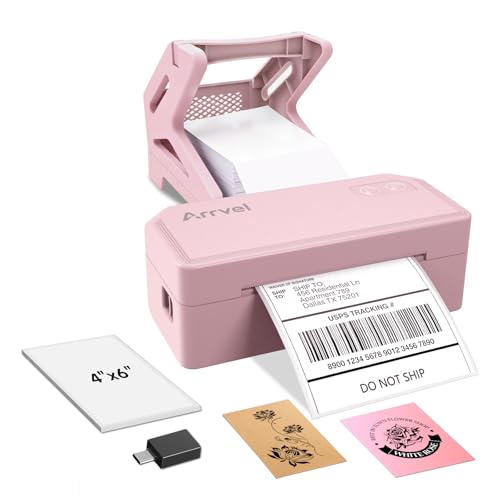
Arrvel A42BT 4x6 Bluetooth printer with stand
4x6 direct thermal72 labels a minuteBluetooth and USBIncludes stand
Check price on Amazon
Best for: Parcel sellers who want the cheapest sensible answer.

The Arrvel sits in this list as a reality check. It prints 4x6 direct thermal labels at 72 labels a minute, connects by Bluetooth and USB and comes with a stand, and it does so at a fraction of the Zebra's price. For a parcel seller, it covers the whole job.

What the extra budget buys over it is duty cycle, a mature driver ecosystem and a longer expected life. If you ship a few dozen parcels a day, the Arrvel will serve well. If you ship hundreds, you will wear a cheaper head faster.

Clean the head every few rolls, keep the stack straight on the stand and recalibrate after a stock change. Most of what a shop gains by moving up to a Zebra is not visible on the label, so treat the Arrvel as the default and justify any step above it with a clear reason such as volume, durability or a shared network.

What works

  • 72 labels a minute
  • Bluetooth and USB routes
  • Stand holds the stack straight
  • Costs far less than the industrial printers

Watch out for

  • Lower duty cycle than an industrial printer
  • Newer brand with less history

Spec sheet

Label size
4x6 inch shipping labels
Print method
Direct thermal, no ink
Speed
150 mm per second, 72 labels a minute
Wireless
Bluetooth with the FlashLabel app
Wired
USB for Windows 7+, ChromeOS, Linux, Mac via USB-C adapter
05
SUPVAN T50M Pro Bluetooth label maker with 3 tapes
3/4 to 2 in wideWaterproof labels30+ fontsApp editing
Check price on Amazon
Best for: Small shops that label products and bins from a phone.

SUPVAN's T50M Pro prints 3/4 to 2 inch wide labels that the listing describes as waterproof, and the bundle includes three tapes. It is a Bluetooth label maker for homes and small businesses, with an app that imports images and offers more than 30 fonts.

In a list full of industrial printers, it is the small-label option that does not need a computer. It cannot print 4x6 parcel labels and it is not built for hours of daily use. Its real role here is to show that most small shops need nothing like a four-figure printer.

Keep spare tapes, update the app and wipe the head sometimes. The waterproof claim suits bins and tubs in a damp stockroom, but test an adhesive sample on your surface before labeling a full shelf. A label that peels off a cold container is a common surprise.

What works

  • Wide labels up to 2 inches
  • Waterproof label material
  • Imports images and logos
  • Three tapes in the bundle

Watch out for

  • Cannot print parcel labels
  • Relies on a phone app

Spec sheet

Label width
3/4 to 2 inch
Label type
Wide waterproof label
Connection
Bluetooth with the app
Editing
Phone, tablet or PC with 30+ fonts
In the bundle
Three tapes
06
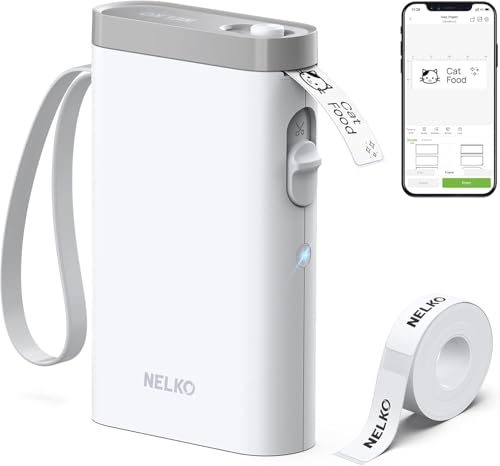
Nelko P21 Bluetooth label maker, half-weight design
Direct thermalBluetooth appiOS and AndroidHandheld size
Check price on Amazon
Best for: Households and offices that need quick small labels from a phone.

Nelko's P21 is the lightest machine in the list, described as having half the weight of traditional label makers. It prints with BPA-free direct thermal technology and pairs with iOS and Android phones through the Nelko app, which carries many templates.

It does the quiet jobs well: pantry labels, cable tags and drawer markings. It is no match for an industrial printer in speed or durability, and its direct thermal prints fade. But for the many buyers who never need a four-figure machine, it makes the point that a pocket printer and a phone often cover the work.

Charge it, wipe the head now and then and store spare rolls in a drawer. Because it is so light, it travels easily to a storage unit or a second shop, and a single charge covers many labels. If the app ever stops being updated, the printer loses its value, so check that the maker still ships updates before you rely on it.

What works

  • Very light handheld body
  • BPA-free direct thermal printing
  • Works with iOS and Android
  • Many app templates

Watch out for

  • Prints fade over time
  • Not for parcel or industrial use

Spec sheet

Print method
BPA-free direct thermal, no ink
Connection
Bluetooth with the Nelko app
Apps
iOS and Android
Size
Handheld, about half the weight of traditional label makers
Templates
Multiple templates in the app

Spec sheet decoder

What the numbers on the box really mean

The specs manufacturers lead with, translated into what they tell you about real-world performance.

300 dpi

Three hundred dots per inch, finer than the common 203 dpi. It sharpens small print and codes.

Watch forOne Zebra ZD421 here is 300 dpi, and the others are 203.

Dual thermal

A printer that handles both direct thermal paper and ribbon-based thermal transfer.

Watch forThe Zebra ZD421t does both.

Field-upgradeable wireless

A connection option that can be added after purchase through a module.

Watch forThe ZD421t lists it, so it can gain Wi-Fi later.

Inches per second

How fast media passes under the head.

Watch forThe direct thermal ZD421 lists 6, and the Arrvel is 150 mm/s, about 5.9.

1 inch core

The diameter of the cardboard tube at the center of a label roll.

Watch forThe ZD421 family takes 1 inch core rolls up to a 5 inch outer diameter.

Methodology

How We Evaluated These Label Printers Under $1000

Duty cycle and build

We looked at which printers are designed for daily industrial use. The Zebra ZD421 configurations lead, and the Arrvel, SUPVAN and Nelko are lighter-duty. This separated the lineup into two classes.

Flexibility of printing method

We compared direct thermal, thermal transfer and dual models. The ZD421t covers both, one ZD421 is transfer-only at 300 dpi, and another is direct only. Flexibility scored for buyers with mixed work.

Connections

USB, Ethernet, Bluetooth and Wi-Fi sets were compared. The ZD421t has four routes, and the small printers have one or two. Redundancy scored higher.

Cost-to-need fit

We asked whether each printer matches a realistic job. The Arrvel and Nelko matched small jobs well, and the Zebras matched high-volume ones. Overbuying lost points.

Longevity and service

Replaceable heads, spare parts and driver history were weighed. Industrial printers scored high, and pocket printers scored lower. A printer that can be repaired outlives one that must be replaced.

Decision guide

How to Choose the Right Label Printers Under $1000

By Work

WorkPickWhy
Shipping and durable tags from one machineZebra ZD421tDirect thermal and thermal transfer.
Shipping labels on Wi-FiZebra ZD421 direct thermal6 ips with Wi-Fi.
Tiny barcodes and fine textZebra ZD421 300 dpiSharper grid with a ribbon.
A few dozen parcels a dayArrvel A42BT72 labels a minute and a stand.

By Budget Position

PositionPickWhy
LowestNelko P21Pocket sticker maker.
MiddleArrvel A42BTComplete 4x6 package.
HighestZebra ZD421tDual method and four connections.

Industrial vs Compact

Industrial

The Zebra ZD421 models are built for daily duty. They have replaceable parts and mature drivers. They cost far more.

Compact

The Arrvel, SUPVAN and Nelko are light and phone-driven. They suit modest volume. They wear out faster under heavy use.

Choose industrial for volume and compact for modest work.

By Connection

LayoutPickWhy
Shared office networkZebra ZD421tEthernet plus wireless upgrade.
Router and Wi-FiZebra ZD421 direct thermalWi-Fi and Bluetooth.
Phone onlyNelko P21Bluetooth app.

For Durable Labels Specifically

Look for

Thermal transfer with a ribbon that matches the label stock, and resolution suited to the smallest print.

In this comparison

The Zebra ZD421t and the 300 dpi ZD421 both print thermal transfer, and the 300 dpi one suits tiny detail.

When to Spend More

Spend more if

You print hundreds of labels a day or need durable tags and parcels from one machine. The Zebra ZD421t covers both.

Save if

You print a few dozen labels a day. The Arrvel A42BT is enough.

Ownership

Maintenance schedule

The upkeep that decides whether this machine lasts two seasons or ten.

TaskIntervalWhy it matters
Clean head and platenEvery roll on busy printersIndustrial printers run longer hours, so adhesive builds up. Alcohol keeps print dark.
Set media typeAfter stock changesIndustrial printers must be told label type and gap. A stale setting wastes labels.
Check ribbon alignmentEach ribbon changeA wrinkled ribbon causes patchy prints on transfer models.
Give network units a fixed addressOnceA drifting address makes a working printer look dead.
Update firmware sparinglyYearlyUpdates fix bugs but can change settings. Note your configuration first.

FAQ

Frequently Asked Questions

Do I need an industrial printer?

Only if you print hundreds of labels a day or need dual printing methods. For a few dozen parcels a day, the Arrvel A42BT is enough.

What is the difference between ZD421 versions?

Some print direct thermal only, some thermal transfer only and some both. They also differ in resolution and connections, so read the configuration, not just the model number.

Is 300 dpi worth it?

Only for tiny text, small codes and fine logos. For parcel labels 203 dpi is plenty.

Can the small printers replace a Zebra?

For modest volumes, yes. Under heavy daily use, they wear out faster and lack mature drivers.

Prices change. How should I read the cap?

As a guide, since listings move. Check the live price, and remember that the cap leaves room for printers well below it.

Which should a seller with growth plans buy?

The Zebra ZD421t, because it covers both printing methods and four connections. It saves a second purchase when the business changes.

Bottom line

The short version

Browse more label printers under $1000on Amazon →
James Miller, Lead Machine Editor

About the author

James Miller

Lead Machine Editor, MachineFanatic

James Miller leads MachineFanatic's buying guides, turning spec sheets, manuals and owner feedback into clear verdicts on power tools, outdoor power equipment, shop machines and kitchen machines.

More from James →

Keep reading

Related guides