
Amazon affiliate links - we earn a commission.Affiliate disclosure

Buying guide · 14 min read · Updated 2026-11-18

Best Label Printers Under $200 (2026)

Six label printers at or below $200, from renewed industrial 4-inch units to Wi-Fi address printers and a portable cable labeler, with real tradeoffs.

James MillerBy James MillerLead Machine Editor6 machines comparedSpec-sheet verified
Best Label Printers Under $200

At a glance

Our top picks

Side by side

Spec comparison

MachinePrint methodUses
Zebra GX420d direct thermal 4-inch label printer (renewed)Best OverallZebra GX420d direct thermal 4-inch label printer (renewed)Direct thermal, no ink, toner or ribbonn/a
Brother QL-810W Wi-Fi label printer, 110 labels a minuteBest ValueBrother QL-810W Wi-Fi label printer, 110 labels a minuten/aPackages, envelopes, file folders, name badges, postage
CLABEL X1 4-inch thermal transfer label printerBest New Thermal TransferCLABEL X1 4-inch thermal transfer label printerThermal transfer with wax, resin or wax-resin ribbonn/a
Zebra GX420t thermal transfer printer with peeler (renewed)Best for Peeled LabelsZebra GX420t thermal transfer printer with peeler (renewed)Thermal transferBarcode labels, shipping labels, asset tags, receipts, product labels
Brother PT-E310BT industrial handheld label printerBest Portable Cable LabelerBrother PT-E310BT industrial handheld label printern/an/a
DYMO LabelWriter 450 direct thermal label printerBest Established Address PrinterDYMO LabelWriter 450 direct thermal label printerDirect thermal, no ink or tonerAddress, file folder and barcode labels

Two hundred dollars is where label printing changes character. Below it, almost everything is a pocket sticker maker. At this level a buyer can reach industrial desktop printers from the warehouse world, usually as renewed units, alongside newer Wi-Fi office printers and a handheld cable labeler.

The choices pull in different directions: durability against a warranty, a roll printer against a tape printer, a printer built for one carrier against a flexible one. Prices move, and the cap reflects listing prices when this guide was updated, so check the live listing before you commit.

Before you buy

6 Criteria to Look For Before Buying a Label Printer Under $200

  1. 01

    New versus renewed

    Two of the six printers here, the Zebra GX420d and GX420t, are renewed units. Renewed means refurbished by a seller, with warranty terms that vary. A proven industrial design plus spare parts can outweigh the lack of a new-unit warranty, but only if the seller gives a clear return window. Read the terms, test the printer in the first week and keep the packaging. Look for a seller that states a return window of at least thirty days and check whether the head has been replaced. A refurbisher that tells you the print head was renewed is giving you useful information, because the head is the part that wears most.

  2. 02

    Direct thermal versus thermal transfer

    The Zebra GX420d and DYMO LabelWriter 450 use direct thermal, and the Zebra GX420t and CLABEL X1 use thermal transfer with a ribbon. Direct thermal is cheaper to run and fades. Thermal transfer lasts and resists water. At this price you can finally choose, so decide how long your labels must last. If a label will sit in a warehouse for a year, thermal transfer is the safe call, and if it rides on a parcel for three days, direct thermal is plenty. Paying for ribbon on a short-life label is the commonest way to spend more than you need.

  3. 03

    Label width and format

    The Zebra printers and CLABEL X1 handle 4-inch labels suited to parcels, while the Brother QL-810W and DYMO LabelWriter 450 handle narrower address labels. The PT-E310BT prints tape for cables. A parcel seller who buys a narrow address printer will find it cannot print a shipping label. Match the format to the job first. Before buying, hold a ruler to the largest label you print and compare it with the widest media the printer accepts, since a spec stated in millimeters hides the inch figure that most sellers think in.

  4. 04

    Network sharing

    The Brother QL-810W prints over Wi-Fi and can be shared across a network, and the Zebra GX420t lists Ethernet. A two-person office benefits from sharing, and a one-person desk does not. If several people print, choose a network-capable model and give it a fixed address.

  5. 05

    Consumable lock-in

    The Brother QL-810W uses DK rolls and the DYMO LabelWriter 450 uses DYMO labels, so you buy from one family. The CLABEL X1 accepts wax, resin and wax-resin ribbons on two core sizes. If you print a lot, a printer that accepts several suppliers keeps your costs down over the years.

  6. 06

    Fit to a trade

    The PT-E310BT has keys for cable wrap, cable flag, patch panel and punch-down labels, and it stores databases and templates. That is a trade tool, and a shipping seller would be wasting money on it. Buy the printer built for your own work, not the one with the longest feature list.

Detailed reviews

The 6 best label printers under $200, explained

01
Zebra GX420d direct thermal 4-inch label printer (renewed)
4 in direct thermalUPS FedEx USPS labelsRenewed unitNo ribbon
Check price on Amazon
Best for: Sellers who want an industrial 4-inch printer and accept a renewed unit.

The GX420d is the sort of desktop printer that has sat on warehouse benches for years, and a renewed one is how a small seller gets into that league on a $200 limit. It prints direct thermal, so there is no ribbon or ink, and the listing describes 4-inch shipping and barcode labels for UPS, FedEx and USPS. The design is built for retail, warehouse, healthcare and logistics work, which tells you the duty cycle is higher than a home printer's.

Renewed is the important word. These are refurbished units, so the condition and warranty depend on the seller, and you should read the return terms before buying. The upside is a proven platform with widely available spare heads and platens. The downside next to a new printer is a lack of the maker's full warranty.

Keep the head and platen clean and set the media type and width when you change stock. A printer like this tends to keep going for years, and the gap between its cost and a new one buys a lot of labels. When it arrives, check the print head for scratches, run the printer's self-test and print a full roll before trusting it with real orders. If the seller offers a short warranty, mark the end date on your calendar.

What works

  • Proven industrial desktop platform
  • Prints 4-inch UPS, FedEx and USPS labels
  • Spare parts are widely available
  • No ribbon or ink needed

Watch out for

  • Renewed unit with seller-set warranty
  • No wireless route listed

Spec sheet

Print method
Direct thermal, no ink, toner or ribbon
Print width
4-inch shipping and barcode labels
Carrier use
UPS, FedEx and USPS shipping labels
Duty
Built for retail, warehouse, healthcare and logistics
Condition
Renewed
02
Brother QL-810W Wi-Fi label printer, 110 labels a minute
110 labels a minuteUSB and Wi-FiBlack and red printDK rolls
Check price on Amazon
Best for: Small offices that print address, postage and file labels over Wi-Fi.

Brother's QL-810W prints up to 110 labels a minute, the highest rate of any printer here, and it does so over USB or Wi-Fi so a small office can share it. It uses DK drop-in rolls and prints black and red on the DK 2251 roll, which gives a fragile or priority stripe with no second label. The listing gives a cutter life of up to 300,000 die-cut or 150,000 continuous labels, a reassuring number for a part that takes constant wear.

Where it differs from the Zebra is label width and roll supply: it handles narrower address and postage labels, not full 4x6 parcel labels, and it relies on Brother's DK rolls. The reward is a lightweight Wi-Fi printer that loads without threading and prints names, addresses and file labels quickly.

Clean the head with alcohol, keep spare DK rolls in the sizes you use and place the printer near the router for a strong signal.

What works

  • Up to 110 labels a minute
  • USB and Wi-Fi with network sharing
  • Black and red printing on DK 2251
  • Long rated cutter life

Watch out for

  • Does not print full 4x6 parcel labels
  • Tied to Brother DK rolls

Spec sheet

Speed
Up to 110 labels per minute
Connection
USB and Wi-Fi, shareable on a network
Colors
Black and red on DK 2251 roll
Cutter life
Up to 300,000 die-cut or 150,000 continuous labels
Uses
Packages, envelopes, file folders, name badges, postage
03
CLABEL X1 4-inch thermal transfer label printer
Thermal transfer152 mm/s5 in roll capacity20 to 120 mm media
Check price on Amazon
Best for: Sellers who need durable product and asset labels from a new printer.

CLABEL's X1 is the one new thermal transfer printer in this price range, and that matters for durability. It melts ribbon onto the label, and the listing says the result is waterproof, fade-resistant and scratch-resistant, which suits product labels, cable tags and asset stickers. It accepts wax, resin and wax-resin ribbons on either half-inch or one-inch cores, so you are not locked into one supplier.

A 5-inch roll capacity cuts the number of label changes, and the stated speed is up to 152 millimeters per second. The media width of 20 to 120 millimeters covers small product labels and a wide parcel label. Against the Zebra, it is new with a warranty, and it prints durable labels, but the maker has a shorter track record.

Thread the ribbon carefully, match ribbon type to label stock and wipe the head. If a print looks faint, the ribbon and label pairing is the first thing to check.

What works

  • Thermal transfer for waterproof labels
  • Accepts wax, resin and wax-resin ribbons
  • 5-inch roll capacity
  • Up to 152 mm per second

Watch out for

  • Shorter track record than established makers
  • Ribbon adds running cost

Spec sheet

Print method
Thermal transfer with wax, resin or wax-resin ribbon
Speed
Up to 152 mm per second
Roll capacity
5-inch roll
Media width
20 to 120 mm
Ribbon cores
0.5 inch and 1 inch cores
04
Zebra GX420t thermal transfer printer with peeler (renewed)
Thermal transferBuilt-in peelerUSB serial EthernetRenewed unit
Check price on Amazon
Best for: Packers who label products or totes and want peeled labels ready to apply.

This is the thermal transfer sibling of the GX420d, with a built-in peeler. The peeler separates each label from its liner as it prints, which speeds up a job where every label goes straight onto a product or tote. The listing names barcode labels, shipping labels, asset tags and product labels, and connections include USB, serial and Ethernet.

Thermal transfer means ribbons, and the labels it prints are more durable than direct thermal. It is also a renewed unit, with the same caution about warranty. Next to the GX420d, you gain durability and a peeler, and you take on a ribbon and a bit more setup. Next to the CLABEL X1, you have a more proven platform but no new-unit warranty.

Buy a ribbon that matches the label stock, clean the head and platen, and test the peeler with a few labels before a large batch.

What works

  • Built-in peeler speeds label application
  • Thermal transfer prints last
  • USB, serial and Ethernet connections
  • Proven industrial platform

Watch out for

  • Renewed unit with seller-set warranty
  • Ribbons add cost and setup

Spec sheet

Print method
Thermal transfer
Print width
4-inch
Peeler
Built-in label peeler
Connections
USB, serial and Ethernet
Uses
Barcode labels, shipping labels, asset tags, receipts, product labels
05
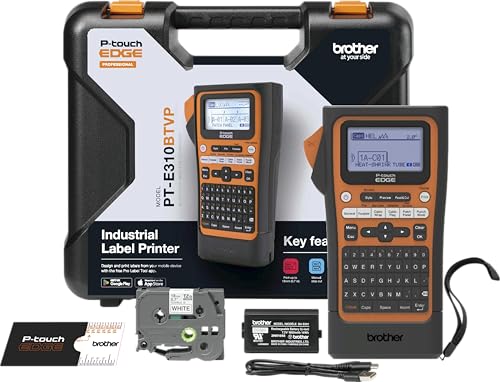
Brother PT-E310BT industrial handheld label printer
Handheld industrialBluetooth and USB-CCable wrap and flagStores databases
Check price on Amazon
Best for: Electricians and network installers who label cables and panels on site.

The PT-E310BT is the odd one out because it is a tape machine for tradespeople, not a roll printer for shipping. It has quick-application keys for cable wrap, cable flag, patch panel and punch-down labels, and it stores databases and templates so a technician can print numbered runs from existing work. Connection is by Bluetooth or USB-C.

Laminated tape in a handheld means labels that survive a cable tray, which is a better fit for electrical and network work than any direct thermal printer. What it cannot do is shipping or large label jobs, and its tape costs more per inch than thermal rolls.

Keep spare tape cassettes in the toolbag, clean the cutter and check the battery before a day on site. For a network installer, it is the right tool. A useful habit is to load the numbered series into the printer's memory before leaving for site, so a hundred patch-panel labels print in order without a laptop. Spare tape in black on white, plus one in white on black for dark cabling, covers most jobs.

What works

  • Quick keys for cable and panel labels
  • Bluetooth and USB-C connections
  • Stores databases and templates
  • Handheld for work on a ladder

Watch out for

  • Not for shipping or wide labels
  • Tape costs more per inch

Spec sheet

Type
Portable industrial tape printer
Connection
Bluetooth and USB-C
Quick keys
Cable wrap, cable flag, patch panel and punch-down
Memory
Stores databases and templates
Use
Mid-size labeling jobs
06
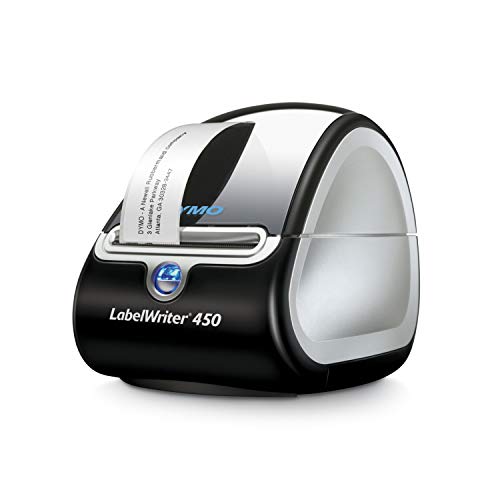
DYMO LabelWriter 450 direct thermal label printer
Direct thermalAddress and file labelsBarcode labelsIncluded software
Check price on Amazon
Best for: Offices that print address and file labels with a familiar, simple machine.

The LabelWriter 450 is the long-running workhorse of the address-label world. It prints exact quantities from a roll instead of leaving half-used sheets, uses direct thermal so there is no ink, and comes with DYMO software for address, file folder and barcode labels. Its reputation rests on simplicity and a large owner community.

The tradeoff is that it is an older design. Next to the Brother QL-810W it has no Wi-Fi in the listing and no black-and-red printing, and it works with DYMO's own labels. Against the Zebra printers, it is a lightweight office machine, not a warehouse tool.

Keep a spare roll, wipe the head and store the printer in a dry place. It is a sensible, low-fuss choice for an office that prints addresses and file labels. A frequent mistake with this model is loading a third-party roll and wondering why it will not feed, so buy the maker's labels from the start. Also keep the printer out of dusty corners, since paper lint is its main enemy.

What works

  • Prints exact quantities with no sheet waste
  • Direct thermal, no ink or toner
  • Included label software
  • Large owner community

Watch out for

  • Older design with no Wi-Fi listed
  • Tied to DYMO labels

Spec sheet

Print method
Direct thermal, no ink or toner
Output
Precise quantities, not sheet labels
Software
Included DYMO label software
Uses
Address, file folder and barcode labels
Waste
No sheet waste

Spec sheet decoder

What the numbers on the box really mean

The specs manufacturers lead with, translated into what they tell you about real-world performance.

Renewed

A used unit refurbished and resold by a third party. Condition and warranty depend on the seller.

Watch forThe Zebra GX420d and GX420t are renewed.

Thermal transfer ribbon

A film coated with wax, resin or both that melts onto the label. Wax suits paper, and resin suits synthetics.

Watch forThe CLABEL X1 accepts wax, resin and wax-resin ribbons.

Cutter life

How many labels the cutting blade can cut before it wears out.

Watch forThe Brother QL-810W lists up to 300,000 die-cut or 150,000 continuous labels.

Built-in peeler

A mechanism that separates each printed label from its liner, so it can be applied immediately.

Watch forThe Zebra GX420t has one.

Quick application keys

Dedicated keys that format a label for a common electrical or network task.

Watch forThe Brother PT-E310BT has them for cable wrap, flag, patch panel and punch-down.

Methodology

How We Evaluated These Label Printers Under $200

Platform proven in the field

We weighed how long a design has been in service. The Zebra GX420d and GX420t and the DYMO LabelWriter 450 score highly for history. The CLABEL X1 scored lower for track record but higher for being new.

Print durability

Direct thermal and thermal transfer were compared, with the Zebra GX420t and CLABEL X1 leading on durability. The Brother PT-E310BT uses laminated tape, which also scores well. The direct thermal units are cheaper to run and fade more.

Connectivity

We looked at USB, serial, Ethernet and Wi-Fi and Bluetooth routes. The Brother QL-810W has Wi-Fi and the Zebra GX420t has Ethernet. Network capability scored for shared offices.

Speed and workflow

The Brother QL-810W lists up to 110 labels a minute and the CLABEL X1 up to 152 mm/s. We compared these with typical office and shipping volumes. The peeler on the GX420t scored for packing workflows.

Risk and warranty

Renewed listings carry a different risk from new ones. We marked renewed units down for warranty uncertainty and up for parts supply. New units were judged on maker history.

Decision guide

How to Choose the Right Label Printers Under $200

By Job

JobPickWhy
Industrial 4-inch shipping labelsZebra GX420d (renewed)Proven platform with spare parts.
Address and postage labels over Wi-FiBrother QL-810WUp to 110 labels a minute.
Durable product and asset labelsCLABEL X1Thermal transfer and a new-unit warranty.
Cable and panel labels on siteBrother PT-E310BTQuick keys and laminated tape.

By Budget Position

PositionPickWhy
Lower end of the capDYMO LabelWriter 450Simple address-label printer.
Middle of the capBrother QL-810WWi-Fi and speed.
Upper end of the capCLABEL X1New thermal transfer printer.

New vs Renewed

Renewed

The Zebra GX420d and GX420t give industrial pedigree for less. Parts are widely available. The warranty depends on the seller.

New

The CLABEL X1, Brother QL-810W and PT-E310BT carry a new-unit warranty. They offer fresh parts. The maker's track record is shorter in some cases.

Choose renewed for pedigree and new for peace of mind.

Roll vs Tape

PreferencePickWhy
4-inch rolls for parcelsZebra GX420dDirect thermal shipping labels.
Laminated tape for cablesBrother PT-E310BTDurable tape.
DK rolls for addressesBrother QL-810WDrop-in rolls.

For Product Labels Specifically

Look for

Thermal transfer for water resistance, a ribbon you can source from several suppliers and a roll capacity that cuts changes.

In this comparison

The CLABEL X1 offers ribbon choice and a 5-inch roll, and the Zebra GX420t adds a peeler.

When to Spend More

Spend more if

You need a new warranty on an industrial printer or fully rated outdoor labels. That is beyond this cap.

Save if

You print addresses only. The DYMO LabelWriter 450 is enough.

Ownership

Maintenance schedule

The upkeep that decides whether this machine lasts two seasons or ten.

TaskIntervalWhy it matters
Clean head and platenEvery roll or two on industrial unitsBusy printers collect adhesive and dust. Alcohol keeps print dark and feed steady.
Set media type after stock changesEach new stockIndustrial printers need to know label type and width. A stale setting causes blank labels.
Check ribbon seatingEach ribbon changeA creased ribbon causes patchy prints on thermal transfer units.
Clean the cutterQuarterlyAdhesive buildup dulls the blade. A damp swab restores a clean cut.
Test a renewed unit hardFirst weekRun a full roll to expose any fault while the return window is open.

FAQ

Frequently Asked Questions

Is a renewed Zebra printer a good idea?

It can be, because the platform is proven and parts are common. The risk is the warranty, which depends on the seller. Read the return terms and test it hard in the first week.

What does a $200 limit buy that a lower cap does not?

Industrial desktop printers, thermal transfer on a new unit and Wi-Fi address printers. The cheaper tiers are mostly pocket sticker makers, so the jump here is about durability, label width and network sharing rather than speed alone.

Which of these prints 4x6 shipping labels?

The Zebra GX420d and GX420t, and the CLABEL X1 with its 20 to 120 mm media width. The Brother QL-810W and DYMO LabelWriter 450 print narrower labels.

Do I need a ribbon?

Only with the thermal transfer models. Direct thermal printers need no ribbon but their labels fade. Choose by how long the label must last.

Is the Brother PT-E310BT good for shipping?

No. It is a handheld tape printer for cables and panels. Use a roll printer for shipping.

Prices change. How should I treat the cap?

Treat it as a guide, since listings move. A printer slightly above the cap may still be worth it if it fits the job better.

Bottom line

The short version

Browse more label printers under $200on Amazon →
James Miller, Lead Machine Editor

About the author

James Miller

Lead Machine Editor, MachineFanatic

James Miller leads MachineFanatic's buying guides, turning spec sheets, manuals and owner feedback into clear verdicts on power tools, outdoor power equipment, shop machines and kitchen machines.

More from James →

Keep reading

Related guides