
Amazon affiliate links - we earn a commission.Affiliate disclosure

Buying guide · 14 min read · Updated 2026-11-07

Best Label Printers With Cutters (2026)

Label printers with built-in auto cutters compared: handheld industrial, desktop thermal transfer, 4x6 shipping and print-and-cut sticker machines.

James MillerBy James MillerLead Machine Editor6 machines comparedSpec-sheet verified
Best Label Printers With Cutters

At a glance

Our top picks

Side by side

Spec comparison

A cutter turns a label printer from a tool that spits out a strip into one that produces finished labels. The mechanism matters more than it sounds: a full cut separates labels, a half cut slices only the tape and leaves the backing so you can peel one at a time, and a die-cut mode follows pre-cut stock.

Cutters also affect cost and noise. An auto cutter wastes a short leader on every label, and the blade wears on thick laminate. The machines below cover handheld industrial, desktop and print-and-cut sticker designs, each with a different cutter and a different job.

Before you buy

6 Criteria to Look For Before Buying a Label Printer With Cutters

  1. 01

    Full cut vs half cut

    A full cut separates each label, while a half cut slices only the face tape and leaves the backing. Half cuts make a strip of peel-and-apply labels, which suits cable wrap work on the Brother PT-E510 and PT-E560BT. Full cuts suit loose labels. If you only need single labels, a manual tear may be enough. Think about who handles the label next, because a strip that an installer peels one at a time suits a half cut, while a clerk handing out loose labels suits a full cut.

  2. 02

    Cutter wear and blade cleaning

    Laminated tape and adhesive dull and gum up blades over time. A cutter that is not cleaned leaves ragged edges and eventually jams. Wipe the blade with isopropyl alcohol and keep a spare blade where the maker sells one. Heavy users should favor machines with replaceable cutters. A blade that fails mid-job turns a quick install into a manual scissors task, so carry a spare or a second printer if the work is billable by the hour.

  3. 03

    Tape width and label size

    The Brother PT-E510 spans 3.5 to 24 millimeters, the PT-D610BT handles narrower office tapes, the Makeid D50 uses a 2 inch head and the Zebra ZD420t prints 4 by 6 inch labels. Match the width to your largest label. A cutter is only useful if the label size fits. Measure the largest label you expect to print, including margins, and compare it with the maximum tape width, because a label that is too tall cannot be printed at all, no matter how good the cutter is.

  4. 04

    Print method and durability

    Thermal transfer, used by the Brother, Makeid and Zebra machines, prints from a ribbon for long-lasting results. Dye-sublimation, used by the Liene PixCut S1, produces color but not industrial durability. Choose by how long the label must survive and in what conditions. Outdoor or chemical exposure calls for laminated thermal transfer, while an indoor shelf tag can live with a cheaper approach.

  5. 05

    Connectivity and software

    Bluetooth and USB-C let you print lists from a phone or laptop. The PT-E560BT and PT-D610BT use Bluetooth, the PT-E510 uses USB-C and the Zebra adds Wi-Fi. Check the software for your computer before buying, since a driver gap can stop a purchase.

  6. 06

    Leader waste and cost per label

    Auto cutters waste a short leader on each label, which adds up on narrow tape. Half-cut strips reduce waste. The Liene PixCut S1 and Zebra ZD420t use more expensive or larger media. Count cost per finished label, including leader and cutter wear.

Detailed reviews

The 6 best label printers with cutters, explained

01
Brother PT-E560BT industrial label printer, Bluetooth, dual cutter
Dual auto cutterHalf-cut stripsBluetoothQuick layout keys
Check price on Amazon
Best for: Cable and panel crews who label all day and want half-cut strips.

The PT-E560BT is an advanced handheld industrial printer with a dual auto-cutter that can print a strip of half-cut labels. Half cuts slice only the laminated tape and leave the backing intact, which makes cable wrap and flag labels peel one at a time without a loose pile of stickers. Quick application keys cover cable wrap, patch panel, punch block and faceplate layouts, and Bluetooth sends longer lists from a phone.

The tradeoff is complexity and cost. It is a heavier tool than the PT-D610BT and aimed at trades that label all day. Against the PT-E510 in this lineup, it adds Bluetooth, so you pay for wireless workflow.

Ownership centers on cutter care and tape. Adhesive builds up on the blade, and laminated tape dulls it slowly. Clean the cutter with isopropyl alcohol and keep spare cassettes of several widths. A crew that numbers a full rack of ports will notice the half-cut strips most, because each label lifts off cleanly without peeling the neighbor next to it, and the strip stays in order from start to finish.

What works

  • Dual cutter with half-cut peel strips
  • Quick keys for wrap, flag and patch panel
  • Bluetooth list printing from a phone
  • Laminated tape suits harsh use

Watch out for

  • Heavier than a plain label maker
  • Cutter blade needs periodic cleaning
  • Cassettes cost more than generic rolls

Spec sheet

Cutter
Dual auto-cutter
Half-cut
Peel-and-apply strips
Connection
Bluetooth
Layout keys
Wrap, patch panel, punch block, faceplate
Class
Advanced handheld industrial
02
Brother PT-E510 industrial label printer, USB-C, dual cutter
3.5 to 24 mm tapeUSB-CDual cutterHeat shrink support
Check price on Amazon
Best for: Installers who want wide-range tape and heat shrink on a wired tool.

The PT-E510 handles tape from 3.5 to 24 millimeters, covering laminated labels and heat shrink tubes, and its dual auto-cutter can print strips of half-cut labels. The wide range reaches both small wire flags and large panel labels. Quick keys for cable wrap, cable flag, patch panel, punch block and faceplate layouts speed up repeated jobs.

The tradeoff is that it connects through USB-C only, so there is no phone printing. Compared with the PT-E560BT, it costs less but lacks wireless input. Against the PT-D610BT, it is tougher and wider but heavier.

Ownership is simple. Keep the print head and cutter clean, store cassettes in their sleeves and update the printer's software. Because it handles heat shrink, one machine covers both flat and tube labeling. The USB-C link also lets you preload a long list of labels from a laptop before you leave the shop, which is often faster than typing in a crowded closet.

What works

  • Tape range from 3.5 to 24 mm
  • Handles heat shrink tube as well as labels
  • Dual cutter with half-cut strips
  • Quick keys for common cable layouts

Watch out for

  • No Bluetooth, USB-C only
  • Heavier than office label makers
  • Cassettes cost more per label

Spec sheet

Tape width
3.5 to 24 mm
Media
Laminated labels and heat shrink tube
Cutter
Dual auto-cutter
Connection
USB-C
Keys
Wrap, flag, patch panel, punch block, faceplate
03
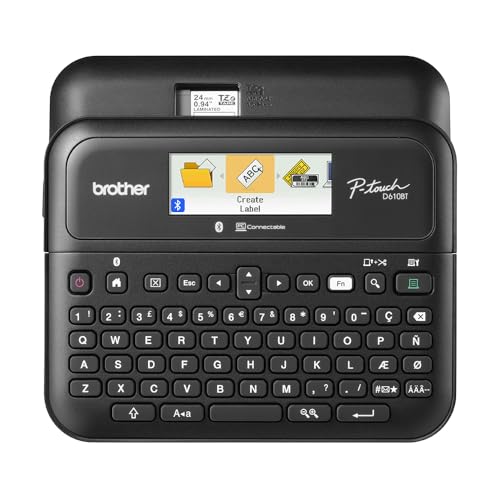
Brother P-Touch PT-D610BT connected label maker with Bluetooth
Bluetooth and USB17 fonts160 frames90 label memory
Check price on Amazon
Best for: Offices and workshops that reprint the same labels often.

The PT-D610BT is a business label maker with Bluetooth or USB connections, 17 fonts, 17 styles, 160 frames and 900 symbols. Built-in memory stores up to 90 frequently used labels, which suits an office that reprints the same file and shelf labels. An automatic cutter handles the tape.

The tradeoff is that it is not an industrial tool. It suits indoor office and workshop labeling, while the PT-E560BT is the better choice for cable and panel work. Compared with the Makeid D50, it prints narrower tape but is lighter and easier to carry.

Ownership is easy because Brother tape is widely sold. Keep the cutter clean, store spare cassettes and update the app when it prompts. A connected design lets several users share templates, which helps a small team. Because the cutter is built for light tape, avoid feeding it thick specialty media, and expect shelf, folder and equipment labels to be its best use.

What works

  • Bluetooth and USB connectivity
  • 90 label memory for repeat jobs
  • 17 fonts, 160 frames and 900 symbols
  • Widely stocked laminated tape

Watch out for

  • Not built for heavy industrial use
  • Narrower tape than the industrial models
  • Cassette cost per label is higher

Spec sheet

Connection
Bluetooth and USB
Fonts
17 fonts, 17 styles
Frames
160
Symbols
900
Memory
Up to 90 labels
04
Makeid D50 industrial 2 inch desktop label printer with auto cutter
2 inch print head2600 mAh batteryThermal transferAuto cutter
Check price on Amazon
Best for: Small shops that need wide thermal transfer labels with a cutter.

The D50 uses a 2 inch print head with thermal transfer printing, which the maker says keeps labels clear for a long time, and an automatic cutter for bulk work. A 2600 mAh battery lets it work without a plug, which matters on a job site. The wide head supports cable labels, data and telecom labels and larger identification labels.

The tradeoff is that it is a newer brand, and tape supply is narrower than for Brother. Against the Brother PT-E510, it prints wider but is a desktop-style unit rather than a belt tool.

Ownership is about keeping the ribbon and label stock matched. Wipe the head and cutter, store spare rolls and charge the battery before each job. For a small shop that needs wide labels on a budget, it is a practical middle ground. Treat the first ribbon and label roll as a trial and confirm that the cutter leaves a clean edge before you order a case of stock.

What works

  • 2 inch print head for wide labels
  • Thermal transfer for durable prints
  • Automatic cutter for bulk jobs
  • 2600 mAh battery for cordless use

Watch out for

  • Newer brand with narrower tape supply
  • Desktop style, not a belt tool
  • Ribbon and label stock must match

Spec sheet

Print head
2 in
Battery
2600 mAh
Print method
Thermal transfer
Cutter
Automatic
Use
Cable, telecom and general labels
05
Liene PixCut S1 color sticker printer and cutting machine
Print and cutDye-sublimationAI image extractionColor stickers
Check price on Amazon
Best for: Craft sellers making custom color stickers.

The PixCut S1 prints and cuts in one step, so a photo or design becomes a contour-cut sticker without a separate cutting machine. It uses thermal dye-sublimation for vivid color, and an AI image extraction feature isolates the subject of a photo for a clean cut line. It is aimed at crafts, custom labels and sticker making rather than industrial identification.

The tradeoff is media. It uses special paper and cartridges, so cost per sticker is higher than a monochrome roll, and it is not meant for harsh environments. Against the Makeid D50, it is a creative tool rather than an industrial one.

Ownership centers on consumables and software. Keep the media dry, calibrate the cutter when prompted and update the app. For a small business that sells custom stickers, the single-step workflow saves a lot of time. Plan the cost per sticker honestly, since color cartridges and special sheets are the main expense, and test a few designs on cheap stock before selling.

What works

  • Prints and cuts in one step
  • Dye-sublimation gives vivid color
  • AI image extraction makes cut lines easy
  • Suits crafts and custom labels

Watch out for

  • Special media costs more per sticker
  • Not for harsh industrial labels
  • Needs its app and cartridges

Spec sheet

Function
Print and cut in one step
Print method
Thermal dye-sublimation
Software
AI image extraction
Output
Color stickers
Use
DIY crafts and custom labels
06
Zebra ZD420t 300 dpi 4x6 thermal transfer printer with cutter bundle
300 dpi4x6 labelsWi-Fi and BluetoothInstalled cutter
Check price on Amazon
Best for: Small warehouses and shops printing 4 by 6 shipping labels.

This bundle pairs a Zebra ZD420t thermal transfer printer at 300 dpi with an installed automatic cutter and a starter roll. The 4 by 6 inch format suits shipping and inventory labels, and the 300 dpi head prints barcodes, QR codes and small text cleanly. Wi-Fi, Bluetooth and USB give flexible connections.

The tradeoff is size and purpose. It is a desktop warehouse printer, not a handheld, and the cutter slices individual labels from a roll rather than half-cutting strips. Against the Brother PT-E560BT, it handles big labels but not cable work.

Ownership is straightforward because Zebra supplies are common. Match the ribbon and label stock, clean the head and platen and use the correct driver. The cutter works best with the right liner thickness. A thick backing or a heavy tag stock dulls the blade quickly, so confirm the stock weight your supplier recommends and set the cut mode in the driver instead of the printer menu.

What works

  • 300 dpi prints sharp barcodes and QR codes
  • 4x6 format fits shipping labels
  • Installed cutter separates labels
  • Wi-Fi, Bluetooth and USB connectivity

Watch out for

  • Desktop size, not portable
  • Cutter does not half-cut strips
  • Ribbon and stock must match

Spec sheet

Resolution
300 dpi
Label size
4x6 in
Connectivity
Wi-Fi, Bluetooth, USB
Cutter
Installed automatic cutter
Use
Shipping, inventory, asset labels

Spec sheet decoder

What the numbers on the box really mean

The specs manufacturers lead with, translated into what they tell you about real-world performance.

Half cut

A cut through the face tape only, leaving the backing. It makes a strip of peelable labels.

Watch forThe PT-E510 and PT-E560BT print half-cut strips.

Thermal transfer

A heated head transfers ink from a ribbon to the label. It gives durable prints.

Watch forThe Makeid D50 and Zebra ZD420t use it.

Dye-sublimation

A process that transfers dye by heat for vivid color images. It is used for photo stickers.

Watch forThe Liene PixCut S1 uses it.

DPI

Dots per inch of the print head. Higher gives sharper small text and codes.

Watch forThe Zebra ZD420t prints at 300 dpi.

Tape width

The label height the printer accepts. It limits label size and layout.

Watch forThe PT-E510 spans 3.5 to 24 mm.

Methodology

How We Evaluated These Label Printers With Cutters

Cutter design

We looked at whether each machine offers full or half cuts and how well the mechanism suits its media. The Brother industrial units lead on half-cut strips. The Zebra's installed cutter suits large labels.

Label durability

We compared print methods and media. Thermal transfer labels from Brother, Makeid and Zebra scored high. The Liene's color stickers scored lower on harsh use.

Size and range

We checked tape widths and label sizes. The PT-E510's 3.5 to 24 mm range and the Zebra's 4x6 format cover different jobs. We matched range to use cases.

Connectivity

We considered Bluetooth, USB-C and Wi-Fi. The PT-E560BT and PT-D610BT offer wireless workflow. Wired-only units scored lower for mobile use.

Cost of ownership

We weighed printer price against media and cutter wear. Brother tape is widely stocked, and special media costs more. We favored machines with replaceable parts.

Decision guide

How to Choose the Right Label Printers With Cutters

By Job Type

SituationPickWhy
Cable and panel labelingBrother PT-E560BTHalf-cut strips and Bluetooth
Wide tape and heat shrinkBrother PT-E5103.5 to 24 mm range
Office and workshopBrother PT-D610BT90 label memory
Wide thermal transfer labelsMakeid D502 inch head
Custom color stickersLiene PixCut S1Print and cut
Shipping and inventoryZebra ZD420t bundle4x6 at 300 dpi

By Budget

Budget tierPickWhy
Lowest costBrother PT-D610BTOffice label maker
Low to midMakeid D50Wide head with cutter
Mid rangeLiene PixCut S1Print and cut crafts
Upper midBrother PT-E510Industrial wired
UpperBrother PT-E560BTBluetooth industrial
HighestZebra ZD420t bundleWarehouse class

Handheld vs Desktop

Handheld (Brother industrial)

The PT-E510 and PT-E560BT go on a belt and work on site. Their half-cut strips and layout keys suit cable work, but they cannot print 4 by 6 labels.

Desktop (Makeid, Zebra)

The Makeid D50 and Zebra ZD420t sit on a bench and print wider labels. They are better for volume but less portable.

Handheld for field jobs, desktop for bench and warehouse work.

Industrial vs Craft

PreferencePickWhy
Durable laminated labelsBrother PT-E560BTLaminated tape
Color stickersLiene PixCut S1Dye-sublimation
Barcodes at 300 dpiZebra ZD420t bundleSharp small codes
Rugged job-site toolBrother PT-E510Industrial build
Light office useBrother PT-D610BTMemory and templates

For Cable Labeling Specifically

Look for

Half-cut strips, quick layout keys and laminated tape that wraps cleanly. A cutter that leaves a clean edge makes labels peel easily.

In this comparison

The Brother PT-E560BT is the pick for cable work, with the PT-E510 as the wired alternative.

When to Spend More

Spend more if

You label all day or need wide, durable labels. The Brother PT-E560BT and Zebra ZD420t justify their cost.

Save if

You label occasionally. The Brother PT-D610BT or Makeid D50 covers general needs at lower cost.

Ownership

Maintenance schedule

The upkeep that decides whether this machine lasts two seasons or ten.

TaskIntervalWhy it matters
Clean the cutter bladeMonthlyAdhesive builds on the blade and leaves ragged edges. Wipe it with isopropyl alcohol.
Service the print headEvery few rollsDust and adhesive cause streaks. Wipe with alcohol and let it dry.
Replace the bladeAs neededA dull blade jams and crushes tape. Replace it if the maker provides one.
Store cassettes in sleevesAlwaysHeat and dust shorten media life. Keep spares in a closed case.
Update softwareQuarterlyDrivers and apps affect connectivity. Updates add media support.

FAQ

Frequently Asked Questions

What does a half cut do?

It cuts through the face tape only and leaves the backing intact. You get a strip of labels that peel one at a time. The Brother PT-E510 and PT-E560BT do this.

How much should I budget for a label printer with a cutter?

Handheld industrial units cost more than office label makers, and warehouse printers cost the most. Add tape or ribbon, which is the recurring cost. Count labels per month to estimate.

How long does a cutter last?

Blades last for thousands of cuts with cleaning. Adhesive and thick laminate shorten life. Clean the blade monthly.

Is an auto cutter worth it?

For batches of labels, yes. For a few labels a day, a manual tear is fine. Auto cutters waste a leader per label.

Can the PixCut S1 make industrial labels?

It is a color sticker printer with dye-sublimation, not built for harsh environments. Use a thermal transfer machine for durable identification.

Do I need Bluetooth?

Only if you print lists from a phone. The PT-E560BT and PT-D610BT offer it, while the PT-E510 is USB-C only.

Bottom line

The short version

Browse more label printers with cutterson Amazon →
James Miller, Lead Machine Editor

About the author

James Miller

Lead Machine Editor, MachineFanatic

James Miller leads MachineFanatic's buying guides, turning spec sheets, manuals and owner feedback into clear verdicts on power tools, outdoor power equipment, shop machines and kitchen machines.

More from James →

Keep reading

Related guides