
Amazon affiliate links - we earn a commission.Affiliate disclosure

Buying guide · 13 min read · Updated 2026-11-18

Best Laminated Label Printers (2026)

Six laminated tape label printers compared on tape width, keyboard or app control and power, so your labels survive water, rubbing and years of handling.

James MillerBy James MillerLead Machine Editor6 machines comparedSpec-sheet verified
Best Laminated Label Printers

At a glance

Our top picks

Side by side

Spec comparison

A laminated label is a sandwich: the printed layer sits under a clear film, so rubbing, moisture and sunlight meet the film first and the print last. That is why workshop, kitchen and cable labels are almost always made this way.

Printers in this family run on tape cartridges, and the main decisions are how wide the tape can be, whether you type on the machine or design on a screen and what powers it. Each of those choices shapes the label you can make and what it will cost to keep making.

Before you buy

6 Criteria to Look For Before Buying a Laminated Label Printer

  1. 01

    Why lamination matters

    A laminated label seals the print under a clear film, which shields it from rubbing, moisture and sunlight. A thermal sticker is a single layer that fades and scratches. Choose lamination for anything that gets handled, cleaned or exposed. The film also protects the adhesive edge, so a laminated label stays flat on a curved cable or a cold bottle where a plain sticker lifts at the corners. The only real downside is thickness, which is why very tiny labels on a narrow wire are sometimes printed on a thinner, non-laminated tape.

  2. 02

    Tape width and cassette format

    The PT-D410 prints up to about 18 mm, while the PTD220, PTD210, D210s and H1100 use 12 mm. TZe cassettes are common and come in many finishes. Pick the width for your largest label and expect to buy spare cassettes. Narrower tapes fit inside the wider ones' printers, so a machine that takes 18 mm tape can also run 12 mm and 9 mm cassettes, while the reverse is not true. Think about how many tape colors you will want, since white-on-clear and black-on-yellow cassettes are separate purchases.

  3. 03

    Keyboard or app control

    The PTD220, PTD210 and D210s are keyboard machines you can use without a phone. The E10 is app-driven and uses Bluetooth. Keyboard models are faster for single labels, and apps are better for icons and layout. A keyboard also keeps working when a phone is flat or the app is retired, while an app-only printer is at the mercy of the maker. If more than one person will use the labeler, a keyboard is the more forgiving choice.

  4. 04

    Cable and wire layouts

    The H1100 has three cable modes that format labels for wrapping and flagging. A generic labeler leaves you measuring each wire. If cable work is your main job, the layout modes save more time than any extra font. Wrap labels need to be long enough to overlap themselves around the wire, and a flag label needs its fold in the right place, so a mode that does the arithmetic removes a common source of wasted tape. Test the labels on a real cable before you print a hundred.

  5. 05

    Power and portability

    Handheld labelers run on batteries, and some add a wall or USB option. A printer that dies in the middle of a job costs more than a spare battery. Check the power options and weight before you buy. A model with a USB or wall option lets you work at a desk without burning batteries, which is why the desk-oriented labelers feel more economical. For field use, a rechargeable pack is a plus, and a model that eats six AAs is a recurring expense.

  6. 06

    Tape availability and cost

    Genuine TZe cassettes are widely sold, while smaller brands use their own tape. A proprietary tape can vanish from shelves. Buy a few extra cassettes when the model is in stock. Genuine tape from the big brand costs more, but it is sold in most office stores and comes in a long list of colors and strengths. If you choose a smaller brand, look for a seller that has stocked the tape for more than a year.

Detailed reviews

The 6 best laminated label printers, explained

01
Brother P-Touch PT-D410 advanced label maker, USB, 18 mm
18 mm TZeUSB to PC and MacLaminated tapeDesign tools
Check price on Amazon
Best for: Small businesses and workshops that design labels on a computer and want 18 mm laminated tape.

Wider tape plus real design software gives the PT-D410 its lead. It prints on TZe tape up to about 3/4 inch (18 mm), a width that handles equipment labels, binder spines and shelf edges that a 12 mm printer finds cramped. A USB link to a PC or Mac opens up the full design tools, so you can lay out a label on a screen and print it exactly.

TZe tapes are the standard laminated format, with options for color, finish and adhesive strength, so you can choose a tape for a cold shelf or a rough bin. That tape system is what separates a laminated label from a thermal sticker, which is a single layer that fades. Compared with the PTD220, you gain wider tape and a computer link, and lose a bit of simplicity.

Expect the tape cassette to be the running cost, because laminated TZe cassettes cost more per inch than thermal sticker rolls. Keep spare cassettes in a drawer, clean the cutter if labels start to tear and replace the batteries before they leak. For anyone who labels weekly and wants labels that last, this is the strongest all-round option.

What works

  • Prints on TZe tape up to about 18 mm
  • USB link to PC and Mac for design work
  • Wide range of TZe tape finishes
  • Suits business and home organization

Watch out for

  • Tape costs more per inch than rolls
  • Needs mains or battery power
  • More controls to learn than a basic labeler

Spec sheet

Maximum tape width
About 3/4 inch (18 mm)
Tape type
TZe laminated
Connection
USB to PC or Mac
Design
Built-in design tools and software
Audience
Small business and home organization
02
Brother P-Touch PTD220 everyday label maker, 12 mm TZe
12 mm TZe14 fonts99 frames600+ symbols
Check price on Amazon
Best for: Home offices and classrooms that want laminated labels with a keyboard and plenty of styling.

Plenty of styling in a plain body is how the PTD220 earns its place. It offers 14 fonts, 11 font styles, 99 designer frames and more than 600 symbols, so a label can look finished without a computer. The tape is the genuine TZe laminated type, 12 mm wide, which is the standard width for filing, shelves and everyday home labels.

The tradeoff against the PT-D410 is width and software: this model stops at 12 mm and has no PC design link in this listing. It is a keyboard labeler, which means all editing happens on a small screen. For a home office, a classroom or a small shop, that simplicity is the appeal.

Because TZe is a common format, tape cassettes are widely available in many colors. Store spares flat, keep the cutter clean and swap batteries before a long project. If you rarely label anything wider than a folder tab, this is the sensible middle choice.

What works

  • 14 fonts, 99 frames and 600+ symbols
  • Genuine TZe laminated tape
  • Keyboard editing without a computer
  • Common tape format widely sold

Watch out for

  • Limited to 12 mm tape
  • Small screen for editing
  • No computer link in this listing

Spec sheet

Tape width
About 1/2 inch (12 mm)
Fonts
14 fonts, 11 styles
Frames
99 designer frames
Symbols
Over 600 symbols
Tape type
Genuine TZe laminated
03
SUPVAN E10 Bluetooth label maker, continuous laminated tape
Continuous labels40 fonts450+ iconsWaterproof
Check price on Amazon
Best for: Households that want custom-length laminated labels designed in a phone app.

Custom-length labels are the E10's strength. The listing highlights laminated continuous printing, so you can cut a label to the exact length a cable or a long shelf needs, with larger text and more detail than a fixed-size sticker allows. It also fits die-cut waterproof labels.

The free app supplies 40 fonts, 30 frames and more than 450 icons, in several languages, and printing is done directly through the app with no ink or toner. That makes it more flexible than a keyboard labeler for people who like a visual editor, and less self-sufficient when the phone is not at hand. Against the PT-D410, it gives up the formal TZe ecosystem but offers a lower-effort design flow.

Since the tape is the maker's own, check that your preferred widths and colors are in stock. Keep the app updated, store tape flat and wipe the cutter edge if the cut roughens. It is a good fit for tidy-minded households that want a phone-driven laminated label.

What works

  • Custom-length continuous laminated labels
  • 40 fonts, 30 frames and 450+ icons
  • Bluetooth app with no ink or toner
  • Fits continuous and die-cut stock

Watch out for

  • Phone needed for design
  • Proprietary tape supply
  • No standalone keyboard

Spec sheet

Label style
Continuous and die-cut waterproof
Fonts
40 fonts
Frames
30 frames
Icons
450 plus
Control
Bluetooth via a free app
04
VolenGo D210s laminated label maker, 12 mm waterproof tape
12 mm tape800+ icons100+ bordersHeat transfer
Check price on Amazon
Best for: Budget-minded users who want waterproof 12 mm labels with lots of icons.

A generous design set on a small body is how the D210s competes. The listing cites 800-plus icons, over 100 borders and one-touch keys, with continuous printing and two-line printing on 12 mm laminated tape. That is more decorative range than the Brother PTD220 offers.

The printer uses heat transfer on durable laminated tapes, so the labels resist water in a way that thermal stickers do not. It is a keyboard-style machine, so there is no need to pair with a phone for a quick label. A sibling listing under another brand uses the same D210S model name, so treat the platform as widely sold.

Because the maker is smaller, buy a few extra tape cassettes while the model is in stock. Keep the cutter clean and the battery fresh. It is a value-minded choice for anyone who wants waterproof labels without brand-name tape prices.

What works

  • 800+ icons and 100+ borders
  • Heat transfer on laminated tape
  • Two-line printing at 12 mm
  • Keyboard use, no phone needed

Watch out for

  • Smaller brand, check tape supply
  • Limited to 12 mm tape
  • Fewer ecosystem accessories

Spec sheet

Tape width
12 mm
Technology
Heat transfer on laminated tape
Icons
800 plus
Borders
100 plus
Print lines
Continuous and two-line printing
05
VolenGo H1100 wire label maker, backlit, laminated tape
Backlit LCD3 cable modes12 mm tape4 tapes
Check price on Amazon
Best for: Technicians labeling cables and patch cords in dark racks and cabinets.

Cable labeling gets its own modes on the H1100. A backlit LCD helps in dark cabinets and racks, and three cable modes lay out labels for wrapping around a wire or flagging a cable, which saves measuring. The bundle includes four tapes, so you can start a job straight away.

It uses 12 mm laminated tape that is waterproof, and it is a handheld that suits a technician's bag better than a desk. Compared with the D210s, the H1100 trades some of the decorative range for cable-specific layouts, and compared with the PT-D410, it lacks the wide tape.

Expect the tape cassette to be the ongoing cost. Keep the cutter blade clean, store tapes away from heat and replace batteries before a long job. It is the pick if your labels are mostly wires and patch cords.

What works

  • Backlit LCD for dark spaces
  • Three cable layout modes
  • Waterproof laminated 12 mm tape
  • Four tapes in the bundle

Watch out for

  • Narrow 12 mm tape only
  • Less decorative than a desk labeler
  • Smaller brand support

Spec sheet

Screen
Backlit LCD
Cable modes
Three
Tape width
12 mm (0.47 inch)
Tape type
Waterproof laminated
Bundle
Machine and 4 tapes
06
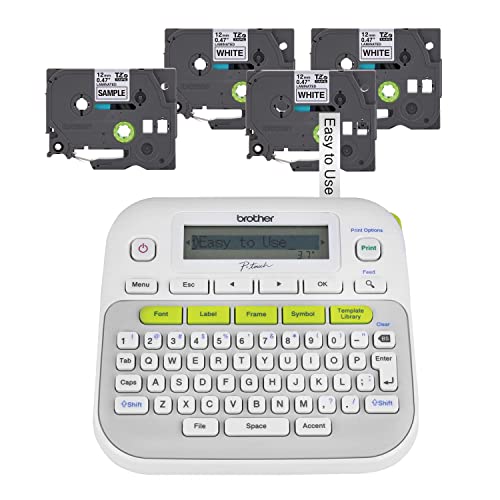
Brother P-Touch PTD210 easy-to-use label maker bundle
TZe laminatedLightweight4 tapesHome and office
Check price on Amazon
Best for: Households wanting a plain, portable laminated labeler out of the box.

Easy is the word the PTD210 leans on. It is a lightweight portable labeler that prints on genuine TZe laminated tape and comes with four tapes in the box, so the first labels are made within minutes. The listing points to file folders, shelves and storage as typical uses.

It is the simpler sibling of the PTD220, with fewer styling options but the same tape family. The result is a plain labeler that does the main job: type, print, cut and stick. It does not offer the wider tape or the USB design link of the PT-D410.

Because TZe is a common format, replacement cassettes are easy to find. Keep the cutter clean and the batteries fresh, and store tapes flat. For a household that wants a no-fuss laminated label, it is hard to fault.

What works

  • Genuine TZe laminated tape
  • Four tapes in the bundle
  • Lightweight and portable
  • Simple keyboard controls

Watch out for

  • Fewer styling options
  • No computer link
  • Narrow tape range

Spec sheet

Tape type
Brother Genuine TZe laminated
Design
Lightweight and portable
Bundle
Four label tapes included
Uses
File folders, shelves and storage
Control
Keyboard

Spec sheet decoder

What the numbers on the box really mean

The specs manufacturers lead with, translated into what they tell you about real-world performance.

TZe tape

A laminated tape cassette family with many widths, colors and adhesives. The print sits under a film.

Watch forThe PT-D410, PTD220 and PTD210 use it.

Heat transfer on laminate

A heated head transfers ink from a ribbon in the cassette onto the laminated label. It gives a durable image.

Watch forThe D210s lists it.

12 mm vs 18 mm tape

The tape width in millimeters. Wider tape allows larger text and bigger labels.

Watch forThe PT-D410 reaches about 18 mm and the others stop at 12 mm.

Continuous printing

A label of any length, cut where you choose, instead of a fixed size. It suits cables and long shelves.

Watch forThe E10 and D210s list continuous labels.

Backlit LCD

A lit screen that stays readable in dark places. It helps in racks and cabinets.

Watch forThe H1100 lists it.

Methodology

How We Evaluated These Laminated Label Printers

Lamination and tape

We checked that each printer uses a laminated tape, and noted the cassette family. The TZe-based Brother models and the heat-transfer VolenGo models qualified. Tape width and availability shaped the ranking.

Controls and design

Keyboard, app and computer link options were compared. The PT-D410 leads on computer design, and the E10 on app icons. Simple keyboard models scored for speed.

Special layouts

We looked at cable modes, backlit screens and continuous printing. The H1100 stands out for cabling. Layout aids counted for working jobs.

Power and portability

We looked at battery and USB power and the size of each printer. Handhelds were favored for field jobs. A desk labeler was judged for home and office use.

Ownership reality

Based on owner feedback patterns, we weighed cassette cost, cutter wear and tape supply for smaller brands. Genuine TZe earned credit for availability. We did not quote prices.

Decision guide

How to Choose the Right Laminated Label Printers

By Primary Use

SituationPickWhy
Computer-designed labels up to 18 mmBrother PT-D410USB design link and wide TZe tape
Everyday keyboard labelingBrother PTD22014 fonts and 99 frames
Phone-designed custom-length labelsSUPVAN E10Continuous tape and 450+ icons
Cables and patch cordsVolenGo H1100Three cable modes and backlit LCD
Plain, cheap TZe labelingBrother PTD210Four tapes in the bundle

By Budget

Budget tierPickWhy
Lowest costBrother PTD210Entry TZe machine
Low-midVolenGo D210sValue keyboard
MidSUPVAN E10App-driven continuous
Upper-midVolenGo H1100Cable-specific features
HighestBrother PT-D410Wide tape and PC link

Keyboard vs App Control

Keyboard

The PTD220, PTD210 and D210s let you type and print without a phone. They are faster for single labels. They have small screens.

App

The E10 designs labels on a phone with a large icon library. It makes better-looking labels. It depends on the app.

Choose a keyboard if several people share the printer; choose the app if you design alone.

Genuine vs Third-Party Tape

PreferencePickWhy
Widely sold tapeBrother PT-D410TZe cassettes everywhere
Lower tape costVolenGo D210sOwn tape at a lower price
Waterproof continuous rollSUPVAN E10Continuous laminated stock
Wire labeling kitVolenGo H1100Four tapes in the box

For Workshop and Kitchen Labels Specifically

Look for

A laminated tape that shrugs off water and grease, a sticky adhesive and a label wide enough to read at a glance.

In this comparison

The PT-D410 handles workshop labels, the PTD220 handles kitchen shelves, and the H1100 handles cable bundles.

When to Spend More

Spend more if

You label weekly or need wider tape. The PT-D410 is worth it for daily labeling.

Save if

You label a few items a month. The PTD210 or D210s is enough.

Ownership

Maintenance schedule

The upkeep that decides whether this machine lasts two seasons or ten.

TaskIntervalWhy it matters
Clean the cutterMonthlyAdhesive builds up on the blade and tears tape. A dry swab clears it.
Wipe the print headWhen print weakensResidue dims the print. Use a swab with isopropyl alcohol.
Replace batteriesBefore long jobsWeak cells cause pale prints and cutter errors. Remove them for storage.
Store cassettes flatOngoingHeat curls tape and softens adhesive. Keep unused cassettes boxed.
Update the appQuarterlyBluetooth printers need a current app to pair. Old versions drop connections.

FAQ

Frequently Asked Questions

Is laminated tape worth the cost?

Yes for labels that get handled, cleaned or exposed. A laminated label lasts years where a thermal sticker fades in months.

PT-D410 or PTD220?

The PT-D410 prints wider and links to a computer. The PTD220 is a simpler keyboard labeler with 12 mm tape.

Can I use third-party tape in a Brother?

Many third-party TZe-compatible tapes exist, but quality varies. Genuine tape is the safest choice for adhesion and print.

Are these labels waterproof?

Laminated tapes resist water better than thermal paper. Check the tape's rating for hot or oily use, and press the label down firmly on a clean, dry surface, since adhesion fails first on dusty or greasy plastic.

What is the running cost?

Cassettes are the ongoing cost. Laminated cassettes cost more per inch than thermal rolls. Printing narrower text and trimming the blank lead-in saves tape, and a short label on a long cassette wastes the leader each time, so batch your labels into one print run.

Do I need an app?

Not for keyboard models. The SUPVAN E10 uses an app for design.

Bottom line

The short version

Browse more laminated label printerson Amazon →
James Miller, Lead Machine Editor

About the author

James Miller

Lead Machine Editor, MachineFanatic

James Miller leads MachineFanatic's buying guides, turning spec sheets, manuals and owner feedback into clear verdicts on power tools, outdoor power equipment, shop machines and kitchen machines.

More from James →

Keep reading

Related guides