
Amazon affiliate links - we earn a commission.Affiliate disclosure

Buying guide · 14 min read · Updated 2026-11-07

Best Large Label Printers (2026)

Wide-format label printers compared: 4 inch shipping label machines, network desktop printers and 2 inch portable models, with speed and media limits.

James MillerBy James MillerLead Machine Editor6 machines comparedSpec-sheet verified
Best Large Label Printers

At a glance

Our top picks

Large label printers handle labels that are wider than a pocket label maker can reach, usually 2 to 4 inches across. That covers shipping labels, warehouse tags, product labels and the big address blocks that sellers print by the dozen.

The difference between a small and a large label printer is more than width. Wide print heads change resolution options, media supply, speed and how the printer connects to a computer or a network. The machines below cover desktop wide-format printers and a few portable models that stretch to 2 inches.

Before you buy

6 Criteria to Look For Before Buying a Large Label Printer

  1. 01

    Maximum label width

    Width sets what the printer can do. The Brother QL-1100c reaches 4 inches, so it prints 4 by 6 shipping labels. The QL-820NWB, Makeid D50, SUPVAN T50M Pro and NIIMBOT B1 stop near 2 inches. Measure your largest label first, because a printer that is too narrow cannot be fixed with software. Many buyers pick the narrower model and then cannot print a postage label.

  2. 02

    Resolution for barcodes

    At 300 dpi, as on the Brother QL machines, barcodes and QR codes print crisply even at small sizes. At 203 dpi, small codes can fail to scan. If you print codes smaller than about an inch, favor 300 dpi. For plain address text, the difference is small, so do not pay extra if you never print codes.

  3. 03

    Speed and daily volume

    The QL-820NWB is rated at up to 110 address labels per minute and the QL-1100c at up to 69. A seller who prints 200 labels a day will feel that gap, while a hobbyist will not. Match speed to the batch size you actually run. A slow printer is a daily tax on a busy shop. Rated speeds assume short labels, so a long 4 by 6 label prints slower than the headline figure, and heavy batches also heat the print head.

  4. 04

    Connectivity

    USB is simple but ties the printer to one computer. The QL-820NWB adds Bluetooth, wireless and Ethernet, so several people can share it. The portable machines use Bluetooth apps. Pick the connection that fits your office, and confirm driver support for your computer before buying. A printer that works on Windows may lack a macOS driver, and mobile printing needs its own app, so test the workflow you actually use.

  5. 05

    Label supply lock-in

    The DYMO LabelWriter 550 works only with authentic DYMO labels, which means one supplier sets the price. Brother and the Makeid and NIIMBOT machines have broader roll catalogs. If label cost is a large part of your spend, prefer an open system or check supply risk before buying.

  6. 06

    Direct thermal vs thermal transfer

    Direct thermal, used by the Brother QL and DYMO machines, has no ribbon but fades in heat and sunlight. Thermal transfer, used by the Makeid D50, lasts longer. For shipping labels that live for days, direct thermal is fine. For equipment tags that must last years, choose thermal transfer. Tags that live in a hot vehicle or on a sunny wall are the worst case for direct thermal, and the extra ribbon cost is cheaper than replacing faded tags.

Detailed reviews

The 6 best large label printers, explained

01
Brother QL-1100c wide format label printer, up to 4 inch
Up to 4 in wide300 dpi69 labels per minuteAuto crop
Check price on Amazon
Best for: Online sellers printing 4 by 6 shipping labels and product labels.

The QL-1100c prints on labels up to four inches wide, which includes the standard 4 by 6 inch shipping label. It runs at 300 dpi, which gives clean barcodes, QR codes and small text, and the maker rates it at up to 69 standard address labels per minute. An automatic crop function lets online sellers print product labels from letter or A4 size label sheets and trims the unused margin.

The tradeoff is its bulk and its wired USB connection. It is a desk printer, not a portable one, and it uses direct thermal rolls, so labels fade in heat and sunlight over time. Against the QL-820NWB, it prints wider but lacks the network and wireless options.

Ownership is straightforward. Keep the print head and the platen clean with isopropyl alcohol when streaks appear, store rolls in their sleeve and use the right driver for your operating system. For a seller who ships a few hundred parcels a week, it is the most direct way to print postage and product labels. Because the roll holds hundreds of labels, you can leave it loaded for weeks, and the heavy body stays put when you pull a label off in a hurry, which small portable printers cannot match.

What works

  • Prints labels up to 4 inches wide
  • 300 dpi for sharp barcodes and QR codes
  • Auto crop trims labels from letter-size sheets
  • Up to 69 address labels per minute

Watch out for

  • USB only, no wireless or network
  • Direct thermal labels fade over time
  • Large footprint for a small desk

Spec sheet

Max width
4 in
Resolution
300 dpi
Speed
Up to 69 address labels per minute
Feature
Automatic crop
Connection
USB
02
Brother QL-820NWB professional network label printer
Wi-Fi and Ethernet110 labels per minute300 dpiUSB host port
Check price on Amazon
Best for: Shared offices that print address and file labels over a network.

The QL-820NWB is an ultra flexible monochrome label printer with Bluetooth, wireless and Ethernet connections, so a shared office can print from several computers. It adds a USB host port for a peripheral such as a barcode scanner. The maker rates it at up to 110 standard address labels per minute at 300 dpi, which is faster than the QL-1100c.

The tradeoff is width. It prints on labels narrower than the QL-1100c, so it handles address and file labels but not full 4 by 6 shipping labels. Against the DYMO LabelWriter 550, it offers network options but costs more.

Ownership is easy because Brother labels are widely stocked. Keep the print head clean and update the driver when the operating system changes. For an office that shares a printer between several people, network support is the main reason to choose it. A fixed IP address and a short setup session with your office manager prevent most of the early printing complaints, and the scanner port lets one machine serve a returns desk as well.

What works

  • Bluetooth, Wi-Fi and Ethernet connectivity
  • Up to 110 labels per minute
  • USB host port for a scanner
  • 300 dpi for clear barcodes

Watch out for

  • Narrower than the QL-1100c
  • Cannot print full 4x6 shipping labels
  • Higher cost than basic desktop printers

Spec sheet

Connectivity
Bluetooth, Wi-Fi, Ethernet
Speed
Up to 110 address labels per minute
Resolution
300 dpi
USB host
For a scanner
Width
Up to about 2.4 in
03
DYMO LabelWriter 550 series direct thermal label printer
Direct thermalAuto label recognitionNo inkAuthentic labels only
Check price on Amazon
Best for: Small sellers printing address and shipping labels at a desk.

The LabelWriter 550 is a desk label printer that prints direct thermal, so there is no ink or toner to buy. It uses automatic label recognition and low waste, and it prints precise quantities instead of wasting sheet labels. It is a common choice for a small seller who prints address labels and shipping labels from a computer.

The tradeoff is that it works only with authentic DYMO labels, which locks you into one supply chain. Against the Brother QL machines, it offers a simple, quiet desk printer but no third-party label freedom.

Ownership is minimal. Keep the labels in their sleeve, wipe the head and use the DYMO software. If the label supply ever becomes a problem, you will have no alternative, so check availability before you commit. For a casual seller who ships a few parcels a week, that risk is small, but a business that scales up should price the labels over a year, not just the printer, before choosing.

What works

  • No ink or toner to buy
  • Automatic label recognition
  • Prints exact quantities with low waste
  • Simple desk operation

Watch out for

  • Only works with authentic DYMO labels
  • Narrow label options compared with open systems
  • Direct thermal labels fade in heat

Spec sheet

Print method
Direct thermal
Ink
None
Recognition
Automatic label recognition
Labels
Authentic DYMO labels only
Use
Address and shipping labels
04
Makeid D50 industrial 2 inch label printer with auto cutter
2 inch headThermal transfer2600 mAhAuto cutter
Check price on Amazon
Best for: Workshops that need durable 2 inch labels away from a desk.

The D50 uses a 2 inch print head with thermal transfer printing and an automatic cutter, and its 2600 mAh battery lets it run cordless. That makes it one of the widest portable printers in this guide, useful for identification labels, equipment tags and cable labels at a job site. The maker says thermal transfer keeps labels clear for a long time.

The tradeoff is that two inches is the ceiling. It will not print a shipping label, and the brand is newer than Brother or DYMO. Against the NIIMBOT B1, it adds thermal transfer durability.

Ownership needs matching ribbon and label stock. Wipe the head and cutter, store spare rolls and charge the battery before use. It is a practical middle ground for a workshop that wants durable labels without a full desktop printer. Carry a spare roll in the case and check that the battery is charged the night before, since a printer that dies mid-job costs more than the time to charge it.

What works

  • 2 inch head with thermal transfer durability
  • Automatic cutter for bulk labels
  • 2600 mAh battery for cordless use
  • Fits cable and equipment labeling

Watch out for

  • Maximum 2 inches, no shipping labels
  • Newer brand with narrower supply
  • Ribbon and labels must be matched

Spec sheet

Print head
2 in
Print method
Thermal transfer
Battery
2600 mAh
Cutter
Automatic
Use
Cable, data and general labels
05
SUPVAN T50M Pro Bluetooth label printer, up to 2 inch tape
3/4 to 2 in tapeWaterproof tape30+ fontsApp editing
Check price on Amazon
Best for: Home and small business users who want wide waterproof tape labels.

The T50M Pro prints on waterproof tape from three quarters of an inch up to two inches wide, which gives a larger label than most pocket makers. It is app driven, with 30 or more fonts and image editing, so a logo and a block of text fit on one label. It targets home organization and small business use.

The tradeoff is that it is a tape printer, not a shipping label machine, and it is slower on repeat jobs than a die-cut roll printer. Against the NIIMBOT B1, it offers waterproof tape but fewer die-cut shapes.

Ownership is light. Keep the tape dry, wipe the head and keep the app updated. If you outgrow two inches, step up to a Brother QL machine. In daily use, the app saves your common layouts, so a repeat product label is a two-tap job, and the waterproof tape means a label on a garage shelf survives a wet floor.

What works

  • Tape up to 2 inches wide
  • Waterproof media suits damp areas
  • App supports images and 30+ fonts
  • Compact for a wide printer

Watch out for

  • Not suited to 4x6 shipping labels
  • App needed for each label
  • Continuous tape wastes a short leader

Spec sheet

Tape width
3/4 to 2 in
Media
Waterproof tape
Fonts
30+
Editing
App with images
Use
Home and small business
06
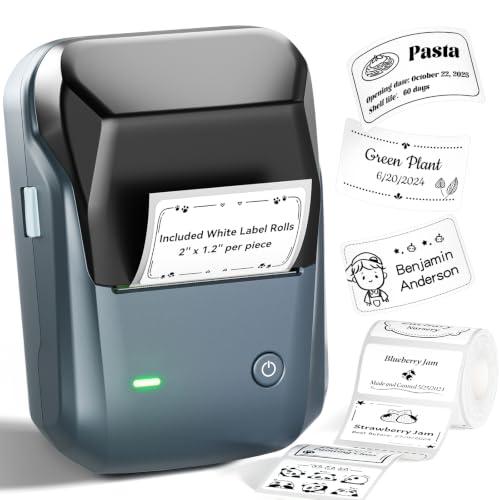
NIIMBOT B1 2 inch Bluetooth label printer, auto size detect
2 inch classAuto size detect30+ fontsRechargeable
Check price on Amazon
Best for: Budget buyers who want 2 inch labels from a small printer.

The B1 is a 2 inch class Bluetooth label printer that detects the loaded roll and prints with 30 or more fonts. A wide catalog of die-cut rolls gives it good flexibility for product and storage labels. A rechargeable battery keeps it cordless and the app handles layout.

The tradeoff is width and resolution. It stops at about two inches and uses standard resolution, so it will not replace a QL machine for shipping. Against the Makeid D50, it is cheaper and lighter but not as durable.

Ownership is simple: keep a few roll sizes, wipe the head and use the app. It is the budget choice for someone who wants a wider label without desk space. A small seller can run a whole pantry, craft room or storage unit on it, and the rolls are widely sold, so running out of a size is rare.

What works

  • 2 inch class with a wide roll catalog
  • Auto-detects the loaded roll
  • Rechargeable and portable
  • Low cost compared with desk printers

Watch out for

  • Cannot print 4x6 shipping labels
  • Standard resolution only
  • Needs the app for every label

Spec sheet

Max width
2 in class
Detection
Auto label size
Fonts
30+
Power
Rechargeable
Rolls
Die-cut catalog

Spec sheet decoder

What the numbers on the box really mean

The specs manufacturers lead with, translated into what they tell you about real-world performance.

Max print width

The widest label the head can print. It sets label size and use.

Watch forThe QL-1100c prints up to 4 inches.

Labels per minute

Rated speed for standard address labels. Real speed depends on label length.

Watch forThe QL-820NWB lists up to 110, the QL-1100c up to 69.

Auto crop

Trims the unused margin when printing from sheet label stock. It reduces waste.

Watch forThe QL-1100c lists automatic crop.

Direct thermal

Printing by heating paper with no ribbon. It is cheap but fades.

Watch forThe DYMO LabelWriter 550 uses it.

USB host

A port that lets the printer connect to a peripheral such as a scanner.

Watch forThe QL-820NWB includes one.

Methodology

How We Evaluated These Large Label Printers

Label width and range

We compared maximum widths and the label sizes each printer can take. The QL-1100c leads at 4 inches, while the 2 inch models cover most non-shipping needs. Range was judged against typical seller tasks.

Print quality

We compared resolution and the sharpness of codes and small text. The Brother QL machines at 300 dpi scored high. Units without stated resolution scored lower.

Speed and workflow

We compared rated speeds and connectivity. The QL-820NWB's 110 labels per minute and network options stood out. Single-computer USB units scored lower for shared use.

Supply and lock-in

We looked at how open each printer is to third-party labels. The DYMO machine is locked to authentic labels, while Brother has wider options. Supply risk was weighed.

Cost and footprint

We weighed price against desk space and portability. Desk printers cost more and take room, while portable models are cheaper but narrower. The lineup runs from the 2 inch NIIMBOT B1 to the 4 inch QL-1100c.

Decision guide

How to Choose the Right Large Label Printers

By Label Size

SituationPickWhy
4x6 shipping labelsBrother QL-1100cPrints up to 4 inches wide
Address labels over a networkBrother QL-820NWBWi-Fi, Ethernet and Bluetooth
Desk address labelsDYMO LabelWriter 550Simple direct thermal
Durable 2 inch labelsMakeid D50Thermal transfer
Waterproof 2 inch tapeSUPVAN T50M ProWaterproof media
Budget 2 inch labelsNIIMBOT B1Die-cut catalog

By Budget

Budget tierPickWhy
Lowest costNIIMBOT B1Compact portable
Low to midSUPVAN T50M ProWaterproof tape
Mid rangeDYMO LabelWriter 550Desk printer
Upper midMakeid D50Thermal transfer and cutter
UpperBrother QL-820NWBNetwork printer
HighestBrother QL-1100c4 inch wide format

Desktop vs Portable

Desktop printers

The Brother QL-1100c, QL-820NWB and DYMO LabelWriter 550 sit on a desk and print at higher speed. They suit shipping and office work but are not portable.

Portable printers

The Makeid D50, SUPVAN T50M Pro and NIIMBOT B1 run on batteries and print up to 2 inches. They suit job sites and market stalls but cannot print shipping labels.

Desktop for shipping and volume, portable for tags and field work.

Open vs Locked Labels

PreferencePickWhy
Wide label choiceBrother QL-1100cMany roll types
Authentic labels onlyDYMO LabelWriter 550Locked to DYMO labels
Network sharingBrother QL-820NWBOpen Brother roll catalog
Durable thermal transferMakeid D50Ribbon and roll choice
Die-cut varietyNIIMBOT B1Large roll catalog

For Online Sellers Specifically

Look for

4 inch width, 300 dpi and a driver that works with your selling platform. Speed matters when you print dozens of labels in a batch.

In this comparison

The Brother QL-1100c is the pick for sellers, with the DYMO LabelWriter 550 as the simpler desk option.

When to Spend More

Spend more if

You print 4x6 labels daily or share a printer between users. The Brother QL-1100c and QL-820NWB justify their cost.

Save if

You print occasional labels under 2 inches. The NIIMBOT B1 or SUPVAN T50M Pro does it for much less.

Ownership

Maintenance schedule

The upkeep that decides whether this machine lasts two seasons or ten.

TaskIntervalWhy it matters
Service the print headEvery few rollsDust and adhesive cause streaks. Wipe with isopropyl alcohol on a swab.
Clean the platen rollerMonthlyA dirty roller feeds labels crookedly. Wipe it with alcohol and let it dry.
Store rolls in sleevesAlwaysHeat and light fade direct thermal media. Keep spares in a cool drawer.
Update driversAfter OS updatesDriver gaps cause print errors. Update when your operating system changes.
Charge portable unitsMonthlyLithium cells age when stored empty. Top up monthly.

FAQ

Frequently Asked Questions

Which printer do I need for 4x6 shipping labels?

The Brother QL-1100c prints up to 4 inches wide, so it fits 4 by 6 labels. The 2 inch portable models cannot. Check the maximum width before buying.

How much should I budget for a large label printer?

The printer is only part of the spend, and rolls are recurring. Desk printers cost more than portables. Count labels per week to estimate roll cost.

How long do the labels last?

Direct thermal labels fade in heat and sunlight over months. Thermal transfer labels last longer. For shipping, direct thermal is fine.

Can I use third-party labels?

Brother and the portable models accept compatible labels, while the DYMO LabelWriter 550 works only with authentic DYMO labels. Check supply risk.

Do I need 300 dpi?

Only for small barcodes and QR codes. The Brother QL machines print at 300 dpi. Plain address text prints fine at lower resolution.

Can I print wirelessly?

The Brother QL-820NWB offers Wi-Fi, Bluetooth and Ethernet. The QL-1100c is USB. The portable models use Bluetooth apps.

Bottom line

The short version

Browse more large label printerson Amazon →
James Miller, Lead Machine Editor

About the author

James Miller

Lead Machine Editor, MachineFanatic

James Miller leads MachineFanatic's buying guides, turning spec sheets, manuals and owner feedback into clear verdicts on power tools, outdoor power equipment, shop machines and kitchen machines.

More from James →

Keep reading

Related guides