
Amazon affiliate links - we earn a commission.Affiliate disclosure

Buying guide · 14 min read · Updated 2026-11-18

Best Mobile Label Printers (2026)

Six mobile label printers for the field, from rugged Zebra 4-inch belt-clip units to pocket Bluetooth makers, compared on battery, ruggedness and radios.

James MillerBy James MillerLead Machine Editor6 machines comparedSpec-sheet verified
Best Mobile Label Printers

At a glance

Our top picks

Side by side

Spec comparison

A mobile label printer has to work where the job is: on a truck tailgate, in an aisle, on a stairwell landing. That changes what matters. Battery life beats speed, a belt clip beats a fancy screen, and a drop onto concrete is a normal event, not a warranty claim.

Two very different products share the name. Rugged industrial mobile printers print full-width labels and receipts for drivers and stock pickers, and pocket Bluetooth printers print small stickers from a phone. This guide compares both families and says clearly which one suits which kind of field work.

Before you buy

6 Criteria to Look For Before Buying a Mobile Label Printer

  1. 01

    Ruggedness for the job

    A warehouse picker and a florist are both mobile, but they put different loads on a printer. The Zebra QLn420 lists a rugged design for harsh environments, the ZQ630 is a field-ready portable, and the pocket Bluetooth makers are not built for drops. Match the build to the worst day, not the average one. A cracked case in a rain shower ends the shift. Look for an ingress rating on the spec sheet if the work is outdoors, and treat a missing rating as a sign the maker has not claimed any water resistance. A rugged printer costs more up front and far less than replacing a printer every winter.

  2. 02

    Wireless that fits the site

    The Zebra ZQ630 lists dual-band 802.11ac Wi-Fi plus Bluetooth 4.x, the QLn420 lists Bluetooth and 802.11a/b/g/n, and the ZQ520 lists Bluetooth 4.0 only. Depot Wi-Fi is often congested, so a newer dual-band radio helps. If the site has no network at all, a direct Bluetooth link is the dependable route. Many crews run both: Wi-Fi at the depot for bulk jobs and Bluetooth to a phone on the road. A printer that supports both radios, like the ZQ630, lets one device serve the whole route without reconfiguration.

  3. 03

    Battery and swap

    A mobile printer's battery is its fuel tank. A full day of labels may need a spare, and swapping a battery in a printer takes seconds while charging takes hours. The SUPVAN E11's claim of up to a month per charge is for light use. Ask how many labels a charge really covers for your volume. Printing at full 4-inch width draws far more power than a narrow sticker, and heavy black coverage on a label drains it faster still. Time a real shift of printing with a fresh battery before deciding how many spares to buy.

  4. 04

    Label width and media

    A 4-inch printer like the ZQ630 handles shipping labels and receipts. The SUPVAN and Nelko print small stickers. Choose the width for the output you need, and remember that wide media needs a bigger battery and a heavier body. Direct thermal stock also darkens in a hot vehicle.

  5. 05

    Carrying and mounting

    A belt clip, a shoulder strap or a cradle on a cart changes how a printer is used. The Zebra ZQ630 listing mentions a belt clip. If a printer is awkward to carry, crews leave it in the truck and the label never gets printed. Test the clip with the printer fully loaded, since a loaded roll weighs more than an empty one. If your crew wears hi-vis vests or work belts, check that the clip actually fits a thick belt.

  6. 06

    Renewed versus new

    The Zebra ZQ520 here is renewed, and a ZQ630 listing in the same family is also renewed. A refurbished printer can be a bargain with a long-established design, but its battery may be worn. Lithium cells lose capacity with age, so a unit that lasted a shift when new may only manage half of one after years of use, and a replacement pack is often a better first purchase than extra labels. Check the warranty, ask about the battery and test with a full roll.

Detailed reviews

The 6 best mobile label printers, explained

01
Zebra ZQ630 4-inch mobile printer with Wi-Fi and Bluetooth
4 in mobileUSB Bluetooth Wi-FiDual-band 802.11ac104 mm print width
Check price on Amazon
Best for: Drivers and field crews who print 4-inch labels and receipts on the move.

The ZQ630 is the sort of printer a delivery driver or a field service crew carries on a belt. The listing describes professional 4-inch wide printing in a portable body, with dual-band 802.11ac Wi-Fi, Bluetooth 4.x and USB. A print width of 104 millimeters covers shipping labels, work orders and receipts from a single unit.

Dual-band Wi-Fi matters because depot networks are crowded, and a printer that can use the less congested band holds its connection better. Bluetooth gives a direct link to a handheld terminal or phone when no network exists. Compared with the older ZQ520, it adds modern Wi-Fi, and compared with the QLn420, it is lighter and more recent.

Keep spare batteries charged, clean the head with alcohol and check the belt clip before a shift. A printer carried all day should be inspected for cracks in the case, since dust and rain find them. Drivers often leave the printer in a vehicle overnight, and a freezing or sweltering cab shortens battery life and can warp the paper roll, so bring it indoors at the end of the route. A simple charging routine at the depot, with a labeled spare pack, prevents most dead-battery mornings.

What works

  • Dual-band 802.11ac Wi-Fi plus Bluetooth 4.x
  • USB for cable connection
  • 104 mm print width for 4-inch labels
  • Portable body built for field carry

Watch out for

  • Direct thermal prints fade
  • Much more printer than casual use needs

Spec sheet

Print method
Direct thermal, no ink or ribbon
Print width
104 mm, about 4 inches
Wi-Fi
Dual-band 802.11ac
Bluetooth
Version 4.x
Wired
USB
02
Zebra QLn420 rugged 4-inch mobile label printer
Rugged 4 inBluetooth and Wi-Fi802.11a/b/g/nDirect thermal
Check price on Amazon
Best for: Warehouse pickers and stock handlers who print 4-inch labels at the shelf.

Zebra's QLn420 is the heavy-duty option. The listing says its rugged design is made for harsh environments such as warehouses, and it prints labels up to 4 inches wide for barcodes, shipping labels and inventory tags. Wireless covers Bluetooth and Wi-Fi in the 802.11a, b, g and n bands.

Its Wi-Fi standards are older than the ZQ630's dual-band 802.11ac, which matters in a congested building, and it is a larger, heavier machine. In return it takes a harder beating and suits a forklift or a pick cart better than a pocket does. For a distribution center that scans and prints at the shelf, it earns its weight.

Charge batteries on a rotation, wipe the head and check the clip and the case for wear. Because the wireless chip is older, ask your network team whether the site still supports the security setting the printer uses, since a newer, stricter Wi-Fi policy can lock it out. A short call before purchase can save a week of puzzling.

What works

  • Rugged design for harsh environments
  • Prints labels up to 4 inches wide
  • Bluetooth and Wi-Fi
  • Suits barcodes and inventory tags

Watch out for

  • Older Wi-Fi standards than the ZQ630
  • Larger and heavier than the ZQ630

Spec sheet

Print method
Direct thermal
Print width
Up to 4 inches
Wireless
Bluetooth and Wi-Fi 802.11a/b/g/n
Build
Rugged design for harsh environments
Uses
Barcodes, shipping labels and inventory tags
03
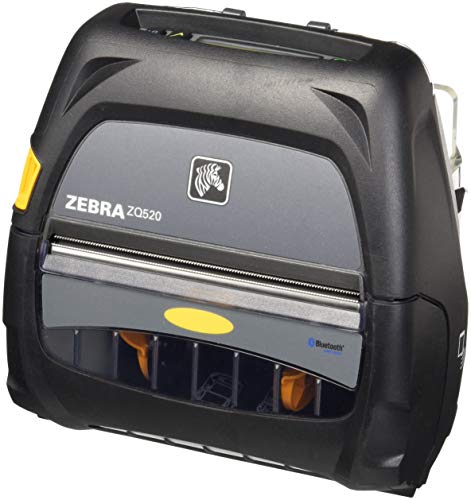
Zebra ZQ520 4-inch portable printer, Bluetooth 4.0, 203 dpi
4 in portableBluetooth 4.0203 dpi5 ips (127 mm/s)
Check price on Amazon
Best for: Crews who pair a phone directly and want a simple portable Zebra.

The ZQ520 is the Bluetooth-only portable Zebra, with 203 dpi and a rated 5 inches or 127 millimeters per second. The listing names compatibility with Apple iOS, Android, Windows Mobile and BlackBerry devices, a roll call that shows its age. The renewed condition means it is a refurbished unit.

For a crew using a modern phone, the iOS and Android support is what matters, and the old platforms in the list are history. Next to the ZQ630, it lacks Wi-Fi, so a phone or terminal must pair directly. The benefit is a simple, lighter machine whose behavior is well understood.

Because it is renewed, test it with a full roll and read the warranty. Replace the battery if run time has dropped.

What works

  • Prints 4-inch labels at 203 dpi
  • Up to 5 inches per second
  • Bluetooth 4.0 with iOS and Android support
  • Familiar Zebra platform

Watch out for

  • No Wi-Fi
  • Renewed unit with seller-set warranty

Spec sheet

Print width
4 inch
Resolution
203 dpi, 8 dots per mm
Speed
Up to 5 inches or 127 mm per second
Bluetooth
Version 4.0
Condition
Renewed
04
SUPVAN E11 keyboard and Bluetooth label maker
Keyboard and app1200 mAh battery0.2 in margins4 tapes included
Check price on Amazon
Best for: Technicians who label equipment on site and want no dependence on a phone.

For a technician who labels equipment in a van or a closet, the E11's keyboard is the feature that counts in the field. Type, print and cut, with no phone or network in sight. When a phone is handy, the Bluetooth app adds fonts and symbols.

The listing claims up to about a month of use per charge from the 1200 milliamp-hour battery, which suits a tool that rides in a bag between jobs. It prints with only about a 0.2 inch margin, a modest but real saving on small labels. It will not print 4-inch labels, so it complements a Zebra rather than replaces it.

Charge it monthly and carry spare tapes in the same pouch. A habit that suits a technician is to label equipment before the repair starts, so the next visit begins with a readable tag. In cold garages, keep the printer in an inside pocket until needed, because adhesive and battery output both fall sharply in the cold.

What works

  • Keyboard prints with no phone
  • Battery claims up to a month per charge
  • Minimal 0.2 inch margins
  • Four tapes included

Watch out for

  • Narrow label width
  • Tape costs more per inch

Spec sheet

Input
Keyboard or Bluetooth app
Battery
1200 mAh, up to about a month per charge
Margins
About 0.2 inch
Fonts and symbols
30+ fonts and 660+ symbols
In the bundle
Four tapes
05
SUPVAN T50M Pro Bluetooth label maker, 3/4 to 2 in
3/4 to 2 in wideWaterproof labels30+ fontsApp editing
Check price on Amazon
Best for: Mobile teams that need wide waterproof stickers from a phone.

SUPVAN's T50M Pro suits mobile work where labels get wet. The listing describes wide waterproof labels from 3/4 to 2 inches, and an app that imports images and offers more than 30 fonts. A mobile technician can print a bin or tool label on the spot and stick it on a damp surface.

It is a small-label machine, so it does not replace a 4-inch Zebra for shipping. It also depends on a phone app and Bluetooth, which makes it fragile compared with the rugged Zebras. Against the SUPVAN E11, it lacks a keyboard and has a wider tape.

Carry spare tape and a charging cable, and keep the app updated. Test the adhesive on a damp sample surface before labeling a whole job, because moisture and oil are the two things that make any label peel. If you work outdoors, a printed label under a clear cover or tape overlay lasts noticeably longer than one left bare.

What works

  • Wide labels up to 2 inches
  • Waterproof label material
  • Images and 30+ fonts in the app
  • Light enough for a tool bag

Watch out for

  • No keyboard or standalone mode
  • Not for 4-inch labels

Spec sheet

Label width
3/4 to 2 inch
Label type
Wide waterproof label
Editing
App on phone, tablet or PC
Fonts
30+ fonts and image import
Connection
Bluetooth
06
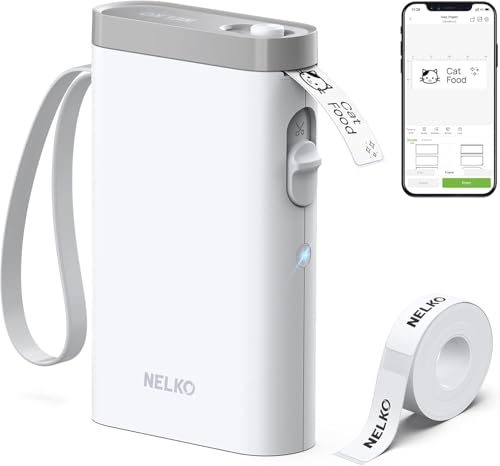
Nelko P21 handheld Bluetooth label printer
BPA-free thermaliOS and AndroidHalf the weightApp templates
Check price on Amazon
Best for: Light-duty mobile users who print small stickers from a phone.

Weight is the point of Nelko's P21: the listing says it is half the weight and size of traditional label makers. For someone who carries a printer all day, that difference adds up. It pairs with iOS and Android phones through the Nelko app and prints BPA-free direct thermal stickers.

It is a pocket tool for small labels, not a rugged field printer, so a drop on concrete is a real risk. It also depends entirely on its app. Next to the SUPVAN E11, it is lighter and cheaper, and lacks the keyboard fallback.

Keep it in a pouch with a spare roll and the charging cable. If you rely on it for a market stall or a pop-up, print the day's labels at home and treat the printer as a backup for the unexpected. That habit cuts the risk of a dead battery or a lost Bluetooth link in front of a customer.

What works

  • About half the weight of traditional machines
  • BPA-free direct thermal
  • Works with iOS and Android
  • Many templates

Watch out for

  • Not rugged
  • App is the only way to print

Spec sheet

Print method
BPA-free direct thermal
Phones
iOS and Android through the Nelko app
Weight
About half the weight and size of traditional label makers
Printing
High-speed chips
Templates
Multiple app templates

Spec sheet decoder

What the numbers on the box really mean

The specs manufacturers lead with, translated into what they tell you about real-world performance.

Dual-band 802.11ac

Wi-Fi that can use both the 2.4 and 5 GHz bands, which helps in a crowded building.

Watch forThe Zebra ZQ630 lists it.

Bluetooth 4.x

A short-range radio version used to pair a printer with a phone or handheld terminal.

Watch forThe ZQ630 lists 4.x and the ZQ520 lists 4.0.

104 mm print width

The widest printable area, about 4.1 inches, which fits a 4-inch label.

Watch forThe ZQ630 lists it.

Rugged design

A body built to survive drops, dust and moisture in field work.

Watch forThe QLn420 states it.

Renewed

A used unit refurbished and resold by a third party with varying warranty.

Watch forThe ZQ520 here is renewed.

Methodology

How We Evaluated These Mobile Label Printers

Field durability

We looked for rugged claims and carry features. The Zebra QLn420 states a rugged build and the ZQ630 mentions a belt clip. The pocket printers scored lower for drops and water.

Radio fit

We compared Wi-Fi and Bluetooth versions. The ZQ630's dual-band 802.11ac is the most current, and the ZQ520 is Bluetooth only. We weighed what each radio does in a crowded or empty site.

Output size and media

Widths were sorted into 4-inch and small-sticker classes. We matched them to jobs such as delivery, picking and equipment labeling.

Power and uptime

Battery claims and swap options were compared. The SUPVAN E11's month-long claim and Zebra's swappable batteries scored differently for different jobs.

Condition and risk

Renewed units were marked down for warranty uncertainty and up for proven design. New pocket printers were judged on maker history.

Decision guide

How to Choose the Right Mobile Label Printers

By Field Job

JobPickWhy
Delivery labels and receiptsZebra ZQ630Dual-band Wi-Fi and Bluetooth.
Warehouse pickingZebra QLn420Rugged build.
Equipment labels on siteSUPVAN E11Keyboard works with no phone.
Light sticker work from a phoneNelko P21Half the weight.

By Budget

TierPickWhy
Lower tierNelko P21Pocket sticker printer.
Middle tierZebra ZQ520 (renewed)Bluetooth 4-inch Zebra.
Higher tierZebra ZQ630Dual-band Wi-Fi and Bluetooth.

Rugged Zebra vs Pocket Printer

Rugged Zebra

The ZQ630, QLn420 and ZQ520 print 4-inch labels. They survive field use. They are heavier and costlier.

Pocket printer

The SUPVAN and Nelko print small stickers. They are light. They are not built for drops.

Choose Zebra for real field duty and pocket for light use.

By Connectivity

EnvironmentPickWhy
Crowded depot Wi-FiZebra ZQ630Dual-band 802.11ac.
No network, phone onlyZebra ZQ520Bluetooth direct.
Mixed legacy networkZebra QLn420802.11a/b/g/n and Bluetooth.

For Delivery Drivers Specifically

Look for

A belt clip, a 4-inch width and a battery that lasts a full route. Wi-Fi at the depot helps.

In this comparison

The Zebra ZQ630 lists a belt clip and a 104 mm width, so it suits route work.

When to Spend More

Spend more if

The printer rides on a forklift or a truck all day. The Zebra ZQ630 and QLn420 fit.

Save if

You label a few items from a phone. The Nelko P21 is enough.

Ownership

Maintenance schedule

The upkeep that decides whether this machine lasts two seasons or ten.

TaskIntervalWhy it matters
Charge and rotate batteriesEvery shiftA mobile printer lives on its battery. A spare on charge keeps work moving.
Clean the headWeekly in dusty workField dust builds on the head faster than office dust. Alcohol keeps prints dark.
Inspect the case and clipMonthlyDrops crack cases and loosen clips. Dust and rain follow.
Check the pairing or Wi-Fi profileAfter system updatesUpdates can drop saved links. Verify before the shift.
Test renewed units fullyOn arrivalA full roll test reveals worn batteries and heads while a return is still possible.

FAQ

Frequently Asked Questions

What is the best mobile printer for 4-inch labels?

The Zebra ZQ630 for most crews, thanks to dual-band Wi-Fi and Bluetooth. The QLn420 suits harsher environments.

Can a pocket printer replace a rugged one?

For small stickers, yes. For 4-inch labels and drops on concrete, no.

How long does a mobile printer battery last?

It depends on labels printed. A full shift may need a spare. Check the label count per charge for your volume.

Is a renewed Zebra a good idea?

It can be, but test it with a full roll and check the battery and warranty.

Do I need Wi-Fi on a mobile printer?

Only if your system prints over a network. Bluetooth is enough for a phone or handheld.

Can mobile printers print receipts too?

The 4-inch Zebras print both labels and receipts, which suits drivers who hand over paperwork. Check that the receipt layout is supported by your route software before buying, since printing a label and printing a receipt use different print commands. A quick trial with the actual app avoids a surprise on day one.

Bottom line

The short version

Browse more mobile label printerson Amazon →
James Miller, Lead Machine Editor

About the author

James Miller

Lead Machine Editor, MachineFanatic

James Miller leads MachineFanatic's buying guides, turning spec sheets, manuals and owner feedback into clear verdicts on power tools, outdoor power equipment, shop machines and kitchen machines.

More from James →

Keep reading

Related guides