
Amazon affiliate links - we earn a commission.Affiliate disclosure

Buying guide · 14 min read · Updated 2026-11-07

Best Name Label Printers (2026)

Label makers for kids' names, school supplies, lunch boxes and camp gear compared on tape durability, templates, battery life and ongoing tape cost.

James MillerBy James MillerLead Machine Editor7 machines comparedSpec-sheet verified
Best Name Label Printers

At a glance

Our top picks

A name label printer makes small, readable labels for lunch boxes, drink bottles, folders, uniforms and camp gear. The goal is not decoration. It is a name that stays legible after a term of drops, spills, washes and rubbing against a bag.

That makes the tape material the most important choice, ahead of fonts or app features. A laminated tape seals the print between two films, while a plain thermal sticker leaves the print exposed. The machines below cover both approaches, from desk keyboards to pocket Bluetooth printers.

Before you buy

6 Criteria to Look For Before Buying a Name Label Printer

  1. 01

    Tape durability

    A name label must survive drops, spills and rubbing. Laminated tape, used by the Brother PT-D210, seals the print between films and resists abrasion. Waterproof tape, as on the SUPVAN T50M Pro, also helps. Plain thermal stickers, as from the Nelko P21 and NIIMBOT B1, can scuff. Match the tape to how rough the item's life is.

  2. 02

    Washing and dishwasher claims

    No printer here can promise that its labels survive a dishwasher or a washing machine, because heat, detergent and abrasion defeat most adhesives. Laminated tape and sew-in options do better than thermal stickers. For clothes, use a sew-in or iron-on name label instead. Always do a trial wash of one label before printing thirty. Check the label after a few cycles for lifting at the corners, because that is the first sign that the adhesive is losing to heat and detergent.

  3. 03

    Label width and name length

    A short name fits a 12 millimeter strip, but a full name plus a phone number needs a wider label. The Brother PT-N20 and Btag tape stop at about 12 millimeters, while the SUPVAN T50M Pro reaches 2 inches. Decide whether you want only a name or extra details before choosing.

  4. 04

    App versus keyboard

    A keyboard printer such as the Brother PT-D210 or SUPVAN E11 needs no phone, which helps when children or teachers share it. App printers like the Nelko P21 and NIIMBOT B1 make batches easy but need a device and updates. A drawer printer that needs a dead app is useless. If a family shares the printer, also consider who will operate it, because a keyboard model is easier for grandparents and children than a pairing flow.

  5. 05

    Batch printing

    Back-to-school week means dozens of labels. App printers let you copy a layout and change the name in seconds. A one-at-a-time keyboard printer is slower for large batches. If you label a whole class, favor an app with copy and paste.

  6. 06

    Ongoing tape cost

    Laminated TZe tape costs more per inch than thermal rolls, but a name label uses little tape. Thermal sticker rolls are cheaper but may need replacing sooner on rough items. Count labels per term and multiply by the cost per label. Compare the cost of reprinting faded labels too.

Detailed reviews

The 7 best name label printers, explained

01
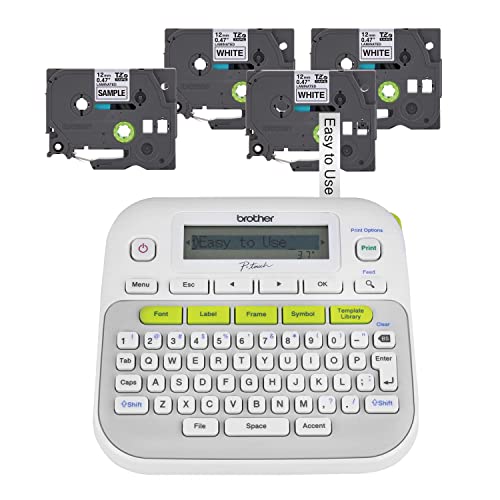
Brother P-touch PT-D210 label maker bundle with 4 TZe tapes
Laminated TZe tape4 tapes includedPortableDesk or handheld
Check price on Amazon
Best for: Families labeling school gear that gets rough handling.

The PT-D210 is a lightweight keyboard label maker sold in a bundle with four tapes. It prints on genuine Brother TZe laminated tape, which seals the printed text between two films, so a name survives rubbing, drops and moisture better than plain thermal paper. It has no app, so you type the name and press print.

The tradeoff is style and speed. It prints one label at a time, and fonts and layouts are plainer than a template app offers. Against the Nelko P21, it is slower to design but far tougher on the tape. Against the Brother PT-N20, it uses the larger TZe family, which gives more colors and widths.

In year three, the cost is the tape, which is more expensive per inch than thermal rolls. A cassette lasts a long time for names, though, and the printer rarely fails. Clean the head occasionally and keep a spare cassette in black on white for the quick jobs, since that is the label parents print most.

What works

  • Laminated TZe tape resists rubbing and moisture
  • No app, just type and print
  • Four-tape bundle gives a ready start
  • Portable and light for travel

Watch out for

  • Tape costs more per inch than thermal rolls
  • Plain layouts compared with template apps
  • One label at a time

Spec sheet

Tape type
Laminated TZe
Bundle
4 label tapes
Design
Lightweight and portable
Input
Built-in keyboard
Uses
File, home, school and office
02
Brother P-touch PT-N20 personal desktop label maker, Btag 12 mm
Btag 12 mm3 fonts, 7 styles15 frames250 symbols
Check price on Amazon
Best for: Households that want a plain name labeler with no app.

The PT-N20 is a personal desktop label maker that uses Brother's Btag tape, about half an inch wide. It comes pre-loaded with three fonts in seven styles, 15 frames and 250 symbols, and it prints up to two lines of text. It is aimed at home, dorm rooms and studio use, where names and short tags are the main job.

The tradeoff is that it only works with Btag tapes, so you cannot use the broader TZe range. Against the PT-D210, it is simpler and cheaper to run but narrower in options. For a household that labels names and boxes, that simplicity is enough.

Ownership is easy. Keep spare cassettes, replace the batteries and wipe the head if the print fades. Because there is no app, it keeps working years from now with no software updates, which is an under-rated advantage for a tool that sits in a drawer.

What works

  • No app or pairing needed
  • Pre-loaded frames and 250 symbols
  • Two-line text for name plus detail
  • Simple desktop body

Watch out for

  • Only works with Btag tapes
  • Narrow 12 mm tape width
  • Fewer options than TZe machines

Spec sheet

Tape
Btag 12 mm wide
Fonts
3 fonts, 7 styles
Frames
15
Symbols
250
Text
Up to two lines
03
SUPVAN E11 keyboard and Bluetooth label maker, 1200 mAh
Keyboard and app1200 mAh battery0.2 in margin4 tapes
Check price on Amazon
Best for: Parents who want a keyboard for quick names and an app for layouts.

The E11 lets you type a name on its keyboard or design one in the app with more than 30 fonts. The 1200 mAh battery is rated for up to a month of use per charge, so it can sit in a school bag or a camp box without a charger. Its 0.2 inch margin wastes less tape than older printers, and the kit includes four tapes.

The tradeoff is that its tapes are a different standard from Brother's, so you depend on the maker for supply. Against the PT-D210, it offers wireless design and a rechargeable battery but a less established tape range.

In ownership, keep the tape cassettes dry and the battery topped up. Use the keyboard for quick names and the app when you want a fancier layout. For parents who print a batch before term starts, the combination keeps both paths open. It is also handy for a kid who wants to print their own name label on the spot, because the keyboard works without handing over a phone.

What works

  • Keyboard and app both supported
  • Rechargeable battery rated about a month
  • Small margin wastes less tape
  • Starter kit includes four tapes

Watch out for

  • Narrow tape standard with a smaller range
  • Tape supply depends on one maker
  • Bulkier than the smallest printers

Spec sheet

Input
Keyboard or app
Battery
1200 mAh rechargeable
Life
Up to a month per charge
Margin
0.2 in
Fonts
30+ in the app
04
SUPVAN T50M Pro Bluetooth label printer, 3/4 to 2 inch tape
3/4 to 2 in tapeWaterproof tape30+ fontsImage editing
Check price on Amazon
Best for: Bag tags and swim gear that need wide waterproof labels.

The T50M Pro prints on waterproof tape from three quarters of an inch up to two inches wide, which is generous for a name label and leaves room for a phone number on a bag tag. The app supports images and more than 30 fonts, so a child's favorite character can sit beside the name. Waterproof tape suits water bottles and swim bags.

The tradeoff is bulk and phone dependence. It is larger than the pocket printers and needs an app for every label. Against the Nelko P21, it offers a wider label and tougher tape, but it is less portable.

Ownership is light. Wipe the head, keep tape dry and store spares. The wide tape is best for bag tags and gear labels, while a narrower tape makes better use of the roll on small items like pencils. A matching second printer is rarely needed, since one wide-tape machine can cover both sizes if you cut labels to length.

What works

  • Wide tape up to 2 inches
  • Waterproof media for bottles and bags
  • App image editing and 30+ fonts
  • Room for a name plus contact details

Watch out for

  • Larger than pocket printers
  • Needs a phone for every label
  • Continuous tape wastes a short leader

Spec sheet

Tape width
3/4 to 2 in
Media
Waterproof tape
Fonts
30+
Editing
App with images
Use
Home and small business
05
Nelko P21 Bluetooth label maker, half the weight of older units
Half the weightBPA-free thermalBluetoothTemplate app
Check price on Amazon
Best for: Indoor labeling of folders, bins and notebooks on a budget.

The P21 is a handheld Bluetooth label maker that the maker says has half the weight and size of traditional models. It uses BPA-free direct thermal printing, so there is no ink, and the app offers templates for names, dates and storage labels. A batch of thirty names is a copy and paste job in the app.

The tradeoff is durability. Direct thermal stickers can scuff and fade, so they suit indoor items such as folders, bins and notebooks rather than lunch boxes that go in the dishwasher. Against the Brother PT-D210, it is faster to design but weaker on the tape.

Ownership is minimal. Keep the roll sealed, wipe the head and update the app. A strip of clear packing tape over a thermal label gives it extra protection on items that get handled a lot. Press the label on a clean, dry surface and leave it a few hours before the item goes into a bag, since adhesive builds strength slowly.

What works

  • Light and small for a bag
  • Template app speeds batches of names
  • BPA-free direct thermal with no ink
  • Low entry cost

Watch out for

  • Thermal stickers scuff and fade
  • Not for dishwasher or laundry use
  • Needs a phone to print

Spec sheet

Size
Half the weight and size of older units
Print method
BPA-free direct thermal
Connection
iOS and Android
App
Nelko templates
Use
Names and household labels
06
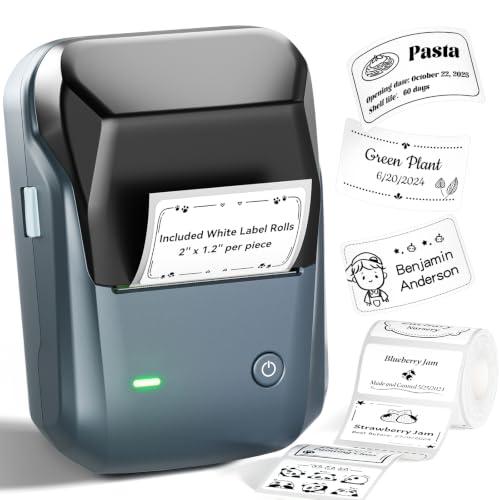
NIIMBOT B1 2 inch Bluetooth label printer, auto size detect
Auto size detect30+ fontsiOS and AndroidRechargeable
Check price on Amazon
Best for: Uniform sticker name labels for classrooms.

The B1 auto-detects the loaded roll and prints with 30 or more fonts, and its die-cut roll catalog includes small rectangles, rounds and strips that suit name stickers. Die-cut labels print identical, clean-edged names with no trimming, which looks neat on a row of notebooks. A rechargeable battery keeps it cordless.

The tradeoff is the same as other thermal sticker printers: the labels are not laminated. Against the SUPVAN T50M Pro, it gives uniform sizes but less waterproof tape.

Ownership is simple. Pick a couple of roll sizes, keep them dry and wipe the head. Because the app reads the roll, a mismatch between layout and stock is rare, which saves labels in a busy back-to-school week. Print one test label first, check that the name is spelled correctly, then run the batch, because a typo repeated thirty times costs a full roll.

What works

  • Die-cut rolls give identical neat labels
  • Auto-detects the loaded roll size
  • Rechargeable for cordless use
  • 30+ fonts and many symbols

Watch out for

  • Labels are not laminated
  • Needs the NIIMBOT app
  • Die-cut sizes are fixed

Spec sheet

Max width
2 in class
Detection
Auto label size
Fonts
30+
Power
Rechargeable
Rolls
Die-cut catalog
07
Phomemo D30 mini Bluetooth label maker, inkless thermal
Continuous and fixedInkless thermalPrint Master appRechargeable
Check price on Amazon
Best for: Small items such as pens, rulers and cables.

The D30 supports both continuous tape and fixed-length labels, and it uses the Print Master app with free materials for DIY layouts. It is an inkless mini thermal printer with a rechargeable battery, small enough for a pencil case. Continuous mode is handy for odd lengths such as a long name on a ruler or a pen.

The tradeoff is narrow tape and fade, as with other thermal minis. Against the NIIMBOT B1, it is smaller but less wide.

Ownership is easy: keep the roll sealed, wipe the head and update the app. It works best for small items where a narrow label fits. Use continuous mode to size each label to the object, wrapping a pen or a cable with a flag rather than wasting a fixed label on a thin surface.

What works

  • Supports continuous and fixed-length labels
  • Small enough for a pencil case
  • Rechargeable inkless design
  • Free materials in the app

Watch out for

  • Narrow tape limits label size
  • Thermal labels fade over time
  • App dependence for every label

Spec sheet

Label types
Continuous and fixed-length
Print method
BPA-free direct thermal
App
Print Master
Power
Rechargeable
Size
Mini

Spec sheet decoder

What the numbers on the box really mean

The specs manufacturers lead with, translated into what they tell you about real-world performance.

TZe tape

Brother's laminated tape family. The print sits between two films, which resists wear.

Watch forThe PT-D210 uses it.

Btag tape

A narrow Brother tape for its small handheld labelers. It is not interchangeable with TZe.

Watch forThe PT-N20 uses it exclusively.

Direct thermal

Printing by heating special paper with no ink. It is cheap but scuffs and fades.

Watch forThe Nelko P21, B1 and D30 use it.

Die-cut roll

Pre-cut labels on a backing roll. They print identical shapes.

Watch forThe NIIMBOT B1 has a large die-cut range.

mAh

Battery capacity. Higher means longer between charges.

Watch forThe E11 lists 1200 mAh.

Methodology

How We Evaluated These Name Label Printers

Label toughness

We compared tape types and how they handle rubbing and moisture. The Brother PT-D210's laminated tape and the T50M Pro's waterproof tape led. Plain thermal stickers scored lower.

Ease for parents

We looked at how fast a parent can print a batch of names. App printers scored high for batches, while keyboard printers scored high for no setup. The E11 offered both.

Label size

We compared widths against typical name label needs. The T50M Pro reaches 2 inches, while the PT-N20 stops near 12 millimeters. Wider labels give room for contact details.

Portability

We checked weight and battery. The Nelko P21's light body and the E11's month-long battery stood out. Desk units scored lower on carry.

Running cost

We weighed tape and roll costs per label. Thermal rolls are cheaper, while laminated tape lasts longer. We favored machines with accessible supply.

Decision guide

How to Choose the Right Name Label Printers

By Item Type

SituationPickWhy
Lunch boxes and school bagsBrother PT-D210Laminated TZe tape
Water bottles and swim gearSUPVAN T50M ProWaterproof tape
Folders and notebooksNelko P21Cheap thermal stickers
Classroom batchesNIIMBOT B1Die-cut uniform labels
Pens and rulersPhomemo D30Narrow strips
No app, simple namesBrother PT-N20Plain desktop
Keyboard plus appSUPVAN E11Both input modes

By Budget

Budget tierPickWhy
Lowest costPhomemo D30Mini thermal printer
LowNelko P21Template app
Low to midNIIMBOT B1Die-cut catalog
MidBrother PT-N20No app, simple
Mid to upperSUPVAN E11Keyboard and battery
UpperBrother PT-D210Laminated tape bundle
HighestSUPVAN T50M ProWide waterproof tape

Laminated Tape vs Thermal Stickers

Laminated tape

The Brother PT-D210 seals the name between films. It resists rubbing and moisture, and it lasts a school term. The tape costs more per inch.

Thermal stickers

The Nelko P21, NIIMBOT B1 and Phomemo D30 print on uncoated paper. They are cheap and fast to batch, but they scuff and fade on rough items.

Laminated for rough gear, thermal for indoor stationery.

App vs Keyboard

PreferencePickWhy
Type on the unitBrother PT-D210Keyboard and no app
Plain desktop typingBrother PT-N20No app at all
Both optionsSUPVAN E11Keyboard and app
Batch copy and pasteNelko P21Template app
Uniform stickersNIIMBOT B1Auto roll detect

For School Labels Specifically

Look for

Tape that survives rubbing and moisture, a size that fits a pencil or a bag, and a fast way to print many names. Test a label in the dishwasher or wash before printing thirty.

In this comparison

The Brother PT-D210 is the pick for rough school gear, while the Nelko P21 suits indoor stationery at low cost.

When to Spend More

Spend more if

You label gear that gets wet and rough. The Brother PT-D210 and SUPVAN T50M Pro justify their cost.

Save if

You label folders and notebooks. The Nelko P21 or Phomemo D30 does it at low cost.

Ownership

Maintenance schedule

The upkeep that decides whether this machine lasts two seasons or ten.

TaskIntervalWhy it matters
Service the print headEvery few rollsDust causes streaks. Wipe with isopropyl alcohol on a swab.
Store tape dryAlwaysHumidity weakens adhesive. Keep cassettes in their sleeves.
Replace batteriesWhen print fadesWeak batteries cause faint print. Replace or recharge.
Update the appQuarterlyPairing and roll detection need current software. Updates add roll support.
Check the cutterEvery few monthsAdhesive dulls the blade. Wipe it with alcohol.

FAQ

Frequently Asked Questions

Will name labels survive the dishwasher?

Laminated tape does better than thermal stickers, but no label is guaranteed. Try one label before printing many. For clothes, use sew-in or iron-on labels.

How much should I budget for a name label printer?

The printer is cheap and tape is the recurring cost. Laminated tape costs more per inch but lasts longer. Count labels per term to estimate.

Do I need an app?

Not with the Brother PT-D210 or PT-N20. App printers help with batches but need a phone. Choose by how you work.

How wide should the tape be?

A 12 millimeter strip fits a short name. Wider tape such as the T50M Pro's 2 inches fits a name plus a phone number. Measure the item first.

Can I label clothes with these?

Adhesive labels often peel in the wash. Use iron-on or sew-in labels for clothes. The printers here suit gear and stationery.

Which is best for a classroom?

The NIIMBOT B1 gives uniform die-cut stickers in batches. The Brother PT-D210 gives tougher labels. Pick by how long the labels must last.

Bottom line

The short version

Browse more name label printerson Amazon →
James Miller, Lead Machine Editor

About the author

James Miller

Lead Machine Editor, MachineFanatic

James Miller leads MachineFanatic's buying guides, turning spec sheets, manuals and owner feedback into clear verdicts on power tools, outdoor power equipment, shop machines and kitchen machines.

More from James →

Keep reading

Related guides