
Amazon affiliate links - we earn a commission.Affiliate disclosure

Buying guide · 13 min read · Updated 2026-11-18

Best Network Label Printers (2026)

Six Ethernet and Wi-Fi label printers compared for shared office, warehouse and shipping desks, with driver, media lock-in and upkeep notes.

James MillerBy James MillerLead Machine Editor6 machines comparedSpec-sheet verified
Best Network Label Printers

At a glance

Our top picks

Side by side

Spec comparison

MachineConnectivityPrint methodResolution
Brother QL-820NWBC Ethernet, Wi-Fi and Bluetooth Label PrinterBest OverallBrother QL-820NWBC Ethernet, Wi-Fi and Bluetooth Label PrinterEthernet, Wi-Fi, Bluetooth, USBDirect thermal300 dpi
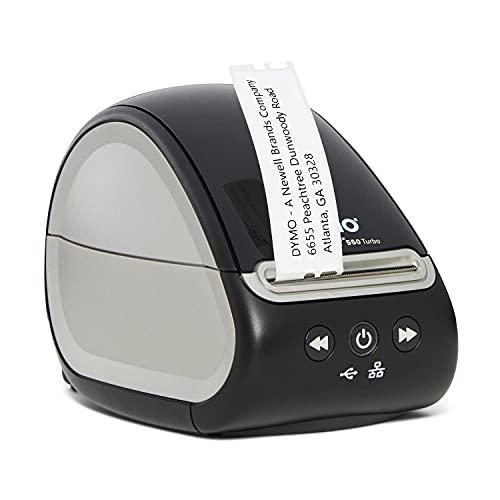
DYMO LabelWriter 550 Turbo USB and LAN Label PrinterBest Value LAN PrinterDYMO LabelWriter 550 Turbo USB and LAN Label PrinterUSB and LAN (Ethernet)Direct thermaln/a
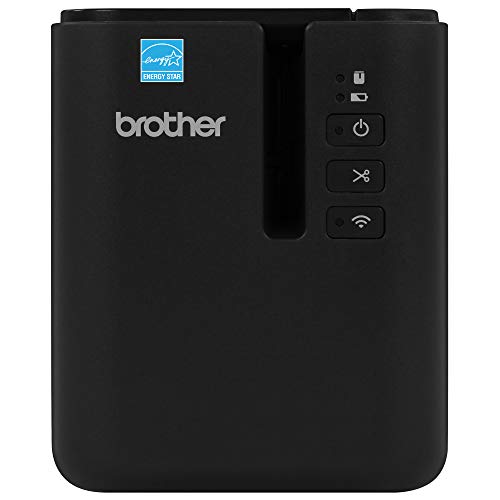
Brother PT-P950NW Network Tape Label Printer up to 36mmBest for Durable TapeBrother PT-P950NW Network Tape Label Printer up to 36mmWired network and Wi-FiThermal transfer on laminated tape360 dpi
Brother QL-1110NWB Wide Format Network Label PrinterBest Wide FormatBrother QL-1110NWB Wide Format Network Label PrinterEthernet, Wi-Fi (802.11b/g/n), BluetoothDirect thermaln/a
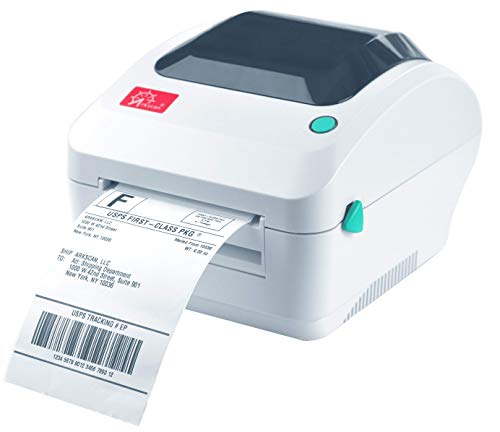
Arkscan 2054A-LAN Ethernet 4 by 6 Shipping Label PrinterBest for Marketplace ShippingArkscan 2054A-LAN Ethernet 4 by 6 Shipping Label PrinterEthernet (LAN)n/an/a
JADENS Dual-Band Wi-Fi and LAN 4 by 6 Label PrinterBest Budget Wi-Fi 4 by 6JADENS Dual-Band Wi-Fi and LAN 4 by 6 Label PrinterDual-band Wi-Fi and LANn/a203 dpi

A network label printer is one that sits on your router or switch instead of hanging off one computer. Everyone with permission can send a job to it, and the printer keeps working when the person who set it up goes on holiday.

Most buyers fall into two camps. Shipping desks want a 4-inch direct thermal machine that takes cheap rolls, while offices and workshops want a compact unit for addresses, folders, cables and asset tags. This guide separates those jobs, explains what Ethernet, Wi-Fi and Bluetooth each add, and flags the lock-in and setup traps that a spec sheet hides.

Before you buy

6 Criteria to Look For Before Buying a Network Label Printer

  1. 01

    Interface matters more than speed

    A network printer is only as good as how it joins the network. Ethernet is the most dependable, with no signal or sleep problems, while Wi-Fi is the flexible option and Bluetooth is a phone convenience, not a sharing solution. The Brother QL-820NWBC carries all three, the DYMO LabelWriter 550 Turbo and Arkscan 2054A-LAN are wired only, and the JADENS offers dual-band Wi-Fi plus LAN.

  2. 02

    Label width for your actual jobs

    Measure the biggest label you print, not the average one. The QL-820NWBC takes DK rolls to about 2.4 inches, the QL-1110NWB stretches to 4 inches, and the Arkscan and JADENS are built around the 4 by 6 shipping format. The PT-P950NW prints tape up to 36mm.

  3. 03

    Media lock-in and running cost

    The printer is the cheap part; rolls are the real bill. The DYMO 550 Turbo works only with DYMO-branded labels, Brother DK and TZe media are proprietary formats with a wide third-party market, and the Arkscan and JADENS take standard thermal rolls.

  4. 04

    Print method and label life

    Direct thermal prints with a heated head on heat-reactive paper, so labels fade with heat, sunlight and time. Thermal transfer uses a ribbon or a laminated tape and lasts years. The PT-P950NW is the durable choice at 360 dpi, while the rest of the lineup is direct thermal and is fine for shipping labels that live a week.

  5. 05

    Resolution for barcodes and small text

    203 dpi is standard for shipping labels and large barcodes, and 300 dpi gives sharper small text and tiny 2D codes. The QL-820NWBC prints at 300 dpi, the PT-P950NW at 360 dpi, and the JADENS at 203 dpi. If you print small QR codes on narrow labels, a 203 dpi machine may still scan but with less margin for error, so favor the higher resolutions for compact codes.

  6. 06

    Driver and platform support

    Check Windows, macOS and Chromebook support before buying, because a network printer that only ships a Windows driver strands Mac users. The Arkscan bundles BarTender UltraLite for Windows only, and the JADENS does not support AirPrint, so iOS users depend on an app. The Brother units offer a full driver set and a utility for assigning IP addresses.

Detailed reviews

The 6 best network label printers, explained

01
Brother QL-820NWBC Ethernet, Wi-Fi and Bluetooth Label Printer
Ethernet + Wi-FiBluetooth300 dpiAuto cutter
Check price on Amazon
Best for: Small offices that want one flexible printer on Ethernet, with Wi-Fi and phone printing as fallbacks.

The QL-820NWBC is a direct thermal desktop printer built around Brother's drop-in DK roll system, and its main trick is carrying every common interface at once. You get wired Ethernet for a fixed office position, Wi-Fi for a shelf that has no cable run, and Bluetooth for a quick phone job. The spec sheet quotes up to 110 standard address labels per minute at 300 dpi, which is the sharpest resolution among the 2-inch class machines in this guide.

The tradeoff is that the print head is narrower than a shipping printer. DK rolls top out around 2.4 inches wide, so full 4 by 6 shipping labels belong to the QL-1110NWB further down. Compared with the DYMO LabelWriter 550 Turbo, the Brother costs noticeably more,.

Ownership is calm. There is no ink, no ribbon and no cartridge to dry out, and the automatic cutter is the only part that really wears. Wipe the print head and roll path now and then.

What works

  • Ethernet, Wi-Fi and Bluetooth all on a single unit
  • 300 dpi output keeps small barcodes and fine text sharp
  • LCD screen allows standalone printing of saved templates
  • Drop-in DK rolls load in seconds without ink or ribbon

Watch out for

  • Roll width stops near 2.4 inches, so no full shipping labels
  • Premium over the cheapest LAN-capable options in this lineup
  • Works best with Brother-format DK media rather than generic rolls

Spec sheet

Connectivity
Ethernet, Wi-Fi, Bluetooth, USB
Print method
Direct thermal
Resolution
300 dpi
Quoted speed
Up to 110 address labels per minute
Standalone use
Monochrome LCD screen
02
DYMO LabelWriter 550 Turbo USB and LAN Label Printer
USB + LANDirect thermalAuto recognitionCompact body
Check price on Amazon
Best for: Offices sharing address and file labels across a handful of PCs at the lowest entry cost.

The LabelWriter 550 Turbo is the cheapest machine here that still gives you a real Ethernet port next to USB. It uses direct thermal printing, so there is no ink or toner, and it reads each roll to learn the label size and how many remain.

The catch is media control. The printer is calibrated to work only with DYMO-branded labels, which means the low running cost that made the older LabelWriter line famous is gone. Against the Brother QL-820NWBC the DYMO has no Wi-Fi or Bluetooth, so it needs a cable to the switch, and it has no screen for standalone jobs.

Day to day, upkeep is light. The print head is a fixed thermal strip, so wipe it with isopropyl alcohol when streaks appear and keep the roll spindle free of adhesive residue.

What works

  • Real Ethernet port at the cheapest tier of this lineup
  • Automatic label recognition tracks size and remaining count
  • Direct thermal means no ink, toner or ribbon to replace
  • Compact footprint fits on a crowded desk or shelf

Watch out for

  • Only accepts DYMO-branded label rolls, which lifts running cost
  • No Wi-Fi, Bluetooth or screen, so it needs a cable and a PC

Spec sheet

Connectivity
USB and LAN (Ethernet)
Print method
Direct thermal
Media recognition
Automatic label recognition
Media policy
Works with DYMO-branded labels only
Price tier
Cheapest of the six
03
Brother PT-P950NW Network Tape Label Printer up to 36mm
Wired + Wi-Fi36mm TZe tape360 dpi3.1 ips
Check price on Amazon
Best for: IT and electrical teams labelling cables, panels and equipment that must stay legible for years.

The PT-P950NW is the odd one in this lineup because it prints on laminated TZe tape instead of paper rolls. Print sits between two films, which makes the result resistant to water, sunlight and abrasion, so it suits cable flags, patch panel labels, equipment ids and anything that lives outdoors or near chemicals. It offers a wired network port and Wi-Fi, a 360 dpi head, and a quoted speed up to 3.1 inches per second.

Compared with the QL-820NWBC, this machine trades address-label speed for toughness. Tape width reaches 36mm, which is far narrower than a shipping label, and the cost per inch of laminated tape is higher than direct thermal paper.

Ownership centers on the tape cartridge. Each cartridge carries its own ribbon, so you never swap a separate ribbon, but you do stock several widths and colors. Because the print is thermal transfer rather than heat-reactive paper, it does not darken in a warm truck or fade under a window.

What works

  • Laminated TZe tape resists water, UV and abrasion
  • Wired network and Wi-Fi support shared use across a team
  • 360 dpi head renders small text clearly on narrow tape
  • Tape widths up to 36mm cover cable flags and panel labels

Watch out for

  • Tape costs more per inch than direct thermal paper rolls
  • Not suited to shipping labels or high-volume address printing
  • Highest price tier of the six, so overkill for light office use

Spec sheet

Connectivity
Wired network and Wi-Fi
Print method
Thermal transfer on laminated tape
Max tape width
36mm
Resolution
360 dpi
Speed
Up to 3.1 ips
04
Brother QL-1110NWB Wide Format Network Label Printer
4-inch wideEthernet + Wi-FiBluetoothBarcode crop
Check price on Amazon
Best for: Shipping and postage desks that also need Brother's DK media variety and network connectivity.

The QL-1110NWB is the wide-format sibling of the 820 model, stretching the print path to labels up to 4 inches across. That opens up shipping and postage labels, wide barcodes and warehouse tags that the 2.4 inch machines cannot touch. It keeps the full connectivity set of Ethernet, 802.11b/g/n Wi-Fi and Bluetooth, so you can place it at a packing bench or hang it on the network with no cable.

Its closest rival is the JADENS Wi-Fi 4 by 6 printer, which costs far less but lacks Ethernet-grade vendor support and a proper driver pedigree. The Brother wins when you also need the DK system's wide range of film and continuous rolls and the barcode crop function, which lets you pull a barcode out of a PDF and print only that region rather than a full sheet.

In ownership terms, expect the same quiet, ink-free routine as the other DK machines: occasional head cleaning and a fresh roll.

What works

  • Prints labels up to 4 inches wide for shipping and postage
  • Ethernet, Wi-Fi and Bluetooth all included in one chassis
  • Barcode crop function prints only the barcode from a PDF
  • Same quiet, ink-free routine as the rest of the DK family

Watch out for

  • Costs far more than a generic 4 by 6 thermal shipping printer
  • Larger body and wide rolls need more desk room than the QL-820
  • Best value depends on buying Brother DK rolls rather than generic stock

Spec sheet

Connectivity
Ethernet, Wi-Fi (802.11b/g/n), Bluetooth
Print method
Direct thermal
Max label width
Up to 4 inches
Best jobs
Postage, mailing and barcode labels
Software extra
Barcode crop function
05
Arkscan 2054A-LAN Ethernet 4 by 6 Shipping Label Printer
Ethernet4 by 6 labelsDirect thermalBarTender Lite
Check price on Amazon
Best for: Marketplace sellers who want a wired, set-and-forget 4 by 6 printer on a packing bench.

The Arkscan 2054A-LAN is a straightforward 4 by 6 thermal shipping printer with an Ethernet port, aimed at sellers who print marketplace labels for fulfilment, FBA prep, eBay, Etsy and carrier tools. The listing says it works with Windows, Mac, Chromebook, iPhone and Android, and ships with BarTender UltraLite for label design on Windows.

Against the JADENS Wi-Fi printer, the Arkscan is the wired alternative: no wireless dropouts, but also no cable-free placement. It sits above the JADENS in price tier here, and the premium is for a wired network link rather than for faster printing.

Ownership is typical of 4-inch direct thermal machines. Use standard thermal rolls or fanfold stacks, mind the core size when loading, wipe the head with isopropyl alcohol every few rolls, and keep the label sensor free of paper dust.

What works

  • Wired Ethernet link avoids wireless dropouts at a packing bench
  • 4 by 6 format matches marketplace and carrier shipping labels
  • Works with Windows, Mac, Chromebook and mobile platforms
  • Takes standard thermal rolls instead of locked branded media

Watch out for

  • No Wi-Fi, so placement is tied to a network cable
  • Bundled BarTender UltraLite software is Windows only

Spec sheet

Connectivity
Ethernet (LAN)
Label format
4 by 6 shipping labels
Platforms
Windows, Mac, Chromebook, iPhone, Android
Included software
BarTender UltraLite (Windows only)
Price tier
Upper-middle of the six
06
JADENS Dual-Band Wi-Fi and LAN 4 by 6 Label Printer
Dual-band Wi-FiLAN sharing203 dpi150mm/s
Check price on Amazon
Best for: Home businesses that want one cheap 4 by 6 printer shared across several devices on Wi-Fi.

The JADENS is a 4 by 6 shipping printer that shares over both Wi-Fi and LAN, and it is the lowest-priced route to a networked shipping label printer in this guide. The head prints at 203 dpi, which is the industry standard for shipping labels, at a quoted 150mm/s.

The warning label on its listing matters: AirPrint is not supported. iPhone and iPad users must rely on the maker's app instead of the native print sheet, which is the main reason a Mac or Windows PC remains the better host. Next to the Arkscan 2054A-LAN, the JADENS gives up wired-only simplicity in exchange for dual-band Wi-Fi, and next to the Brother QL-1110NWB it gives up the DK media range for far lower cost.

Keep expectations realistic over the first year.

What works

  • Dual-band Wi-Fi plus LAN shares one printer across devices
  • 203 dpi head matches the shipping label industry norm
  • Reversible core converter fits different roll core sizes
  • Built-in roll compartment keeps the setup compact

Watch out for

  • AirPrint is not supported, so iPhone printing relies on an app
  • Less vendor pedigree than the Brother and DYMO machines
  • Wi-Fi reliability depends on router placement and band choice

Spec sheet

Connectivity
Dual-band Wi-Fi and LAN
Print speed
150mm/s
Resolution
203 dpi
AirPrint
Not supported
Roll feature
Reversible core converter, built-in compartment

Spec sheet decoder

What the numbers on the box really mean

The specs manufacturers lead with, translated into what they tell you about real-world performance.

Ethernet vs Wi-Fi

Ethernet is a wired link with fixed latency and no signal drops. Wi-Fi trades that reliability for placement freedom and can fail when the router channel is crowded.

Watch forThe DYMO 550 Turbo and Arkscan are wired only, so budget for a cable run to the printer.

dpi (dots per inch)

Resolution sets how many dots the head places per inch. 203 dpi suits shipping labels and big barcodes, while 300 dpi and up render small text and small 2D codes more cleanly.

Watch forThe JADENS prints at 203 dpi while the Brother QL-820NWBC reaches 300 dpi, a real gap for tiny QR codes.

Direct thermal vs thermal transfer

Direct thermal darkens heat-reactive paper with no consumable besides the roll. Thermal transfer melts ink from a ribbon or tape onto the label for a longer-lasting print.

Watch forOnly the PT-P950NW in this lineup uses laminated tape that survives sun, water and abrasion.

Labels per minute

Quoted speed is measured on short address labels at the best case, so real throughput with larger labels or a slow PC is lower.

Watch forThe QL-820NWBC lists up to 110 address labels per minute, but shipping labels are bigger and slower to print.

Media lock-in

Some printers read a chip or marker on the roll and refuse anything else. That keeps jams down and protects the maker's margin but removes your freedom to shop for cheaper stock.

Watch forThe DYMO LabelWriter 550 Turbo only accepts DYMO-branded labels, while the Arkscan and JADENS use standard thermal rolls.

Methodology

How We Evaluated These Network Label Printers

Network setup path

We evaluated how each printer joins a network based on the spec sheet and the maker's documented setup tools. Ethernet units were scored on the clarity of IP assignment, Wi-Fi units on band support and reconnect behavior. The QL-820NWBC and JADENS scored highest for flexibility because they offer more than one path.

Label format coverage

We compared the widest label each machine can print and the formats it supports. The PT-P950NW reaches 36mm tape, the QL-820NWBC about 2.4 inches, and the QL-1110NWB, Arkscan and JADENS cover 4-inch jobs. A printer that cannot fit your biggest label scored zero regardless of other strengths.

Running cost and media freedom

We looked at how open each printer is to third-party media and how that shapes cost over two years. The locked DYMO rolls and Brother format rolls were weighed against the standard thermal rolls the Arkscan and JADENS accept.

Print durability

We separated labels that need to last weeks from labels that need to last years. Direct thermal output was scored lower for long-term durability than the thermal transfer, laminated output from the PT-P950NW.

Ownership friction

We estimated upkeep from owner feedback patterns and from how each model loads media, cuts and handles jams. Machines with a screen, such as the QL-820NWBC, scored better for standalone recovery when the PC is off.

Decision guide

How to Choose the Right Network Label Printers

By Primary Job

SituationPickWhy
Shared office addresses and file labelsDYMO LabelWriter 550 TurboEthernet and USB at the cheapest tier with automatic label recognition.
Mixed office with phone printingBrother QL-820NWBCEthernet, Wi-Fi and Bluetooth plus an LCD for standalone jobs.
Cable, panel and equipment idsBrother PT-P950NWLaminated TZe tape up to 36mm that survives water and sunlight.
Postage and wide barcodesBrother QL-1110NWBLabels up to 4 inches wide plus a barcode crop function.
Marketplace packing benchArkscan 2054A-LANWired 4 by 6 printing on a reserved IP address.
Home seller on a tight budgetJADENS Wi-Fi 4 by 6Dual-band Wi-Fi and LAN at the lowest 4 by 6 price tier.

By Budget

Budget tierPickWhy
Lowest entry costDYMO LabelWriter 550 TurboCheapest LAN-capable machine here, though it locks you to DYMO rolls.
Low 4 by 6JADENS Wi-Fi 4 by 6Networked shipping labels at a fraction of the Brother wide-format cost.
MiddleArkscan 2054A-LANWired shipping reliability with standard rolls.
Upper middleBrother QL-820NWBCFull connectivity and 300 dpi for mixed use.
HighestBrother PT-P950NWPay for tape durability and 36mm width that no paper roll can match.

Ethernet vs Wi-Fi

Ethernet

A wired link is the most reliable choice for a printer that stays in one place. The DYMO 550 Turbo, Arkscan 2054A-LAN, QL-820NWBC and PT-P950NW all offer a wired path. It avoids channel congestion and sleep-mode dropouts, and it makes a reserved IP address trivial to maintain.

Wi-Fi

Wi-Fi frees you from a cable run and suits a shared shelf in another room. The JADENS adds dual-band Wi-Fi, and the Brother QL-1110NWB and QL-820NWBC support it as an alternative. Expect occasional reconnect issues if the router is far or crowded.

Pick Ethernet when the printer has a permanent home, and Wi-Fi only when a cable cannot reach.

Paper Rolls vs Laminated Tape

PreferencePickWhy
Cheapest labels in bulkJADENS Wi-Fi 4 by 6Standard thermal rolls with a reversible core converter.
Open media marketArkscan 2054A-LANAccepts standard rolls and fanfold stacks.
Clean, branded rollsBrother QL-820NWBCDK rolls load in seconds and cut automatically.
Weatherproof labelsBrother PT-P950NWLaminated tape sandwiches the print between two films.
Branded convenienceDYMO LabelWriter 550 TurboAuto recognition at the cost of locked media.

For Shared Shipping Desks Specifically

Look for

A true 4 by 6 print path, a platform driver for every computer on the desk, and a reserved IP address. Standard thermal rolls keep the running cost down, and a built-in roll holder saves bench space.

In this comparison

The Arkscan 2054A-LAN is the wired pick for a packing bench, the JADENS is the Wi-Fi budget pick, and the Brother QL-1110NWB is the premium choice when postage labels, barcodes and DK media variety all matter.

When to Spend More

Spend more if

You need labels to last years, as with the PT-P950NW, or you print small barcodes and want the 300 dpi sharpness of the QL-820NWBC.

Save if

Your jobs are short-lived address and shipping labels that will be thrown away within a week. The DYMO LabelWriter 550 Turbo and JADENS cover that need at the lowest tiers in this lineup, provided you accept their media and platform limits.

Ownership

Maintenance schedule

The upkeep that decides whether this machine lasts two seasons or ten.

TaskIntervalWhy it matters
Clean the print headEvery 3 to 5 rollsA dirty head leaves streaks and faint bars across labels. Wipe it with isopropyl alcohol on a lint-free swab and let it dry before printing.
Wipe the platen roller and roll pathMonthlyAdhesive and paper dust collect on the rollers and cause feed errors. A damp cloth with a little alcohol keeps the label path clear.
Reserve a fixed IP addressOnce, then recheck after router changesA printer that changes address after a power cut breaks every saved driver. Pin it in the router so the mapping never moves.
Update firmware and driversTwice a yearOperating system updates can break an old driver. Check the maker's site and update the printer firmware when it is offered.
Store spare media flat and coolOngoingHeat darkens direct thermal paper and curls rolls. Keep spare rolls and tape cartridges in a drawer away from sunlight.

FAQ

Frequently Asked Questions

Do I need a network label printer or is USB enough?

USB is enough when one person uses one computer. A network printer pays off when two or more people share it, or when the printer lives away from any PC. If you only print from one laptop, buy USB and save the money.

Which is the best value for a shared office?

The DYMO LabelWriter 550 Turbo has the cheapest Ethernet entry here, but it locks you to DYMO rolls. The Brother QL-820NWBC costs more up front and gives you Wi-Fi, Bluetooth and a screen, which suits mixed use better.

How long do network label printers last?

The print head is the wear part, and entry desktop heads are usually rated in the tens of kilometres of print. With regular cleaning, most of these machines last several years. The cutter and platen roller are the next items to wear.

Does more dpi always mean better labels?

Not always. 203 dpi is perfectly good for shipping labels and large barcodes. Higher resolution like 300 dpi or 360 dpi only matters for small text and tiny QR codes on narrow labels.

Can I use third-party labels?

It depends on the model. The DYMO 550 Turbo accepts only DYMO-branded labels. The Arkscan and JADENS use standard thermal rolls, and Brother DK and TZe media has a wide third-party market, though quality varies.

Why does my network printer keep going offline?

The usual cause is a changed IP address or a sleeping Wi-Fi radio. Reserve a fixed address in the router and try the wired port on models that offer one. Updating the firmware also resolves many dropout cases.

Bottom line

The short version

Browse more network label printerson Amazon →
James Miller, Lead Machine Editor

About the author

James Miller

Lead Machine Editor, MachineFanatic

James Miller leads MachineFanatic's buying guides, turning spec sheets, manuals and owner feedback into clear verdicts on power tools, outdoor power equipment, shop machines and kitchen machines.

More from James →

Keep reading

Related guides