Amazon affiliate links - we earn a commission.Affiliate disclosure

Buying guide · 12 min read · Updated 2026-11-18

Best Phomemo Label Printers (2026)

Four Phomemo Bluetooth label printers compared: the M110, the D30 mini, a 184 g USB model and the P15 ribbon printer, with real widths.

James MillerBy James MillerLead Machine Editor4 machines comparedSpec-sheet verified
Best Phomemo Label Printers

At a glance

Our top picks

Side by side

Spec comparison

This brand makes a family of small Bluetooth thermal printers that print stickers and tape from a phone app. They are inexpensive to start with and popular for home organizing, craft sales and small shop labels.

The differences between models are less obvious than the names suggest: sticker rolls versus tape, label width, whether a display or a USB port is included and what the printer is actually meant to print on. A few minutes comparing those details will save the common mistake of buying the wrong format.

Before you buy

6 Criteria to Look For Before Buying a Phomemo Label Printer

  1. 01

    Sticker rolls or tape

    The M110 and the 184 g model print on sticker rolls up to about 2 inches wide, while the D30 prints on narrow tape and fixed labels. Sticker rolls suit barcodes and shipping stickers. Tape suits cables and jars. Think about what you stick the label on: a flat box lid takes a 2 inch sticker easily, while a narrow cable or a curved bottle neck needs a thin strip that wraps without wrinkling. A printer that does both well does not exist at this size, so most owners end up choosing the format they use most and accepting the other as an occasional compromise.

  2. 02

    Label width

    The 184 g model prints 20 to 50 mm, or 3/4 to 2 inches, and the M110 sits in the same 2 inch class. The D30 is much narrower. Measure your biggest label before choosing, and remember that the printable area is a little smaller than the roll. A design that fills a 50 mm sticker edge to edge will lose its border, so leave a margin in the layout. If you sell products, also check that the sticker is large enough to carry the text and barcode that a marketplace or customer expects, since a label that is too small is the commonest reason for a reprint.

  3. 03

    Connectivity and fallback

    The M110 uses Bluetooth 4.0 with a range of up to 33 feet. The 184 g model adds USB for a wired connection. If you print for work, a cable fallback is a useful safety net. Bluetooth printers tend to fail at the worst moment, usually after a phone update or when another device grabs the connection, and a USB cable sidesteps both problems. Range also drops through walls, so a printer in a back room may disconnect when you work in the next one. Keep the printer within sight of the phone for reliable pairing.

  4. 04

    App library

    The M110 lists more than 3000 templates and the D30 lists more than 4000 icons. A large library helps non-designers. The quality of the app matters more than the count. A tidy layout, fast previews and reliable printing beat a catalog of clip art you never open, and the best check is to read recent reviews for complaints about crashes or pairing. Also look at whether the app works without an account, since some require sign-in just to print, which is a nuisance and a privacy question.

  5. 05

    Durability of the print

    The M110, D30 and 184 g model use direct thermal printing, so labels fade over time. The P15 describes water, oil and temperature resistant prints. Choose by how much abuse the label takes. A sticker on a shelf box lives an easy life, while a label on a jar that is washed, a ribbon that is handled or a tag in a sunny window will not. Laminating a direct thermal label with clear tape is a cheap trick that extends its life, though it adds a step and a little thickness.

  6. 06

    On-body display

    Only the M110 lists a clear electronic display. A display shows connection status without opening the app. It matters on a shared printer. When several family members or staff use one printer, a screen answers the common questions at a glance, such as whether the paper has run out or the printer is still connected, and it cuts the number of times someone has to ask the person who set it up. Screenless printers rely on a blinking light, which means consulting a manual to decode it.

Detailed reviews

The 4 best phomemo label printers, explained

01
Phomemo M110 portable Bluetooth label printer with display
2 inch labelsDisplay3000+ templatesBluetooth 4.0
Check price on Amazon
Best for: Households and small shops that print stickers and barcodes from a phone.

A real screen on the body is the M110's differentiator within a family of screenless mini printers. The display keeps you informed about connection and status, so you are not guessing whether the printer is paired or the roll is loaded. That small convenience is the reason a first-time user is less likely to give up.

The Print Master app lists more than 3000 templates, and the printer pairs by Bluetooth 4.0 with a range of up to 33 feet. A one-click connection saves the fiddling that older Bluetooth printers demand. The M110 is a sticker printer for roughly 2 inch labels, so it suits barcodes, price tags, spice jars and shipping stickers.

Because it is direct thermal, labels will fade with heat and light, so use it for indoor and short-life labels. Keep rolls dry, wipe the head with alcohol when prints weaken and charge before a long session. The wider models in the family, such as the 184 g USB unit, add a wired connection.

What works

  • Clear display shows printer status
  • 3000+ templates in Print Master
  • Bluetooth 4.0 up to 33 feet
  • One-click connection

Watch out for

  • Direct thermal labels fade
  • Phone app needed to design
  • Narrower than a 4 inch shipping printer

Spec sheet

Label width
2 inch class
Display
Clear electronic display
Templates
Over 3000 in the app
Bluetooth
4.0, range up to 33 feet
App
Print Master
02
Phomemo 2 inch thermal label maker, 184 g, Bluetooth and USB
184 g20 to 50 mmBluetooth + USB2 second pairing
Check price on Amazon
Best for: People who want a 2 inch sticker printer with a wired backup.

Having both Bluetooth and USB is the notable thing about this model. The listing describes Bluetooth 4.0 with a stable range up to 33 feet and quick pairing in about two seconds, plus a USB option for a wired connection. When a Bluetooth link misbehaves, a cable gets the job done.

It weighs 184 g and measures 4.49 by 3.43 by 2.32 inches, and prints labels from 20 to 50 mm wide, or 3/4 to 2 inches. That puts it in the same width class as the M110, but with a lighter, newer body and the wired fallback. It is aimed at home organizing, storage boxes, bottles and small business labeling.

The listing does not give a model name, so check the product page for the exact version. Keep rolls cool, wipe the head if prints dim and update the app. It is a good choice for people who want the M110 workflow with a cable option.

What works

  • Bluetooth 4.0 and USB connections
  • 184 g portable body
  • Prints 20 to 50 mm labels
  • Pairs in about two seconds

Watch out for

  • No model name in the listing
  • No display on the body
  • Direct thermal labels fade

Spec sheet

Weight
184 g
Size
4.49 x 3.43 x 2.32 inches
Label width
20 to 50 mm (3/4 to 2 inches)
Connections
Bluetooth 4.0 and USB
Pairing
About 2 seconds
03
Phomemo D30 mini Bluetooth label maker with tape
Continuous + fixedRechargeable4000+ iconsDirect thermal
Check price on Amazon
Best for: Craft and home users who want a pocket printer with a huge icon library.

Tiny and capable describes the D30. It accepts continuous label tape and fixed-length labels, so a long cable flag and a short jar label come out of the same machine, and the Print Master app offers more than 4000 icons. That is a larger icon library than the M110 lists, which suits craft and gift labels.

The printer uses BPA-free direct thermal printing and a rechargeable battery, so there is no ink and no disposable cell to replace. It is narrower than the M110 and the 184 g model, since it uses small tape rather than 2 inch sticker rolls. For cable labels, shelf strips and spice jars, that narrow tape is exactly right.

Buy several tape colors, because the white, gold and clear tapes in some bundles look different in use. Keep tapes flat, wipe the head if text pales and charge before a session. It is the lowest-commitment way into the family.

What works

  • Continuous and fixed-length labels
  • 4000+ icons in Print Master
  • Rechargeable and ink-free
  • Small enough for a pocket

Watch out for

  • Narrow tape only
  • No display
  • Direct thermal fade

Spec sheet

Label types
Continuous tape and fixed-length labels
App
Print Master
Icons
4000 plus
Technology
BPA-free direct thermal
Power
Rechargeable
04
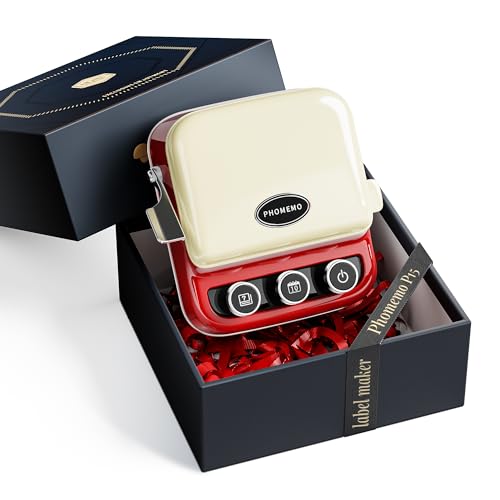
Phomemo P15 ribbon printer, Bluetooth, typewriter style
Ribbon printingTypewriter designWater-resistantBluetooth
Check price on Amazon
Best for: Gift makers and small sellers who personalize ribbon and packaging.

A different kind of machine, the P15 prints on ribbon, which makes it a craft and gifting tool more than an organizer. The listing leans into its classic typewriter design and says it supports a range of label types and custom ribbons for gift wrap and small business packaging.

The prints are described as water-resistant, oil-resistant and wide-temperature durable, a stronger claim than the direct thermal sticker prints of the M110 and D30. That durability suits ribbons and tags that get handled. It is not a sticker printer for shelves and bins, so match it to the job.

Because the supplies are ribbon rolls, plan to stock several colors and widths. Keep rolls dry, wipe the head and update the app. If your goal is neat gift packaging or branded wrapping, this is the one to look at.

What works

  • Prints on ribbon for gift packaging
  • Water and oil resistant prints
  • Typewriter-style design
  • Bluetooth phone control

Watch out for

  • Not a general shelf label printer
  • Ribbon stock is a specialist purchase
  • Narrow use case

Spec sheet

Format
Ribbon and label printer
Design
Classic typewriter styling
Prints
Water, oil and temperature resistant
Connection
Bluetooth
Use
Gift wrap and small business

Spec sheet decoder

What the numbers on the box really mean

The specs manufacturers lead with, translated into what they tell you about real-world performance.

Bluetooth 4.0

A low-energy wireless standard used for phone pairing. It is limited in range and bandwidth.

Watch forThe M110 and 184 g model list a range of up to 33 feet.

20 to 50 mm

The label width range in millimeters, about 3/4 to 2 inches. It decides which stickers fit.

Watch forThe 184 g model states it.

Continuous vs fixed-length

Continuous tape is cut to any length. Fixed-length labels come at set sizes.

Watch forThe D30 supports both.

BPA-free direct thermal

A heat-sensitive coating without bisphenol A. It darkens under the print head.

Watch forThe D30 states it.

Print Master

The brand's app for design and printing. The printers depend on it for most functions.

Watch forThe M110 and D30 both use it.

Methodology

How We Evaluated These Phomemo Label Printers

Format fit

We separated sticker printers, tape makers and the ribbon printer into their own jobs. The M110 and 184 g model were judged as sticker printers. The D30 and P15 were judged on their own formats.

Connectivity

We compared Bluetooth, USB and display features. The 184 g model's USB and the M110's display stand out. We noted range and pairing claims.

App and templates

Template and icon counts were compared, with the caveat that quality matters more than quantity. The D30's 4000 icons and the M110's 3000 templates lead. We judged ease for beginners, looking at how quickly a first label can be made and how many steps it takes to reprint one. A larger library only helps if the search and categories make the right template easy to find, which is why we treated the quantity claims with caution.

Print durability

We noted which printers use direct thermal and which claim water and oil resistance. The P15's durability claim was treated as the maker's. Fade risk applies to the others. We read durability as a question of where the label will live, so an indoor pantry label and a handled gift ribbon were weighed against different standards, and no printer was marked down for a limit that does not affect the job it is meant for.

Ownership reality

Based on owner feedback patterns, label roll supply, app updates and battery life were weighed. Roll costs are the ongoing expense. We did not quote prices, but we did note that roll compatibility is the largest lever on running cost, because a printer that accepts several sizes lets you shop around. We also considered how long a family of printers stays supported, since an app that stops getting updates turns a good printer into a paperweight.

Decision guide

How to Choose the Right Phomemo Label Printers

By Job

SituationPickWhy
Barcodes and shipping stickersPhomemo M1102 inch sticker rolls with display
Wired backup for BluetoothPhomemo 184 g modelUSB and Bluetooth
Cables, jars and craftsPhomemo D30Narrow tape and 4000+ icons
Gift ribbon and packagingPhomemo P15Ribbon printing

By Budget

Budget tierPickWhy
Lowest costPhomemo D30Mini tape printer
Low-midPhomemo M110Display and sticker rolls
MidPhomemo 184 g modelUSB and Bluetooth
HighestPhomemo P15Specialist ribbon printer

Sticker Roll vs Tape

Sticker rolls

The M110 and 184 g model print on roughly 2 inch stickers. They suit barcodes and parcels. Rolls cost more to stock.

Tape

The D30 uses narrow tape and fixed labels. It suits cables and small jars. It is the smallest to carry.

Choose rolls for packages; choose tape for small items.

Bluetooth vs Wired Backup

PreferencePickWhy
Phone-only workflowPhomemo M110One-click Bluetooth connection
Cable when Bluetooth failsPhomemo 184 g modelUSB included
PocketablePhomemo D30Rechargeable mini
Craft ribbonPhomemo P15Bluetooth ribbon printer

For Craft Sellers Specifically

Look for

A big icon library, labels that look good on packaging and a printer that is quick to set up between orders.

In this comparison

The D30 leads on icons, the P15 leads on gifting, and the M110 handles stickers. A craft seller who ships parcels will want the M110 or the 184 g model for product stickers, and the D30 for small tags and packaging details that need a decorative touch.

When to Spend More

Spend more if

You print daily or need a wired option. The 184 g model or M110 is better. The wired option and the display each remove a frustration that shows up quickly when a printer is used every day, and those small things are what the extra cost buys.

Save if

You label rarely. The D30 is enough. It is small enough to live in a drawer, it charges by cable and it does the occasional label without any fuss, which is all a light user needs.

Ownership

Maintenance schedule

The upkeep that decides whether this machine lasts two seasons or ten.

TaskIntervalWhy it matters
Wipe the print headWhen prints weakenDust dims prints. Use a swab with alcohol.
Store rolls cool and dryOngoingHeat darkens thermal paper. Keep spares sealed. A drawer near a radiator or a window is the usual place where a stock of thermal rolls goes bad, so choose a cool cupboard and use the oldest roll first. A roll that has already darkened slightly prints with less contrast and will give you grey labels.
Charge the batteryBefore long sessionsA low battery causes light prints. Charge fully before a big job.
Update Print MasterQuarterlyPairing depends on current software. Stale app versions break pairing. After a phone operating system update, open the app and print a test label before you need one for real, because that is when permission settings for Bluetooth tend to reset and the printer will not appear in the list.
Seat the roll flatOn each roll changeA crooked roll jams the feed. Seat it flat against the guides.

FAQ

Frequently Asked Questions

M110 or D30?

The M110 prints 2 inch stickers and has a display. The D30 prints narrow tape and is smaller. If your labels are mostly addresses, barcodes and product stickers, the M110 is the better fit, and if they are mostly cable flags and jar labels, the D30 wastes less material and fits a pocket.

Do Phomemo labels fade?

Direct thermal labels fade with heat and sun. Keep them indoors. A label that spends months in a bright window can turn grey or unreadable, and heat from a stove or a car dashboard speeds the process. If a label has to last, cover it with clear tape or move up to a ribbon-based printer.

Can I print from a computer?

The 184 g model lists USB for a wired connection. Others rely on Bluetooth and the app. Check the listing for desktop software before you assume a computer workflow, since mobile apps are the main route on this brand.

What is the P15 for?

It prints on ribbon for gift wrap and small business packaging. It is not a shelf label printer, so buy it only if ribbon is what you need to print. Its supplies are ribbon spools rather than sticker rolls, which makes it a poor fit for a pantry or an office.

Do I need an app?

Yes, Print Master handles design and printing on these models. Install it on your phone before the printer arrives, and check that it supports your phone's operating system, because the printer has little use without it.

What is the running cost?

Rolls and tapes are the only consumable. Buying in bulk lowers it. Stick to the roll sizes you use most, because mixing several sizes leaves half-used rolls in a drawer. Check that the roll size you want is sold by more than one shop before you commit to a printer.

Bottom line

The short version

Browse more phomemo label printerson Amazon →
James Miller, Lead Machine Editor

About the author

James Miller

Lead Machine Editor, MachineFanatic

James Miller leads MachineFanatic's buying guides, turning spec sheets, manuals and owner feedback into clear verdicts on power tools, outdoor power equipment, shop machines and kitchen machines.

More from James →

Keep reading

Related guides