
Amazon affiliate links - we earn a commission.Affiliate disclosure

Buying guide · 13 min read · Updated 2026-11-07

Best Printers for High Volume Printing (2026)

Six printers built for heavy home and small office use compared: mono laser, color laser, ink tank and heat-free inkjet, with speeds and yields.

James MillerBy James MillerLead Machine Editor6 machines comparedSpec-sheet verified
Best Printers for High Volume Printing

At a glance

Our top picks

Side by side

Spec comparison

MachineTechnologyFunctionsDuplexConnectivity
Brother DCP-L2640DW wireless mono laser multifunctionBest OverallBrother DCP-L2640DW wireless mono laser multifunctionMonochrome laserPrint, copy, scanAutomatic 2-sidedWireless and mobile printing
Brother wireless color laser printer 19 ppm duplexBest Compact Color LaserBrother wireless color laser printer 19 ppm duplexColor lasern/aAutomaticWireless and mobile
Canon imageCLASS MF753Cdw II color laser all-in-oneBest Color Laser MultifunctionCanon imageCLASS MF753Cdw II color laser all-in-oneColor laserPrint, scan, copy, faxAutomaticWireless
Epson EcoTank ET-4950 wireless supertank all-in-oneBest Value for ColorEpson EcoTank ET-4950 wireless supertank all-in-oneInk tank inkjetPrint, scan, copy, faxn/aWireless and mobile
Epson WorkForce Pro WF-4930 heat-free business inkjetBest Fast InkjetEpson WorkForce Pro WF-4930 heat-free business inkjetPrecisionCore heat-free inkjetn/aAutomatic 2-sidedn/a
HP Smart Tank 5003 wireless ink tank all-in-oneBest Low-Cost Tank OptionHP Smart Tank 5003 wireless ink tank all-in-oneInk tank inkjetPrint, copy, scann/aWireless and mobile

Heavy printing changes the buying logic. A low purchase price stops mattering, and what you pay per page, how fast the first page appears, and how often the paper path jams take over as the real measures of a printer.

The three technologies, laser, ink tank and heat-free business inkjet, each win on a different axis. Decide how many pages you print a month, whether you need color, and how much downtime you can tolerate before comparing anything else.

Before you buy

6 Criteria to Look For Before Buying a Printer for High Volume Printing

  1. 01

    Cost per page, not sticker price

    Cost per page is the consumable price divided by its ISO page yield, rated at 5 percent page coverage. A mono laser like the DCP-L2640DW has the lowest black cost, and an ink tank like the ET-4950 has the lowest color cost. Dense pages cost more than the rating implies, so treat the rating as a best case.

  2. 02

    Monthly volume and duty cycle

    Above about 200 pages a month, the running-cost savings of a laser or ink tank offset their higher hardware price. The duty cycle is a ceiling, not a target, so the honest number is the recommended monthly volume. Pick a machine whose recommended volume is comfortably above what you print.

  3. 03

    Speed and first page time

    The DCP-L2640DW reaches 36 ppm, the WF-4930 reaches 25 black and 12 color ISO ppm, and the color laser runs at 19 ppm. Ink tank printers are slower for long jobs. If you print long reports, speed saves real time over a year.

  4. 04

    Paper path and jams

    Duplex printing forces each sheet to reverse and re-enter the path, so curled, damp, thin or heavy paper causes most jams. Keep paper flat and sealed, and avoid overloading trays. The ADF sheet limit on scanner models, such as the 50 pages on the WF-4930, is another jam cause when overfilled.

  5. 05

    Technology fit

    Laser suits text and dry-toner reliability. Ink tank suits color and low cost per page. A heat-free business inkjet like the WF-4930 suits fast color documents with pigment ink durability. Match the technology to the kind of pages you print most.

  6. 06

    Ink program traps

    Subscription ink programs bundle ink by page count but can lock the printer to the plan, and some firmware updates can reject non-original cartridges. Read the terms before you buy. A tank printer with bottle refills, such as the ET-4950, avoids most of that.

Detailed reviews

The 6 best printers for high volume printing, explained

01
Brother DCP-L2640DW wireless mono laser multifunction
Up to 36 ppmMono laserDuplexWireless
Check price on Amazon
Best for: Heavy black and white printing at home or in a small office.

The DCP-L2640DW is a monochrome laser multifunction machine, and the engineering choice that matters is the toner system. A laser fuses dry toner onto the page, so nothing dries out between jobs and a cartridge can sit for months without a clogged nozzle. Print speeds reach up to 36 pages per minute, which is the fastest figure among the picks here, and automatic duplexing halves paper use on long documents.

The tradeoff is that it prints in black only. A household that needs color photos or school projects will find it limiting, and the multifunction unit uses a drum and toner that wear out separately over many thousands of pages. Compared with the color laser, it is smaller, cheaper to run per black page and quicker to first print, while the Epson ink tank models give you color at the cost of speed.

Ownership is quiet and low drama. Dust the paper path, wipe the pickup rollers with a damp lint-free cloth, and keep paper flat and sealed so it does not curl and jam in the duplex path. Check the yield of the replacement cartridge, because starter toner often holds far fewer pages than a full-size one, and treat the monthly duty rating as a ceiling rather than a target.

What works

  • Up to 36 ppm for fast long documents
  • Toner never dries out between infrequent jobs
  • Automatic duplex saves paper on large reports
  • Compact multifunction with wireless printing

Watch out for

  • Black and white only, so no color documents
  • Drum and toner are separate wear parts

Spec sheet

Technology
Monochrome laser
Print speed
Up to 36 ppm
Functions
Print, copy, scan
Duplex
Automatic 2-sided
Connectivity
Wireless and mobile printing
02
Brother wireless color laser printer 19 ppm duplex
19 ppm color laser250-sheet trayDuplexWireless
Check price on Amazon
Best for: Heavy office documents that need color text and graphics.

This color laser is a single-function printer that trades scanning for speed and a larger tray. It uses four toner cartridges, delivers crisp text and prints smudge and water-resistant pages, which matters for documents that get handled. A 250-sheet tray means fewer refills during a long job, and automatic duplex keeps paper use down.

The compromise is speed and cost. At 19 ppm, it is slower than the mono laser and its toner set costs more to replace, so a color laser only pays off when you actually need color pages in bulk. Photographic gradation is also weaker than on an inkjet, which makes it a document printer rather than a photo machine. Against the Canon color laser, it is the simpler, lighter option without a scanner.

Treat it as a workhorse. Keep a spare set of toner on hand, because running one color empty can stop a job, and clean the paper path once in a while. Imaging units and drums are wear parts on many color lasers, so check their cost before you commit.

What works

  • Four-toner color laser with crisp, smudge-resistant text
  • Generous 250-sheet paper tray
  • Automatic duplex printing
  • Wireless and mobile printing built in

Watch out for

  • Slower than the mono laser at 19 ppm
  • Toner set costs more per page than black only

Spec sheet

Technology
Color laser
Print speed
19 ppm
Paper tray
250 sheets
Duplex
Automatic
Connectivity
Wireless and mobile
03
Canon imageCLASS MF753Cdw II color laser all-in-one
4-in-1Color laserDuplexFax and ADF
Check price on Amazon
Best for: A small office that needs color print, scan, copy and fax in one machine.

The imageCLASS MF753Cdw II is a four-in-one color laser that prints, scans, copies and faxes, with an automatic document feeder for stacks of paper. It uses laser technology with four toner cartridges, so text is sharp and pages come out dry. Automatic duplexing and wireless printing round out a package that is clearly aimed at a small office.

Its tradeoff is size and cost per unit. It is bigger and heavier than the Brother color laser, and a full set of toner is a real expense. Compared with the Epson ink tank models, it is faster and prints durable documents, but it cannot match their color cost per page for photos. Its scanner and feeder make it more useful than the print-only color laser if you also digitize paper.

Plan on a permanent shelf with space for paper and toner. Check the ADF sheet limit before loading a stack, because overfilling is a common jam cause, and print on single sides for labels and glossy media. Keep the firmware current and use genuine toner to avoid chip-related warnings.

What works

  • Four functions in one color laser
  • Automatic document feeder for stacks of paper
  • Dry toner pages resist smudging and water
  • Automatic duplex and wireless printing

Watch out for

  • Large and heavy for a home desk
  • Full toner sets are a notable expense

Spec sheet

Technology
Color laser
Functions
Print, scan, copy, fax
Duplex
Automatic
Document feeder
Automatic
Connectivity
Wireless
04
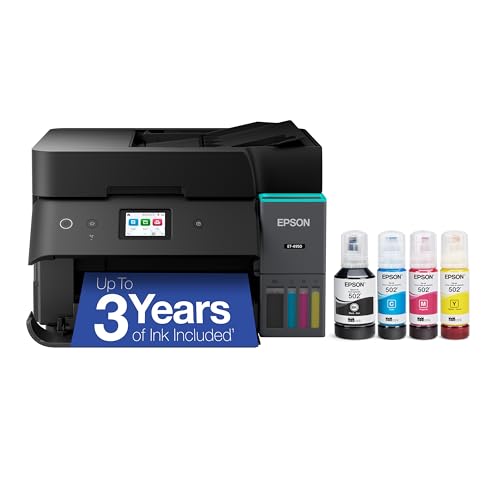
Epson EcoTank ET-4950 wireless supertank all-in-one
Cartridge-free6,600 black pages5,500 color pagesFax and ADF
Check price on Amazon
Best for: A household that prints a lot of color documents and photos on a tight running cost.

The ET-4950 replaces cartridges with refillable tanks, which is why it has the lowest cost per page of any color printer in the group. It ships with enough ink for up to 6,600 black or 5,500 color pages, and the keyed EcoFit bottles prevent a messy or incorrect fill. A four-in-one body with fax and a document feeder makes it a complete home office machine.

The tradeoff is speed and first-page time. An inkjet carriage moves across the page, so long jobs are slower than on a laser, and a unit that sits unused can suffer from dried nozzles. Compared with the WF-4930, the ET-4950 has a much cheaper per-page cost, while the WF-4930 prints faster and uses pigment ink for durability. It is the pick for a family that prints colour schoolwork and photos in bulk.

Ownership rewards regular use. Print a few pages weekly to keep nozzles clear, run a nozzle check when colors look off, and store the bottles upright. Refilling is simple, and the supersized tanks mean you only top up occasionally.

What works

  • Cartridge-free tanks with very low cost per page
  • Up to 6,600 black or 5,500 color pages of included ink
  • Keyed EcoFit bottles make refilling tidy
  • Print, scan, copy and fax with a document feeder

Watch out for

  • Slower than a laser on long jobs
  • Nozzles can dry if the printer sits unused

Spec sheet

Technology
Ink tank inkjet
Included ink
Up to 6,600 black, 5,500 color pages
Functions
Print, scan, copy, fax
Refilling
Keyed EcoFit bottles
Connectivity
Wireless and mobile
05
Epson WorkForce Pro WF-4930 heat-free business inkjet
25/12 ISO ppmHeat-free50-page ADFPigment ink
Check price on Amazon
Best for: A home business that needs fast, durable inkjet pages with a big document feeder.

The WF-4930 is a business inkjet that uses PrecisionCore heat-free technology, which pushes ink out of the printhead without heating it. That reduces wear and allows quick, accurate dot placement at 25 ISO pages per minute in black and 12 in color. DURABrite Ultra pigment ink dries instantly and resists water and fading, so documents come out ready to handle.

The cost is a higher purchase price and cartridge-based ink, so it lacks the very low running cost of a tank printer. Compared with the ET-4950, it is faster and more rugged, but it is more expensive to feed. A 50-page document feeder and automatic duplex make it comfortable for scanning and copying thick files, which is why it appeals to a home business.

In ownership terms, it is a workhorse that expects regular use. Keep the paper path clean, check the ADF limit before loading stacks and choose high-yield cartridges to reduce cost. Check your replacement ink yield rather than the starter set, which holds less.

What works

  • Heat-free printhead built for heavy workloads
  • 25 black and 12 color ISO ppm speeds
  • Instant-dry pigment ink resists water and fading
  • 50-page document feeder and automatic duplex

Watch out for

  • Cartridge ink costs more per page than a tank printer
  • Higher purchase price than basic inkjets

Spec sheet

Technology
PrecisionCore heat-free inkjet
Speed
25 black / 12 color ISO ppm
Ink
DURABrite Ultra pigment
Document feeder
50-page ADF
Duplex
Automatic 2-sided
06
HP Smart Tank 5003 wireless ink tank all-in-one
3 years of ink6,000 pagesCartridge-freeWireless
Check price on Amazon
Best for: A family that prints thousands of pages a year without wanting a cartridge bill.

The Smart Tank 5003 is built around bulk ink. It ships with up to three years of ink, rated at around 6,000 pages, and refills from bottles rather than cartridges. That arrangement is meant for low-cost, high-volume printing, and it supports borderless prints and wireless printing from a phone.

Its limitation is that it is a three-function machine with no fax and a more basic feeder arrangement than the ET-4950. Compared with the Epson tank, you get a similar philosophy at a simpler spec, and compared with a laser, you give up speed. If your printing is steady but not office-grade, it is a very economical choice.

Ownership comes down to using it. Print a few pages every week, refill carefully with the supplied bottles and read the terms of any ink program that comes with the printer. Check that the printer works without a subscription before you buy, and keep its firmware up to date.

What works

  • Up to three years of ink included
  • Bottle-fed tanks keep cost per page low
  • Borderless printing and wireless support
  • Simple three-in-one design

Watch out for

  • No fax and a simpler feeder than the ET-4950
  • Slower than a laser on long documents

Spec sheet

Technology
Ink tank inkjet
Included ink
Up to 3 years, about 6,000 pages
Functions
Print, copy, scan
Borderless
Yes
Connectivity
Wireless and mobile

Spec sheet decoder

What the numbers on the box really mean

The specs manufacturers lead with, translated into what they tell you about real-world performance.

ppm (pages per minute)

The speed of continuous printing of a simple document. First page time and duplex speed are usually slower.

Watch forThe DCP-L2640DW lists up to 36 ppm, the color laser 19 ppm, and the WF-4930 25 black and 12 color ISO ppm.

ISO page yield

The number of pages a cartridge or bottle set prints at 5 percent coverage under a standard method. It lets you compare cost per page.

Watch forThe ET-4950 lists up to 6,600 black and 5,500 color pages for its included ink.

Duty cycle

The maximum monthly page count a printer is built to handle. It is a ceiling, not a recommended workload.

Watch forLook for the recommended monthly volume for an honest number.

ADF capacity

How many sheets the automatic document feeder holds. Overfilling is a common jam cause.

Watch forThe WF-4930 has a 50-page ADF.

Pigment vs dye ink

Pigment ink resists water and fading, which suits documents. Dye ink gives vivid photo color on glossy paper.

Watch forThe WF-4930 uses DURABrite Ultra pigment ink.

Methodology

How We Evaluated These Printers for High Volume Printing

Running cost

We compared consumable type, included ink and yields for each printer. The ET-4950 includes up to 6,600 black pages, and the HP Smart Tank 5003 includes up to three years of ink. Lower cost per page scored higher for heavy users.

Speed and throughput

We looked at rated page speeds and duplex behavior. The DCP-L2640DW reaches 36 ppm and the WF-4930 reaches 25 black ISO ppm. Faster long-job output raised the scores.

Paper handling

We checked tray capacity, ADF size and duplex. The color laser has a 250-sheet tray and the WF-4930 has a 50-page ADF. Fewer refills and cleaner paths scored higher.

Print quality and durability

We considered text sharpness, smudge resistance and ink type. Laser toner and pigment ink score well for documents. Dye ink and tank printers score well for color.

Ownership

We weighed drum wear, nozzle clogging and firmware policies. Owner feedback patterns on ink programs and cartridge locks informed the scores. Simple maintenance scored higher.

Decision guide

How to Choose the Right Printers for High Volume Printing

By Type of Pages

SituationPickWhy
Long black and white reportsBrother DCP-L2640DWUp to 36 ppm and cheap toner
Color documents with sharp textBrother color laserFour-toner laser with 250-sheet tray
Color, scan, copy and faxCanon MF753Cdw IIFour-in-one color laser with ADF
Color photos and schoolworkEpson ET-4950Tank ink at a low cost per page
Fast durable inkjet pagesEpson WF-4930Heat-free printhead and pigment ink

By Budget

SituationPickWhy
Lowest running cost for blackBrother DCP-L2640DWMono laser toner
Low running cost for colorEpson ET-4950Refillable supertanks
Simple tank optionHP Smart Tank 5003Bottle ink with years included
Upper tier laserBrother color laserColor laser at a mid tier
Premium officeCanon MF753Cdw IIFour functions and ADF

Laser vs Ink Tank

Laser

The DCP-L2640DW, Brother color laser and Canon MF753Cdw II print fast and dry pages. Toner does not dry out, but drums and imaging units wear.

Ink tank

The ET-4950 and Smart Tank 5003 have the lowest color cost per page and very high bottle yields. They are slower on long jobs and need regular use.

Text-heavy offices should pick laser, and color-heavy families should pick ink tank.

Document Handling

SituationPickWhy
Scanning thick filesEpson WF-493050-page document feeder
Fax plus scan plus copyEpson ET-4950Four-in-one with ADF
Print-only colorBrother color laserSingle-function with a large tray
Compact multifunctionBrother DCP-L2640DWPrint, copy and scan

For High Volume Specifically

Look for

Look for a recommended monthly volume well above your needs, high-yield consumables and a large tray. A machine that fills and empties quickly costs time. Avoid starter cartridges.

In this comparison

The DCP-L2640DW is the strongest for pure volume with its speed and cheap toner. The ET-4950 and Smart Tank 5003 win on color volume, and the WF-4930 balances speed and color.

When to Spend More

Spend more if

Spend more if you print thousands of pages a month or need color laser speed. The Canon MF753Cdw II and WF-4930 suit that workload.

Save if

Save if you print mostly black text. The DCP-L2640DW covers it with low running cost.

Ownership

Maintenance schedule

The upkeep that decides whether this machine lasts two seasons or ten.

TaskIntervalWhy it matters
Clean the paper path and pickup rollersEvery few monthsDust and toner on rollers cause misfeeds. Wipe with a damp lint-free cloth.
Run a nozzle check on inkjetsMonthlyA check shows dried nozzles early. A cleaning cycle usually clears them.
Print a few pages weeklyWeeklyRegular use keeps ink moving through the nozzles. Idle tank printers clog faster.
Store paper flat and sealedAlwaysDamp or curled paper is the main cause of duplex jams.
Check toner and drum lifeEvery few monthsA drum is a separate wear part. Order replacements before a job fails.

FAQ

Frequently Asked Questions

Which printer is cheapest per page?

A mono laser such as the DCP-L2640DW is cheapest per black page, and an ink tank such as the ET-4950 is cheapest per color page. Check the consumable yield rather than the sticker price.

Is laser better than inkjet for heavy use?

Laser is faster for text and does not clog, but ink tank printers win on color cost. Pick by the pages you print most.

How many pages a month justifies a better printer?

Above about 200 pages a month, laser or ink tank running costs offset the higher purchase price. Below that, a basic inkjet is fine.

Will a printer lock me into an ink plan?

Some programs bundle ink and can tie the printer to the plan, and firmware updates can reject non-original cartridges. Read the terms before buying.

Why does my duplex printing jam?

Each sheet must reverse and re-enter the path, so curled or damp paper jams easily. Keep paper flat and avoid overloading the tray.

How long will these printers last?

Lasers can run many years with regular cleaning. Tank printers last well if used weekly, and the wear parts are rollers, drums and printheads.

Bottom line

The short version

Browse more printers for high volume printingon Amazon →
James Miller, Lead Machine Editor

About the author

James Miller

Lead Machine Editor, MachineFanatic

James Miller leads MachineFanatic's buying guides, turning spec sheets, manuals and owner feedback into clear verdicts on power tools, outdoor power equipment, shop machines and kitchen machines.

More from James →

Keep reading

Related guides