
Amazon affiliate links - we earn a commission.Affiliate disclosure

Buying guide · 12 min read · Updated 2026-11-07

Best Printers for Occasional Use (2026)

Six printers for people who print rarely, covering dry-toner lasers, low-cost inkjets, an ink tank and an inkless thermal printer, plus anti-clog advice.

James MillerBy James MillerLead Machine Editor6 machines comparedSpec-sheet verified
Best Printers for Occasional Use

At a glance

Our top picks

Side by side

Spec comparison

MachineTypeFunctionsBest use
Brother DCP-L2640DW Wireless Monochrome Multifunction LaserBest OverallBrother DCP-L2640DW Wireless Monochrome Multifunction LaserMonochrome laser MFPPrint, copy, scanRare black and white jobs
Canon PIXMA TS4320 Wireless Color Inkjet All-in-OneBest ValueCanon PIXMA TS4320 Wireless Color Inkjet All-in-OneCartridge inkjet MFPPrint, copy, scanLow cost color printing
Canon PIXMA TS6520 Wireless Color Inkjet All-in-OneBest Display and SetupCanon PIXMA TS6520 Wireless Color Inkjet All-in-OneCartridge inkjet MFPPrint, scan, copyLight home use
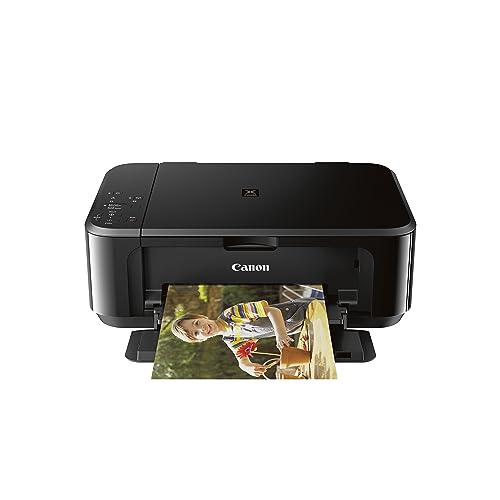
Canon PIXMA MG3620 Wireless All-in-One Color InkjetBest Budget BasicCanon PIXMA MG3620 Wireless All-in-One Color InkjetCartridge inkjet MFPPrint, copy, scanBasic home printing
HP Smart Tank Plus 651 Wireless All-in-One with ADF and Two Years of InkBest Ink TankHP Smart Tank Plus 651 Wireless All-in-One with ADF and Two Years of InkInk tank all-in-onen/aPrint more than occasionally
iDPRT MT610Pro Wireless Inkless Portable Thermal PrinterBest Inkless OptioniDPRT MT610Pro Wireless Inkless Portable Thermal PrinterPortable thermal printern/aRare mobile printing

The worst printer for someone who prints twice a month is the one that wins reviews for high volume. Liquid ink dries in the nozzles when a machine sits idle, and a printer that needs cleaning cycles before every job eats ink and patience faster than it prints pages.

For rare use, the winning traits are different: low purchase price, ink or toner that survives long gaps, a simple setup, and a small footprint. Each technology handles inactivity differently, which is why the type of printer matters more than the brand.

Before you buy

6 Criteria to Look For Before Buying a Printer for Occasional Use

  1. 01

    Technology and idle behavior

    Occasional printing is a test of how each engine handles gaps. A laser like the Brother DCP-L2640DW fuses dry toner and shrugs off months of inactivity, while cartridge inkjets such as the Canon TS4320 can dry out. A thermal printer like the iDPRT MT610Pro has no ink to dry, so pick the technology before the model.

  2. 02

    Purchase price versus running cost

    At low volume, hardware cost dominates, so a cheap inkjet such as the Canon MG3620 can be the best value. A laser has a higher price but almost no per-page cost, and an ink tank like the HP Smart Tank Plus 651 has the lowest ink cost but the highest idle risk. Estimate yearly pages before choosing.

  3. 03

    Cleaning cycles and wasted ink

    Inkjets run cleaning cycles after long gaps, which pushes ink through the nozzles and into a waste pad. For an occasional user, that waste can exceed the ink actually printed. Printing a short color page monthly reduces the need for deep cleans.

  4. 04

    Color needs

    If your printing is forms and text, a monochrome laser or thermal printer is enough. The Canon TS6520 or HP Smart Tank Plus 651 gives color for the occasional school poster or photo. Do not pay for color you will use twice a year.

  5. 05

    Setup and connectivity

    A printer you use rarely should connect easily after months asleep. Units with a display, such as the Canon TS6520, show status without an app. Ensure your phone and printer share the same Wi-Fi network, and keep the setup app handy.

  6. 06

    Size and portability

    A printer used a few times a year should not take over a desk. The iDPRT MT610Pro weighs about 1.2 pounds and tucks into a bag, while the HP Smart Tank Plus 651 needs a shelf. Choose the size that fits the space you can spare.

Detailed reviews

The 6 best printers for occasional use, explained

01
Brother DCP-L2640DW Wireless Monochrome Multifunction Laser
Mono laserDuplexScan/copyWi-Fi
Check price on Amazon
Best for: People who print black and white pages a few times a month.

The DCP-L2640DW uses a laser engine that fuses dry toner onto paper with heat, so a month or three of sitting unused does not clog or dry anything. That is the single most important trait for an occasional printer, and it is why a laser tops this list for people who print only black text.

The compromise is that it prints in black and white only and costs more up front than the cheapest inkjets here. Against the Canon TS4320, you give up color and gain a machine that wakes on the first try after a long gap. It also adds scanning and copying, which is useful for the occasional form.

Ownership is almost maintenance free. Leave it plugged in on the network, replace toner when prompted, and keep the paper in a sealed sleeve so humidity does not curl it. The toner cartridge lasts for a long time at occasional volume, so replacement is rare. Put it on a shelf where a dust cover is not needed, and update firmware once a year when you remember. When the printer wakes from sleep, the first page takes a few seconds longer than an inkjet, which is a small price for never wondering whether it will work.

What works

  • Dry toner does not clog when idle
  • Scan, copy and duplex included
  • Wi-Fi and mobile printing
  • Low running cost per page

Watch out for

  • Black and white only
  • Higher price than basic inkjets
  • Bulkier than a cheap inkjet

Spec sheet

Type
Monochrome laser MFP
Speed
Up to 36 ppm
Duplex
Automatic
Functions
Print, copy, scan
Best use
Rare black and white jobs
02
Canon PIXMA TS4320 Wireless Color Inkjet All-in-One
Color inkjet2 cartridgesWi-FiPrint/copy/scan
Check price on Amazon
Best for: Occasional color printing on a small budget.

The TS4320 is a low-cost color inkjet all-in-one with a two-cartridge system and wireless setup from a phone or computer. For someone who needs a printer once in a while, the low purchase price is the main appeal, since you do not pay for features you will not use.

The tradeoff is ink behavior. A cartridge inkjet can dry out during idle months, and the machine runs a cleaning cycle that uses ink when it wakes up, so the true cost per page is higher at low volume than the sticker suggests. Next to the Canon TS6520, it is a plainer machine with a basic display.

To keep it healthy, print a color page every month, store spare cartridges sealed and cool, and avoid leaving the printer unplugged for months, because it manages its own head maintenance only when powered. It fits a corner of a desk and prints from a phone without a computer.

What works

  • Low purchase price
  • Color print, copy and scan
  • Simple setup from a phone
  • Compact footprint

Watch out for

  • Cartridges can dry when idle
  • Cleaning cycles use ink
  • Basic display and features

Spec sheet

Type
Cartridge inkjet MFP
Cartridges
2
Functions
Print, copy, scan
Wireless
Yes
Best use
Low cost color printing
03
Canon PIXMA TS6520 Wireless Color Inkjet All-in-One
Color inkjetOLED display2 cartridgesWi-Fi
Check price on Amazon
Best for: A light household that wants a clear display and a small footprint.

The TS6520 is a compact color inkjet all-in-one with a small OLED display and a two-cartridge system. For occasional use, the display shows status and error messages without a phone app, which helps when the machine has been asleep for weeks and you need to see what it wants.

Compared with the TS4320, it is a step up in interface and finish, and the cost difference is small. It shares the same ink risk: cartridges dry if ignored, so occasional users should schedule a monthly test page.

Set it on the home network from a phone, keep a spare cartridge pair, and avoid turning off the power strip, since the printer parks the printhead properly only when it is switched off at its own button. A cleaning cycle after a long gap is normal. The two-cartridge layout, one black and one tri-color, is simple to maintain but means that running out of one color forces you to replace the whole color cartridge. Keep the printer out of direct sunlight and away from a heating vent, since heat speeds up evaporation in the nozzles and shortens the life of idle cartridges.

What works

  • Small OLED display shows status
  • Print, scan and copy
  • Compact and easy to place
  • Easy wireless setup

Watch out for

  • Cartridges dry when unused
  • Small ink capacity
  • Higher ink cost per page

Spec sheet

Type
Cartridge inkjet MFP
Display
1.42 inch OLED
Cartridges
2
Functions
Print, scan, copy
Best use
Light home use
04
Canon PIXMA MG3620 Wireless All-in-One Color Inkjet
Color inkjetMobile printing9.9 ipmWi-Fi
Check price on Amazon
Best for: Very light home use where cost is the main concern.

The MG3620 is an older, basic color inkjet with mobile and tablet printing and rated speeds of 9.9 images per minute in black and 5.7 in color. It does the standard household jobs, and its age shows in a simple control panel.

Its compromise is that it is the oldest design here, so features and support are less polished. Against the TS4320, it offers similar function with a simpler interface, and the choice often comes down to price and availability of cartridges.

Like every cartridge inkjet, it should be used monthly. Keep ink sealed, check that replacement cartridges are still stocked before buying, and consider it a stopgap printer rather than a long-term investment. If a cheaper newer model is available, take it instead. The mobile and tablet printing support is basic but works for a quick print from a phone, and the flatbed handles a single scanned page without fuss. Its age also means fewer software updates, so check that the current phone app still supports it before you rely on it for something time sensitive.

What works

  • Simple, familiar basic design
  • Wireless mobile printing
  • Print, copy and scan
  • Low purchase price

Watch out for

  • Older design
  • Basic interface
  • Cartridges dry when idle

Spec sheet

Type
Cartridge inkjet MFP
Black speed
9.9 ipm
Color speed
5.7 ipm
Functions
Print, copy, scan
Best use
Basic home printing
05
HP Smart Tank Plus 651 Wireless All-in-One with ADF and Two Years of Ink
Ink tankADFWi-Fi2 yrs ink
Check price on Amazon
Best for: People whose printing comes in bursts and who want color at low ink cost.

The Smart Tank Plus 651 is an ink tank all-in-one with an automatic document feeder, and it ships with up to two years of ink at typical use. The ink is stored in large tanks rather than small cartridges, which keeps running cost low.

It is not an ideal pure occasional printer because liquid ink can still dry, and a printhead that sits unused for months can clog. It makes sense if your printing is irregular but sometimes heavy, such as a busy month followed by a quiet quarter.

To keep it ready, print a page monthly and avoid moving the printer with full tanks tilted. The feeder helps when you scan a form stack, and the bundled ink removes the first-year refill chore. Compared with the Brother laser, it gains color and loses the idle forgiveness.

What works

  • Up to two years of ink in the box
  • Low cost per page
  • Auto document feeder
  • Color and black in one machine

Watch out for

  • Liquid ink can clog when idle
  • Bigger body than a basic inkjet
  • HP account setup required

Spec sheet

Type
Ink tank all-in-one
Ink in box
Up to 2 years
Feeder
Auto document feeder
Wireless
Yes
Best use
Print more than occasionally
06
iDPRT MT610Pro Wireless Inkless Portable Thermal Printer
Thermal1.2 lb300 dpiBluetooth
Check price on Amazon
Best for: Travelers and rare printers who want no ink at all.

The MT610Pro is a portable thermal printer that uses heat on special paper instead of ink or toner, so there is nothing to dry out and nothing to replace but paper. It weighs about 1.2 pounds, supports letter and A4 sheets at 300 dpi and connects by Bluetooth to a phone, tablet or laptop.

It prints in black only and on thermal paper, so it is a poor fit for photos or long-term archives, because thermal prints fade with heat and time. For boarding passes, forms, receipts and quick documents, it is a smart answer for someone who prints rarely and travels.

Store the paper in a cool, dark place, keep a spare roll or stack, and wipe the thermal head if lines appear. It will not replace a household printer for copying or scanning, but it solves the problem of being unable to print when you need to.

What works

  • No ink or toner to dry out
  • About 1.2 pounds and portable
  • Bluetooth for phone and laptop
  • 300 dpi for readable text

Watch out for

  • Black only on thermal paper
  • Prints fade with heat and time
  • No scan or copy

Spec sheet

Type
Portable thermal printer
Weight
1.2 lb
Resolution
300 dpi
Paper
Letter and A4 thermal
Best use
Rare mobile printing

Spec sheet decoder

What the numbers on the box really mean

The specs manufacturers lead with, translated into what they tell you about real-world performance.

Laser versus inkjet

Lasers fuse dry toner with heat and tolerate idle time. Inkjets spray liquid ink that can dry in the nozzles.

Watch forThe Brother DCP-L2640DW is a laser, and the Canon TS4320 and MG3620 are inkjets.

Thermal printing

Heat darkens special paper so no ink or toner is needed. The print is single color and fades over time.

Watch forThe iDPRT MT610Pro uses thermal paper.

Ink tank

Large refillable reservoirs instead of small cartridges, giving very low cost per page.

Watch forThe HP Smart Tank Plus 651 ships with up to two years of ink.

Images per minute (ipm)

A Canon speed rating for inkjets, measured with standard test pages. Real speeds are lower.

Watch forThe MG3620 lists 9.9 ipm in black and 5.7 in color.

300 dpi

Dots per inch, a measure of detail. It is sharp enough for text and forms.

Watch forThe iDPRT MT610Pro prints at 300 dpi.

Methodology

How We Evaluated These Printers for Occasional Use

Idle tolerance

We evaluated how each technology copes with weeks or months of inactivity. The Brother laser and thermal printer scored highest, and cartridge inkjets scored lowest. This follows engine type and owner feedback patterns about clogged heads.

Purchase price

We weighed entry cost, since low volume makes hardware the main expense. The Canon TS4320 and MG3620 scored well, and the laser scored lower. We ranked price against idle risk.

Running cost

We compared cost per page at occasional volume, noting waste from cleaning cycles. Lasers and thermal paper stayed low, and inkjets rose. The HP Smart Tank Plus 651 led on ink cost if used regularly.

Ease of setup

We considered how easily each machine reconnects after months asleep. Units with displays and clear apps scored higher. Simple wireless setup was assumed on all models.

Size and weight

We compared footprint, since occasional printers should not dominate a desk. The iDPRT MT610Pro at about 1.2 pounds scored best, and the tank printer scored lowest.

Decision guide

How to Choose the Right Printers for Occasional Use

By How Often You Print

SituationPickWhy
A few pages a month, black textBrother DCP-L2640DWDry toner survives gaps
Monthly color pagesCanon PIXMA TS4320Low cost color
Bursts then long gapsHP Smart Tank Plus 651Ink bundle and feeder
Travel and rare formsiDPRT MT610ProNo ink at all
Light basic printingCanon PIXMA MG3620Lowest cost basic

By Budget

TierPickWhy
LowestCanon PIXMA MG3620Basic inkjet
LowCanon PIXMA TS4320Newer inkjet
Lower middleCanon PIXMA TS6520Display and finish
MiddleiDPRT MT610ProInkless portable
Upper middleBrother DCP-L2640DWLaser multifunction
HighestHP Smart Tank Plus 651Tank with ADF

Laser vs Inkjet

Laser

The Brother DCP-L2640DW tolerates idle months and prints sharp text, with no color. It is the safest choice for rare black and white jobs.

Inkjet

The Canon TS4320, TS6520 and MG3620 add color at a low price. They can dry out, so print a page monthly.

Rare black text goes to a laser, and occasional color goes to an inkjet.

Home vs Travel

PreferencePickWhy
Fixed home printerBrother DCP-L2640DWDuplex and scanning
Home colorCanon PIXMA TS6520Display and Wi-Fi
Home with document feederHP Smart Tank Plus 651ADF scanning
TraveliDPRT MT610ProAbout 1.2 pounds

For Rare Forms Specifically

Look for

Look for a machine that wakes reliably after months and prints readable text. Laser toner and thermal paper are the least fussy options.

In this comparison

The Brother DCP-L2640DW is the most dependable, and the iDPRT MT610Pro is the most portable. Either avoids the clog risk of liquid ink.

When to Spend More

Spend more if

Step up if you want reliability after long gaps, which points to the Brother DCP-L2640DW, or if you print in bursts, which suits the HP Smart Tank Plus 651.

Save if

Save if you print a few pages a year, where the Canon MG3620 or TS4320 is enough.

Ownership

Maintenance schedule

The upkeep that decides whether this machine lasts two seasons or ten.

TaskIntervalWhy it matters
Print a color pageEvery month on inkjetsA short print keeps nozzles open and avoids deep cleaning cycles that waste ink.
Keep the printer poweredAlwaysInkjets manage head care when powered. Unplugging for months lets nozzles dry.
Store spare ink sealedAlwaysCartridges dry in open air and heat. Keep them in their sealed packs in a cool cupboard.
Store paper flat and sealedAlwaysHumidity curls paper and causes jams after a long idle spell.
Wipe the thermal headEvery few rollsResidue causes streaks on thermal prints. A lint-free swab with isopropyl alcohol restores clean lines.

FAQ

Frequently Asked Questions

What printer is best if I print once a month?

A laser such as the Brother DCP-L2640DW is the most reliable, since dry toner does not clog. If you need color, a cartridge inkjet like the Canon TS4320 works with a monthly test page.

Do inkjets really dry out?

Yes. Liquid ink thickens in the nozzles after weeks unused, and cleaning cycles waste ink. Printing a short page monthly prevents most problems.

Is an ink tank good for occasional use?

It has the lowest ink cost but still uses liquid ink. The HP Smart Tank Plus 651 suits bursty printing better than a once-a-quarter schedule.

Are thermal printers worth it?

For rare, black text jobs, yes. The iDPRT MT610Pro needs no ink, but prints fade with heat and time and need thermal paper.

Should I buy the cheapest printer?

Not always. A cheap inkjet can cost more in wasted ink than a laser costs to buy, so weigh idle behavior as well as price. Add up the ink you would waste on cleaning cycles and the cartridges you would replace unused, and the apparently cheap machine often loses to a laser within two years.

How do I wake a printer after months?

Power it on, run the built-in cleaning or nozzle check, and print a test page. Replace cartridges that have expired or dried. If the nozzle check still shows gaps after two cleaning cycles, stop cleaning, because each cycle burns ink, and let the printer rest for a day before trying a third time. A laser or thermal machine skips this routine entirely, which is why they suit people who truly forget the printer exists.

Bottom line

The short version

Browse more printers for occasional useon Amazon →
James Miller, Lead Machine Editor

About the author

James Miller

Lead Machine Editor, MachineFanatic

James Miller leads MachineFanatic's buying guides, turning spec sheets, manuals and owner feedback into clear verdicts on power tools, outdoor power equipment, shop machines and kitchen machines.

More from James →

Keep reading

Related guides