
Amazon affiliate links - we earn a commission.Affiliate disclosure

Buying guide · 13 min read · Updated 2026-11-19

Best Printers That Don't Jam (2026)

No printer is jam-proof, but six models with simple paper paths and big trays jam less. Compare laser, tank and inkjet picks and the habits that matter.

James MillerBy James MillerLead Machine Editor6 machines comparedSpec-sheet verified
Best Printers That Don't Jam

At a glance

Our top picks

Side by side

Spec comparison

MachineTypeSpeedDuplexFunctionsWireless
Brother DCP-L2640DW Duplex Mono Laser All-in-OneBest OverallBrother DCP-L2640DW Duplex Mono Laser All-in-OneMonochrome laser multifunctionUp to 36 pages per minuteAutomatic two-sidedPrint, scan, copyWi-Fi with mobile printing
Brother Wireless Duplex Color Laser Printer, 19 ppmBest Color Laser TrayBrother Wireless Duplex Color Laser Printer, 19 ppmColor laser, print onlyUp to 19 pages per minuteAutomatic two-sidedn/aWi-Fi with mobile printing
Brother INKvestment 5010 Wireless Duplex All-in-OneBest Feeder DesignBrother INKvestment 5010 Wireless Duplex All-in-OneColor inkjet all-in-one with tank systemn/aAutomatic print, copy and scann/an/a
Epson EcoTank ET-4800 Wireless Supertank All-in-OneBest Tank for Plain PaperEpson EcoTank ET-4800 Wireless Supertank All-in-OneInk tank multifunction15.5 black / 8.5 color ppmn/aPrint, scan, copy, faxn/a
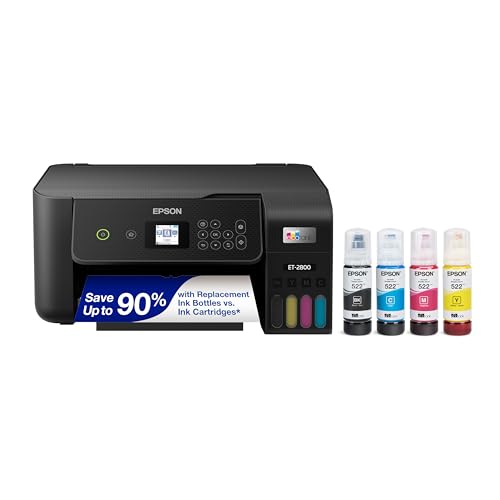
Epson EcoTank ET-2800 Wireless Ink Tank All-in-OneBest ValueEpson EcoTank ET-2800 Wireless Ink Tank All-in-OneRefillable ink tank all-in-onen/an/aPrint, scan, copyWi-Fi
Canon PIXMA TR4720 4-in-1 Wireless Inkjet with ADFBest Cartridge InkjetCanon PIXMA TR4720 4-in-1 Wireless Inkjet with ADFCartridge inkjet multifunctionn/an/aPrint, copy, scan, faxn/a

No printer is jam-proof, and any guide that promises one is selling something. What a buyer can control is the design of the paper path, the size of the tray, the way the machine handles two-sided pages and, most important, the paper and habits that go into it.

Jams cluster around a few causes: curled or damp paper, overfilled trays, worn pickup rollers and special media forced through a path built for plain sheets. The picks below were chosen for features that reduce those risks, not for a claim no maker can honestly make.

Before you buy

6 Criteria to Look For Before Buying a Printer That Don't Jam

  1. 01

    Paper path length and turns

    Every turn in the path is a chance for a sheet to catch. A laser like the Brother DCP-L2640DW has a short, mostly straight path, while a printer with a feeder and a duplex unit adds more turns. Fewer turns means fewer jam chances.

  2. 02

    Tray size and overfilling

    The most common home jam cause is a stuffed tray. A 250-sheet tray, as on the Brother color laser and INKvestment 5010, lets you load a ream without crowding the guides. A small tray invites overfilling.

  3. 03

    Duplex design

    Duplex sends the sheet through a second pass, and that reversal is where many jams happen. The Brother DCP-L2640DW and INKvestment 5010 have it, while the Epson ET-2800 and Canon TR4720 do not. If you rarely print two-sided, skipping duplex removes a jam path.

  4. 04

    Paper quality and storage

    Damp, curled or cheap thin paper causes more jams than any mechanical fault. Store reams sealed and flat, and fan them before loading. Match the paper weight to the printer's stated range.

  5. 05

    Special media

    Labels, glossy photo paper and envelopes can jam on a path built for plain paper. Use the rear or manual slot when the printer offers one and check the printer's limits. Printing labels through a duplex path is asking for trouble.

  6. 06

    Feeder condition

    A scanner feeder jams on curled, stapled or creased originals. The Brother INKvestment 5010 and Canon TR4720 have feeders, while the Epson ET-2800 uses a flatbed only. If you rarely scan stacks, a flatbed removes the problem.

Detailed reviews

The 6 best printers that don't jam, explained

01
Brother DCP-L2640DW Duplex Mono Laser All-in-One
Mono laser36 ppmAuto duplexPrint scan copy
Check price on Amazon
Best for: Anyone who wants the simplest, most forgiving paper path.

A laser draws paper through a short, fixed path: pickup roller, drum, fuser and out. With few turns and no wet ink to smear, there are fewer places for a sheet to stall, and the Brother DCP-L2640DW is the cleanest example in this lineup. Rated at up to 36 pages per minute with automatic duplex, it also handles two-sided jobs through a defined reversing channel.

One limit to weigh is that duplex is a second trip through the machine, and that is where many jams happen on any printer. Use fresh flat paper in the stated weight range and the risk falls. The scanner is a flatbed rather than a feeder, so it avoids feeder jams entirely, but it is slower for stacks.

Ownership favors prevention. Keep paper in its wrapper until you load it, do not overfill the tray and clean the pickup rollers with a damp lint-free cloth twice a year. A jam on this class of machine is almost always a paper or tray problem rather than a mechanical one, which makes it a forgiving machine to own. If a jam does happen, the rear and front covers open wide enough to reach the path, so clearing it takes a minute rather than a service call.

What works

  • Short laser paper path with few turns
  • Automatic duplex with a defined reversing channel
  • Flatbed scanner avoids feeder jams
  • Toner path has no wet ink to smear

Watch out for

  • Black and white only
  • Duplex still adds a second pass that can jam
  • Flatbed is slow for stack scanning

Spec sheet

Type
Monochrome laser multifunction
Speed
Up to 36 pages per minute
Duplex
Automatic two-sided
Functions
Print, scan, copy
Wireless
Wi-Fi with mobile printing
02
Brother Wireless Duplex Color Laser Printer, 19 ppm
Color laser250-sheet trayAuto duplex19 ppm
Check price on Amazon
Best for: Offices that want color with a large tray and a laser path.

This Brother color laser pairs the laser's short paper path with a 250-sheet tray, which cuts the single most common jam cause: overfilling a small tray and mashing the stack. A bigger tray lets you load a ream without crowding the edge guides.

The main concession is that color lasers carry more parts than mono machines, including a belt and four toner stages, and a duplex unit adds a second pass. The 19 pages per minute rating is relaxed, which is gentle on paper but slow for long jobs. It is a print-only model, so scanner jams are out of the picture.

Ownership centers on tray discipline. Keep the guides snug against the stack, fan the ream before loading and store paper flat. Replace worn rollers when the pickup starts to double-feed rather than fighting it with settings, and choose high-yield toner so the printer is not repeatedly opened for cartridge swaps.

What works

  • 250-sheet tray avoids overfilling
  • Laser paper path with few turns
  • Automatic duplex built in
  • Print-only body has no scanner jams

Watch out for

  • Color lasers have more internal parts than mono
  • 19 pages per minute is slow for long jobs
  • Higher tier than inkjets

Spec sheet

Type
Color laser, print only
Input tray
250 sheets
Duplex
Automatic two-sided
Speed
Up to 19 pages per minute
Wireless
Wi-Fi with mobile printing
03
Brother INKvestment 5010 Wireless Duplex All-in-One
Inkjet250-sheet tray50-page duplex ADFPerfectPrint
Check price on Amazon
Best for: Offices that scan stacks and want a feeder built for volume.

Brother's INKvestment 5010 has a 250-sheet tray and a 50-page single-pass duplex feeder, and the listing highlights its PerfectPrint Auto Detection System as a way to help ensure reliable output. A single-pass duplex scanner reads both sides in one trip, avoiding the flip-and-rescan routine that makes feeder jams common.

The tradeoff is complexity. It has more rollers and a longer path than a basic laser, and a stack of curled originals in the feeder can still jam. It is the biggest and priciest machine here, and the Brother DCP-L2640DW's simpler path is the safer choice for plain printing.

Ownership is the inkjet routine plus feeder care. Load originals flat and unstapled, wipe the feeder rollers every few months and print weekly to keep the head wet. Use the paper settings that match your stock, and let the detection system warn you before a job fails.

What works

  • 50-page single-pass duplex feeder
  • 250-sheet tray reduces overfilling
  • Auto detection aimed at reliable output
  • Tank-style ink lowers cost per page

Watch out for

  • Longest and most complex paper path here
  • Largest body and highest tier
  • Feeder jams if originals are curled or stapled

Spec sheet

Type
Color inkjet all-in-one with tank system
Input tray
250 sheets
Feeder
50-page single-pass duplex ADF
Duplex
Automatic print, copy and scan
Feature
PerfectPrint Auto Detection
04
Epson EcoTank ET-4800 Wireless Supertank All-in-One
Ink tank15.5 ppm black8.5 ppm color4800x1200
Check price on Amazon
Best for: Households printing plain documents at a relaxed pace.

Epson's ET-4800 prints at a relaxed 15.5 pages per minute in black and 8.5 in color, and a slower pace is gentle on paper because the sheet is not yanked through the path. It uses a heat-free Micro Piezo head, and the listing stresses the cartridge-free tank design that avoids the small-cartridge swaps where mishandling can occur.

The price of this design is that wet ink and plain paper are a pairing that can curl sheets in humid rooms, and curl is a jam cause. Pigment black ink dries quickly, but heavy color coverage can warp thin paper. It also carries a feeder for scanning, which adds a path that can jam on creased originals.

Ownership rewards a dry, flat paper stash and weekly printing. Use paper of the stated weight, avoid heavy ink coverage on thin stock and keep the paper tray guides snug. Since the machine prints slowly, give it time and never pull a sheet against the feed direction. If you print on thin stock, switch to a heavier plain paper so ink does not warp it, and run a nozzle check when streaks appear.

What works

  • Relaxed speed is gentle on the sheet
  • Cartridge-free tanks avoid swap handling
  • Heat-free head built for reliability
  • Scan, copy and fax included

Watch out for

  • Heavy color on thin paper can curl sheets
  • Slow at 8.5 pages per minute in color
  • Feeder adds a scanning path that can jam

Spec sheet

Type
Ink tank multifunction
Speed
15.5 black / 8.5 color ppm
Resolution
4800 x 1200
Functions
Print, scan, copy, fax
Head
Micro Piezo heat-free
05
Epson EcoTank ET-2800 Wireless Ink Tank All-in-One
Ink tankWi-FiPrint scan copyCompact
Check price on Amazon
Best for: Households that want the fewest moving parts at a low tier.

The ET-2800 is the simplest machine in this guide: a small tank printer with a flatbed scanner and no feeder, which removes the feeder as a jam source. The paper path is short and the tank design uses no tiny cartridges to seat.

Be aware that it has no duplex in the listing, so there is no reversing channel to fail. It also has a small tray, which makes overfilling tempting. Against the Brother DCP-L2640DW, it is slower but equally uncomplicated.

Ownership is about restraint: do not overload the tray, store paper flat and print weekly. The compact body sits easily on a desk, and the front tank window shows ink levels without a menu. For a family that wants the fewest moving parts at a low tier, this is a sound pick. If you ever need to scan a stack, take it to a feeder-equipped machine rather than forcing the flatbed to do the job, and keep a small stock of good paper beside the printer.

What works

  • No feeder, no duplex means fewer jam paths
  • Short paper path in a compact body
  • Cartridge-free tank design
  • Front window shows ink level

Watch out for

  • No duplex or feeder in the listing
  • Small tray invites overfilling
  • Slower than a laser

Spec sheet

Type
Refillable ink tank all-in-one
Functions
Print, scan, copy
Wireless
Wi-Fi
Refill
Cartridge-free bottles
Class
Entry EcoTank
06
Canon PIXMA TR4720 4-in-1 Wireless Inkjet with ADF
Inkjet4-in-1FeederWi-Fi
Check price on Amazon
Best for: Home users who want a feeder without duplex complexity.

Canon's TR4720 is a compact inkjet with a feeder and easy cartridge installation, a design that keeps the print path simple. It has no automatic duplex in the listing, so two-sided printing is manual, but a manual flip happens outside the machine where you can see the sheet.

The catch is that cartridge inkjets have more consumable handling and a head that needs steady use. A dried head causes poor prints, not usually jams, but wet-ink curl on thin paper can. The feeder is the one path to watch, and it can jam if originals are creased.

Ownership favors tidy habits. Use the feeder only with flat originals, print weekly and keep paper stored sealed. For a home user who wants a modest machine with a feeder and no duplex complexity, it is a reasonable middle path. Straighten any curled original under a book before loading it, and never staple pages that will go through the feeder.

What works

  • No duplex unit means one less jam path
  • Feeder for stack scanning
  • Easy cartridge installation
  • Low standby power draw

Watch out for

  • Feeder can jam on creased originals
  • Manual duplex only
  • Cartridge ink adds running cost

Spec sheet

Type
Cartridge inkjet multifunction
Functions
Print, copy, scan, fax
Feeder
Automatic document feeder
Power
0.8 W standby
Setup
Canon PRINT app

Spec sheet decoder

What the numbers on the box really mean

The specs manufacturers lead with, translated into what they tell you about real-world performance.

Input tray sheets

Tray capacity is the number of sheets loaded at once. Bigger trays allow looser, safer loading.

Watch forThe Brother color laser and INKvestment 5010 list 250 sheets.

Single-pass duplex ADF

The feeder scans both sides in one trip, avoiding the flip that causes feeder jams.

Watch forThe Brother INKvestment 5010 lists a 50-page single-pass duplex feeder.

Pages per minute

A slower speed is gentler on the sheet. Speed matters little for jams in itself.

Watch forThe Epson ET-4800 lists 15.5 black and 8.5 color, the Brother DCP-L2640DW lists up to 36.

Duplex

Automatic duplex reverses the sheet inside the printer. Manual duplex does it outside.

Watch forThe Brother DCP-L2640DW has automatic duplex, the Canon TR4720 does not.

Auto detection

Some printers sense paper type or problems before a job fails. The benefit depends on the implementation.

Watch forThe Brother INKvestment 5010 lists PerfectPrint Auto Detection.

Methodology

How We Evaluated These Printers That Don't Jam

Paper path design

We considered path length, turns and the presence of a duplex unit or feeder. The Brother DCP-L2640DW's short laser path scored well. Models with more parts were judged on their safeguards.

Tray and handling

We looked at tray size, from the 250-sheet Brother models to smaller entry trays. Overfilling is the top cause of jams, so big trays earned credit. Guides and fit were noted.

Duplex and feeder risk

We separated automatic duplex from manual and flagged feeder paths. The Epson ET-2800's lack of both counted as fewer jam paths. Scanning needs were weighed.

Media tolerance

We checked what each machine says about special media and paper weight. Plain paper in range is safe, while labels and gloss need care. Wet-ink curl was flagged for inkjets.

Ownership habits

We weighed how much prevention each machine asks of the owner, from roller cleaning to weekly printing. Honest advice beats a no-jam claim. The Brother DCP-L2640DW asks the least.

Decision guide

How to Choose the Right Printers That Don't Jam

By Jam Cause

SituationPickWhy
Overfilled traysBrother Color Laser 19 ppm250-sheet tray gives room
Duplex re-feed jamsEpson EcoTank ET-2800No duplex unit to fail
Feeder jams on stacksBrother INKvestment 5010Single-pass duplex feeder
Wet ink curling paperBrother DCP-L2640DWToner path stays dry
Plain paper at slow paceEpson EcoTank ET-4800Relaxed 15.5 ppm speed
Manual duplex, simple feederCanon PIXMA TR4720No duplex unit, easy cartridges

By Budget

TierPickWhy
Lowest tierEpson EcoTank ET-2800Simplest path at a low price
Low tierCanon PIXMA TR4720Feeder without duplex
Lower mid tierEpson EcoTank ET-4800Tank with a feeder and fax
Mid tierBrother DCP-L2640DWLaser with duplex
Upper tierBrother INKvestment 5010Single-pass duplex feeder
Top tierBrother Color Laser 19 ppmColor laser with a big tray

Laser vs Inkjet for Jams

Laser

A laser's dry toner and short path reduce curl and smear, so the Brother DCP-L2640DW and color laser handle plain paper reliably. Their fusers add heat, and a stray label can melt inside.

Inkjet or tank

An inkjet path is gentle but wet ink can curl thin paper. The Epson ET-2800 and ET-4800 run cooler, but humid rooms and heavy coverage cause curl.

Pick a laser if your jams come from curl and humidity; pick a tank if you want a cool, gentle path.

Feeder vs Flatbed

PreferencePickWhy
Feeder for stacksBrother INKvestment 501050-page duplex feeder
Feeder, simpleCanon PIXMA TR4720Basic automatic feeder
Flatbed onlyEpson EcoTank ET-2800No feeder to jam
Flatbed laserBrother DCP-L2640DWSimple scan and copy

For Fixing the Cause Specifically

Look for

Look for the real cause before buying. Curled paper, a stuffed tray and worn rollers cause most jams, and a new printer does not fix them.

In this comparison

The Brother DCP-L2640DW suits those who want fewer failure points. The Brother color laser suits those whose problem is tray size.

When to Spend More

Spend more if

Spend more if you scan stacks daily, where the Brother INKvestment 5010 earns its tier, or if you want color with a large tray.

Save if

Save if you print plain pages and scan occasionally, where the Epson ET-2800 or Canon TR4720 is enough.

Ownership

Maintenance schedule

The upkeep that decides whether this machine lasts two seasons or ten.

TaskIntervalWhy it matters
Store paper flat and sealedAlwaysDamp or curled sheets cause most jams. Keep the ream in its wrapper.
Fan the ream before loadingEvery loadSeparating sheets stops two from feeding together. Do not overfill.
Clean pickup rollersEvery six monthsGlazed rubber slips and misfeeds. Wipe with a damp lint-free cloth.
Clear jams along the feed pathWhen they occurPulling against the feed damages rollers. Open the covers and pull gently with the path.
Keep guides snugEvery loadLoose guides let paper skew. Press them lightly against the stack.

FAQ

Frequently Asked Questions

Is there a printer that never jams?

No. Any machine can jam on damp paper, an overfilled tray or special media. A simple path and a big tray reduce the risk, but habits matter most.

Do lasers jam less than inkjets?

Often, because toner is dry and the path is short, but heat and special media bring their own risks. Both can jam on bad paper.

Why does my printer jam on duplex?

The sheet must reverse and re-enter, and curled, damp or heavy paper fails at that step. Print heavy or glossy media single-sided, and if a particular document keeps jamming, lower the ink coverage or print it as separate single-sided jobs. Keep the duplex path clean by clearing every scrap of torn paper after a jam.

Does paper quality matter?

Yes. Cheap thin paper and paper stored in a humid room curl and cause jams. Use paper in the stated weight and keep it sealed.

How often should I clean the rollers?

About every six months, or sooner if the printer starts double-feeding. Use a damp lint-free cloth and let the rollers dry.

Will a bigger tray reduce jams?

It helps, because you can load without cramming the stack against the guides. Overfilling is a common cause of jams.

Bottom line

The short version

Browse more printers that don't jamon Amazon →
James Miller, Lead Machine Editor

About the author

James Miller

Lead Machine Editor, MachineFanatic

James Miller leads MachineFanatic's buying guides, turning spec sheets, manuals and owner feedback into clear verdicts on power tools, outdoor power equipment, shop machines and kitchen machines.

More from James →

Keep reading

Related guides