
Amazon affiliate links - we earn a commission.Affiliate disclosure

Buying guide · 12 min read · Updated 2026-11-19

Best Printers Under $200 (2026)

Five printers under $200 compared on ink tank economics, document feeders, duplex and office features, showing what the extra budget buys over a cheap inkjet.

James MillerBy James MillerLead Machine Editor5 machines comparedSpec-sheet verified
Best Printers Under $200

At a glance

Our top picks

Side by side

Spec comparison

MachineTypeFunctionsDuplexFeeder
Canon MegaTank G3270 Wireless Ink Tank All-in-OneBest OverallCanon MegaTank G3270 Wireless Ink Tank All-in-OneRefillable ink tank all-in-onePrint, copy, scann/an/a
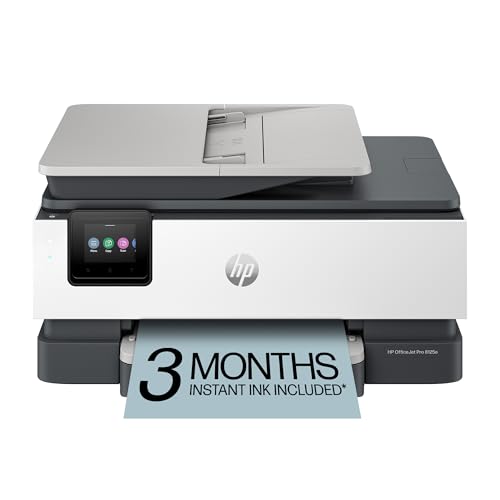
HP OfficeJet Pro 8125e Wireless Duplex All-in-One InkjetBest Office InkjetHP OfficeJet Pro 8125e Wireless Duplex All-in-One InkjetColor inkjet all-in-onen/aAutomatic two-sidedAutomatic document feeder
HP OfficeJet Pro 8135 Wireless Duplex All-in-One with FaxBest With FaxHP OfficeJet Pro 8135 Wireless Duplex All-in-One with FaxColor inkjet all-in-onePrint, scan, copy, faxAutomatic two-sidedAutomatic document feeder
HP Smart Tank 5003 Wireless Ink Tank All-in-OneBest HP TankHP Smart Tank 5003 Wireless Ink Tank All-in-OneRefillable ink tank all-in-onePrint, copy, scann/an/a
Brother Work Smart 1360 Wireless Duplex InkjetBest Brother OptionBrother Work Smart 1360 Wireless Duplex InkjetCartridge inkjet multifunctionPrint, scan, copyAutomatic two-sided20-sheet automatic feeder

Doubling the budget past the entry level changes what a printer can be. The spending buys different engineering: refillable ink tanks, office-grade paper handling and feeders that scan a stack unattended, none of which appear in the cheapest machines.

The question is which of those upgrades pays you back. A tank rewards steady color printing, a feeder rewards document work and duplex rewards anyone with long papers. The five picks below were at or under the cap at their listing price when updated, and listing prices move.

Before you buy

6 Criteria to Look For Before Buying a Printer Under $200

  1. 01

    What the extra budget buys

    Past the entry level, money buys three things: tank economics, office paper handling and a longer ink supply. The Canon MegaTank G3270 and HP Smart Tank 5003 spend it on ink, while the HP OfficeJet Pro 8125e spends it on a feeder and duplex. Pick the upgrade that matches how you print. If most of your pages are color school projects and photos, the tank wins. If most of your pages are contracts, forms and scans, the office features win. Buyers who pick on box price alone usually end up paying more in ink within two years.

  2. 02

    Ink supply and cost per page

    A tank ships with up to two or three years of ink, as on the Canon G3270 and HP Smart Tank 5003, while cartridge printers like the HP OfficeJet Pro 8125e use small cartridges that run out sooner. Over three years a tank can cost a fraction of a cartridge model. Check the replacement bottle price and yield on the listing rather than assuming it is cheap, and compare it to the cartridge price divided by its page yield.

  3. 03

    Feeder and duplex

    A feeder scans a stack unattended and duplex halves paper. The HP OfficeJet Pro 8125e and 8135 have both, and the Brother Work Smart 1360 offers duplex with a 20-sheet feeder. The tanks here have neither.

  4. 04

    Fax need

    Fax is a niche need, handled by the HP OfficeJet Pro 8135 in this lineup. Most households can skip it and take the 8125e. Fax also needs a phone line or adapter.

  5. 05

    Idle behavior

    Tanks and inkjets can clog if left unused. A weekly page keeps the head wet on the Canon G3270 and HP models. If you print only a few times a year, a laser is a better tool.

  6. 06

    Cap and live price

    Each pick was at or under the cap at its listing price when this guide was updated, and prices move. Check the live listing, because a model can drift above the cap during a busy sales season.

Detailed reviews

The 5 best printers under $200, explained

01
Canon MegaTank G3270 Wireless Ink Tank All-in-One
Ink tank6,000 B / 7,700 C2 years of inkWi-Fi
Check price on Amazon
Best for: Households that print weekly and want the lowest ink cost.

Under this cap, a refillable ink tank is the smartest upgrade, and Canon's G3270 is the model that proves it. It lists up to 6,000 black and 7,700 color pages from one ink set and up to two years of ink in the box, which moves the cost of printing from cartridges to bottles that cost far less per page.

The drawback is the office feature set. There is no feeder, no fax and no automatic duplex in the listing, so it handles a family or a student better than an office. It is also slower than a laser, and the tanks add bulk.

Ownership means printing a page every week or two so the nozzles stay wet and refilling carefully from the bottle. The reward is a printer that rarely asks for ink. For a home that prints color regularly, this is where the extra budget does the most good. Fill the tanks slowly from the keyed bottle spout and wipe any drip at once, because dye ink stains fingers and countertops. The front-facing tank window shows ink levels at a glance, so you can top up before a deadline rather than during it.

What works

  • Up to 7,700 color pages from one ink set
  • Up to two years of ink in the box
  • Refill bottles cost far less than cartridges
  • Print, scan and copy included

Watch out for

  • No feeder, fax or duplex in the listing
  • Slower than a laser or office inkjet
  • Needs weekly use to avoid clogs

Spec sheet

Type
Refillable ink tank all-in-one
Ink yield
Up to 6,000 black / 7,700 color pages
Ink in box
Up to two years of ink
Functions
Print, copy, scan
Wireless
Wi-Fi with mobile printing
02
HP OfficeJet Pro 8125e Wireless Duplex All-in-One Inkjet
InkjetAuto duplexADF225-sheet tray
Check price on Amazon
Best for: Home offices that scan stacks and print two-sided color documents.

The 8125e is what a cap near this level buys in office features: automatic duplex, an automatic document feeder and a 225-sheet input tray in one body. HP's app adds AI formatting that trims web pages and emails so you do not waste sheets on footers.

The downside is ink cost and the HP account. Cartridge ink costs more per page than the Canon G3270's tank, and Instant Ink bills by page count after a trial, so read the terms. It also uses HP's app for setup, which some buyers dislike.

Ownership rewards steady use. Print weekly, keep a spare cartridge set and use plain paper for duplex. For a home office that copies and scans stacks and prints color documents, the feeder and duplex are the reason to pay this much. Load plain paper in the stated weight range for two-sided jobs, because glossy or heavy sheets can jam on the second pass. Keep the feeder rollers wiped every few months so multi-page scans stay straight, and fan the ream before loading to separate clinging sheets. It is the practical choice for someone who treats the printer as office equipment.

What works

  • Duplex, feeder and 225-sheet tray together
  • AI formatting trims wasted pages
  • Color printing for charts and handouts
  • App-based setup and remote printing

Watch out for

  • Cartridge ink costs more per page than a tank
  • Setup leans on an HP account
  • Instant Ink subscription needs reading

Spec sheet

Type
Color inkjet all-in-one
Duplex
Automatic two-sided
Feeder
Automatic document feeder
Input tray
225 sheets
App
HP app with AI formatting
03
HP OfficeJet Pro 8135 Wireless Duplex All-in-One with Fax
InkjetFaxAuto duplexADF
Check price on Amazon
Best for: Small offices that still send and receive faxed forms.

The 8135 is the OfficeJet Pro 8125e with a fax function added, which suits a small office that still receives faxed forms. It keeps the feeder, automatic duplex and 225-sheet tray, and adds a Wi-Fi app for phone printing.

The tradeoff is paying for fax that most households never use. Against the 8125e, the difference is that one extra function, so only choose this model if a real workflow needs fax. It is still a cartridge inkjet, so ink cost per page is above a tank.

Ownership is the same: weekly printing, a spare cartridge set and firmware updates through the app. A fax line adds a one-time setup chore, so plan for a phone cable or an analog adapter. Test a fax to yourself from a friend or a service before you rely on it for a deadline. If you do not fax, take the 8125e instead. Check the voicemail and answering settings if the line is shared, because fax reception can clash with a phone on the same line. Treat the fax board as insurance for the day a lender or clinic insists on it.

What works

  • Fax added to a feeder and duplex body
  • 225-sheet tray handles long runs
  • Phone printing through the HP app
  • Color printing for office handouts

Watch out for

  • Fax function is wasted without a phone line
  • Cartridge ink costs more per page than a tank
  • Same engine as the cheaper 8125e

Spec sheet

Type
Color inkjet all-in-one
Functions
Print, scan, copy, fax
Duplex
Automatic two-sided
Feeder
Automatic document feeder
Input tray
225 sheets
04
HP Smart Tank 5003 Wireless Ink Tank All-in-One
Ink tank3 years of inkBorderlessWi-Fi
Check price on Amazon
Best for: Households that want the longest ink supply from HP.

HP's Smart Tank 5003 is the tank alternative from the HP side, advertising up to three years of ink in the box and a yield of thousands of pages. Borderless printing is on the feature list, which helps for school projects and photos.

The tradeoff is brand ecosystem and office features. It lacks the feeder and duplex of the HP OfficeJet Pro 8125e, and the HP app is central to setup. Against the Canon G3270 it claims a longer ink supply but a similar category of use. The yield the listing quotes is in thousands of pages, so confirm the exact figure on the live page before you lean on it for a purchase decision.

Ownership follows the tank routine: weekly printing, careful refills and keeping bottles capped. For households that wants years of ink and does not care about office features, it is a safe, low-maintenance buy. Genuine HP bottles are the supported route, and the app tracks ink state from a phone so you know when a refill is due. Borderless prints suit school posters, but check the paper size options before you buy photo stock. Since the body is a tank design, place it on a flat surface and avoid tilting it when you move it.

What works

  • Up to three years of ink in the box
  • Borderless printing for projects and photos
  • Cartridge-free tanks cut running cost
  • Print, scan and copy included

Watch out for

  • No feeder or duplex in the listing
  • HP account and app are part of setup
  • Needs weekly use to avoid clogs

Spec sheet

Type
Refillable ink tank all-in-one
Ink in box
Up to three years of HP ink
Yield
Thousands of pages per set
Functions
Print, copy, scan
Prints
Borderless photos supported
05
Brother Work Smart 1360 Wireless Duplex Inkjet
InkjetAuto duplex20-sheet ADFCloud apps
Check price on Amazon
Best for: Home workers who want duplex and a feeder at the lowest tier.

Brother's Work Smart 1360 is the least expensive way into duplex plus a feeder, with a 20-sheet document feeder and cloud connections. It prints and scans directly to cloud services, which helps when a laptop is out of reach.

The catch is that its feeder holds 20 sheets against the HP OfficeJet Pro 8125e's larger setup, and it is a cartridge inkjet with the usual ink cost. It sits at the lower end of this cap, so it is the budget route to office features. A student, a remote worker or a small freelancer will get most of what the HP offers without the larger body.

Care follows the inkjet routine. Brother's drivers are straightforward, and a weekly page keeps the head wet. For a home worker who wants duplex and a feeder without paying for the larger HP, it is a sound middle path. Brother's cloud scan feature is useful for sending a signed form straight to a folder without a laptop. Expect to load paper more often than on the OfficeJet because the tray is smaller, and keep a spare cartridge set for deadline weeks.

What works

  • Automatic duplex and a 20-sheet feeder
  • Cloud scan and print from the unit
  • Straightforward Brother drivers
  • Lower tier than the HP office models

Watch out for

  • Feeder holds only 20 sheets
  • Cartridge ink cost per page is high
  • Smaller tray than the OfficeJet Pro

Spec sheet

Type
Cartridge inkjet multifunction
Duplex
Automatic two-sided
Feeder
20-sheet automatic feeder
Cloud
Google Drive and Dropbox links
Functions
Print, scan, copy

Spec sheet decoder

What the numbers on the box really mean

The specs manufacturers lead with, translated into what they tell you about real-world performance.

Years of ink

The maker's estimate of how long the starter ink lasts in typical home use.

Watch forThe HP Smart Tank 5003 claims three years and the Canon G3270 claims two.

Pages per ink set

Yield is the pages an ink set prints at standard coverage.

Watch forThe Canon G3270 lists up to 6,000 black and 7,700 color pages.

ADF sheets

Feeder capacity is the stack size the scanner pulls through unattended.

Watch forThe Brother Work Smart 1360 lists 20 sheets.

Input tray sheets

Tray capacity is the paper loaded at once.

Watch forThe HP OfficeJet Pro 8125e and 8135 list 225 sheets.

Borderless printing

Borderless prints run to the paper edge with no white margin.

Watch forThe HP Smart Tank 5003 lists borderless prints.

Methodology

How We Evaluated These Printers Under $200

Ink economics

We compared tank supplies, such as up to three years on the HP Smart Tank 5003, with cartridge cost on the OfficeJet models. Cost per page weighed most. Starter supply size was noted.

Office features

We checked feeders, duplex and tray size, with the HP OfficeJet Pro 8125e leading. Fax was noted as a niche. Features were judged by actual need.

Ownership

We weighed idle behavior, firmware policy and subscription terms. Weekly use was the baseline for tanks and inkjets. Warranty and supplies were noted.

Setup and apps

We looked at app-led setup and cloud features, including the Brother Work Smart 1360's cloud connections. Account requirements were flagged. Simple setup earned credit.

Cap compliance

We confirmed each pick sat at or under the cap when this guide was updated. Prices move, so the cap reflects listing prices on that date. Anything above it was excluded.

Decision guide

How to Choose the Right Printers Under $200

By What You Print

SituationPickWhy
Weekly color for a familyCanon MegaTank G3270Low ink cost per page
Color documents and scanning stacksHP OfficeJet Pro 8125eDuplex, feeder and tray
Same, plus faxHP OfficeJet Pro 8135Fax added
Longest ink supplyHP Smart Tank 5003Three years of ink
Duplex and feeder, lowest tierBrother Work Smart 1360Both features cheaply

By Budget Within the Cap

TierPickWhy
Lowest tier hereBrother Work Smart 1360Cheapest duplex plus feeder
Low tierHP OfficeJet Pro 8135Adds fax to the HP office body
Mid tierHP OfficeJet Pro 8125eOffice inkjet without fax
Upper tierCanon MegaTank G3270Tank design for ink savings
Top tierHP Smart Tank 5003Three years of ink in the box

Ink Tank vs Office Inkjet

Ink tank

The Canon G3270 and HP Smart Tank 5003 turn the budget into cheap ink. They lack feeders and duplex, and they want weekly use.

Office inkjet

The HP OfficeJet Pro 8125e and 8135 spend the budget on a feeder, duplex and tray. Ink costs more per page.

Pick a tank for heavy color printing; pick an office inkjet for paperwork and scanning.

Feeder Capacity

PreferencePickWhy
Large office feederHP OfficeJet Pro 8125eAutomatic document feeder
Feeder with faxHP OfficeJet Pro 8135Feeder plus fax
Small feeder, low tierBrother Work Smart 136020 sheets
No feeder, tank economicsCanon MegaTank G3270Flatbed only

For a Home Office Specifically

Look for

Look for duplex, a feeder and a tray that holds a short ream. A fast first page and phone printing help when a client waits.

In this comparison

The HP OfficeJet Pro 8125e is the clearest fit, with the 8135 adding fax. The Brother Work Smart 1360 is the lower-tier alternative.

When to Spend More

Spend more if

Spend more if you print color daily, where a larger tank or an office laser beats cartridge cost, or if you need a duplex feeder and faster speeds.

Save if

Save if you print a few pages a week, where the Brother Work Smart 1360 gives duplex and a feeder at the lowest tier.

Ownership

Maintenance schedule

The upkeep that decides whether this machine lasts two seasons or ten.

TaskIntervalWhy it matters
Print a color pageWeeklyKeeps nozzles wet on tanks and inkjets. A short test page is enough.
Refill tanks carefullyWhen ink nears the lower lineOverfilling spills and underfilling lets air into the lines. Stop at the upper mark.
Clean feeder rollersEvery six monthsDust causes misfeeds on stacks. A damp lint-free cloth restores grip.
Store paper sealedAlwaysDamp paper jams in duplex. Keep reams in their wrappers.
Check firmware notesWhen promptedUpdates fix bugs but may alter ink rules. Read before installing.

FAQ

Frequently Asked Questions

Is a printer under $200 worth it over a cheaper one?

Yes if you print weekly, because tank economics or a feeder and duplex pay back. If you print rarely, a cheaper printer is enough, and the money is better spent on a spare cartridge set. Think about what you will print in the next two years and buy the upgrade that matches it.

Tank or office inkjet at this price?

A tank saves on ink for heavy color printing. An office inkjet gives a feeder and duplex for paperwork. Pick by your page mix: color projects favor the tank, while contracts, forms and scans favor the office inkjet, even though its ink costs more per page.

How long will the ink in the box last?

The listings quote up to two or three years for typical home use. Heavy use shortens that, and photos use ink faster than text. When the box supply runs low, bottles replace it at a far lower cost than a full set of cartridges, which is the reason to choose a tank.

Do I need fax?

Most households do not. The HP OfficeJet Pro 8135 is the fax model here, and it needs a phone line or an analog adapter. If a lender, clinic or government office insists on fax, it earns its place, but a scanning app and email cover most other cases.

Will prices change?

Yes. Listing prices move, and the cap reflects the price when this guide was updated. Check the live listing.

Is a laser a better choice?

For black text, yes, since toner is cheap, does not dry and prints crisp small type. Lasers at this cap are mostly monochrome, so these picks serve households that need color, scanning or both, and a mono laser can be added later as a second device.

Bottom line

The short version

Browse more printers under $200on Amazon →
James Miller, Lead Machine Editor

About the author

James Miller

Lead Machine Editor, MachineFanatic

James Miller leads MachineFanatic's buying guides, turning spec sheets, manuals and owner feedback into clear verdicts on power tools, outdoor power equipment, shop machines and kitchen machines.

More from James →

Keep reading

Related guides