
Amazon affiliate links - we earn a commission.Affiliate disclosure

Buying guide · 13 min read · Updated 2026-11-19

Best Printers With Cheap Ink (2026)

Six printers with cheap ink compared by ink in the box, bottle yield and refill design, showing which refillable tank printer costs least over several years.

James MillerBy James MillerLead Machine Editor6 machines comparedSpec-sheet verified
Best Printers With Cheap Ink

At a glance

Our top picks

Side by side

Spec comparison

MachineTypeInk in boxWirelessFunctions
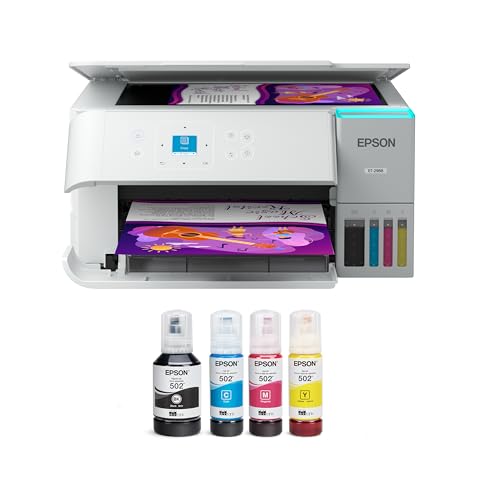
Epson EcoTank ET-2988 with Up to 3 Years of InkBest OverallEpson EcoTank ET-2988 with Up to 3 Years of InkRefillable ink tank all-in-oneUp to 6,600 black / 5,500 color pagesWi-Fin/a
Epson EcoTank ET-2400 Wireless Ink Tank PrinterBest Epson ValueEpson EcoTank ET-2400 Wireless Ink Tank PrinterRefillable ink tank all-in-oneUp to two years of inkWi-FiPrint, scan, copy
Canon MegaTank G3270 Wireless Ink Tank All-in-OneBest Color YieldCanon MegaTank G3270 Wireless Ink Tank All-in-OneRefillable ink tank all-in-oneUp to two years of inkWi-FiPrint, copy, scan
HP Smart Tank 5003 Wireless Ink Tank All-in-OneBest HP TankHP Smart Tank 5003 Wireless Ink Tank All-in-OneRefillable ink tank all-in-oneUp to three years of HP inkn/aPrint, copy, scan
HP Smart Tank 5101 Wireless Ink Tank All-in-OneBest Entry HP TankHP Smart Tank 5101 Wireless Ink Tank All-in-OneRefillable ink tank all-in-oneUp to two years of HP inkWi-FiPrint, scan, copy
Canon PIXMA G620 Wireless MegaTank Photo All-in-OneBest for PhotosCanon PIXMA G620 Wireless MegaTank Photo All-in-OneSix-ink MegaTank photo all-in-onen/an/aPrint, copy, scan

Cheap ink is not a coupon or a clever cartridge. It is a design choice: large refillable tanks filled from bottles, so the maker sells ink in bulk and the price per page falls dramatically compared with small cartridges sold at a premium.

The decision comes down to how much ink ships in the box, what a replacement set costs, how clean the refill is and whether you print often enough to keep the printhead healthy. The picks below all use tanks, and the differences among them are where the savings hide.

Before you buy

6 Criteria to Look For Before Buying a Printer With Cheap Ink

  1. 01

    Ink in the box versus replacement cost

    The starter ink is a head start, and the replacement bottles are where long-term cost lives. The Epson ET-2988 lists up to 6,600 black and 5,500 color pages, the Canon G3270 up to 6,000 black and 7,700 color. Check the price and yield of the replacement set before you buy.

  2. 02

    Yield by color or black

    Black and color yields differ, so match them to your printing. A household printing mostly text should weigh the black yield of the Epson ET-2988, while a color-heavy household should weigh the Canon G3270's 7,700 color pages. A mismatch wastes the savings.

  3. 03

    Refill design

    Keyed bottles, as on Epson's EcoFit design, only fit the matching tank so you cannot mix colors. Canon and HP bottles use spill-resistant spouts. A clumsy refill creates a mess and wastes ink.

  4. 04

    Third-party and subscription ink

    Third-party bottles cost less but vary in quality and can complicate warranty claims. Subscription ink plans bill by page count and may lock the printer. Check the terms before mixing sources.

  5. 05

    Usage rhythm

    Tanks reward steady use. If a page prints every week or two, nozzles stay wet. If the printer sits for months, clogs can erase the ink savings, and a laser is cheaper.

  6. 06

    Photo needs

    Standard tanks use four inks, which suits documents and snapshots. A six-ink tank such as the Canon G620 adds channels for smoother photos. Pay for those channels only if photos are a real share of your printing.

Detailed reviews

The 6 best printers with cheap ink, explained

01
Epson EcoTank ET-2988 with Up to 3 Years of Ink
Ink tank3 years of ink6,600 B / 5,500 CWi-Fi
Check price on Amazon
Best for: Households that want the largest ink supply for the money.

The ET-2988 is built around the idea that the box should contain years of printing. Epson lists enough ink for up to 6,600 black and 5,500 color pages, and describes up to three years of supply, which is the longest claim in this roundup. The keyed EcoFit bottles only fit the matching tank, so the common refill error of pouring the wrong color never happens.

The downside is that the engine is entry class: no feeder, no fax and a modest speed. It does the household job well, but an office that copies stacks will want the Epson EcoTank ET-4950 or an office inkjet. The three-year figure also assumes typical home use, and a busy family will drain the tanks sooner.

Ownership comes down to two habits. Print a page every week or two so the heat-free Micro Piezo head stays wet, and refill at the lower line rather than waiting for an empty tank. Genuine Epson bottles keep the printer inside its warranty, and the spill-resistant design is forgiving for first-time refillers.

What works

  • Up to three years of ink in the box
  • Up to 6,600 black pages from the starter set
  • Keyed bottles prevent color mix-ups
  • Flatbed scan and copy included

Watch out for

  • No feeder or fax
  • Entry-class print speed
  • Three-year claim assumes light home use

Spec sheet

Type
Refillable ink tank all-in-one
Ink in box
Up to 6,600 black / 5,500 color pages
Supply
Up to three years of ink
Refill
Keyed EcoFit bottles
Wireless
Wi-Fi
02
Epson EcoTank ET-2400 Wireless Ink Tank Printer
Ink tank2 years of inkWi-FiPrint scan copy
Check price on Amazon
Best for: Light to moderate home printers who want a low-cost Epson tank.

Epson's ET-2400 is the compact version of the same idea, offering up to two years of ink in the box and replacement bottles that do not need changing nearly as often as cartridges. The listing emphasizes fewer out-of-ink moments, which is the lived benefit of a tank design.

The compromise against the ET-2988 is the supply: two years against three, so the first refill arrives sooner. It also lacks a feeder, so scanning stacks is slow. The smaller supply is a fair trade if the price tier is lower and your printing is modest. A student, a retiree or a couple who prints a few pages a week will rarely see the bottom of those tanks.

Ownership is the standard tank routine. Keep the printer on a level surface, print weekly and never let the ink fall below the lower mark, which can pull air into the lines. The body is compact enough for a bookshelf, and the front tank window lets you see levels without a menu. Since the printer is light, check that the cables and the paper tray do not pull it off a narrow shelf.

What works

  • Up to two years of ink in the box
  • Bottles replace tiny cartridges
  • Compact body for a desk
  • Print, scan and copy included

Watch out for

  • Shorter ink supply than the ET-2988
  • No feeder or duplex in the listing
  • Needs weekly use to avoid clogs

Spec sheet

Type
Refillable ink tank all-in-one
Ink in box
Up to two years of ink
Refill
Cartridge-free bottles
Functions
Print, scan, copy
Wireless
Wi-Fi
03
Canon MegaTank G3270 Wireless Ink Tank All-in-One
Ink tank6,000 B / 7,700 C2 years of inkWi-Fi
Check price on Amazon
Best for: Color-heavy households printing school and craft projects.

Canon lists the G3270 at up to 6,000 black and 7,700 color pages from one ink set, which makes its color yield the highest in this lineup. For a family that prints a steady stream of school projects, charts and photos, that extra color capacity is where the savings pile up.

A drawback here is that it carries no feeder, no duplex and a basic panel, so it favors home use over office use. Scanning is flatbed only, which is fine for single pages. Against the Epson ET-2988 the black yield is lower, but the color yield is higher, and you should choose by the color you actually print.

Ownership follows the tank routine: weekly use and careful refills. Canon's bottles are designed to avoid spills, and the front tank window shows levels. Keep a full set of replacement bottles on hand, since running a tank dry can introduce air into the lines. A school year of projects will move the color levels faster than black, so refill colors first.

What works

  • Up to 7,700 color pages from one set
  • Two years of ink in the box
  • Cheap replacement bottles
  • Simple home all-in-one

Watch out for

  • No feeder or duplex in the listing
  • Lower black yield than the ET-2988
  • Basic control panel

Spec sheet

Type
Refillable ink tank all-in-one
Ink yield
Up to 6,000 black / 7,700 color pages
Ink in box
Up to two years of ink
Functions
Print, copy, scan
Wireless
Wi-Fi
04
HP Smart Tank 5003 Wireless Ink Tank All-in-One
Ink tank3 years of inkBorderlessWi-Fi
Check price on Amazon
Best for: Households that prefer HP and want years of ink.

HP's Smart Tank 5003 packs up to three years of ink into the box and supports borderless printing, with a yield HP quotes in the thousands of pages. It is HP's low-cost, high-volume pitch in tank form.

Its weak point is that it uses HP's app and account for setup, and it lacks a feeder and duplex. Against the Epson ET-2988 it claims a similar supply, so brand preference and bottle design decide it.

Ownership is the tank routine of weekly printing and careful refilling. Use genuine HP bottles and watch the ink level in the front window. Pour slowly and stop at the fill mark, because overfilling a tank is the quickest way to a mess. For a busy house that prefers HP software, it is a safe low-cost buy, and the borderless feature suits school posters and certificates well.

What works

  • Up to three years of ink in the box
  • Borderless printing for projects
  • Cartridge-free tanks lower cost
  • Print, scan and copy included

Watch out for

  • No feeder or duplex in the listing
  • HP account is part of setup
  • Needs weekly use to avoid clogs

Spec sheet

Type
Refillable ink tank all-in-one
Ink in box
Up to three years of HP ink
Yield
Thousands of pages per set
Functions
Print, copy, scan
Prints
Borderless photos supported
05
HP Smart Tank 5101 Wireless Ink Tank All-in-One
Ink tank2 years of inkWi-FiPrint scan copy
Check price on Amazon
Best for: Light households that want an HP tank at a lower tier.

The Smart Tank 5101 is the entry HP tank, offering up to two years of ink and a low-maintenance pitch. It is a three-in-one with Wi-Fi and cartridge-free tanks.

What separates it from the HP Smart Tank 5003 is a shorter supply. It also lacks a feeder and fax, which is typical of the class. For a light household the difference may be irrelevant.

Ownership is the same tank routine, and the HP app handles setup and status. Print weekly and keep bottles capped. If you print rarely, a laser is a better match than any tank. Keep the box and cap seals from the first fill, because the printer ships with a setup routine that primes the lines, and skipping steps can leave air in them. Treat the first month as a learning period and watch how fast the levels fall to judge your real consumption.

What works

  • Up to two years of ink in the box
  • Cartridge-free tanks cut running cost
  • Simple HP app setup
  • Print, scan and copy included

Watch out for

  • Shorter supply than the 5003
  • No feeder or fax
  • Needs weekly use to avoid clogs

Spec sheet

Type
Refillable ink tank all-in-one
Ink in box
Up to two years of HP ink
Functions
Print, scan, copy
Wireless
Wi-Fi
Design
Cartridge-free tanks
06
Canon PIXMA G620 Wireless MegaTank Photo All-in-One
Ink tank6-ink photo3,800 4x6 photosAlexa
Check price on Amazon
Best for: Families who print many photos and want low cost per print.

The G620 is Canon's photo-minded tank, using six ink channels and listing up to 3,800 4x6 color photos from a full set. That makes it the cheapest route here to prints that look like photographs rather than flat documents.

The shortfall is that it is bulkier and costs more than the entry tanks, and it prints documents at the same modest speed. It also supports Alexa notifications and Smart Reorders, which suit buyers who like automatic ink reminders but add an account to manage.

Ownership is the tank routine with a photo bias. Use Canon photo paper for best results, print weekly and keep bottles upright. For someone who prints family photos regularly, the extra channels justify the extra cost. Let prints dry for a few minutes before stacking, store spare photo paper flat in its bag and avoid direct sun on the finished prints. If your photo printing is occasional, a four-ink tank is the more economical choice.

What works

  • Up to 3,800 4x6 photos from a full ink set
  • Six ink channels for smoother gradients
  • Alexa notifications and reorder options
  • Print, scan and copy included

Watch out for

  • Bulkier than entry tanks
  • Higher tier than document-only models
  • Document speed is modest

Spec sheet

Type
Six-ink MegaTank photo all-in-one
Photo yield
Up to 3,800 4x6 color photos per set
Ink channels
Six
Smart features
Alexa and Smart Reorders
Functions
Print, copy, scan

Spec sheet decoder

What the numbers on the box really mean

The specs manufacturers lead with, translated into what they tell you about real-world performance.

Pages per ink set

Yield is quoted at standard coverage. Dense graphics use ink faster than the figure suggests.

Watch forThe Epson ET-2988 lists up to 6,600 black and 5,500 color, the Canon G3270 lists 6,000 and 7,700.

Years of ink

This is a maker estimate for typical home use, not a promise.

Watch forThe HP Smart Tank 5003 and Epson ET-2988 claim three years, the ET-2400 and HP 5101 claim two.

Keyed bottles

Keyed bottles fit only the matching tank. They prevent mixing colors.

Watch forEpson's EcoFit bottles on the ET-2400 and ET-2988 are keyed.

Six-ink system

Extra ink channels give smoother gradients in photos. They cost more to run.

Watch forThe Canon G620 lists six channels.

Photo yield

Photo yield counts 4x6 prints per ink set. It is a photo-specific figure.

Watch forThe Canon G620 lists up to 3,800 4x6 photos.

Methodology

How We Evaluated These Printers With Cheap Ink

Ink supply

We compared starter supplies, from up to two years on the Epson ET-2400 to three on the ET-2988 and HP Smart Tank 5003. Page yields for black and color were noted. The supply sets the first years of cost.

Replacement economics

We looked at bottle design and likely replacement cost per page. Tank bottles cost far less than cartridges. Third-party and subscription options were flagged.

Refill design

We examined keyed bottles, tank windows and spill risk. Epson's EcoFit scored well for mistake prevention. Clean refills were credited.

Use pattern

We weighed how each tank tolerates idle time, since clogs erase savings. A weekly page is the baseline. A laser was named for rare printers.

Photo capability

We noted the Canon G620's six inks against the four-ink tanks. Photo yield counted for family printers. Documents were judged separately.

Decision guide

How to Choose the Right Printers With Cheap Ink

By Print Mix

SituationPickWhy
Longest ink supply overallEpson EcoTank ET-2988Up to three years in the box
Light Epson householdEpson EcoTank ET-2400Two years of ink at a lower tier
Color-heavy projectsCanon MegaTank G3270Up to 7,700 color pages
HP loyalist, long supplyHP Smart Tank 5003Three years of HP ink
Light HP householdHP Smart Tank 5101Two years of ink
Lots of photosCanon PIXMA G620Six inks and 3,800 photo yield

By Budget

TierPickWhy
Lowest tierHP Smart Tank 5101Entry HP tank
Low tierEpson EcoTank ET-2400Compact Epson with two years of ink
Lower mid tierEpson EcoTank ET-2988Three years of ink
Mid tierCanon MegaTank G3270Highest color yield
Upper tierHP Smart Tank 5003Three years of HP ink
Top tierCanon PIXMA G620Six-ink photo tank

Four-Ink vs Six-Ink

Four-ink tank

The Epson ET-2988, Canon G3270 and HP tanks suit documents and snapshots, and they cost less to run. They lack the extra channels that smooth photo gradients.

Six-ink tank

The Canon G620 adds channels for photos and lists up to 3,800 4x6 prints. Expect a higher tier and a bulkier body.

Pick four-ink for documents and projects; pick six-ink if photos are a real share of your printing.

Brand and Bottle Design

PreferencePickWhy
Keyed bottlesEpson EcoTank ET-2988EcoFit design prevents mix-ups
Spill-resistant spoutsCanon MegaTank G3270Canon bottle design
HP app and ink trackingHP Smart Tank 5003App-led setup
Alexa reorder alertsCanon PIXMA G620Smart Reorders

For Low-Volume Printers Specifically

Look for

Look for the largest box supply and a machine you can keep sealed between jobs. A long idle gap undoes tank savings.

In this comparison

The Epson ET-2988 and HP Smart Tank 5003 carry the largest supplies. If you print less than weekly, a laser is cheaper overall.

When to Spend More

Spend more if

Spend more if you print many photos, where the Canon G620 lowers photo cost, or if you want the longest supply from the Epson ET-2988.

Save if

Save if you print a few pages a week, where the HP Smart Tank 5101 or Epson ET-2400 covers it.

Ownership

Maintenance schedule

The upkeep that decides whether this machine lasts two seasons or ten.

TaskIntervalWhy it matters
Print a color pageWeeklyKeeps nozzles wet. A short test page is enough.
Refill at the lower lineAs neededWaiting for empty can pull air into the lines. Top up before the tank drains.
Keep bottles capped and uprightAlwaysOpen or tilted bottles leak and dry out. Store in a cool place.
Run a nozzle checkWhen streaks appearCleaning uses ink, so do it only when the pattern shows gaps.
Wipe the scanner glassMonthlyDust shows as lines on scans. A dry cloth is enough.

FAQ

Frequently Asked Questions

Which printer has the cheapest ink?

Refillable tank printers such as the Epson ET-2988, Canon G3270 and HP Smart Tank 5003 have far lower ink cost per page than cartridge models. Compare the replacement bottle price and yield.

Are tank printers worth it if I print rarely?

No. They need regular use to keep nozzles wet, and a head that dries out costs ink to clean or may need service. If you print only a few pages a month, a laser is cheaper and safer, because toner does not dry and the first page after a long gap prints fine.

Can I use third-party ink?

You can, and it costs less, but quality varies and a printhead problem may complicate a warranty claim. Read the terms.

How long does the starter ink last?

The listings quote up to two or three years for typical home use. Heavy printing shortens that, and so does a lot of photo printing, because photos lay down more ink than text. Track how fast the tank levels fall in the first month to project when you will need bottles.

Is subscription ink cheaper?

It can be if your page count is steady, but plans bill by page and may lock the printer to the subscription. A tank with bottles is often cheaper still, because you buy ink only when you need it and own the supply once it is paid for.

Do tank printers print worse?

Text and snapshots look good, but a six-ink tank such as the Canon G620 does better on photo gradients. Pigment black ink, where a model uses it, keeps text sharp on plain paper. The visible difference from a cartridge printer is small, and the savings are large.

Bottom line

The short version

Browse more printers with cheap inkon Amazon →
James Miller, Lead Machine Editor

About the author

James Miller

Lead Machine Editor, MachineFanatic

James Miller leads MachineFanatic's buying guides, turning spec sheets, manuals and owner feedback into clear verdicts on power tools, outdoor power equipment, shop machines and kitchen machines.

More from James →

Keep reading

Related guides