
Amazon affiliate links - we earn a commission.Affiliate disclosure

Buying guide · 14 min read · Updated 2026-11-07

Best Sticker Label Printers (2026)

Sticker and label printers for small sellers compared: Bluetooth thermal minis, a 4x6 shipping printer and a color print-and-cut machine for custom stickers.

James MillerBy James MillerLead Machine Editor6 machines comparedSpec-sheet verified
Best Sticker Label Printers

At a glance

Our top picks

Sticker label printers cover two very different jobs. One is utility labeling, such as price tags, barcodes, shipping labels and storage stickers, where a black-and-white thermal printer is fast and cheap. The other is making stickers to sell or give away, where color and a contour cut matter more than speed.

That split should drive the purchase. Thermal printers run on cheap rolls and never need ink, while color sticker machines use special cartridges and media. The six machines below cover both sides, from pocket Bluetooth printers to a 4 by 6 inch shipping printer and an all-in-one print-and-cut machine.

Before you buy

6 Criteria to Look For Before Buying a Sticker Label Printer

  1. 01

    Utility versus color stickers

    A thermal printer produces black text on cheap rolls, which suits prices, barcodes and addresses. A color sticker machine such as the Liene PixCut S1 makes decorative stickers but costs more per piece. Decide whether your stickers are tools or products. Many sellers buy a color machine for utility work and discover the media bill is several times higher than a thermal roll.

  2. 02

    Sticker width and size

    The Phomemo M110 and NIIMBOT B1 reach about 2 inches, the SUPVAN T50M Pro 2 inches and the Arrvel A42BT a full 4 by 6 inches. A shipping label cannot be printed on a 2 inch machine, and a small sticker wastes a 4 inch roll. Measure your largest sticker before choosing, and consider owning one small and one large printer if your needs vary.

  3. 03

    Direct thermal fade

    Direct thermal stickers darken with heat and sunlight, so they fade on a hot shelf, a car dashboard or a sunny window. Most printers here use direct thermal paper. For stickers that must last years, choose laminated media or accept replacement. Keep spare rolls in a cool drawer so unprinted paper does not darken before you use it.

  4. 04

    Roll supply and cost

    Printers are cheap and rolls are the recurring cost. The NIIMBOT B1 and Phomemo M110 have wide catalogs of die-cut and continuous rolls, while the Arrvel uses standard 4 by 6 rolls sold by many shops. Dye-sublimation media for the PixCut S1 is the most expensive per sticker. Compare cost per finished sticker, including the first few you waste learning the layout.

  5. 05

    App and workflow

    Most of these printers depend on an app, and the app is part of the product. The Phomemo M110 lists 3000+ templates, the NIIMBOT B1 auto-detects rolls and the Arrvel A42BT works through FlashLabel or a driver. If the maker stops updating an app, features vanish. Check for desktop software if you print large batches. Some sellers also want to pull product names from a spreadsheet, so test whether the app can import a list and print many stickers in a row without a tap for each one, because that feature saves far more time than a bigger template library.

  6. 06

    Cutting and finishing

    Thermal sticker printers rely on die-cut rolls, so the shape comes with the roll. The Liene PixCut S1 cuts contours to your design. If you need custom shapes, only the PixCut S1 does that in one step. For standard shapes, a die-cut roll is faster and cheaper. A craft seller who sells themed stickers needs the cutter, while a shop that labels jars and boxes will never use it and should not pay for it.

Detailed reviews

The 6 best sticker label printers, explained

01
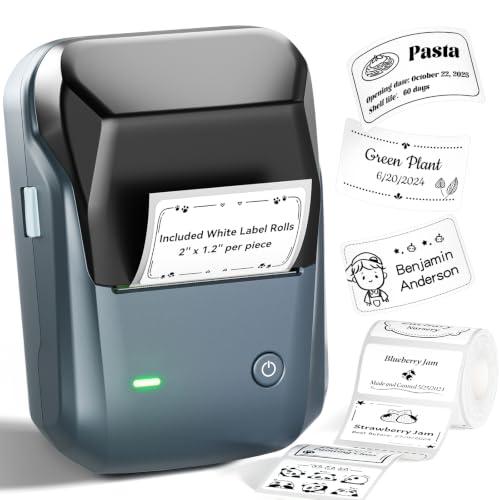
Phomemo M110 portable Bluetooth thermal sticker printer, 2 in
2 inch width3000+ templatesStatus displayBluetooth 4.0
Check price on Amazon
Best for: Sellers who tag products and print small shipping labels.

The M110 prints on thermal sticker rolls up to 2 inches wide, which covers price stickers, barcode labels, return address labels and small shipping tags. Its Print Master app lists more than 3000 templates and lets you build your own layouts, and a clear electronic display shows battery and connection state. Bluetooth 4.0 with a stated range of about 33 feet keeps it connected from a bag or shelf.

The tradeoff is that it prints in black only, on direct thermal paper that fades with heat and sunlight. A sticker stuck on a car dashboard or a sunny window will lose contrast within months. Against the NIIMBOT B1, it matches the 2 inch class and trades a slightly larger roll supply for a broader template library.

In ownership, the printer asks for little. Keep the rolls dry, wipe the head with isopropyl alcohol when streaks appear and update the app so pairing stays reliable. For a seller who needs one printer to tag products and print small shipping labels, it is the most balanced choice.

What works

  • Prints stickers up to 2 inches wide
  • 3000+ templates in the app
  • Status display shows battery and connection
  • Good Bluetooth range for a bag or shelf

Watch out for

  • Black only, on fading thermal paper
  • Needs a phone to print each label
  • Cannot print 4x6 shipping labels

Spec sheet

Width
Up to 2 in
Templates
3000+
Display
Electronic status display
Bluetooth
4.0, range about 33 ft
App
Print Master
02
NIIMBOT B1 2 inch Bluetooth label printer, auto size detect
Auto size detect30+ fontsiOS and AndroidRechargeable
Check price on Amazon
Best for: Sellers who want uniform die-cut stickers in many sizes.

The B1 auto-detects the loaded roll and works with both iOS and Android, so the app lays out a sticker to the right size without manual setup. It offers more than 30 fonts with multilingual support and prints with no ink, and its die-cut roll catalog includes rectangles, rounds and strips. Pre-cut stickers come out uniform with clean edges, which looks professional on a row of jars or boxes.

The tradeoff is that the stickers are black on white or on colored stock, with no full-color printing. The roll catalog is broad, but die-cut sizes are fixed, so an unusual shape means a custom order. Against the Phomemo M110, it has a slightly bigger roll range and a simpler app.

Ownership is easy. Stock two or three roll sizes, keep them in their sleeve and clean the head occasionally. Because the app reads the roll, a mismatch between layout and stock is rare, which keeps waste low during a busy batch.

What works

  • Auto-detects the loaded roll size
  • Wide catalog of die-cut rolls
  • 30+ fonts with multilingual support
  • Rechargeable and ink-free

Watch out for

  • Black only, no color printing
  • Die-cut sizes are fixed
  • Needs the NIIMBOT app for every label

Spec sheet

Max width
2 in class
Detection
Auto label size
Fonts
30+, multilingual
Power
Built-in rechargeable
Rolls
Wide die-cut catalog
03
Nelko P21 Bluetooth label maker, half the weight, BPA-free thermal
Half the weightBPA-free thermalBluetoothTemplate app
Check price on Amazon
Best for: New sellers who want a cheap, light sticker printer.

The P21 is a handheld Bluetooth printer that the maker says has half the weight and size of traditional label makers. It prints with BPA-free direct thermal technology, so no ink is needed, and the Nelko app provides templates for names, dates and storage labels. For a seller who only needs simple stickers, it is a light and low-cost way to start.

The tradeoff is width and flexibility. The tape is narrow, so it suits small stickers and tags rather than wide labels, and the print quality is the usual entry-level class. Against the Phomemo M110, it gives up width and template depth in exchange for portability.

Ownership is minimal. Keep the roll sealed, wipe the head and update the app. If you outgrow it, the same logic carries over to a wider printer, so it is a reasonable first purchase for a new seller. Many owners keep it as a second printer after upgrading, using it for quick stickers at a market while a wider machine stays on the packing table.

What works

  • Light and small for a bag or desk
  • BPA-free direct thermal with no ink
  • Template app speeds simple stickers
  • Low entry cost

Watch out for

  • Narrow tape limits sticker size
  • Entry-level print quality
  • Needs a phone to print

Spec sheet

Size
Half the weight and size of older units
Print method
BPA-free direct thermal
Connection
iOS and Android
App
Nelko templates
Use
Small stickers and tags
04
SUPVAN T50M Pro Bluetooth label printer, 3/4 to 2 inch tape
3/4 to 2 in tapeWaterproof tape30+ fontsImage editing
Check price on Amazon
Best for: Stickers for damp places such as bottles and bathroom bins.

The T50M Pro prints on waterproof tape from three quarters of an inch up to two inches wide, which suits stickers that will meet moisture, such as bottle labels and bin tags. The app lets you add images and choose from more than 30 fonts, so a logo or icon can sit beside the text. It targets home organization and small business use.

The tradeoff is that it prints on continuous tape, so each label has a short leader of waste, and it is not a die-cut sticker machine. Against the NIIMBOT B1, it offers tougher tape but less shape variety.

Ownership is light. Keep the tape dry, wipe the head and store spare cassettes. For stickers that go on a garage shelf, a cooler or a bathroom cabinet, the waterproof tape is a practical advantage over plain thermal paper.

What works

  • Waterproof tape suits damp places
  • Tape up to 2 inches wide
  • App image editing and 30+ fonts
  • Good for home and small business

Watch out for

  • Continuous tape wastes a short leader
  • No die-cut shape variety
  • App needed for each label

Spec sheet

Tape width
3/4 to 2 in
Media
Waterproof tape
Fonts
30+
Editing
App with images
Use
Home and small business
05
Arrvel A42BT Bluetooth thermal label printer with stand, 4x6
4x6 labels150 mm/s72 labels per minBluetooth and USB
Check price on Amazon
Best for: Sellers who ship parcels and need 4x6 labels.

The A42BT is a direct thermal 4 by 6 inch shipping label printer with Bluetooth, a stand and wired USB support. It prints at up to 150 millimeters per second, which the maker rates at 72 labels per minute, and works with Windows 7 or later, ChromeOS and Linux over USB, plus macOS through an included USB-C adapter. iOS and Android users can print through the FlashLabel app.

The tradeoff is size. It is a desk printer for shipping labels, not a pocket sticker maker, and it prints in black only on direct thermal rolls. Against the Phomemo M110, it handles full-size shipping labels but is too big to carry around.

Ownership is easy. Keep the roll of 4 by 6 labels in its sleeve, clean the head and platen and keep the driver for your operating system. For a seller who ships a few dozen parcels a week, it removes the need to print labels on regular paper and tape them on. The stand holds the roll steady and the label feeds straight, which matters on a packing line where a crooked feed can jam a roll and waste a dozen labels.

What works

  • Prints 4x6 inch shipping labels
  • Up to 150 mm/s or about 72 labels per minute
  • Bluetooth plus wired USB options
  • Works with Windows, macOS, ChromeOS and Linux

Watch out for

  • Too large to carry around
  • Black only on direct thermal paper
  • Needs a driver or app for each platform

Spec sheet

Label size
4x6 in shipping labels
Speed
150 mm/s, 72 labels per minute
Wireless
Bluetooth with FlashLabel app
Wired
USB, macOS via USB-C adapter
Support
Windows 7+, ChromeOS, Linux
06
Liene PixCut S1 color sticker printer and cutting machine
Print and cutDye-sublimationAI image extractionColor stickers
Check price on Amazon
Best for: Craft sellers making custom full-color stickers.

The PixCut S1 is an all-in-one color sticker printer and cutter. It uses thermal dye-sublimation to produce vivid, true-to-life color and cuts the sticker to shape in the same step, so there is no separate cutting machine. An AI image extraction feature isolates the subject of a photo to make a clean contour cut.

The tradeoff is cost and purpose. It uses special paper and cartridges, so each sticker costs more than a thermal label, and it is not a utility label printer. Against the monochrome thermal printers here, it is the one to buy when the sticker is the product or the gift.

Ownership centers on media and software. Keep the paper dry, calibrate the cutter when prompted and update the app. For a seller of custom stickers, the one-step workflow saves hours compared with printing on a sheet and cutting by hand.

What works

  • Prints and cuts in one step
  • Dye-sublimation gives vivid color
  • AI image extraction makes cut lines easy
  • No separate cutting machine needed

Watch out for

  • Special media costs more per sticker
  • Not for utility or shipping labels
  • Needs its app and cartridges

Spec sheet

Function
Print and cut in one step
Print method
Thermal dye-sublimation
Software
AI image extraction
Output
Full-color stickers
Use
DIY crafts and custom labels

Spec sheet decoder

What the numbers on the box really mean

The specs manufacturers lead with, translated into what they tell you about real-world performance.

Direct thermal

Printing by heating special paper with no ink. It is cheap but fades with heat and light.

Watch forThe M110, B1, P21 and Arrvel use it.

Die-cut roll

Pre-cut stickers on a backing roll with a fixed shape. They print identical labels.

Watch forThe NIIMBOT B1 offers many die-cut sizes.

Dye-sublimation

A heat process that transfers dye for full-color prints. It needs special media.

Watch forThe PixCut S1 uses it.

Labels per minute

Rated speed for a standard label. Real speed depends on label length.

Watch forThe Arrvel lists 150 mm/s or about 72 per minute.

Bluetooth range

The distance at which the phone stays connected. It matters when the printer is in a bag.

Watch forThe M110 lists about 33 feet.

Methodology

How We Evaluated These Sticker Label Printers

Sticker format

We compared maximum widths and the stickers each machine can make. The Arrvel A42BT prints 4 by 6 inch labels, the 2 inch printers cover most product stickers and the PixCut S1 makes color shapes. We matched format to likely jobs, because a printer that is perfect for stickers is useless for shipping if the label is too narrow, and the reverse is true for a bulky desk machine at a market stall.

Print quality and color

We looked at resolution and color capability. The PixCut S1's dye-sublimation stands apart for color, while the thermal printers give clean black text. Fade risk was weighed for direct thermal media.

Workflow

We compared apps, templates and connections. The Phomemo M110's template library and the Arrvel's multi-platform support scored well. Apps that require accounts scored lower.

Portability

We checked weight, battery and size. The Nelko P21 and M110 are pocketable, while the Arrvel and PixCut S1 sit on a desk. We weighed carry needs against capability.

Running cost

We weighed roll and cartridge costs per sticker. Thermal rolls are cheap, while dye-sublimation media costs more. The lineup runs from the Nelko P21 to the PixCut S1.

Decision guide

How to Choose the Right Sticker Label Printers

By Sticker Job

SituationPickWhy
Price stickers and small shipping tagsPhomemo M1102 inch width and templates
Uniform die-cut stickersNIIMBOT B1Wide roll catalog
Simple stickers on a budgetNelko P21Light and cheap
Stickers for damp placesSUPVAN T50M ProWaterproof tape
4x6 shipping labelsArrvel A42BTPrints 4 by 6 inches
Custom color stickersLiene PixCut S1Print and cut

By Budget

Budget tierPickWhy
Lowest costNelko P21Simple thermal printer
Low to midPhomemo M1102 inch width
MidNIIMBOT B1Large roll catalog
Mid to upperSUPVAN T50M ProWaterproof tape
UpperArrvel A42BT4x6 desk printer
HighestLiene PixCut S1Color print and cut

Thermal vs Color

Thermal printers

The Phomemo M110, NIIMBOT B1, Nelko P21, SUPVAN T50M Pro and Arrvel A42BT print black on cheap rolls. They are fast and inexpensive to run, but the prints fade and have no color.

Color print and cut

The Liene PixCut S1 prints vivid color and cuts to shape. It suits products and gifts, and it costs more per sticker.

Thermal for utility work, color for stickers that are the product.

Pocket vs Desk

PreferencePickWhy
Pocket sizeNelko P21Half the weight
Pocket with status screenPhomemo M110Display and range
Pocket with die-cut rollsNIIMBOT B1Auto-detect
Desk shipping labelsArrvel A42BTStand and 4x6 rolls
Craft deskLiene PixCut S1Print and cut machine

For Small Sellers Specifically

Look for

A width that covers your biggest label, a fast app and cheap rolls. Shipping needs 4 by 6 inches, while product tags fit 2 inches.

In this comparison

The Phomemo M110 handles tags, the Arrvel A42BT handles shipping and the PixCut S1 makes custom stickers. Many sellers pair a small and a large printer.

When to Spend More

Spend more if

You ship parcels or sell custom stickers. The Arrvel A42BT and Liene PixCut S1 justify their cost.

Save if

You print simple price stickers. The Nelko P21 or Phomemo M110 does it cheaply.

Ownership

Maintenance schedule

The upkeep that decides whether this machine lasts two seasons or ten.

TaskIntervalWhy it matters
Clean the print headEvery few rollsDust and adhesive cause streaks. Wipe with isopropyl alcohol on a swab.
Store rolls cool and dryAlwaysHeat and humidity darken thermal paper and weaken adhesive. Keep rolls in their sleeve.
Update the appQuarterlyPairing and roll detection need current software. Updates add label sizes.
Calibrate the cutterWhen promptedThe PixCut S1's cutter shifts over time. Calibrate to keep cut lines on the design.
Charge the batteryMonthlyLithium cells age when stored empty. Top up monthly.

FAQ

Frequently Asked Questions

Can a sticker printer print shipping labels?

Only a 4 by 6 inch printer such as the Arrvel A42BT does. The 2 inch printers are too narrow. Check your carrier's label size before buying. Most parcel services accept a 4 by 6 inch thermal label, and some marketplaces print straight to a compatible desk printer without any extra software, which is a good reason to pick a wired or Bluetooth 4 by 6 machine for shipping.

How much should I budget for a sticker printer?

The printer itself is a small share of cost and rolls are recurring. Color media costs more than thermal. Count stickers per month to estimate.

How long do thermal stickers last?

They fade in heat and sunlight over months. Keep them out of sun for long life. Laminated or waterproof media lasts longer.

Do I need a phone?

Most of these printers use apps. The Arrvel A42BT also prints over USB from a computer. Keep a phone charged.

Can I print color stickers on a thermal printer?

No. Thermal printers print black only. For color, use the Liene PixCut S1 or colored label rolls.

Are die-cut or continuous rolls better?

Die-cut rolls give uniform shapes. Continuous tape gives custom lengths. Choose by whether you print repeat sizes. If you print the same sticker hundreds of times, die-cut is neater and quicker, while one-off projects benefit from the freedom of continuous tape cut to the length of each item.

Bottom line

The short version

Browse more sticker label printerson Amazon →
James Miller, Lead Machine Editor

About the author

James Miller

Lead Machine Editor, MachineFanatic

James Miller leads MachineFanatic's buying guides, turning spec sheets, manuals and owner feedback into clear verdicts on power tools, outdoor power equipment, shop machines and kitchen machines.

More from James →

Keep reading

Related guides