
Amazon affiliate links - we earn a commission.Affiliate disclosure

Buying guide · 12 min read · Updated 2026-11-18

Best USB Label Printers (2026)

Four USB label printers compared for home offices, shipping benches and small shops, covering driver support, media rules and print head upkeep.

James MillerBy James MillerLead Machine Editor4 machines comparedSpec-sheet verified
Best USB Label Printers

At a glance

Our top picks

Side by side

Spec comparison

MachineConnectionPrint methodLabel format
Brother QL-600 USB Desktop Label Printer up to 2.4 InchBest OverallBrother QL-600 USB Desktop Label Printer up to 2.4 InchUSBDirect thermal, no inkn/a
Rollo USB Commercial Grade 4 by 6 Shipping Label PrinterBest for ShippingRollo USB Commercial Grade 4 by 6 Shipping Label PrinterUSBDirect thermal, no ink4 by 6 shipping labels
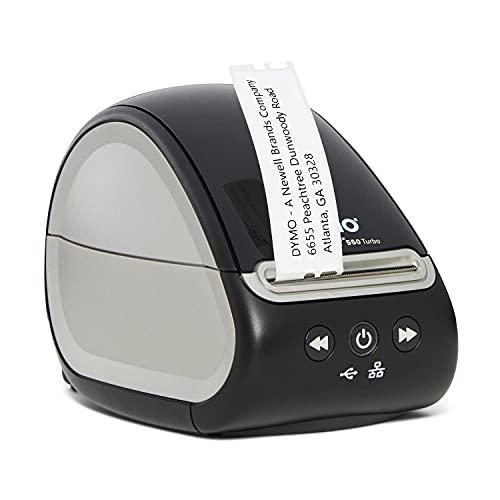
DYMO LabelWriter 550 Turbo USB and LAN Label PrinterBest Auto-Recognition PrinterDYMO LabelWriter 550 Turbo USB and LAN Label PrinterUSB, with LAN as a bonusDirect thermal, no inkn/a
Zebra ZD220 4 by 6 Direct Thermal USB Label PrinterBest for Business DriversZebra ZD220 4 by 6 Direct Thermal USB Label PrinterUSBDirect thermal, no ink4 by 6 shipping labels

A USB label printer is the simplest design in the category: one cable to one computer, no network name to remember and no radio to drop. That simplicity is why it is still the safest choice for a home office or a packing bench where one person does all the printing. The weak spot is the driver, since the cable carries power and data but your operating system decides whether the printer is usable.

Two choices decide most purchases. The first is label size, either compact address and file labels or full 4 by 6 shipping labels. The second is whether the printer accepts any roll or only the maker's. This guide covers both, explains what a USB connection can and cannot do, and notes the upkeep that keeps a thermal head clean for years.

Before you buy

6 Criteria to Look For Before Buying an USB Label Printer

  1. 01

    Label size before everything

    The width of the print path cannot be changed by software. The Brother QL-600 prints up to 2.4 inches, the DYMO LabelWriter 550 Turbo handles small address-style labels, and the Rollo USB and Zebra ZD220 take 4 by 6 shipping labels. Measure the largest label you will ever print before you buy, because a small printer cannot be talked into a big label.

  2. 02

    Driver support for your computer

    USB makes the driver the whole story. The Rollo lists Windows XP and newer plus macOS 10.9 and newer, the Brother and DYMO ship their own drivers, and the Zebra relies on a widely supported printer language. A printer your operating system cannot see is a paperweight, so check the vendor site for your exact system version first.

  3. 03

    Media rules and running cost

    Printers are cheap and rolls are not. The DYMO accepts only DYMO-branded labels, the Brother uses its DK format, and the Rollo and Zebra take standard thermal rolls. Estimate your labels per month and multiply by the cost per label before you decide, because a cheap machine with expensive rolls is a trap.

  4. 04

    Cutter or no cutter

    An automatic cutter saves time on mixed jobs and keeps edges clean. The Brother and DYMO cut for you, while the Rollo and Zebra rely on tearing labels along a perforation or a tear bar. For a few dozen labels a day the difference is small, but at hundreds it adds up to real minutes.

  5. 05

    Direct thermal label life

    Every printer in this guide is direct thermal, so the labels darken with heat and fade with sunlight. That is fine for a parcel that travels for a week but wrong for a label on a piece of equipment you expect to read in five years. If you need long life, look at thermal transfer printers outside this guide.

  6. 06

    Whether you may need to share later

    USB ties the printer to one computer, and that computer must be on. The DYMO LabelWriter 550 Turbo adds a LAN port, which makes it the only model here that can graduate to shared use. If you suspect a second person will print soon, that matters more than a small price difference.

Detailed reviews

The 4 best usb label printers, explained

01
Brother QL-600 USB Desktop Label Printer up to 2.4 Inch
USB2.4 inch wideAuto cutter44 labels/min
Check price on Amazon
Best for: Home offices and small shops printing addresses, file labels and badges from one computer.

The QL-600 is a compact direct thermal printer that takes Brother DK drop-in rolls and cuts each label automatically. The roll drops into a cradle without threading, which removes the most common beginner mistake of loading a roll backward. The maker quotes up to 44 labels per minute, and the print width goes up to 2.4 inches, enough for address labels, folder labels, name badges and small barcodes.

Its tradeoffs are width and openness. The head cannot print a 4 by 6 shipping label, so parcel senders should look at the Rollo or Zebra below. The DK roll system is a Brother format with a healthy third-party market, but it is not a free-for-all like generic thermal rolls. Against the DYMO LabelWriter 550 Turbo, the Brother sits at a similar price tier and rewards you with continuous tape and film options rather than a locked ecosystem.

Ownership is calm. There is no ink or ribbon to replace, and the cutter blade is the only wear part you will think about. Wipe the head with isopropyl alcohol every few rolls, keep spare rolls in a drawer away from heat, and install the Brother driver rather than relying on a generic one, since the driver exposes cut and margin settings that matter.

What works

  • Drop-in DK rolls load without threading or guesswork
  • Automatic cutter trims each label cleanly
  • Quoted rate of up to 44 labels per minute
  • Continuous tape and film options beyond plain paper labels

Watch out for

  • Print width stops at 2.4 inches, so no shipping labels
  • Uses Brother-format DK media rather than any generic roll
  • USB only, so sharing needs a computer left switched on

Spec sheet

Connection
USB
Print method
Direct thermal, no ink
Max label width
Up to 2.4 inches
Quoted speed
Up to 44 labels per minute
Media
Genuine DK drop-in rolls
02
Rollo USB Commercial Grade 4 by 6 Shipping Label Printer
USB4 by 6 labelsDirect thermalWindows + Mac
Check price on Amazon
Best for: Parcel senders who want full 4 by 6 labels on standard thermal rolls over a plain USB cable.

The Rollo USB is a 4 by 6 direct thermal printer built for parcel senders. It runs on Windows XP and newer and macOS 10.9 and newer, which covers very old computers that many small sellers still use. A free shipping app helps with carrier labels, and the machine takes standard thermal rolls and fanfold stacks, so you are not tied to one supplier.

Its tradeoff is that it is a shipping tool, not a general label maker. Small labels fit awkwardly on a 4 by 6 path, and it has no cutter, so you tear labels by hand. Compared with the Brother QL-600, the Rollo is better for parcels and worse for small mixed labels. Compared with the Zebra ZD220, it sits at a lower price tier and offers less enterprise driver depth, though it is plenty for a home seller.

Upkeep is minimal. Wipe the print head with isopropyl alcohol when streaks appear, check the roll core size before loading, and keep the label sensor free of paper dust. Because it is a USB machine, plug it directly into the computer instead of through a crowded hub, which avoids half-printed jobs.

What works

  • Full 4 by 6 shipping label format for carrier labels
  • Works on Windows XP and newer plus macOS 10.9 and newer
  • Standard thermal rolls avoid locked media costs
  • Free shipping app helps with carrier label workflow

Watch out for

  • No auto cutter, so labels are torn off by hand
  • Awkward for small address or folder labels
  • Direct thermal labels fade with heat and sunlight

Spec sheet

Connection
USB
Print method
Direct thermal, no ink
Label format
4 by 6 shipping labels
Platforms
Windows XP and newer, Mac 10.9 and newer
Software extra
Free shipping app
03
DYMO LabelWriter 550 Turbo USB and LAN Label Printer
USB + LANDirect thermalAuto recognitionDYMO rolls only
Check price on Amazon
Best for: Offices printing steady address and file labels that want automatic roll recognition.

The LabelWriter 550 Turbo is a USB printer that also carries a LAN port, so it can start as a one-computer machine and move onto a network later. It uses direct thermal printing with no ink or toner, and it reads each roll to learn the label size and how many labels remain. For an office that prints a steady stream of addresses and file labels, that recognition removes a surprising amount of daily friction.

The cost is the media rule. The printer only works with DYMO-branded labels, which removes the freedom to shop for cheaper rolls. Against the Brother QL-600, the DYMO is the more convenient recognition machine but the less open one, and the QL-600 handles continuous tape more naturally. Against the Rollo USB, it targets small labels rather than parcels.

Ownership is light. Wipe the head when streaks appear, keep adhesive off the roll spindle, and buy rolls in a quantity that suits your volume rather than stockpiling, since thermal paper ages. Keep the USB cable as the default and treat the LAN port as a future option, not a requirement.

What works

  • Automatic label recognition tracks size and remaining count
  • USB for now with a LAN port ready for future sharing
  • Direct thermal means no ink, toner or ribbon to replace
  • Compact body suits a crowded desk

Watch out for

  • Only accepts DYMO-branded labels, which limits cost savings
  • Not suited to full 4 by 6 shipping labels

Spec sheet

Connection
USB, with LAN as a bonus
Print method
Direct thermal, no ink
Media recognition
Automatic label recognition
Media policy
DYMO-branded labels only
Price tier
Mid-range of the four
04
Zebra ZD220 4 by 6 Direct Thermal USB Label Printer
USB4 by 6 labels203 dpiDual-wall frame
Check price on Amazon
Best for: Small businesses that want a recognised brand and standard printer languages for shipping labels.

The ZD220 is the industry-name option in this lineup: a 4 by 6 direct thermal printer at 203 dpi with a dual-wall, space-saving frame. Controls are limited to a single LED indicator and a single feed and pause button, which keeps training time to minutes. Zebra's ZPL and EPL printer languages are the industry norm, so warehouse and retail software often ships with a ready driver.

Its tradeoff is price tier, since it sits at the highest of the four here. Against the Rollo USB, the Zebra costs more for a similar everyday job and rewards you with business-grade driver support and a sturdier reputation. Against the Brother QL-600, it handles shipping labels and the Brother handles small mixed labels.

Ownership centers on the print head and roller. Wipe the head with isopropyl alcohol periodically, use media that matches the core size, and keep spare rolls dry. Because the ZPL language is standard, switching a replacement unit into an existing workflow is usually painless, which is the hidden value of paying for a known name.

What works

  • 203 dpi head matches the shipping label industry norm
  • Standard Zebra printer languages work with business software
  • Single button and LED keep operation simple
  • Dual-wall frame keeps the footprint compact

Watch out for

  • Highest price tier of the four printers here
  • USB only, so no wireless or network convenience

Spec sheet

Connection
USB
Print method
Direct thermal, no ink
Resolution
203 dpi
Label format
4 by 6 shipping labels
Controls
One LED and one feed button

Spec sheet decoder

What the numbers on the box really mean

The specs manufacturers lead with, translated into what they tell you about real-world performance.

Labels per minute

This is a best-case rate for short address labels, not a promise for every job. Larger labels and slow computers reduce it.

Watch forThe Brother QL-600 quotes up to 44 labels per minute, which is a ceiling rather than an average.

203 dpi

Resolution is the number of dots the head places per inch. 203 dpi is the standard for shipping labels and large barcodes.

Watch forThe Zebra ZD220 lists 203 dpi, which is adequate for shipping but soft for tiny QR codes.

Direct thermal

A heated head darkens heat-reactive paper, so no ink or ribbon is needed. The labels fade with heat, light and time.

Watch forAll four printers here are direct thermal, so none suits long-lived equipment labels.

Automatic label recognition

The printer reads a mark or chip on the roll to know the size and count. It reduces setup errors but ties you to the maker's rolls.

Watch forThe DYMO LabelWriter 550 Turbo uses it and only accepts DYMO-branded labels.

Printer language

Languages such as ZPL and EPL tell the printer how to draw a label. They are industry standards that many software packages already speak.

Watch forThe Zebra ZD220 is the only one here that leans on that ecosystem.

Methodology

How We Evaluated These USB Label Printers

Driver and platform coverage

We evaluated which operating systems each printer supports according to the maker's listing. The Rollo names Windows XP and newer and macOS 10.9 and newer. Breadth of support scored higher than a single polished driver.

Label format fit

We compared the widest label each machine can print. The Brother stops at about 2.4 inches, the DYMO targets small labels, and the Rollo and Zebra reach 4 by 6. Fit to the job outweighed speed in the score.

Media freedom and cost

We scored how open each printer is to cheaper rolls. The Rollo and Zebra take standard thermal rolls, the Brother uses its DK format, and the DYMO is locked to its own rolls. Running cost over two years was weighed against purchase price.

Daily friction

We looked at loading, cutting and operation from owner feedback patterns. The Brother's drop-in roll and the DYMO's recognition scored well, while the Rollo and Zebra's tear-off labels cost a little time.

Longevity of the print

We considered how long labels stay readable. All four are direct thermal at 203 dpi class resolution or similar, so none scored high for long-term durability. We favored machines that make the limitation clear.

Decision guide

How to Choose the Right USB Label Printers

By Label Size

SituationPickWhy
Address labels and badgesBrother QL-600Drop-in rolls and auto cutter up to 2.4 inches.
File folder and name labelsDYMO LabelWriter 550 TurboAutomatic recognition and a compact body.
Parcel shipping from homeRollo USBFull 4 by 6 labels on standard rolls.
Business shipping with standard driversZebra ZD220Industry printer language and 203 dpi.

By Budget

Budget tierPickWhy
Lowest of the fourBrother QL-600Strong features for the price tier.
MiddleDYMO LabelWriter 550 TurboRecognition and a LAN port for later.
Upper middleRollo USBDedicated shipping printer on standard rolls.
HighestZebra ZD220Pay for the brand, language and driver depth.

Small Labels vs Shipping Labels

Small labels

The Brother QL-600 and DYMO LabelWriter 550 Turbo are built for addresses, folders and badges. They cut each label and handle mixed sizes well. Neither can print a full shipping label.

Shipping labels

The Rollo USB and Zebra ZD220 take 4 by 6 labels. They suit parcels and warehouse tags, and they are clumsy for small labels because the path is wide.

Choose small-label machines for the office and 4 by 6 machines for the packing bench.

Open Rolls vs Locked Rolls

PreferencePickWhy
Any standard thermal rollRollo USBStandard rolls and fanfold stacks.
Standard rolls with a known brandZebra ZD220Business-class driver and open media.
Brother roll system with varietyBrother QL-600DK rolls include continuous tape and film.
Branded convenienceDYMO LabelWriter 550 TurboAuto recognition but DYMO rolls only.

For a Home Office Specifically

Look for

A model that loads without threading, cuts cleanly and has a driver for your computer. Check the roll cost before the printer price, and confirm whether you will ever print shipping labels.

In this comparison

The Brother QL-600 is the safest all-round choice for a home office, the DYMO LabelWriter 550 Turbo adds recognition and a future LAN port, and the Rollo USB is the pick if parcels matter.

When to Spend More

Spend more if

You want a recognised printer language, such as the Zebra ZD220 offers, or you may share the printer later and need a LAN port, as on the DYMO LabelWriter 550 Turbo.

Save if

One person prints from one computer. The Brother QL-600 and Rollo USB cover most home needs without paying for features you will not use.

Ownership

Maintenance schedule

The upkeep that decides whether this machine lasts two seasons or ten.

TaskIntervalWhy it matters
Clean the print headEvery 3 to 5 rollsDust and adhesive leave streaks on labels. Wipe the head with isopropyl alcohol on a lint-free swab.
Clean the roll pathMonthlyPaper dust causes feed errors and crooked labels. A dry cloth along the path fixes most of it.
Check the cable and portWhen a job stallsA loose or worn USB cable causes half-printed jobs. Plug directly into the computer instead of through a hub.
Update the driverAfter operating system updatesA major update can break an old driver. Download the current version from the maker before you troubleshoot.
Store spare rolls cool and dryOngoingHeat darkens direct thermal paper and humidity curls it. Keep spare rolls in a drawer away from sunlight.

FAQ

Frequently Asked Questions

Which is better, a small-label or a shipping-label printer?

It depends on the label. Small-label machines such as the Brother QL-600 suit addresses and folders, while 4 by 6 machines such as the Rollo USB suit parcels. Buy for the largest label you print.

What is the best budget USB label printer here?

The Brother QL-600 sits at the lowest price tier of the four and offers a drop-in roll and auto cutter. If you ship parcels, the Rollo USB is the better value despite a higher tier.

How long does a USB label printer last?

The print head is the wear part, and with regular cleaning most desktop models last several years. The cutter and roller are the next items to wear. Avoid abrasive cleaners.

Is a higher dpi always better?

No. 203 dpi is standard for shipping labels and large barcodes. Higher resolution helps small text and small QR codes, but it does not help a shipping label.

Can I use a USB label printer with a Mac?

Often yes, but check the maker. The Rollo lists macOS 10.9 and newer, and the Brother and DYMO publish Mac drivers. Check your exact macOS version first.

Why do my USB labels print blank or faint?

The usual causes are a dirty head, the roll loaded upside down or non-thermal paper. Clean the head and flip the roll. If it persists, test with a fresh roll.

Bottom line

The short version

Browse more usb label printerson Amazon →
James Miller, Lead Machine Editor

About the author

James Miller

Lead Machine Editor, MachineFanatic

James Miller leads MachineFanatic's buying guides, turning spec sheets, manuals and owner feedback into clear verdicts on power tools, outdoor power equipment, shop machines and kitchen machines.

More from James →

Keep reading

Related guides