
Amazon affiliate links - we earn a commission.Affiliate disclosure

Buying guide · 13 min read · Updated 2026-11-07

Best XLR Streaming Mixers (2026)

Six XLR streaming mixers compared on preamp gain, dual XLR inputs, faders, routing and DSP, so a real microphone sounds right on a live stream.

James MillerBy James MillerLead Machine Editor6 machines comparedSpec-sheet verified
Best XLR Streaming Mixers

At a glance

Our top picks

Side by side

Spec comparison

Moving a stream to XLR is the single biggest step up in voice quality available to a streamer. A real broadcast microphone rejects room noise better than a USB model, and it can be replaced or upgraded without touching the rest of the chain.

That step needs a mixer or interface that supplies clean gain and, for condensers, phantom power. The best streaming versions also add routing for game and chat audio, onboard processing and a way to control levels without opening a software window.

Before you buy

6 Criteria to Look For Before Buying a XLR Streaming Mixer

  1. 01

    XLR input count

    The Elgato Wave XLR Pro and RØDECaster Duo offer two microphone inputs, while the Wave XLR MK.2, G3, G1 Neo and SC3 offer one. A co host needs the second input, and a solo streamer does not. Count real XLR jacks rather than channel labels.

  2. 02

    Gain for dynamic microphones

    Broadcast dynamic microphones need 60 to 70 dB of clean gain. The Elgato interfaces offer 80 dB per input and the Duo lists high gain preamps. A weak preamp forces you to boost in software, which raises noise.

  3. 03

    Phantom power

    Condenser microphones need 48V. The G1 Neo lists it, and the Duo's combo jacks serve both microphones and instruments. Confirm phantom support before pairing a condenser with any box. A condenser microphone is more sensitive and records keyboard clatter and room echo that a dynamic ignores, so it suits a quiet, treated space rather than a typical gaming desk.

  4. 04

    Physical faders

    Faders let you adjust levels without opening software. The RØDECaster Duo has four and the G3 has four mapped faders, while the Elgato boxes rely on software. Choose faders if you rebalance often. Each fader can be assigned to the source you reach for most, so a hand on the desk replaces a trip into software while a match is in progress.

  5. 05

    Routing and second computers

    The Wave XLR Pro offers dual USB-C and five hardware mixes, and the G3 supports a dual PC setup. If you stream from two machines or add a console, routing depth matters.

  6. 06

    Onboard processing

    DSP in the box keeps compression and EQ off the computer. The Elgato units run a voice chain onboard. Hardware processing keeps your voice consistent even when the PC is busy.

Detailed reviews

The 6 best xlr streaming mixers, explained

01
Elgato Wave XLR Pro dual XLR interface and mixer
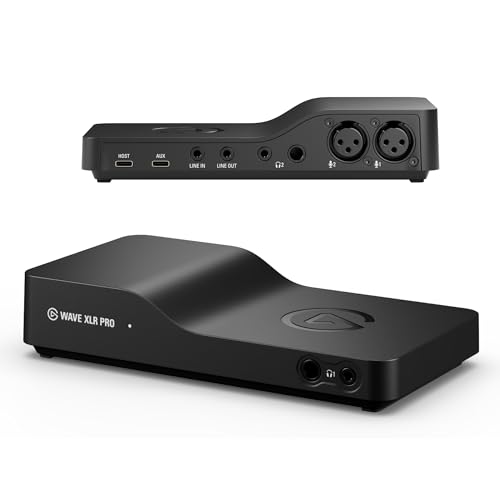
2 XLR inputs80 dB gain eachDual USB-C5 hardware mixes
Check price on Amazon
Best for: Two person streams and podcasts that want high gain, DSP and flexible routing.

The Wave XLR Pro is built for two voices and a busy desk. Each of its two XLR inputs offers 80 dB of gain, enough for demanding dynamic microphones, and an onboard Wave FX processor runs DSP effects and VST plugins in one signal chain. Clipguard 2.0 is designed to catch peaks before they distort.

Its dual USB-C connections let a second computer, a console or a phone join the desk, and any input can be patched to any output through flexible routing and five hardware mixes. The tradeoff is that the mixing happens in software and on a small surface, so it lacks the row of faders that the MAONO G3 provides. It also sits at the premium end of the price range.

For a host and a guest, the practical setup is one microphone per input, a recording mix for the computer and a separate monitor mix for headphones. Save a profile per scene, keep the firmware current and listen to a test recording through speakers to confirm that the blend matches what the audience will hear.

What works

  • Two XLR inputs with 80 dB gain each
  • Onboard DSP and VST plugin support
  • Dual USB-C for a second PC or console
  • Five hardware mixes for flexible routing

Watch out for

  • No bank of physical faders
  • Premium price tier

Spec sheet

Mic inputs
Dual XLR, 80 dB gain each
Processing
Onboard DSP and VST plugins
Connection
Dual USB-C
Mixes
5 hardware mixes
Protection
Clipguard 2.0
02
RØDECaster Duo compact audio production studio
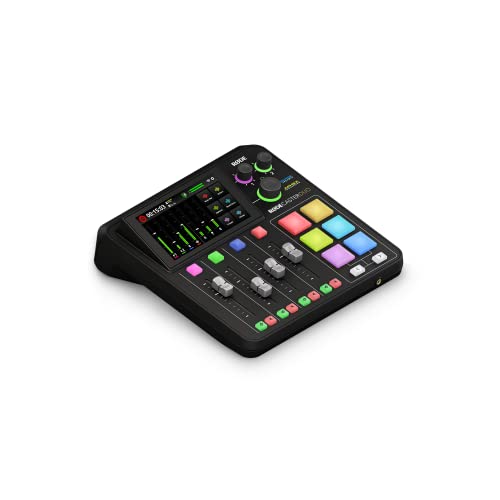
2 combo jacks4 fadersTouchscreen6 SMART pads
Check price on Amazon
Best for: Two host streams that want faders, pads and a touchscreen in one box.

The RØDECaster Duo puts a broadcast desk in a compact body: two Neutrik combo jacks with low noise, high gain preamps, four faders, a haptic touchscreen and six SMART pads with bank switching. It handles microphones and instruments and doubles as a USB interface for streaming.

Its strength is the hardware surface. Four faders under the hand beat any software mixer when a stream gets busy, and the pads trigger effects without a keyboard. The limit is the pair of inputs, so a third microphone needs another device, and the premium build puts it above most USB boxes in price. Against the Wave XLR Pro it offers faders and pads where Elgato offers more routing and a second USB-C link.

It rewards a little setup time. Map the pads to the sounds you actually use, save the routing for each show format and keep the firmware current through the unit's own menu. A short USB cable and balanced XLR leads keep the desk tidy.

What works

  • Four faders on a compact body
  • Two low noise combo preamps
  • Haptic touchscreen reads clearly
  • Pads with bank switching expand effects

Watch out for

  • Only two microphone inputs
  • Costs well above entry level boxes

Spec sheet

Mic inputs
2 Neutrik combo jacks
Faders
4 broadcast quality
Display
Touchscreen with haptic feedback
Pads
6 SMART pads with bank switching
Use
Podcasting, streaming, music
03
MAONO G3 gaming mixer with 4 faders and 3 submixes
4 faders3 submixesAudio mappingXLR interface
Check price on Amazon
Best for: Solo streamers who balance several sources with one XLR microphone.

The G3 is a desktop mixer and XLR interface that maps any audio source to one of four faders, so a streamer controls game, chat, music and microphone by hand. Three submixes let the stream, the headphones and a recording each carry a different blend.

The cost is configuration time and a Windows centric workflow. A streamer who needs only a microphone path will find the G3 overbuilt. Next to the Wave XLR Pro it provides more hands on control and one XLR input rather than two, so it suits a solo streamer with many sources rather than a duo.

Save routing profiles for each game, label the faders and check the stream mix with a short recording. Keep the unit on a direct USB port and back up the profile after changes.

What works

  • Four faders map to any source
  • Three submixes for stream and headphones
  • XLR interface for a real microphone
  • Supports a dual PC layout

Watch out for

  • Single XLR input
  • Setup takes an evening

Spec sheet

Faders
4 mapped to any source
Submixes
3
Mic input
XLR interface
Platform
Windows PC
Setup
Dual PC supported
04
MAONO G1 Neo gaming mixer with XLR, 48V and sound pads
XLR and 48V4 sound padsBluetoothPro preamp
Check price on Amazon
Best for: Streamers who want phantom power and sound pads in one box.

The G1 Neo pairs a built in preamp and 48V phantom power with four custom sound pads, Bluetooth and a voice change feature. It is sold alone and in a bundle with a PD200XS XLR dynamic microphone, which makes it an easy first step into XLR.

The phantom supply means it can drive a condenser microphone, which many entry boxes do not list. The extras suit an entertainment stream more than a quiet talk show, and the box has a single microphone input. It sits between the SC3 and the G3 in control depth.

Load the pad clips once, keep them short and set their level below your voice. If you buy the bundle, the dynamic microphone is a sensible match for a noisy room.

What works

  • Pro preamp with 48V phantom
  • Four custom sound pads
  • Bluetooth and voice change
  • Available with a dynamic microphone

Watch out for

  • One microphone input
  • Pads add a learning curve

Spec sheet

Mic input
XLR with 48V phantom
Preamp
Built in pro preamp
Pads
4 custom soundpads
Extras
Bluetooth, voice change, RGB
Bundle
Also sold with a PD200XS dynamic mic
05
Elgato Wave XLR MK.2 USB interface and DSP mixer
80 dB gainDSP voice chainLED levelLow latency
Check price on Amazon
Best for: Solo streamers with a demanding dynamic microphone.

The MK.2 is the single voice sibling of the Wave XLR Pro: 80 dB of gain, an onboard voice enhancer, compressor and EQ, ultra low latency monitoring and an LED level display. It is the cleanest way to drive one demanding dynamic microphone.

It has one input and no faders, so it suits a solo streamer who sets levels once. Beside the Wave XLR Pro it offers the same voice chain for less money but no second microphone and fewer routing options.

Keep it on a stable USB port and revisit the DSP presets when you change microphones. Set the compressor to a gentle ratio first, then adjust the voice enhancer by ear on a recording rather than in the headphones alone. If you later add a second voice, the Wave XLR Pro keeps the same chain, so your settings carry across.

What works

  • 80 dB of gain
  • Onboard compressor and EQ
  • Low latency monitoring
  • LED meter flags clipping

Watch out for

  • One input and no faders
  • Mix is handled in software

Spec sheet

Gain
80 dB
DSP
Voice enhancer, compressor, EQ
Monitoring
Ultra low latency
Feedback
LED level display
Connection
USB
06
FIFINE Ampligame SC3 XLR gaming mixer with Indi-Fader
1 XLR inputIndi-FaderMute buttonUSB plug and play
Check price on Amazon
Best for: Solo streamers who want a simple XLR box with a mute button.

The SC3 is the minimal XLR box: one input, a slider, front mute and monitor buttons and plug and play USB. It gives a streamer a proper microphone path for very little money.

It does not mix game audio or add effects, so everything else stays in software. Next to the G1 Neo it skips phantom listing, Bluetooth and pads.

Use a balanced cable and a dynamic microphone, and mark the slider position. A dynamic microphone close to the mouth gives the best results in a gaming room full of fans and keyboard noise, and a pop filter costs little. When you outgrow the box, it remains useful as a travel interface for a laptop stream away from home.

What works

  • One XLR input with a slider
  • Front mute and monitor buttons
  • USB plug and play
  • Lowest price tier

Watch out for

  • One microphone input
  • No effects or loopback

Spec sheet

Mic input
1 XLR
Fader
Indi-Fader slider
Controls
Front mute and monitor
Connection
USB plug and play
Platform
PC

Spec sheet decoder

What the numbers on the box really mean

The specs manufacturers lead with, translated into what they tell you about real-world performance.

XLR

A balanced three pin connector used by professional microphones.

Watch forCount real XLR inputs.

Gain (dB)

How much the preamp amplifies a quiet signal.

Watch forThe Elgato units list 80 dB.

Phantom power

A 48V supply that powers condenser microphones.

Watch forThe G1 Neo lists it.

Hardware mix

A separate blend of sources created inside the box.

Watch forThe Wave XLR Pro lists five.

Clipguard

Elgato's feature that tries to prevent distortion from sudden peaks.

Watch forThe Wave XLR Pro lists Clipguard 2.0.

Methodology

How We Evaluated These XLR Streaming Mixers

Microphone path

We compared XLR input count, gain and phantom power. The Elgato interfaces lead on gain and the Duo on build. The microphone path is the foundation of a stream, so we weighed it above extras such as pads, lighting or Bluetooth, which suit entertainment channels but do not make a voice sound better.

Control surface

We weighed faders, pads and software control, noting the Duo's four faders against the Elgato software approach. A streamer's hands are busy, so we valued controls that can be used by feel, and we noted that a software only mix costs nothing extra but takes attention from the audience.

Routing

We looked at dual USB-C, submixes and hardware mixes. Independent mixes for the stream and for your headphones keep private alerts out of the broadcast, and a second USB link lets a console or another PC join without a capture card, so routing depth counted heavily for multi source desks.

Processing

We checked onboard DSP and protection against clipping. Processing in the box keeps the voice consistent when a game spikes the CPU, and clip protection helps with sudden shouts, so units with a hardware voice chain scored higher than those that leave every effect to software plug ins.

Value

We compared price tiers, with the SC3 lowest and the Duo and Wave XLR Pro highest. Value depends on how many of a unit's features you will use, so a premium box earns its place only for a streamer who needs two inputs, deep routing or a full fader surface, while a basic box is better value for everyone else.

Decision guide

How to Choose the Right XLR Streaming Mixers

By Number of Voices

SituationPickWhy
Two hosts, high gainElgato Wave XLR ProDual XLR with 80 dB each
Two hosts, fadersRØDECaster DuoFour faders and pads
One host, many sourcesMAONO G3Four mapped faders
One host, condenserMAONO G1 Neo48V and pads
One host, demanding dynamicElgato Wave XLR MK.280 dB and DSP
One host, tight budgetFIFINE Ampligame SC3Simple XLR

By Budget

TierPickWhy
LowestFIFINE Ampligame SC3Basic XLR box
Low to midMAONO G1 NeoPhantom and pads
MidMAONO G3Faders and submixes
Mid to highElgato Wave XLR MK.2Voice chain
HigherElgato Wave XLR ProDual XLR and routing
HighestRØDECaster DuoFaders and pads

Hardware Faders vs Software Mixing

Hardware faders

The RØDECaster Duo and MAONO G3 give physical level control for a busy stream.

Software mixing

The Elgato interfaces keep the mix in software and spend hardware on gain and DSP.

Choose faders if you rebalance often and software if you set levels once.

By Microphone

MicPickWhy
Hungry dynamicElgato Wave XLR Pro80 dB gain
CondenserMAONO G1 Neo48V phantom
Mic and instrumentRØDECaster DuoCombo jacks
Basic dynamicFIFINE Ampligame SC3Simple XLR

For Two Voices Specifically

Look for

Two real XLR inputs, matched gain and separate headphone control.

In this comparison

The Elgato Wave XLR Pro and RØDECaster Duo are the only two with dual XLR.

When to Spend More

Spend more if

You host two people or want premium processing. The Wave XLR Pro or Duo reward that.

Save if

You stream solo. The SC3 or G1 Neo covers the basics.

Ownership

Maintenance schedule

The upkeep that decides whether this machine lasts two seasons or ten.

TaskIntervalWhy it matters
Update firmwareEvery few monthsUpdates fix bugs and sometimes add routing features. Read the notes first, export your profile and update between streams rather than before one.
Inspect XLR cablesQuarterlyConnectors wear and cables fray at the strain relief. Wiggle each cable while listening on headphones and replace any that crackle, since a failing cable ruins a stream at the worst moment.
Clean faders and padsMonthlyDust and crumbs affect faders and pads on a busy desk. Use compressed air and a soft brush, and cover the unit when the stream ends.
Back up profilesAfter changesProfiles restore your routing and processing after a reinstall or a new computer. Keep a dated copy on a drive other than the one running the stream.
Test levelsBefore streamsGain drifts when knobs are bumped, and a small change is easy to miss. Speak a test sentence at your normal volume and watch the meter before going live.

FAQ

Frequently Asked Questions

Why use XLR for streaming?

XLR microphones sound better and reject noise, because the balanced cable cancels interference and the broadcast capsules used on streams pick up less of the room than a USB desktop microphone. They also let you upgrade or replace the microphone without changing the rest of the chain. The cost is a mixer or interface between the microphone and the computer.

Do I need two XLR inputs?

Only if you stream with a co host or invite guests often. A solo streamer needs one, and buying a second input adds cost and desk space for no benefit. The Wave XLR Pro and RØDECaster Duo carry two, and the others in this group carry one, so choose by the show you really run rather than the show you might run someday.

Which is best for a solo streamer?

The Elgato Wave XLR MK.2 is best if the voice is the priority, with 80 dB of gain and a voice chain in the box. The MAONO G3 is best if you juggle game, chat and music and want faders for each. The FIFINE SC3 is the budget choice when you only need a clean microphone path with a mute button.

Do I need phantom power?

Only for condenser microphones, which need 48V sent through the XLR cable. Dynamic microphones do not need it and are usually the better choice in a noisy room. The G1 Neo lists a 48V supply, and the Duo and Elgato boxes also handle microphones broadly, but check the manual for your exact microphone before connecting it.

Are faders worth it?

They suit busy streams, where a hand on a fader is faster than a trip into a software panel. A streamer who balances game, chat and music every few minutes will appreciate them. One who sets levels once and then talks can save money with a software mixed interface.

Can I use a second computer?

The Wave XLR Pro and G3 support it, through dual USB-C and a dual PC setup respectively. A second computer keeps game and encoding load apart, and a mixer that connects to both avoids capture cards and virtual cables. Plan the routing before you buy, since each unit handles the second machine differently.

Bottom line

The short version

Browse more xlr streaming mixerson Amazon →
James Miller, Lead Machine Editor

About the author

James Miller

Lead Machine Editor, MachineFanatic

James Miller leads MachineFanatic's buying guides, turning spec sheets, manuals and owner feedback into clear verdicts on power tools, outdoor power equipment, shop machines and kitchen machines.

More from James →

Keep reading

Related guides