
Amazon affiliate links - we earn a commission.Affiliate disclosure

Buying guide · 13 min read · Updated 2026-11-18

Best Zebra Label Printers (2026)

Six Zebra desktop label printers compared, from the ZD220 and ZD421 to the ZD621, plus the older GX420d and ZP450, so you can match the family to the workload.

James MillerBy James MillerLead Machine Editor6 machines comparedSpec-sheet verified
Best Zebra Label Printers

At a glance

Our top picks

Side by side

Spec comparison

MachineResolutionConnectivityTechnology
Zebra ZD621 4x6 direct thermal printer, 203 dpiBest OverallZebra ZD621 4x6 direct thermal printer, 203 dpi203 dpiWired or wireless network, or direct to PCn/a
Zebra ZD421 4x6 direct thermal printer with 3-button panelBest Mid-RangeZebra ZD421 4x6 direct thermal printer with 3-button panel203 dpiWired network, wireless network or PCn/a
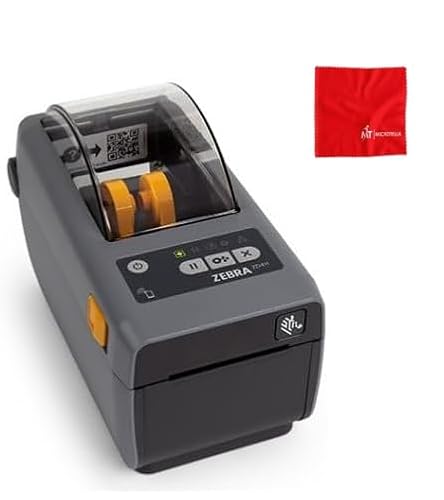
Zebra ZD411 2 inch direct thermal printer, modular, BTLE5Best Compact ModularZebra ZD411 2 inch direct thermal printer, modular, BTLE5203 dpiModular, with Bluetooth Low Energy 5n/a
Zebra ZD220 desktop direct thermal printer, USBBest Entry RungZebra ZD220 desktop direct thermal printer, USBn/an/aDirect thermal, no ink or ribbon
Zebra GX420d direct thermal printer, USB, Ethernet, serialBest Legacy NetworkZebra GX420d direct thermal printer, USB, Ethernet, serialn/an/aDirect thermal, no ribbon
Zebra ZP450 direct thermal printer, 5 ips, 203 dpiBest Low-Volume LegacyZebra ZP450 direct thermal printer, 5 ips, 203 dpi203 dpin/aDirect thermal, toner free

This maker's desktop printers have become the reference point for shipping and barcode work, mostly because they speak the same label languages as warehouse software, shipping platforms and retail systems. A printer that every program already knows how to talk to saves hours of setup.

The line is a ladder, with an entry model, a mid-range model and a premium model, plus older designs that still show up for sale. Climbing the ladder buys you speed, a better front panel and more ways to connect, so the right rung is the one that matches how many labels you print and how many people share the machine.

Before you buy

6 Criteria to Look For Before Buying a Zebra Label Printer

  1. 01

    Which rung of the ladder

    The ZD220 is the entry rung with USB, the ZD421 adds a three-button panel and network options, and the ZD621 adds speed and a refined interface. The ZD411 is a compact 2 inch alternative. Pick the rung that matches how many people print, not how many labels you hope to print one day. Labels formatted for one Zebra move to another with little change, so starting low and upgrading later costs little more than buying high today. The common regret is paying for the top rung and then using a single USB cable and a single user for the printer's whole life.

  2. 02

    Label size and width

    The ZD621, ZD421 and ZD220 handle 4x6 shipping labels, while the ZD411 is a 2 inch class printer. The ZP450 has a fixed media width. Confirm the width of your label against the printer before you order. A printer's maximum print width is a little smaller than the roll it holds, so a 4 inch roll prints about 4 inches of image. A 2 inch printer such as the ZD411 will never print a parcel label, so do not let a low price on a small model tempt you away from the size you need.

  3. 03

    Label language support

    The ZD411 lists ZPL and EPL, the languages most shipping and warehouse software speaks. A Zebra's value is that the software already knows how to talk to it. Check that your tool lists the model or the language. Shipping platforms often publish a short list of supported printers, and a Zebra on that list installs in minutes while an unlisted brand may need a generic driver and a manual page-size setting. If you plan to write your own label formats, ZPL gives you precise control over barcodes and fonts at the cost of a learning curve.

  4. 04

    Connectivity and legacy ports

    The GX420d and ZP450 offer serial and parallel ports for older systems. The ZD411 has modular connectivity with Bluetooth Low Energy 5. Match the ports to what your computer and software use today. Parallel ports are gone from most modern computers, so a ZP450 with only legacy ports can need an adapter or a print server, which adds cost and a failure point. A modern network connection is the safer bet unless an old machine on your bench requires serial.

  5. 05

    Panel and training burden

    The ZD421 uses three buttons and five LED icons, and the ZD621 is described as needing minimal training. A clear panel pays off most when staff rotate. A single user can live with a basic LED. When a bench is shared, a status icon that explains a flashing light saves a supervisor's time, and that is the reason the mid and top rungs add panels. The cost of a stalled bench for ten minutes a week usually exceeds the price gap between the models.

  6. 06

    Direct thermal limits

    Every printer in this guide is direct thermal, so labels fade in heat and light. That suits parcels and receipts. For durable labels, a ribbon-based Zebra is the right family. Many sites run both, with direct thermal for parcels and transfer for asset tags, and the label formats move between them with few changes. Decide label life first, because it picks the technology.

Detailed reviews

The 6 best zebra label printers, explained

01
Zebra ZD621 4x6 direct thermal printer, 203 dpi
Ultra-fast4x6203 dpiEasy interface
Check price on Amazon
Best for: High-volume desks with rotating staff and network printing.

At the top of the desktop ladder sits the ZD621, and the listing sells it on two things: ultra-fast ink-free printing and an interface that new staff can pick up with minimal training. In an operation where temporary packers rotate through, that low training burden is as valuable as raw speed.

It prints 4x6 labels at 203 dpi, connects to wired or wireless networks or directly to a PC, and works from Windows and other systems. Because the Zebra label languages are widely supported, it usually plugs into shipping and warehouse software with little fuss. The ZD421 below it offers the same label size and resolution with a simpler panel.

Ownership is the usual desktop barcode routine: wipe the head, clean the platen roller and keep direct thermal rolls out of the heat. For a desk that prints hundreds of labels a day, it is the model that rarely makes you think about it.

What works

  • Ultra-fast printing as billed
  • Low-training status interface
  • Wired, wireless and PC connection
  • Widely supported label languages

Watch out for

  • Costs more than the ZD421
  • Direct thermal labels fade
  • More than a light user needs

Spec sheet

Label size
4x6 inch
Resolution
203 dpi
Speed
Described as ultra-fast
Interface
Intuitive, status at a glance
Connectivity
Wired or wireless network, or direct to PC
02
Zebra ZD421 4x6 direct thermal printer with 3-button panel
3 buttons5 LED icons203 dpi4x6
Check price on Amazon
Best for: Small businesses expecting more than one user on the same printer.

Think of the ZD421 as the rung most small businesses should stand on. Its three buttons and five LED icons show instantly what the printer needs, and the ink-free direct thermal engine handles labels, barcodes and receipts. It sits between the plain ZD220 and the faster ZD621.

Connection is flexible, since the printer can join an existing wired or wireless network or plug directly into a PC. That covers a one-person desk and a small team equally well. At 203 dpi on 4x6 labels, output is the same as the ZD621, so you are paying for panel and speed differences, not label quality.

Care is simple. Wipe the head every few rolls, keep the roller clean and store labels cool. It is the one to buy if you expect to grow past a single user, but do not yet need the top model.

What works

  • Three buttons and five LED status icons
  • Wired, wireless or direct PC connection
  • Same 4x6 output as the ZD621
  • Ink-free direct thermal

Watch out for

  • Less speed than the ZD621
  • Direct thermal labels fade
  • No ribbon option

Spec sheet

Panel
3 buttons and 5 LED icons
Resolution
203 dpi
Label size
4x6 inch
Connectivity
Wired network, wireless network or PC
Use
Labels, barcodes, receipts
03
Zebra ZD411 2 inch direct thermal printer, modular, BTLE5
2 inch class203 dpiBTLE5ZPL and EPL
Check price on Amazon
Best for: Retail and lab benches that want small labels and a choice of interfaces.

Modular connectivity is the ZD411's twist. The base printer can be configured with different connection options, and the unit in this listing includes Bluetooth Low Energy 5 for phone-based setup. That flexibility lets a business buy exactly the interfaces it needs instead of paying for all of them.

It is a 2 inch class printer at 203 dpi, aimed at shelf labels, product labels and lab labels, and it supports the ZPL and EPL languages that most label software already uses. The listing also highlights Print DNA, a set of tools for managing printers. Against the ZD421, it trades width for compactness and modularity.

As a bench machine for small labels, it does not replace a shipping printer. Wipe the head, keep stock in a cool place and make sure the listing's connectivity module matches what you need. It suits retail, healthcare and lab benches.

What works

  • Modular connectivity with BLE 5
  • ZPL and EPL support
  • Compact 2 inch body
  • Print DNA management tools

Watch out for

  • Cannot print 4x6 labels
  • Interface set depends on the module
  • Direct thermal fade

Spec sheet

Width class
2 inch
Resolution
203 dpi
Connectivity
Modular, with Bluetooth Low Energy 5
Languages
ZPL and EPL
Ecosystem
Print DNA tools
04
Zebra ZD220 desktop direct thermal printer, USB
USBCompactDirect thermalPlug and play
Check price on Amazon
Best for: Single-computer users who want a reliable, compact Zebra at the entry rung.

The ZD220 is where most people start. It connects by USB with plug-and-play installation on Windows and Mac, prints barcode and shipping labels using direct thermal technology and takes up little desk space. There is no ribbon, so the only consumable is the label roll.

What it lacks compared with the ZD421 is a richer panel and network options. A companion listing for the same family describes a single LED and single feed button, which keeps operation basic. For one person on one computer, that simplicity is a plus, and for a team it becomes a limit.

Keep the head clean with alcohol, keep rolls dry and replace the platen roller if feeds get uneven. If you outgrow it, the ZD421 reads the same label languages, so your formats move over without a rewrite.

What works

  • Plug-and-play USB on Windows and Mac
  • Compact desktop footprint
  • No ink or ribbon
  • Same label languages as bigger models

Watch out for

  • USB only in this version
  • Basic single-button operation
  • Direct thermal fade

Spec sheet

Connection
USB, plug and play
Systems
Windows and Mac
Technology
Direct thermal, no ink or ribbon
Design
Compact desktop
Uses
Barcode and shipping labels
05
Zebra GX420d direct thermal printer, USB, Ethernet, serial
USB + EthernetSerialDirect thermalEnergy efficient
Check price on Amazon
Best for: Sites with legacy software or serial connections that still need an older Zebra.

A veteran from the previous generation, the GX420d remains in warehouses because it still works and talks to old software. The listing credits it with rapid printing and energy efficiency, and it offers USB, serial and Ethernet connections, which is useful where legacy systems still use serial ports.

It is a direct thermal printer, so there is no ribbon, and it prints address, shipping and barcode labels. Against the ZD421, it lacks the newer panel and wireless options, but it fills a niche where compatibility with older equipment matters more than new features.

Because the design is older, check driver support for your current operating system before buying. Keep the head clean, the roller free of adhesive and rolls cool. For a site that already runs this model, a replacement is a safe choice.

What works

  • USB, serial and Ethernet ports
  • Rapid and energy-efficient printing
  • Direct thermal with no ribbon
  • Familiar legacy platform

Watch out for

  • Older design, check drivers
  • No modern status panel
  • Direct thermal fade

Spec sheet

Ports
USB, serial, Ethernet (listing also mentions parallel)
Technology
Direct thermal, no ribbon
Uses
Address, shipping and barcode labels
Strengths
Rapid printing and energy efficiency
Family
Older GX series
06
Zebra ZP450 direct thermal printer, 5 ips, 203 dpi
5 ips203 dpiUSB + serial + parallelFixed width
Check price on Amazon
Best for: Low-volume users with older systems that need a basic Zebra.

Compact and purpose-built is how the listing describes the ZP450. It prints at up to 5 ips at 203 dpi with USB, serial and parallel connectivity, aimed at low-volume jobs where a larger printer would be overkill. Direct thermal means no toner or ribbon.

The listing notes a fixed media width, which limits flexibility, and the parallel port tells you it targets older systems. Compared with the GX420d, it offers a simpler, lower-volume role. Compared with the ZD421, it lacks modern connectivity and a status panel.

Check drivers and label sizes before buying, since a fixed media width limits which labels fit. Keep the head clean and rolls cool. It is for low-volume users with older systems, not for a growing shop.

What works

  • 5 ips at 203 dpi
  • USB, serial and parallel ports
  • No toner or ribbon
  • Compact body

Watch out for

  • Fixed media width
  • Older ports, no wireless
  • Direct thermal fade

Spec sheet

Speed
Up to 5 ips
Resolution
203 dpi
Ports
USB, serial, parallel
Technology
Direct thermal, toner free
Media
Fixed media width

Spec sheet decoder

What the numbers on the box really mean

The specs manufacturers lead with, translated into what they tell you about real-world performance.

ZPL and EPL

Zebra's label command languages. Most shipping and warehouse programs speak at least one of them.

Watch forThe ZD411 lists both.

Print DNA

A set of management and configuration tools that work across the printer line. It helps with fleets of printers.

Watch forThe ZD411 listing highlights it.

Modular connectivity

The printer's communication options can be swapped or added as modules. You buy only the interfaces you need.

Watch forThe ZD411 uses it.

ips

Inches per second, the feed speed. Real throughput depends on label length and data speed.

Watch forThe ZP450 lists 5 ips, and the ZD621 is billed as ultra-fast.

Fixed media width

The printer works with a single label width rather than adjustable guides. It limits flexibility.

Watch forThe ZP450 lists it.

Methodology

How We Evaluated These Zebra Label Printers

Family position

We placed each printer on the ladder from entry to premium, then treated the older GX420d and ZP450 as legacy designs. The ZD621, ZD421 and ZD220 form the current line. Position drove what each model was compared with, so the legacy printers were weighed against the jobs they still do and not against current flagships. We did not assume newer is better for every buyer, because a site with serial software may reasonably want an older chassis.

Interface and operation

We compared the status panels, from the ZD220's single button to the ZD421's three buttons and five icons. The ZD621's low-training interface led. Operator friendliness counted on shared benches.

Connectivity

We compared USB, Ethernet, serial, parallel and Bluetooth LE options. The GX420d and ZP450 stand out for legacy ports, and the ZD411 for modular options. Wireless support favored the newer line. We treated a missing wireless option as a limit only when the job needs it, since a wired bench is often more reliable than a wireless one.

Label language and software

We looked for ZPL and EPL and Print DNA tools. The ZD411 lists them. A printer that your software already knows is worth more than a spec. Because language support decides how fast a new printer goes live, we gave extra weight to listings that name ZPL, EPL or management tools, and discounted ones that give only marketing words.

Ownership reality

Based on owner feedback patterns, head cleaning, roller wear and driver support were weighed. Older models were noted for driver risk. We did not quote prices.

Decision guide

How to Choose the Right Zebra Label Printers

By Workload

SituationPickWhy
High-volume desk with rotating staffZebra ZD621Ultra-fast with a low-training interface
Small team on one printerZebra ZD421Three buttons, five icons and network options
One computer, light useZebra ZD220USB plug and play
Small shelf and sample labelsZebra ZD4112 inch with modular BLE 5
Legacy serial softwareZebra GX420dUSB, serial and Ethernet

By Budget

Budget tierPickWhy
Lowest costZebra ZP450Basic legacy printer
Low-midZebra ZD220Entry current model
MidZebra GX420dLegacy with Ethernet
Upper-midZebra ZD421Mid-range current model
HighestZebra ZD621Premium desktop

Current vs Legacy Models

Current line

The ZD220, ZD421, ZD621 and ZD411 have modern interfaces and wireless options. They have current driver support. They suit new setups.

Legacy

The GX420d and ZP450 offer serial and parallel ports for older systems. They fill replacement roles. They need a driver check.

Choose current for new setups; choose legacy only to match existing equipment.

4x6 vs Small Labels

PreferencePickWhy
Shipping labelsZebra ZD4214x6 with a clear panel
Parcels at volumeZebra ZD621Speed and training ease
Shelf and sample labelsZebra ZD4112 inch with modular connectivity
Basic address labelsZebra ZD220Compact and simple

For Small Businesses Specifically

Look for

A printer your shipping tool supports, a panel your staff can read and a connection that suits your computers.

In this comparison

The ZD421 suits most small shops, the ZD220 suits a lone user and the ZD621 suits a busy desk.

When to Spend More

Spend more if

Staff rotate or volume is high. The ZD621 pays back in speed and fewer mistakes.

Save if

You print occasionally on one computer. The ZD220 is enough.

Ownership

Maintenance schedule

The upkeep that decides whether this machine lasts two seasons or ten.

TaskIntervalWhy it matters
Clean the print headEvery few rollsAdhesive and dust cause streaks. Isopropyl on a cotton swab removes the film.
Wipe the platen rollerMonthlyResidue causes misfeeds. Wipe it so labels track straight.
Store labels cool and dryOngoingHeat turns coated label paper dark. Keep spare rolls sealed.
Check drivers after updatesAfter each OS updateOlder models can lose driver support. Keep the installer on hand.
Clean the media sensorEach roll changeDust causes false out-of-paper errors. A puff of air clears it. If the printer still misreads labels after cleaning, run the media calibration routine from the panel, which relearns the label length and gap for the stock you loaded.

FAQ

Frequently Asked Questions

ZD421 or ZD621?

The ZD621 is faster and has a low-training interface. The ZD421 does the same 4x6 job at a lower cost.

Why choose Zebra?

Zebra printers speak label languages that shipping and warehouse software already know. That saves setup time. The other benefit is a deep supply of parts, drivers and used units, so a printer that fails in year six can usually be repaired or swapped without rewriting your label formats.

Is the ZD220 enough?

For one computer and light use, yes. It connects by USB and prints barcode and shipping labels.

Should I buy a legacy GX420d or ZP450?

Only to match existing equipment. New buyers should start with a current ZD model. A legacy printer is a reasonable replacement when an old computer needs a serial cable, and a poor choice when you simply want a cheap Zebra.

Do Zebra labels fade?

Sun and heat will dim direct thermal prints. Use thermal transfer printers for durable labels.

Can I print 4x6 on the ZD411?

No. It is a 2 inch class printer. Use the ZD421 or ZD621 for 4x6.

Bottom line

The short version

Browse more zebra label printerson Amazon →
James Miller, Lead Machine Editor

About the author

James Miller

Lead Machine Editor, MachineFanatic

James Miller leads MachineFanatic's buying guides, turning spec sheets, manuals and owner feedback into clear verdicts on power tools, outdoor power equipment, shop machines and kitchen machines.

More from James →

Keep reading

Related guides