Amazon affiliate links - we earn a commission.Affiliate disclosure

Buying guide · 13 min read · Updated 2026-11-07

Best 600mm/s 3D Printers (2026)

Five 600 mm/s 3D printers compared by how they handle color, from single nozzles to filament switchers and four-toolhead changers, plus upkeep and fit.

James MillerBy James MillerLead Machine Editor5 machines comparedSpec-sheet verified
Best 600mm/s 3D Printers

At a glance

Our top picks

Side by side

Spec comparison

High speed is now table stakes for enclosed hobby printers, so the useful question is what a machine does besides move fast. The biggest difference between today's models is how they handle color and material changes, and that choice shapes cost, waste and maintenance more than the speed figure does.

This guide ranks five printers that share a six hundred millimeter per second headline and splits them by approach: single nozzle, filament switcher and independent toolhead changer. It explains what each costs in plastic, time and upkeep.

Before you buy

6 Criteria to Look For Before Buying a 600mm/s 3D Printer

  1. 01

    Single nozzle, switcher or toolchanger

    A single-filament machine like the AD5M has no purge waste. A filament switcher such as the AD5X IFS or the K2 Combo CFS feeds several spools into one nozzle and purges between colors. A toolchanger such as the Creator 5 Pro uses a nozzle per material and wastes almost nothing. Pick by how often you print in color. A buyer who prints a color figurine once a month does not need a toolchanger, while a seller who prints dozens of multi-material parts each week will recover the cost in saved filament and time.

  2. 02

    Purge waste

    Each color change on a switcher pushes plastic through the nozzle to clear the previous color. A small figure with many changes can waste more filament than it uses. Toolchangers avoid this but cost much more up front. Many switcher owners reduce waste by slicing models with fewer color changes, by using a smaller purge tower or by choosing designs where colors change on large flat regions, and a few minutes in the slicer can cut waste noticeably.

  3. 03

    Build volume

    The AD5M and AD5X offer a 220 mm cube, while the K2 Plus has a large bed. A fast printer does not help if the part does not fit, so measure before buying.

  4. 04

    Chamber heating

    The Creator 5 Pro lists a 65 degree Celsius active chamber, which reduces warping on ABS, ASA and nylon. The other machines here are passively enclosed, which is fine for PLA and PETG.

  5. 05

    Nozzle temperature

    The AD5X lists a 300 degree nozzle, while the AD5M family lists 280 degrees. Higher limits open more filaments, but you still need dry filament and a ventilated room for hot materials.

  6. 06

    Noise and room fit

    At 600 mm/s these machines are loud. The K2 Combo has a silent mode, and enclosed frames muffle sound. If the printer shares your living space, test noise in a quiet mode first. A closed cabinet or a shelf away from the bedroom is a cheap fix, and lowering acceleration trims noise with little effect on total print time for typical parts.

Detailed reviews

The 5 best 600mm/s 3d printers, explained

01
FLASHFORGE AD5X with IFS, four colors, 600 mm/s and auto leveling
600 mm/sIFS 4-color300 C nozzleAuto leveling
Check price on Amazon
Best for: Buyers who want four-color printing without paying for a toolchanger.

The AD5X is a CoreXY machine with the Intelligent Filament System, which feeds four spools into a single nozzle. A 300 degree Celsius direct drive hotend opens more materials than a 280 degree one. Fully automatic leveling handles bed setup, so the first print rarely needs manual adjustment.

The filament-switcher approach is the cheapest way to print in color, and for most home users it is also the most practical, because one nozzle and one hotend keep the machine simple and its parts familiar. The downside is purge waste, because each color change pushes some of the old filament out through the nozzle before the new color arrives. Against the Creator 5 Pro, the AD5X costs far less but wastes more plastic. Against the Adventurer 5M, it adds color and a hotter nozzle.

Ownership centers on the IFS. Keep spools dry, watch the filament path for jams, and expect to buy more plastic than the finished weight suggests. The usual belt and rail care applies, and a clean plate remains the first fix for failed first layers. Keep the IFS tubes straight and untangled, since a kinked tube is the most common cause of a feed fault.

What works

  • IFS feeds four colors into one nozzle
  • 300 C nozzle widens material range
  • Fully automatic bed leveling
  • Lowest-cost multicolor route in this lineup

Watch out for

  • Purge waste on every color change
  • Compact 220 mm build volume
  • Filament path can jam if spools are wet

Spec sheet

Top speed
600 mm/s
Multicolor
IFS, 4 colors
Nozzle limit
300 C
Build size
220 x 220 x 220 mm
Leveling
Fully automatic
02
FLASHFORGE AD5M CoreXY, 600 mm/s with 1-click leveling, 220 mm cube
600 mm/s1-click leveling220 mm cubeCoreXY
Check price on Amazon
Best for: Single-filament buyers who want the lowest-cost fast CoreXY.

The AD5M is the single-filament version of the platform, an all-metal CoreXY machine with one-click automatic leveling and a 220 mm cube build volume. Because there is no filament switcher, there is no purge waste and nothing to jam in a feeder. For many buyers that simplicity is the feature.

It is the lowest-cost path to 600 mm/s here. The tradeoff against the AD5X is the lack of color capability, though you can still paint or swap spools by hand between layers, a technique used for signs and lithophane-style parts. Against the K2 Combo, it leaves out a bundled feeder and a quiet mode.

Ownership is easy: quick nozzle swaps, widely stocked spares and the usual belt and rail care. A clean plate and dry filament cover most failures. Because the machine has no feeder or purge system, the only routine chores are belts, rails and the nozzle, which makes it the easiest of the group to keep running for years. Buyers who want a color option later should know that the same maker sells the multicolor version.

What works

  • No purge waste or feeder to maintain
  • One-click automatic leveling
  • All-metal CoreXY frame
  • Widely stocked spares

Watch out for

  • Single color only
  • Compact 220 mm build volume
  • Fewer extras than bundled rivals

Spec sheet

Top speed
600 mm/s
Frame
All-metal CoreXY
Build size
220 x 220 x 220 mm
Leveling
One-click automatic
Filament
Single
03
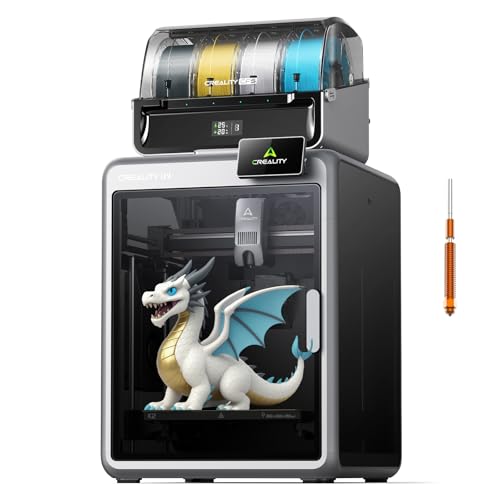
Creality K2 Combo (A) with CFS and quiet operation, 600 mm/s
600 mm/sCFS multicolorSilent modeSmart leveling
Check price on Amazon
Best for: Buyers who want quiet, scalable multicolor from a familiar maker.

The K2 Combo (A) ships with one CFS unit, expandable to four for up to 16 colors, inside an enclosed 600 mm/s frame. A silent mode and smart auto leveling make it friendlier in shared spaces, such as a spare bedroom or a home office where fan noise would otherwise be a complaint. It is a filament-switcher design like the AD5X, with the same purge-waste trade.

Against the AD5X, it offers more maximum colors and a quiet mode but costs more. Against the Creator 5 Pro, it is simpler and far less expensive, which matters because the toolchanger's extra hotends are four more parts that can fail. Against the K2 Plus in this guide, it covers the same ecosystem with a smaller bed.

Ownership requires dry spools, regular plate cleaning and periodic belt checks. Expand the CFS only if you plan to print many colors, since each additional unit adds cost and another spool bay to keep dry. A single unit already handles four colors, which covers most figurines and signage, and the quiet mode is worth testing on day one so you know how loud the machine is in your room.

What works

  • CFS expands up to 16 colors
  • Silent mode for shared rooms
  • Smart automatic leveling
  • Enclosed 600 mm/s class frame

Watch out for

  • Purge waste on color changes
  • Costs more than the AD5X
  • Each extra CFS unit adds cost

Spec sheet

Top speed
600 mm/s
Multicolor
CFS, expandable to 4 units
Noise
Silent mode
Leveling
Smart automatic
Frame
Enclosed
04
FLASHFORGE Creator 5 Pro four-toolhead printer with 65 C heated chamber
4 toolheads7-second swap65 C chamberIndustrial class
Check price on Amazon
Best for: Workshops that need multi-material parts without purge waste.

The Creator 5 Pro uses four independent toolheads and a fast changer, so each color or material has its own nozzle and nothing is purged between changes. A 65 degree Celsius actively heated chamber supports engineering filaments. This is a different class from the filament switchers above.

The benefit is less waste and true multi-material capability, such as pairing a rigid filament with a flexible one. The cost is price and complexity, since four toolheads are four sets of hotend parts to maintain. Against the AD5X, it is much more expensive but wastes far less plastic.

Ownership means calibrating nozzle offsets, keeping four nozzles in good shape and handling a heated chamber. It suits workshops, small businesses and serious hobbyists, not casual buyers. Think of it as a small production tool: the reward is parts that combine a rigid filament with a flexible one in a single job, without hand assembly, and the cost is the time spent aligning and maintaining four separate nozzles.

What works

  • Four independent toolheads avoid purge waste
  • 65 C chamber supports engineering filament
  • Seven-second toolhead swap
  • True multi-material capability

Watch out for

  • Highest cost in this lineup
  • Four hotends to maintain and calibrate
  • Overkill for casual printing

Spec sheet

Toolheads
4 independent
Swap time
7 seconds
Chamber
65 C active heating
Colors
Multi-material and multicolor
Waste
Near-zero design
05
Creality K2 Plus Combo large-format printer with CFS and servo motors
600 mm/sLarge formatCFS multicolorFOC servos
Check price on Amazon
Best for: Makers who need large parts and optional multicolor.

The K2 Plus is the large-format entry in the K2 line, with FOC step-servo motors and the CFS multicolor system in the Combo. The larger bed holds parts that no 220 mm machine can. The closed-loop servos are designed to avoid missed steps at speed, which matters more on a large bed where the moving mass is higher and a single layer shift can ruin a long print.

The tradeoff is footprint and cost. Against the K2 Combo, it is the same ecosystem with more bed. Against the Creator 5 Pro, it is a filament switcher with a big bed rather than a toolchanger with a heated chamber.

Ownership is about scale: a strong bench, dry spools and careful first-layer checks. Buy it only if you will use the volume. The bed is heavy and slow to heat, and the large gantry means that real speeds on big parts sit well below the headline, so expect a long print for a large object whatever the box says.

What works

  • Large bed for oversized parts
  • FOC servo motors resist missed steps
  • CFS multicolor in the Combo
  • Enclosed frame for stable printing

Watch out for

  • Large, heavy machine
  • High cost compared with the 220 mm models
  • Failed big prints waste a lot of plastic

Spec sheet

Top speed
600 mm/s
Multicolor
CFS
Motors
FOC step-servo on XYZ
Format
Large-format bed
Frame
Enclosed

Spec sheet decoder

What the numbers on the box really mean

The specs manufacturers lead with, translated into what they tell you about real-world performance.

IFS

FLASHFORGE's filament system that feeds four spools into one nozzle.

Watch forOnly the AD5X in this lineup has it; spools must be dry.

CFS

Creality's filament system, expandable by chaining units.

Watch forThe K2 Combo and K2 Plus Combo use it.

Toolchanger

A system where each material has its own nozzle that swaps onto the carriage.

Watch forThe Creator 5 Pro uses four toolheads with a 7-second swap.

Active chamber heating

A heater warms the air inside the enclosure, not just the bed.

Watch forThe Creator 5 Pro lists 65 C.

FOC step-servo

Closed-loop motors that sense position and correct errors.

Watch forThe K2 Plus lists them on all three axes.

Methodology

How We Evaluated These 600mm/s 3D Printers

Color and material approach

We grouped machines by single nozzle, filament switcher or toolchanger, then compared waste and complexity. Toolchangers scored best on waste, switchers on price.

Speed credibility

We looked at acceleration and flow claims where published. Machines that list flow figures are easier to trust.

Material range

We compared nozzle and chamber limits. The Creator 5 Pro led on engineering filaments.

Build volume

We compared bed size against typical projects. The K2 Plus led, while the 220 mm machines trade size for cost.

Ownership

We weighed consumables, calibration and parts supply. Single-filament machines scored best on simplicity.

Decision guide

How to Choose the Right 600mm/s 3D Printers

By Color Strategy

SituationPickWhy
One color is enoughFLASHFORGE AD5MNo purge waste, lowest cost
Four colors at a low tierFLASHFORGE AD5XIFS and 300 C nozzle
Quiet, scalable colorCreality K2 Combo (A)Silent mode and CFS
True multi-material, little wasteFLASHFORGE Creator 5 ProFour independent toolheads
Large multicolor partsCreality K2 Plus ComboBig bed with CFS

By Budget

TierPickWhy
Lowest hereFLASHFORGE AD5MSingle filament
Lower-middleFLASHFORGE AD5XFour-color switcher
MiddleCreality K2 Combo (A)Quiet multicolor
UpperCreality K2 Plus ComboLarge format
HighestFLASHFORGE Creator 5 ProToolchanger with heated chamber

Switcher vs Toolchanger

Filament switcher

The AD5X and K2 machines swap spools through one nozzle. They cost less but waste plastic at each change and can jam in the feeder path.

Toolchanger

The Creator 5 Pro swaps whole toolheads. It wastes almost nothing and handles different materials, but costs more and has more parts.

Pick a switcher for casual color. Pick a toolchanger for production or true multi-material work. If you are unsure, start with a switcher, since you can learn what you really print before paying for the extra hardware.

Small vs Large Bed

PreferencePickWhy
Standard partsFLASHFORGE AD5X220 mm cube is enough
Oversized partsCreality K2 Plus ComboLarge-format bed
Production batchesFLASHFORGE Creator 5 ProToolchanger and chamber

For Engineering Parts Specifically

Look for

A heated chamber, a higher nozzle limit and a direct drive. Filament must be dried before printing, and a chamber that reaches 65 degrees is worth little if the spool absorbs water first.

In this comparison

The Creator 5 Pro is the only machine with active chamber heating. The AD5X offers a 300 C nozzle at a lower tier.

When to Spend More

Spend more if

You print multi-material parts or run a small shop. The Creator 5 Pro saves plastic and time.

Save if

You print single-color parts or occasional colors. The AD5M or AD5X is enough.

Ownership

Maintenance schedule

The upkeep that decides whether this machine lasts two seasons or ten.

TaskIntervalWhy it matters
Dry filamentBefore each long printMoist filament fails at speed. Use a dryer or sealed storage.
Check filament pathsMonthlySwitcher feeders jam when tubes kink or spools tangle.
Calibrate toolhead offsetsAfter a nozzle swapA toolchanger needs aligned nozzles. Misaligned heads blur color boundaries.
Check belts and railsEvery 3 monthsHigh acceleration stretches belts and dries rails.
Replace nozzlesWhen wornHigh flow wears nozzles. Worn orifices cause under-extrusion.

FAQ

Frequently Asked Questions

What is the difference between IFS and a toolchanger?

IFS feeds several spools through one nozzle and purges between colors. A toolchanger swaps entire nozzles, so it purges little and handles different materials.

Is multicolor printing wasteful?

On a switcher, yes. Purge waste can exceed the part's weight on small multicolor models. A toolchanger avoids most of it.

Can the AD5X print ABS?

Its 300 C nozzle supports it, but a passive enclosure makes warping on larger parts likely. Dry filament and ventilation are needed, and small parts print far more reliably than large flat ones.

Is 600 mm/s necessary?

No. Most prints never reach it, because short moves and corners are slower. Flow and cooling set real limits, and a well-tuned 300 mm/s print often looks better than a rushed 600 mm/s one.

Which is best for classrooms?

The AD5M is simple and low cost, with no feeder to explain to students. Multicolor models are fun and motivating but add upkeep, so start with single-color projects and add color once the class has the basics.

Do these need special software?

Each maker has its own slicer or supports popular ones. Check profile quality before buying, because a good profile for your filament saves hours of tuning and is often the difference between a machine that feels easy and one that does not.

Bottom line

The short version

Browse more 600mm/s 3d printerson Amazon →
James Miller, Lead Machine Editor

About the author

James Miller

Lead Machine Editor, MachineFanatic

James Miller leads MachineFanatic's buying guides, turning spec sheets, manuals and owner feedback into clear verdicts on power tools, outdoor power equipment, shop machines and kitchen machines.

More from James →

Keep reading

Related guides