
Amazon affiliate links - we earn a commission.Affiliate disclosure

Buying guide · 12 min read · Updated 2026-11-13

Best Power Stations for Home Office (2026)

Five power stations that keep a home office running through outages, compared on UPS switchover, pure sine output, runtime for a PC and router, and fan noise.

James MillerBy James MillerLead Machine Editor5 machines comparedSpec-sheet verified
Best Power Stations for Home Office

At a glance

Our top picks

Side by side

Spec comparison

A home office has a different power problem from a campsite. The loads are modest, a laptop, a monitor, a router and a lamp, but the cost of a dropout is high, because a lost video call or an unsaved file is worse than a dark room.

That changes what to look for. Fast switchover, clean output and quiet operation matter more than raw wattage, and the unit has to sit under a desk for years without annoying anyone. This guide ranks five stations on those terms.

Before you buy

6 Criteria to Look For Before Buying a Power Station for Home Office

  1. 01

    UPS switchover time

    A desktop power supply can usually ride through a gap of about 10 milliseconds, so a station that switches faster than that behaves like a UPS. The EcoFlow DELTA 3 Classic quotes under 10ms and the BLUETTI Elite 30 V2 quotes 10ms. If the listing gives no figure, as with the Anker S2000 and UDPOWER, assume a desktop may reboot.

  2. 02

    Runtime for your actual desk

    List the watts: a laptop at 60, two monitors at 50, a router at 12 and a lamp at 10 make about 130 watts. Divide usable watt-hours by that, so 1024Wh runs roughly six to seven hours and 288Wh about two. A desktop with a graphics card can draw 300 watts or more. Add a margin for the modem and a mesh node, which together draw another 20 to 30 watts.

  3. 03

    Pure sine output

    A switching power supply in a desktop or a laptop charger runs happiest on a clean waveform. The UDPOWER S1200 lists pure sine, and the others generally use it, but check small units. A stepped waveform can make a power supply buzz.

  4. 04

    Fan noise during charging

    A unit that fast-charges at 1500 watts needs fans, and a quiet room makes them audible. The EcoFlow charges to 80 percent in 45 minutes, which is an advantage and a noise source. A smaller unit like the Jackery 300 charges slowly and quietly.

  5. 05

    Outlets and port layout

    An office has several plugs, and a station with few outlets needs a power strip. The UDPOWER offers five AC outlets and 14 outputs, while the Jackery has two AC. A USB-C PD port can replace a laptop brick. Label each outlet so a household member does not unplug the router while looking for a free socket.

  6. 06

    Idle draw and always-on use

    A unit used as a UPS spends years plugged in. The Anker S2000 lists 6W idle, which is low for its size, and the app can cap the charge to protect the cells. Check the manual for standby consumption.

Detailed reviews

The 5 best power stations for home office, explained

01
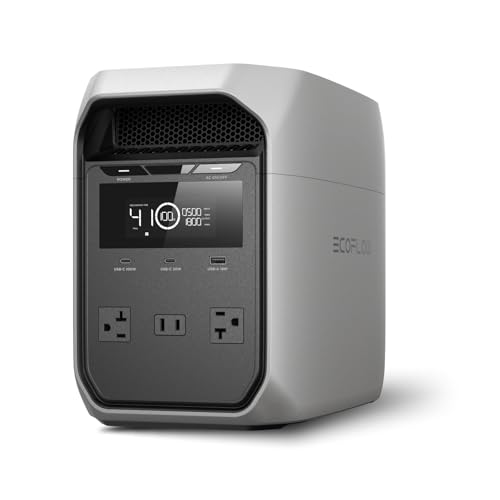
EcoFlow DELTA 3 Classic 1024Wh 1800W Power Station
1024Wh LFP1800W outputUnder 10ms UPS45 min to 80%
Check price on Amazon
Best for: Desktop workers and small servers who need a true UPS with hours of runtime.

Switching to battery in under 10 milliseconds is what lets a station behave like a real uninterruptible power supply for a desktop, a server or a medical device, and the Delta 3 Classic states that figure plainly. Most computers ride through a gap of that length without rebooting, so a brownout becomes a non-event. The unit also offers 1800 watts, 3600 watts of surge with X-Boost, and a 100 watt USB-C output that can charge a laptop directly.

A home office with a desktop, two monitors and a router draws around 150 to 250 watts, which puts 1024 watt-hours at roughly three to five hours of runtime. That is enough to finish a meeting and save work, and far more than a conventional UPS offers. Fast AC charging to 80 percent in 45 minutes means it is ready again before the next storm. Compared with the 1191Wh UDPOWER it has less energy but faster switching, and against the 288Wh BLUETTI it carries more than three times the storage.

Keep it plugged into the wall so the UPS function stays armed, set a charge limit in the app to protect the cells and give it a bit of air around the case. Fans spin during fast charging, so choose a spot where a few minutes of noise will not bother a call. If you share the desk with a standing-desk motor or a printer, keep those on the wall circuit, since laser printers draw large startup surges that waste battery.

What works

  • Under 10ms switchover protects desktops and servers
  • 1800W output with 3600W surge in X-Boost mode
  • 100W USB-C output charges laptops directly
  • 0 to 80 percent charge in 45 minutes

Watch out for

  • Fans run noticeably during fast charging
  • Heavy for a unit that sits under a desk
  • Capacity is modest for an all-day outage

Spec sheet

Capacity
1024Wh
AC output
1800W, 3600W surge with X-Boost
UPS switchover
Under 10 milliseconds
Fast charging
0 to 80 percent in 45 minutes
USB-C
100W output
02
UDPOWER S1200 1191Wh 1200W Power Station with UPS
1191Wh LiFePO41200W pure sineUPS function14 outputs
Check price on Amazon
Best for: Office setups with many devices that want one tidy hub with generous capacity.

Fourteen outputs make the UDPOWER S1200 the station most likely to remove the power strip from under a desk. Five AC outlets, four USB-A ports, two USB-C ports, two DC outputs and a car outlet cover a computer, monitors, a router, a phone and a lamp without adapters. The 1191 watt-hour LiFePO4 battery and 1200 watt pure sine output give it more energy than the Delta 3 Classic, if less peak power.

A UPS function is listed, though the switchover time is not quoted in the data we have, so a desktop that cannot tolerate even a brief gap deserves a test with a lamp and a monitor before it is trusted. The battery is claimed to keep at least 80 percent of capacity across its rated cycles, which fits what LiFePO4 normally delivers. Compared with the 2010Wh Anker S2000 it has about 60 percent of the energy, and against the 288Wh BLUETTI it holds four times the storage.

Place it where the five outlets are easy to reach and label each one so nobody unplugs the router by accident. A 400 watt solar input also lets it recharge from panels in a long outage. Because it carries so many outputs, a quick spare-outlet audit every few months stops a forgotten device from slowly draining the pack.

What works

  • Five AC outlets and 14 outputs total
  • 1191Wh LiFePO4 pack with pure sine output
  • UPS function listed
  • 400W solar input for long outages

Watch out for

  • Switchover time is not stated in the listing
  • 1200W is lower than the EcoFlow's 1800W
  • Less established brand with limited support

Spec sheet

Capacity
1191Wh LiFePO4
AC output
1200W pure sine wave continuous
Outputs
Five AC, four USB-A, two USB-C, two DC, one car
Solar input
Up to 400W
Cycle claim
Retains at least 80 percent capacity over its rated cycles
03
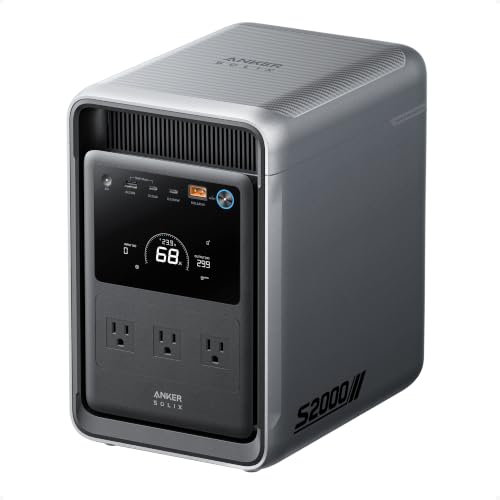
Anker SOLIX S2000 2010Wh 1500W Power Station
2010Wh LFP1500W output6W idle draw10,000 cycles
Check price on Amazon
Best for: Workers who face long outages and want a quiet, efficient battery with real runtime.

A 6 watt idle draw means the Anker S2000 can sit under a desk for years without quietly wasting its battery, which matters when the unit spends most of its life armed and waiting. It stores 2010 watt-hours in LFP cells rated for 10,000 cycles and delivers 1500 watts, a combination meant for long outages rather than quick bridges. For a desktop and router drawing around 200 watts, that is closer to nine hours.

The maker says the unit is 30 percent smaller and 25 percent lighter than earlier 2kWh stations, which helps in a home office where floor space is tight. Next to the 1024Wh EcoFlow it doubles the storage but lacks the stated sub-10ms switching, so confirm how it behaves with your equipment. Compared with the 288Wh BLUETTI it is a serious battery rather than a bridge.

Use it where you need to keep working through a long outage, and pair it with a few efficient devices. Avoid space heaters and anything above 1500 watts, and let the app set a charge ceiling for long-term storage. A modest habit that pays off is to run the unit down to about 30 percent once a year and recharge, which helps the battery management system keep its capacity estimate accurate.

What works

  • 6W idle draw keeps an armed unit efficient
  • 2010Wh gives many hours for a desk setup
  • Stated 10,000 cycle life on LFP cells
  • Compact for its capacity

Watch out for

  • UPS switchover time is not stated in the listing
  • 1500W is lower than some rivals
  • Highest outlay in the group

Spec sheet

Capacity
2010Wh LFP
AC output
1500W
Idle draw
6W
Cycle life
10,000 stated
Size
30 percent smaller than previous 2kWh stations
04
BLUETTI Elite 30 V2 288Wh 600W Power Station
288Wh LFP600W output10ms UPS9.4 lb
Check price on Amazon
Best for: Laptop and router offices that need a short, reliable bridge at low weight.

Light enough to carry between rooms and quick enough to refill in under an hour, the Elite 30 V2 is the sensible bridge for a laptop-and-router office. It lists a 10 millisecond UPS, a 600 watt inverter and 288 watt-hours of LFP cells, with a Power Lifting Mode that runs resistive gear up to 1500 watts.

The arithmetic is plain: a laptop at 60 watts, a monitor at 25 and a router at 12 draw about 100 watts, so 288Wh gives close to two and a half hours after losses. That is enough to finish work and shut down cleanly, but not a full afternoon. Against the 1024Wh Delta 3 Classic it is a third of the storage and a third of the weight, and against the 292Wh Jackery it adds a stronger inverter and the UPS.

Keep it plugged in and use the app's charge limit if it will sit on the desk permanently. It is the right size for a spare room, a bedroom desk or a travel bag. For a desk that also hosts a small printer, plug only the router and laptop into the Elite and leave the printer on the wall.

What works

  • 10ms UPS keeps a laptop and router running
  • 600W inverter with 1500W power lifting for resistive loads
  • 45 minute charge to 80 percent
  • Only 9.4 lb

Watch out for

  • 288Wh is a short runtime for a desktop
  • Few outlets for a larger desk
  • Power Lifting Mode does not suit motors

Spec sheet

Capacity
288Wh LFP
AC output
600W, 1500W power lifting
UPS switchover
10 milliseconds
Charge speed
0 to 80 percent in 45 minutes
Weight
9.4 lb
05
Jackery Explorer 300 292Wh LiFePO4 Power Station
292Wh LiFePO47.5 lb100W USB-C PD2 AC outlets
Check price on Amazon
Best for: Laptop-only workers who want a light, simple battery that also travels.

A 100 watt USB-C PD port is the feature that makes the Explorer 300 a quiet fit for a laptop office, because a modern laptop charges straight from USB-C without the AC inverter wasting power along the way. At 7.5 pounds and with LiFePO4 cells rated at over 4000 cycles, it is the lightest station here and the one most likely to travel between a desk, a kitchen table and a trip.

It has two AC outlets, two USB-A ports and a car port, so a router and a laptop brick can share it. Against the 288Wh BLUETTI it has similar capacity and weight but no stated UPS, so a desktop cannot rely on it to ride through a power drop. Compared with the 1024Wh EcoFlow it is a small, simple, portable choice.

It works best as a laptop power bank with a bonus. Use USB-C for the laptop, keep the router on AC and recharge it after each outage. If you travel with a laptop, the same unit goes in a carry-on only if its watt-hour label fits the airline's rules, and at 292Wh it does not, so it stays checked or at home.

What works

  • 100W USB-C PD charges laptops efficiently
  • 7.5 lb and portable
  • Stated cycle life above 4000
  • Established brand with wide support

Watch out for

  • No stated UPS switchover for desktops
  • 292Wh limits runtime for monitors and routers
  • Only two AC outlets

Spec sheet

Capacity
292Wh LiFePO4
Weight
7.5 lb
USB-C
100W PD
Outlets
Two AC, two USB-A, one car port
Cycle life
Over 4000 stated

Spec sheet decoder

What the numbers on the box really mean

The specs manufacturers lead with, translated into what they tell you about real-world performance.

UPS switchover

The time to move from wall power to battery when the grid drops. Under about 10 milliseconds usually keeps a computer on.

Watch forThe EcoFlow quotes under 10ms and the BLUETTI quotes 10ms.

Watt-hours

The stored energy, which sets runtime. A desk drawing 130 watts runs about 7 hours on 1024Wh.

Watch forThe lineup runs from 288Wh to 2010Wh.

Pure sine wave

A smooth AC waveform that matches grid power. It is gentler on power supplies and chargers.

Watch forThe UDPOWER S1200 lists pure sine on its 1200W output.

USB-C PD output

A direct DC path for charging laptops, which avoids inverter losses.

Watch forThe EcoFlow and Jackery both list 100W USB-C.

Idle draw

The power the unit uses when armed with no load. It matters for always-on UPS use.

Watch forThe Anker S2000 lists 6W.

Methodology

How We Evaluated These Power Stations for Home Office

Switchover protection

We compared stated UPS switching, the key to protecting a computer. The EcoFlow's under 10ms and the BLUETTI's 10ms led, and units without a figure lost points.

Runtime for desk loads

We estimated hours for a typical 130 watt desk setup. The 2010Wh Anker S2000 and 1191Wh UDPOWER lead, and the 288Wh BLUETTI and Jackery cover short outages.

Quiet operation

Fan noise during charging and heavy loads matters in a quiet room. Smaller units and slower charging scored better here.

Port layout

We counted outlets and USB-C PD output, since a tidy desk matters. The UDPOWER's 14 outputs lead.

Ownership realism

Idle draw, app charge limits and brand support came from spec sheets and owner feedback patterns. Established brands earned credit for warranty reach.

Decision guide

How to Choose the Right Power Stations for Home Office

By Equipment

SituationPickWhy
Desktop and server needing UPSEcoFlow DELTA 3 ClassicUnder 10ms switchover and 1800W
Laptop, monitor and routerBLUETTI Elite 30 V210ms UPS in a light unit
Many devices on one deskUDPOWER S1200Five AC outlets and 14 outputs
Laptop onlyJackery Explorer 300100W USB-C PD at 7.5 lb

By Budget

TierPickWhy
Lowest outlayJackery Explorer 300Cheapest of the five and fine for a laptop
Low to middleBLUETTI Elite 30 V2UPS and 600W in a small unit
HigherEcoFlow DELTA 3 ClassicFast UPS and 1800W output
HighestAnker SOLIX S2000Long runtime and low idle draw

UPS Station vs Plain Battery

UPS station

The EcoFlow DELTA 3 Classic and BLUETTI Elite 30 V2 quote fast switchover, so they protect a desktop from brownouts and brief dropouts. They are best left plugged in.

Plain battery

The Jackery 300 and others without a stated UPS suit a laptop that already has its own battery. They are simpler and often quieter.

Choose a UPS station for a desktop and a plain battery for a laptop.

Outage Length

Typical outagePickWhy
Under an hourBLUETTI Elite 30 V2Enough to finish work cleanly
Several hoursEcoFlow DELTA 3 Classic1024Wh runs a desk for around six hours
A day or moreAnker SOLIX S20002010Wh with 6W idle draw

For Video Calls and Remote Work Specifically

Look for

A UPS that switches without a glitch, enough runtime to keep the router and laptop alive and a unit quiet enough not to be heard on a call.

In this comparison

The EcoFlow DELTA 3 Classic gives the fastest switching, and the BLUETTI Elite 30 V2 is the quietest light option.

When to Spend More

Spend more if

A dropped call or lost file is expensive. The EcoFlow or Anker pays for itself in protection.

Save if

You work from a laptop with its own battery. The Jackery 300 or BLUETTI is enough.

Ownership

Maintenance schedule

The upkeep that decides whether this machine lasts two seasons or ten.

TaskIntervalWhy it matters
Test the UPSEvery three monthsUnplug the wall power with a lamp and monitor connected. Confirm the switch is clean.
Set a charge limitAfter setupA unit kept at 100 percent for years ages faster. Limiting charge to about 80 percent helps.
Clean ventsTwice a yearDust blocks cooling during fast charging. Compressed air restores airflow.
Update firmwareYearlyApp updates improve switching and charge limits.
Check cables and stripsYearlyA loose plug or an overloaded strip can overheat. Replace anything worn.

FAQ

Frequently Asked Questions

Can a power station replace a UPS?

If it states a switchover of about 10 milliseconds or less, yes. It gives far more runtime than a typical UPS but must stay plugged in to remain armed. Test the behavior yourself once with a lamp, since marketing claims and real switching can differ.

How long will it run my desk?

Divide usable watt-hours by your load. A 130 watt desk on 1024Wh runs about six to seven hours, and on 288Wh about two.

Should I leave it plugged in all the time?

For UPS use, yes. Set a charge limit in the app so the cells do not sit at full charge for years.

Do I need pure sine wave?

For desktop power supplies and laptop chargers, it is the safest choice. Check the listing, since small units sometimes use simplified output.

Is it noisy?

Fans run during fast charging and heavy loads. Idle is nearly silent, so place it away from your microphone. If the fan is intrusive, move the station to the next room and run a short extension cord.

Can I run a space heater from it?

Not for long. A heater draws 1500 watts and empties a 1024Wh unit in under an hour.

Bottom line

The short version

Browse more power stations for home officeon Amazon →
James Miller, Lead Machine Editor

About the author

James Miller

Lead Machine Editor, MachineFanatic

James Miller leads MachineFanatic's buying guides, turning spec sheets, manuals and owner feedback into clear verdicts on power tools, outdoor power equipment, shop machines and kitchen machines.

More from James →

Keep reading

Related guides